
2. Core Concepts
Entra ID's vocabulary is unusually treacherous, for two reasons. First, several terms are aliases for the same underlying object viewed from different angles ("enterprise application" and "service principal" are the same row in the directory). Second, Microsoft renamed most of it in 2023 while leaving the APIs alone, so the portal, the CLI, and Microsoft Graph frequently disagree about what something is called. This page defines every noun you will meet, in the order they depend on each other.
Throughout: analogy first, precise definition second.
The tenant — the boundary everything lives in
Analogy: a company's own building, with its own front desk and its own visitor policy.
Technical: a tenant is a single, isolated instance of Entra ID, identified by a GUID and by one or more DNS domains. It holds all directory objects — users, groups, applications, devices — and is the boundary for directory roles, Conditional Access policies, and licences. Tenants cannot see each other's objects except through explicit B2B collaboration.
Three properties of a tenant worth knowing before you create one, because none are changeable afterwards:
| Property | Why it's permanent |
|---|---|
| Tenant ID (GUID) | Referenced in every token (tid claim), every authority URL, and every federation trust. It's the tenant's identity |
Initial domain (contoso.onmicrosoft.com) |
Auto-created, globally unique, and cannot be deleted or renamed. You add verified custom domains alongside it and set one as primary |
| Home region / data residency | Fixed at creation and drives where directory data is stored ⚠️ verify current residency behaviour and available geographies against current Microsoft docs |
A tenant may be linked to many subscriptions; a subscription trusts exactly one tenant at a time. Moving a subscription to another tenant is possible and is a destructive identity operation — see Deployment on blast radius.
Verified domains matter more than they look. Adding contoso.com and proving ownership with a
DNS TXT record is what lets users sign in as alice@contoso.com rather than
alice@contoso.onmicrosoft.com, and it is what makes the tenant discoverable during federation.
A domain can be managed (Entra ID holds the credential) or federated (authentication is
redirected to an external IdP, historically AD FS, today more often Okta or Ping).
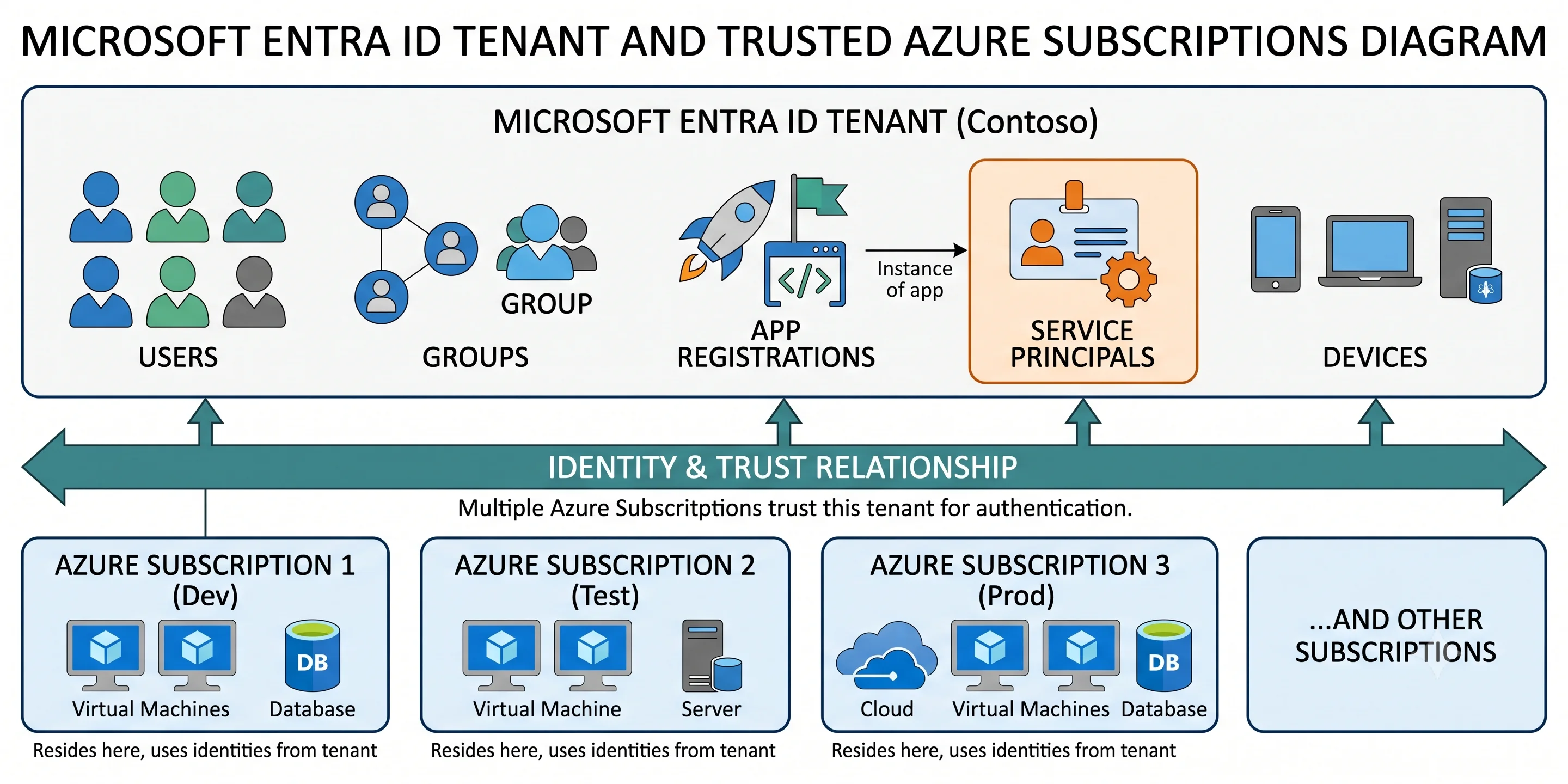
Security principals — the four things that can hold permissions
These are covered in depth in Identity and RBAC in foundations; the short version, so this page stands alone:
| Principal | Analogy | Technical definition |
|---|---|---|
| User | A person with a staff badge | A directory object representing a human, with credentials, an object ID, a UPN, and optionally licences. Member or guest |
| Group | A department | A directory object holding other principals as members. Assigned (manual) or dynamic (membership from a rule over attributes; requires P1) |
| Service principal | A contractor's site pass for one building | The local identity of an application inside one tenant. Holds credentials, role assignments, and consented permissions |
| Managed identity | A site pass Azure prints, carries, and rotates for you | A service principal whose credentials Azure creates, rotates, and never shows you. System-assigned (lifecycle tied to one resource) or user-assigned (its own ARM resource, shareable) |
Every one of them has an object ID — a GUID — and that GUID, not the display name, is what appears in role assignments. Rename a user and every assignment still works; delete and recreate one with the same name and every assignment breaks.
Member vs. guest, and why it's a real distinction
A member is an identity native to this tenant. A guest (userType: Guest) is an identity
invited from elsewhere — another Entra tenant, a Microsoft account, or an email one-time passcode.
The guest's credential and MFA registration live in their home tenant, which is the whole point:
when their employer disables them, they lose access to you too, without anyone at your end doing
anything.
The trap: guests are subject to your Conditional Access policies but authenticate against their home tenant, so an MFA requirement may be satisfied by their tenant's MFA claim (cross-tenant trust settings control whether you accept it). And by default, any member user can invite guests. That default deserves changing on day one.
Application identity — the four names for two objects
This is where most confusion lives. Read the table, then the paragraph under it.
| Term | What it actually is |
|---|---|
Application registration (applications in Graph) |
The global definition of an application: its redirect URIs, the API permissions it wants, the app roles it publishes, the scopes it exposes, its client secrets and certificates. Lives in the tenant that owns the app. Has an Application (client) ID |
Service principal (servicePrincipals in Graph) |
The local instance of that application in a tenant that uses it: consented permissions, role assignments, user assignments, sign-in state. Has its own Object ID, separate from the client ID |
| Enterprise application | The portal's name for a service principal. Same object, different blade |
| Managed identity | A service principal of type ManagedIdentity with no corresponding app registration you can edit, and credentials Azure owns |
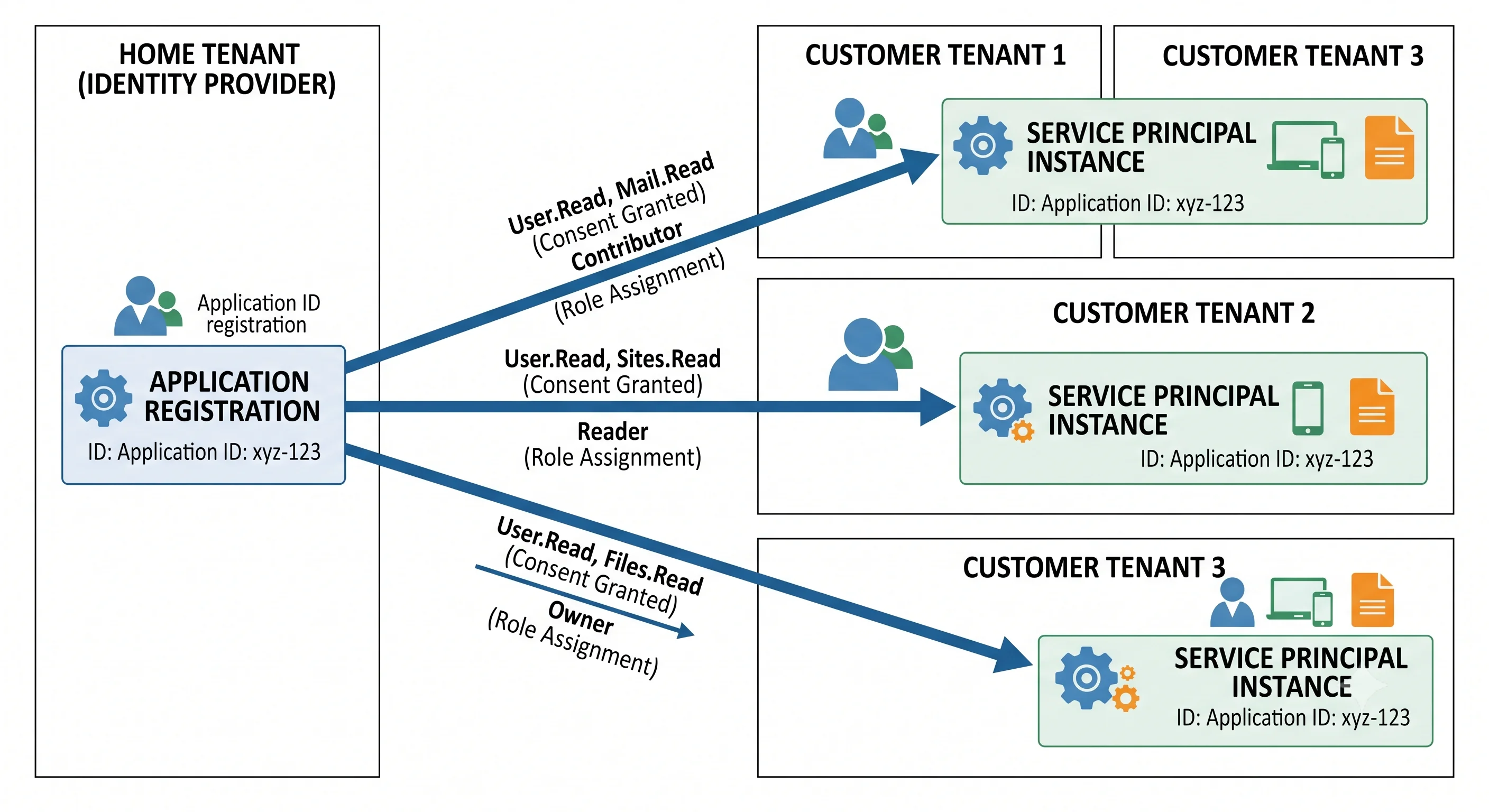
The one-paragraph model: the app registration is the blueprint; the service principal is the instance. In a single-tenant app you create the registration and Azure creates a service principal in the same tenant, so they feel like one thing. In a multi-tenant app — every SaaS product, and every Microsoft first-party service — there is one registration in the vendor's tenant and one service principal per customer tenant, created the moment someone consents. That's why "Microsoft Graph" appears as an enterprise application in your tenant that you never created: it's a service principal for an app registered in Microsoft's tenant.
Practical consequence: role assignments and consent attach to the service principal's object ID, not the application's client ID. Handing someone the client ID when they asked for the object ID is a fifteen-minute debugging session that happens to everyone once.
Credentials on an app registration
- Client secret — a string, with an expiry (the portal caps how long you can pick; a never-expiring secret is no longer offerable). Simple, and the wrong answer in production.
- Certificate — a public key uploaded to the registration, with the private key held by the client. Stronger, still a secret you must rotate.
- Federated credential — no secret at all. The registration trusts an external issuer (GitHub Actions, a Kubernetes service account, another cloud) matching on issuer, subject, and audience. This is workload identity federation, and it is the correct answer for CI/CD. See Deployment.
Scopes vs. app roles — delegated vs. application permissions
An API published through Entra ID can expose two different kinds of permission, and confusing them produces the most common "I have the permission but I get 403" ticket:
| Delegated permission (scope) | Application permission (app role) | |
|---|---|---|
| Token claim | scp |
roles |
| Means | "This app is acting on behalf of a signed-in user" | "This app is acting as itself, no user involved" |
| Effective access | The intersection of what the app was granted and what the user can do | Exactly what was granted — the app's full scope, tenant-wide |
| Consent | User or admin, depending on the permission | Always admin consent |
| Typical use | Interactive apps, SPAs, mobile | Daemons, background jobs, managed identities |
The intersection rule is the subtle bit. Granting a delegated User.ReadWrite.All scope to an app
does not let a normal user edit everyone — their own permissions still cap it. Granting the
application permission User.ReadWrite.All lets the daemon edit every user in the tenant with
nothing capping it. They read almost identically in the portal and differ enormously in blast
radius.
Consent, and why it's a security control
Consent is the act of granting an application the permissions it has requested. User
consent lets an individual approve permissions for themselves; admin consent approves
tenant-wide, for everyone. A new tenant permits user consent for a broad set of permissions by
default, which is exactly the mechanism behind illicit consent grant attacks: a phishing link
sends the user to a genuine, correctly-signed Microsoft consent screen for an attacker-controlled
app requesting Mail.Read. No password is stolen, MFA doesn't help, and the attacker holds a
refresh token afterwards.
The mitigation is a configuration change, not a product: restrict user consent to a low-risk verified-publisher subset (or disable it), and turn on the admin consent workflow so users can request rather than approve. Production lists it with the other day-one settings.
Directory roles vs. Azure RBAC roles
Two catalogues, two systems, one endlessly repeated mistake.
| Entra directory roles | Azure RBAC roles | |
|---|---|---|
| Governs | The directory: users, groups, applications, domains, Conditional Access | Azure resources: VMs, storage accounts, key vaults |
| Stored in | Microsoft Graph | Azure Resource Manager |
| Scoped to | The tenant, or an administrative unit, or (for some roles) a single application | Management group / subscription / resource group / resource |
| Examples | Global Administrator, User Administrator, Application Administrator, Privileged Role Administrator | Owner, Contributor, Reader, Key Vault Secrets User |
| Assigned with | az role assignment no — use Graph / az ad, or PIM |
az role assignment create |
Global Administrator is not Owner and Owner is not Global Administrator. The bridge between them is one deliberate, logged switch: a Global Administrator can toggle "Access management for Azure resources" to grant themselves User Access Administrator at the root management group. If you see that toggle flip in the audit log and nobody claims it, that is an incident.
Administrative units are the closest thing Entra ID has to organisational units: a container of users, groups, or devices over which a directory role can be scoped, so a regional helpdesk can reset passwords for their own region only. They do not nest arbitrarily like AD OUs ⚠️ verify current nesting support against current Microsoft docs, and they scope roles, not policy.
Conditional Access — the policy engine
Analogy: the bouncer who checks not just your ID but which door you came to, what you're wearing, and whether you've been behaving strangely tonight.
Technical: a Conditional Access policy is an if-then rule evaluated by the token service at sign-in. Assignments select the users/groups/roles, the target resources (applications), and the conditions (device platform, client app, location, device compliance state, sign-in risk, user risk, authentication flow). Access controls then grant with requirements (require MFA, require compliant device, require Entra hybrid joined device, require approved client app, require authentication strength) or block outright. Session controls can further limit the session (sign-in frequency, persistent browser, app-enforced restrictions).
The pieces that matter in practice:
- All policies are evaluated; blocks always win. There is no ordering or priority. Any matching block terminates the sign-in.
- Report-only mode evaluates the policy and logs what would have happened without enforcing it. Every new policy should live here first. Skipping this step is how people lock themselves out of their own tenant.
- Break-glass accounts. Two cloud-only accounts with long random credentials, excluded from every Conditional Access policy, stored offline, and alerted on when used. Not optional.
- P1 licence required. Risk-based conditions (sign-in risk, user risk) additionally require P2, because they consume Identity Protection.
- Security defaults are the free, all-or-nothing alternative: MFA for everyone, legacy auth blocked, no exceptions and no configuration. They cannot coexist with Conditional Access policies — enabling CA means turning security defaults off, and a tenant with neither is wide open.
Authentication methods
Ordered by how much they actually help, which is not the order people adopt them:
| Method | Phishing-resistant | Notes |
|---|---|---|
| FIDO2 security key / passkey | Yes | Origin-bound; a phished site cannot replay it |
| Windows Hello for Business | Yes | Device-bound biometric/PIN, backed by TPM |
| Certificate-based authentication | Yes | Common in regulated and government tenants |
| Microsoft Authenticator (passwordless / number matching) | Partly | Number matching exists to kill MFA-fatigue push-bombing |
| TOTP / OATH software token | No | Better than SMS; still relay-phishable |
| SMS / voice call | No | Widely deprecated in guidance; SIM-swap and interception |
Authentication strength is the modern way to require a specific class of method in a Conditional Access policy — "phishing-resistant MFA to reach the admin portals" — rather than the older, blunter "require MFA". Legacy authentication (POP, IMAP, SMTP AUTH, older Office clients using basic auth) cannot do MFA at all and must be blocked; it remains a top source of password-spray success.
The SKU axis — licensing is the architecture
Entra ID's tier is per user per month, and it determines which features exist for that user. This is the axis that decides more design questions than any other on this page.
| Tier | What it unlocks (indicative) |
|---|---|
| Free | Users, groups, SSO, B2B basics, security defaults, self-service password change, basic reports |
| Microsoft Entra ID P1 | Conditional Access, dynamic groups, group-based application assignment, self-service password reset with on-premises writeback, Entra Connect group writeback, cloud app discovery, advanced sign-in reports |
| Microsoft Entra ID P2 | Everything in P1, plus Identity Protection (risk detections, risk-based CA policies) and Privileged Identity Management (eligible assignments, activation approval, access reviews of roles) |
| Microsoft Entra ID Governance (add-on) | Entitlement management, access packages, lifecycle workflows, broader access reviews |
| Microsoft Entra Workload ID (add-on) | Conditional Access for workload identities, risk detection for service principals, access reviews of service principals |
| Microsoft Entra External ID | Separate product, billed per monthly active user rather than per seat |
⚠️ Verify the exact feature-to-tier mapping against current Azure docs before you design around it — Microsoft moves features between tiers, and licence names change more often than the features do.
The trap, stated plainly: licences are per user who benefits, and nothing in the product enforces it at configuration time. A Conditional Access policy scoped to "All users" requires every in-scope user to hold P1. You will not get an error. You will get a licensing finding at audit, possibly years later. The honest architectural move is to decide the tier first and design within it, rather than enabling a feature and discovering the bill.
Tokens, briefly
Full mechanics are in Architecture; the vocabulary belongs here.
| Token | Purpose | Lifetime (indicative) |
|---|---|---|
| ID token | Proves authentication to the client application. OIDC. Never sent to an API | Short ⚠️ verify current defaults |
| Access token | Proves authorisation to a specific API (aud claim). Bearer token, sent to the resource |
~60–90 minutes, variable ⚠️ verify |
| Refresh token | Obtains new access tokens without re-authenticating. Never leaves the client | Long, sliding; revocable |
Claims worth recognising on sight: tid (tenant), oid (the principal's object ID — the stable
one), sub (subject, pairwise per app), aud (audience — which API this is for), appid /
azp (the calling client), scp (delegated scopes), roles (app roles or app permissions),
amr (how they authenticated), exp (expiry).
Device identity
Devices are directory objects too, and they're what "require a compliant device" checks against.
- Entra registered — usually personal (BYOD). The device gets an identity; the user signs in with a work account on a personally-owned machine.
- Entra joined — cloud-only corporate device. No on-premises AD involvement.
- Entra hybrid joined — joined to on-premises AD DS and registered in Entra ID. The transitional state most large enterprises are in.
Compliance is asserted by Intune (or a partner MDM), not by Entra ID itself. Entra ID reads the compliance flag and Conditional Access acts on it — a good example of Entra ID being the decision point while the evidence comes from elsewhere.
Synchronisation with on-premises AD
| Tool | What it is |
|---|---|
| Microsoft Entra Connect Sync | The heavyweight on-premises sync agent. Full attribute flow, filtering, writeback, and support for password hash sync, pass-through authentication, or federation |
| Microsoft Entra Cloud Sync | Lightweight agent, configuration in the cloud, supports multiple disconnected forests, fewer features |
Three authentication topologies, and the choice matters at outage time:
- Password hash synchronisation (PHS) — a hash of the hash is synced to Entra ID, which then authenticates users itself. Survives an on-premises outage. The default recommendation.
- Pass-through authentication (PTA) — Entra ID relays the credential to an on-premises agent. No password material in the cloud; dies with your domain controllers.
- Federation (AD FS or third-party) — Entra ID redirects to an external IdP. Maximum control, maximum operational burden, and the largest single point of failure.
Objects synced from on-premises are mastered on-premises: you cannot edit them in the cloud, which surprises people the first time an attribute change silently reverts.
The running mini-glossary
| Term | Analogy | Technical definition |
|---|---|---|
| Tenant | The company's own building | An isolated Entra ID instance identified by a GUID and one or more verified domains; the boundary for identity, policy, and licensing |
| Verified domain | The nameplate on the door, checked by the council | A DNS domain proven to belong to the tenant via a TXT record, enabling UPNs in that domain |
| App registration | The blueprint of an application | The global application definition: client ID, redirect URIs, credentials, exposed scopes and app roles |
| Service principal | The building pass issued to that application | The application's local identity in one tenant, holding consent and role assignments. Called "enterprise application" in the portal |
| Managed identity | A pass the building prints and rotates for you | A service principal whose credentials Azure fully manages; system-assigned or user-assigned |
| Delegated permission (scope) | "I'm here on behalf of Alice" | A permission exercised as a signed-in user; effective access is the intersection of app grant and user rights. Appears in scp |
| Application permission (app role) | "I'm here as myself, with my own authority" | A permission exercised without a user, always admin-consented, tenant-wide. Appears in roles |
| Consent | Signing the visitor agreement | The act of granting an application its requested permissions, by a user for themselves or by an admin tenant-wide |
| Conditional Access | The bouncer checking more than your ID | A policy evaluated at token issuance combining assignments, conditions, and grant/session controls |
| Administrative unit | A floor of the building a supervisor is responsible for | A container of directory objects that scopes a directory role to a subset of the tenant |
| Directory role | Authority over the building's records | A role granting permissions over directory objects, distinct from Azure RBAC |
| PIM | A pass that only works when you sign it out | Privileged Identity Management: eligible, time-bound, approval-gated role activation (P2) |
| Break-glass account | The fire-axe behind glass | A cloud-only, CA-excluded emergency admin account, alerted on when used |
Next: Architecture →
← Back to the Microsoft Entra ID overview · ← Previous: What & Why