
5. Deployment
Getting Started proved the service exists. This page makes it repeatable, reviewable, and reversible — a parameterised Terraform module, remote state, an Ansible playbook for day-two work, the Bicep equivalent, an OIDC pipeline, three environments, and an honest answer to "how do we roll this back at 2 a.m.".
Foundry has one wrinkle no other topic in this article has: you are deploying two things on two cadences. The infrastructure (account, project, deployments, connections, role assignments) changes rarely and belongs in Terraform. The AI artefacts — prompts, agent definitions, tool schemas, model versions, evaluation datasets — change weekly and are the thing most likely to break production. Treat them as a separate, faster pipeline with its own gate: an evaluation run. Infrastructure CI/CD that does not gate on evaluation quality is deploying a coin flip on a schedule.
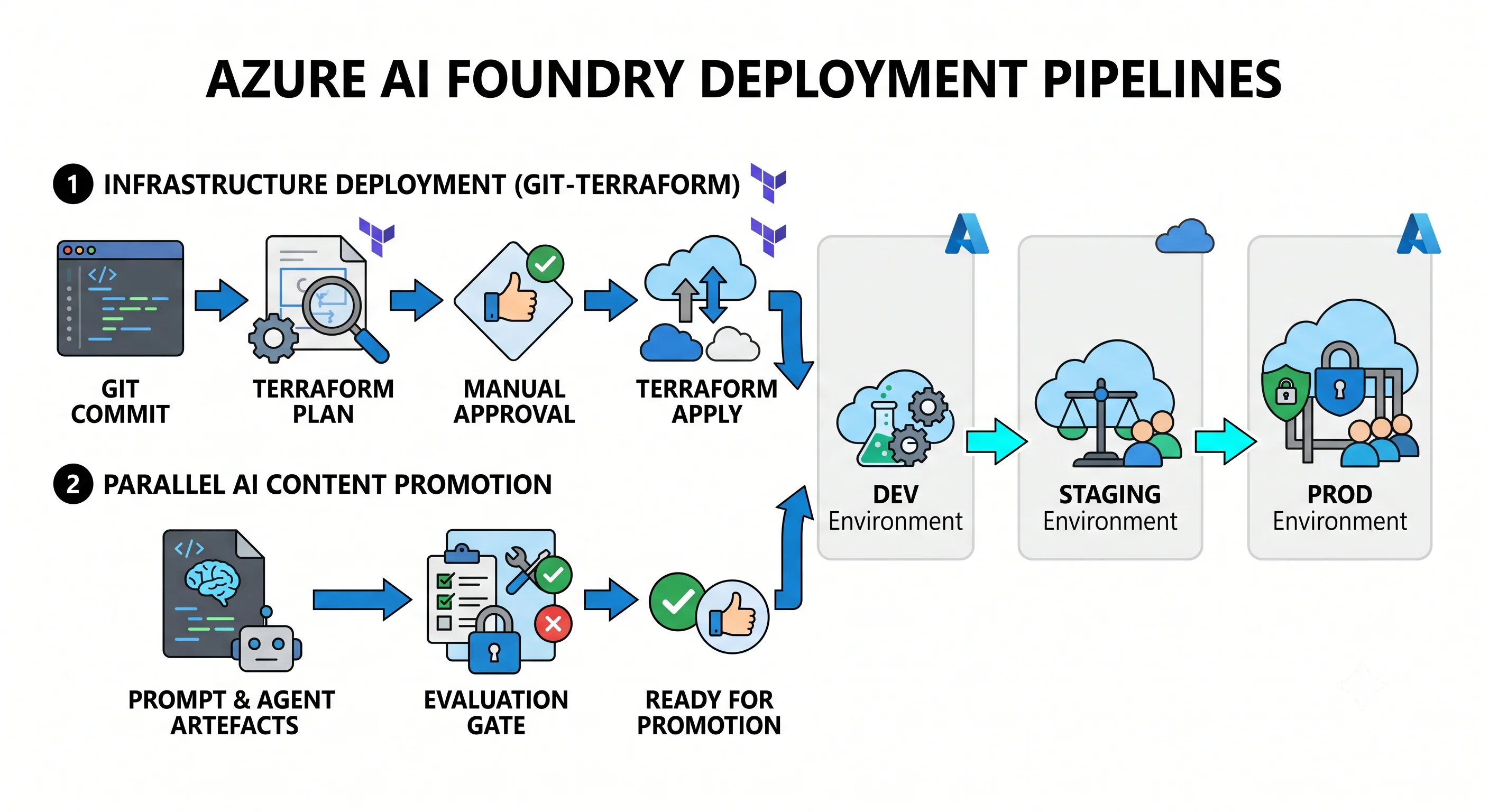
Tool order for this topic
| Rank | Tool | What it does here | Where it struggles |
|---|---|---|---|
| 1. Primary | Terraform (azurerm + azapi) |
Account, model deployments, connections, role assignments, networking, diagnostics — the full worked example below | Foundry projects, capability hosts, and new agent features land in the API before azurerm covers them; that is what azapi is for |
| 2. Secondary | Ansible (azure.azcollection) |
Day-two operations: adding or resizing a model deployment, rotating a connection, bulk-applying a content filter across accounts, orchestrating a region cutover | No drift reconciliation; it will happily create something Terraform then wants to destroy |
| 3. Third | Bicep / ARM | Azure-native, first-class support for preview Foundry properties on day one, what-if preview, deployment stacks |
Azure-only; and the JSON under Bicep is unpleasant when you are generating many deployments |
All three apply to this service. The one honest caveat: agents themselves are not infrastructure. An agent is a data-plane object created through the project endpoint, not an ARM resource. Terraform can create the account, the project, the model deployment, and the connections an agent needs — the agent definition itself belongs in your application repository and its own deploy step, versioned as code. Trying to force agents into Terraform produces a state file that fights your application team.
Terraform — the module shape
Three files, parameterised on environment, with the provider features {} block present because
Cognitive Services has soft-delete behaviour that it governs.
variables.tf
variable "environment" {
  type        = string
  description = "dev | staging | prod"
}

variable "name_prefix" {
  type        = string
  description = "Short, lowercase, no hyphens — becomes part of a globally unique subdomain"
}

variable "location" {
  type        = string
  default     = "eastus2"
  description = "Must be a region offering the models below, for the deployment types below"
}

variable "model_deployments" {
  description = "Job-named deployments. Keys are the names your application calls."
  type = map(object({
    model_name      = string
    model_version   = string
    deployment_type = string # GlobalStandard | Standard | DataZoneStandard | ProvisionedManaged
    capacity        = number # thousands of TPM for standard types; PTUs for provisioned
    upgrade_policy  = string # OnceNewDefaultVersionAvailable | OnceCurrentVersionExpired | NoAutoUpgrade
  }))
  default = {
    "chat-default" = {
      model_name      = "gpt-4.1"
      model_version   = "2025-04-14"
      deployment_type = "GlobalStandard"
      capacity        = 50
      upgrade_policy  = "OnceCurrentVersionExpired"
    }
    "embed-default" = {
      model_name      = "text-embedding-3-large"
      model_version   = "1"
      deployment_type = "Standard"
      capacity        = 30
      upgrade_policy  = "OnceCurrentVersionExpired"
    }
  }
}

variable "app_principal_ids" {
  type        = list(string)
  description = "Object IDs of the managed identities that must be able to CALL the models"
  default     = []
}
main.tf
terraform {
  required_providers {
    azurerm = { source = "hashicorp/azurerm", version = "~> 4.0" }
    azapi   = { source = "Azure/azapi", version = "~> 2.0" }
  }
}

provider "azurerm" {
  features {
    cognitive_account {
      # Purge the soft-deleted account on destroy, so the globally unique name is
      # released and the next apply can recreate it. Set this deliberately:
      # in prod you may WANT the soft-delete safety net instead.
      purge_soft_delete_on_destroy = true
    }
  }
}

provider "azapi" {}

locals {
  is_prod = var.environment == "prod"
  tags = {
    Environment = var.environment
    ManagedBy   = "terraform"
    Workload    = "ai-foundry"
  }
}

resource "azurerm_resource_group" "this" {
  name     = "rg-${var.name_prefix}-aif-${var.environment}"
  location = var.location
  tags     = local.tags
}

# ---------------------------------------------------------------------------
# The Foundry account. kind = AIServices + project management = a Foundry
# resource rather than a bare AI Services or Azure OpenAI resource.
# ---------------------------------------------------------------------------
resource "azurerm_cognitive_account" "this" {
  name                = "aif${var.name_prefix}${var.environment}"
  resource_group_name = azurerm_resource_group.this.name
  location            = azurerm_resource_group.this.location

  kind                       = "AIServices"
  sku_name                   = "S0"
  custom_subdomain_name      = "aif${var.name_prefix}${var.environment}"
  project_management_enabled = true

  # The single highest-value security setting on this resource: no API keys.
  local_auth_enabled            = false
  public_network_access_enabled = !local.is_prod
  outbound_network_access_restricted = local.is_prod

  identity {
    type = "SystemAssigned"
  }

  network_acls {
    default_action = local.is_prod ? "Deny" : "Allow"
  }

  tags = local.tags

  lifecycle {
    # Changing kind or subdomain replaces the resource — and replacement means a
    # new endpoint, lost deployments, and a soft-deleted name in the way.
    prevent_destroy = false # set true in prod once you are past the churn
  }
}

# ---------------------------------------------------------------------------
# Model deployments — the things your application actually calls, by name.
# ---------------------------------------------------------------------------
resource "azurerm_cognitive_deployment" "this" {
  for_each = var.model_deployments

  name                 = each.key
  cognitive_account_id = azurerm_cognitive_account.this.id

  model {
    format  = "OpenAI"
    name    = each.value.model_name
    version = each.value.model_version
  }

  sku {
    name     = each.value.deployment_type
    capacity = each.value.capacity
  }

  version_upgrade_option = each.value.upgrade_policy
}

# ---------------------------------------------------------------------------
# A Foundry project. azurerm coverage of projects has lagged the API, so azapi
# is the dependable path. Verify whether a first-class resource now exists.
# ---------------------------------------------------------------------------
resource "azapi_resource" "project" {
  type      = "Microsoft.CognitiveServices/accounts/projects@2025-04-01-preview"
  name      = "proj-${var.name_prefix}-${var.environment}"
  parent_id = azurerm_cognitive_account.this.id
  location  = azurerm_resource_group.this.location

  identity {
    type = "SystemAssigned"
  }

  body = {
    properties = {
      displayName = "${var.name_prefix} ${var.environment}"
      description = "Managed by Terraform"
    }
  }

  tags = local.tags
}

# ---------------------------------------------------------------------------
# Data-plane RBAC. Without this the account exists and nothing can call it.
# This is the step people leave out of IaC because the portal did it for them.
# ---------------------------------------------------------------------------
resource "azurerm_role_assignment" "app_inference" {
  for_each = toset(var.app_principal_ids)

  scope                = azurerm_cognitive_account.this.id
  role_definition_name = "Cognitive Services OpenAI User"
  principal_id         = each.value
}

# ---------------------------------------------------------------------------
# Observability is off until you turn it on.
# ---------------------------------------------------------------------------
resource "azurerm_log_analytics_workspace" "this" {
  name                = "law-${var.name_prefix}-aif-${var.environment}"
  location            = azurerm_resource_group.this.location
  resource_group_name = azurerm_resource_group.this.name
  sku                 = "PerGB2018"
  retention_in_days   = local.is_prod ? 90 : 30
  tags                = local.tags
}

resource "azurerm_monitor_diagnostic_setting" "this" {
  name                       = "diag-to-law"
  target_resource_id         = azurerm_cognitive_account.this.id
  log_analytics_workspace_id = azurerm_log_analytics_workspace.this.id

  enabled_log { category = "Audit" }
  enabled_log { category = "RequestResponse" }
  enabled_log { category = "Trace" }

  metric { category = "AllMetrics" }
}
⚠️ Argument names on azurerm_cognitive_account (notably project_management_enabled,
outbound_network_access_restricted, and the cognitive_account features block) and the azapi API
version above should be verified against the current provider and Azure documentation before use — this
resource has gained arguments quickly.
outputs.tf
output "account_id"       { value = azurerm_cognitive_account.this.id }
output "endpoint"         { value = azurerm_cognitive_account.this.endpoint }
output "project_endpoint" {
  value = "${azurerm_cognitive_account.this.endpoint}api/projects/${azapi_resource.project.name}"
}
output "deployment_names" { value = keys(var.model_deployments) }
output "identity_principal_id" {
  value = azurerm_cognitive_account.this.identity[0].principal_id
}
The loop
terraform init -backend-config=env/prod.backend.hcl
terraform plan  -var-file=env/prod.tfvars -out=tfplan
terraform apply tfplan
Read the plan for two things specifically on this service: any # forces replacement on the account
(kind, subdomain, or location changed — that is a new endpoint and a soft-delete collision), and any
change to a deployment's sku.name (changing deployment type is not a resize; it is a different
capacity pool and may not be available).
Remote state and locking
Local state is a footgun the moment a second person or a pipeline exists. Use the Azure Storage backend — and note the Azure-specific nicety: locking uses native blob leases, so there is no separate lock table to create and no second thing to pay for, unlike DynamoDB in AWS.
# env/prod.backend.hcl
resource_group_name  = "rg-tfstate"
storage_account_name = "sttfstateprod"
container_name       = "tfstate"
key                  = "ai-foundry/prod.terraform.tfstate"
use_azuread_auth     = true # authenticate to the backend with your identity, not a storage key
Two honest options for separating environments, pick one and be consistent:
- Directory (or repo) per environment, each with its own backend key and
.tfvars. Verbose, but the blast radius is obvious from the file path and you can give prod different permissions. This is the one to choose for Foundry, because environments should live in different subscriptions to get different quota pools. - Terraform workspaces, one state per workspace behind one configuration. Less duplication, but everything shares a backend and a set of credentials, and it is easy to apply to the wrong one.
Ansible — day-two operations
Ansible's place here is not initial provisioning; it is the imperative jobs that Terraform makes awkward — adding a deployment during an incident, resizing capacity across several accounts, or driving a region cutover. Authenticate with a managed identity on the runner or an OIDC-federated service principal, never a stored secret.
# playbook: ensure a Foundry account and a chat deployment exist, idempotently
- name: Foundry day-two operations
  hosts: localhost
  connection: local
  gather_facts: false

  vars:
    resource_group: "rg-{{ name_prefix }}-aif-{{ env }}"
    account_name: "aif{{ name_prefix }}{{ env }}"
    location: eastus2

  tasks:
    - name: Ensure the Foundry account exists
      azure.azcollection.azure_rm_cognitiveservicesaccount:
        resource_group: "{{ resource_group }}"
        name: "{{ account_name }}"
        location: "{{ location }}"
        kind: AIServices
        sku_name: S0
        custom_subdomain_name: "{{ account_name }}"
        state: present
      register: account

    - name: Ensure the chat deployment exists at the right capacity
      # No dedicated module for model deployments at the time of writing, so drive
      # the ARM API directly — still idempotent, because PUT is declarative.
      azure.azcollection.azure_rm_resource:
        api_version: "2024-10-01"
        resource_group: "{{ resource_group }}"
        provider: CognitiveServices
        resource_type: accounts
        resource_name: "{{ account_name }}"
        subresource:
          - type: deployments
            name: chat-default
        body:
          sku:
            name: GlobalStandard
            capacity: "{{ chat_capacity | default(50) }}"
          properties:
            model:
              format: OpenAI
              name: gpt-4.1
              version: "2025-04-14"
            versionUpgradeOption: OnceCurrentVersionExpired
        state: present

    - name: Show the endpoint
      ansible.builtin.debug:
        msg: "{{ account.state.properties.endpoint }}"
Idempotency check: run it twice. The second run should report ok with no changed — because both
tasks are declarative PUTs. If the second run reports changed, something in the body differs from what
the API returns (a common cause is omitting a property the service defaults), and that difference will
fight your Terraform state too.
⚠️ Verify the current azure.azcollection module names and the Cognitive Services API version above
before use.
Bicep / ARM
Azure-native, and genuinely the better choice for two situations on this service: preview Foundry
properties that neither azurerm nor the Ansible collection has caught up with, and teams already
governing deployments with deployment stacks or Azure DevOps.
Bicep equivalent — account, project, and one model deployment
@description('Short lowercase prefix; becomes part of a globally unique subdomain')
param namePrefix string

@allowed(['dev', 'staging', 'prod'])
param environment string

param location string = resourceGroup().location

var accountName = 'aif${namePrefix}${environment}'

resource account 'Microsoft.CognitiveServices/accounts@2025-04-01-preview' = {
  name: accountName
  location: location
  kind: 'AIServices'
  sku: {
    name: 'S0'
  }
  identity: {
    type: 'SystemAssigned'
  }
  properties: {
    customSubDomainName: accountName
    allowProjectManagement: true
    disableLocalAuth: true
    publicNetworkAccess: environment == 'prod' ? 'Disabled' : 'Enabled'
    networkAcls: {
      defaultAction: environment == 'prod' ? 'Deny' : 'Allow'
    }
  }
}

resource project 'Microsoft.CognitiveServices/accounts/projects@2025-04-01-preview' = {
  parent: account
  name: 'proj-${namePrefix}-${environment}'
  location: location
  identity: {
    type: 'SystemAssigned'
  }
  properties: {
    displayName: '${namePrefix} ${environment}'
  }
}

resource chat 'Microsoft.CognitiveServices/accounts/deployments@2025-04-01-preview' = {
  parent: account
  name: 'chat-default'
  sku: {
    name: 'GlobalStandard'
    capacity: 50
  }
  properties: {
    model: {
      format: 'OpenAI'
      name: 'gpt-4.1'
      version: '2025-04-14'
    }
    versionUpgradeOption: 'OnceCurrentVersionExpired'
  }
}

output endpoint string = account.properties.endpoint
output projectEndpoint string = '${account.properties.endpoint}api/projects/${project.name}'
Preview the change before you make it:
az deployment group what-if \
  -g rg-demo-aif-prod \
  -f main.bicep \
  -p namePrefix=demo environment=prod
⚠️ Deployment modes.
az deployment group createdefaults to incremental — resources in the group that are not in the template are left alone. Complete mode deletes them. On a resource group containing a Foundry account plus the Cosmos DB, AI Search, and Storage that your agents depend on, a complete-mode deployment of a template that only describes the account will delete the agent state stores. Runwhat-ifwith the mode you intend to use, every time.
⚠️ Verify the API version and the allowProjectManagement / disableLocalAuth property names against
current Azure docs; this resource type is iterating quickly and several properties arrived in preview
API versions first.
CI/CD — OIDC, never a secret
Workload identity federation means the pipeline exchanges a short-lived GitHub or Azure DevOps token for an Entra ID token. No client secret, nothing to rotate, nothing to leak.
name: ai-foundry-infra

on:
  pull_request:
    paths: ['infra/ai-foundry/**']
  push:
    branches: [main]
    paths: ['infra/ai-foundry/**']

permissions:
  id-token: write   # required for OIDC
  contents: read

jobs:
  plan:
    runs-on: ubuntu-latest
    environment: dev
    defaults:
      run:
        working-directory: infra/ai-foundry
    steps:
      - uses: actions/checkout@v4
      - uses: azure/login@v2
        with:
          client-id: ${{ vars.AZURE_CLIENT_ID }}
          tenant-id: ${{ vars.AZURE_TENANT_ID }}
          subscription-id: ${{ vars.AZURE_SUBSCRIPTION_ID }}
      - uses: hashicorp/setup-terraform@v3
      - run: terraform init -backend-config=env/dev.backend.hcl
      - run: terraform plan -var-file=env/dev.tfvars -out=tfplan
      - run: terraform show -no-color tfplan > plan.txt
      - uses: actions/upload-artifact@v4
        with: { name: plan, path: infra/ai-foundry/plan.txt }

  apply-prod:
    if: github.ref == 'refs/heads/main'
    needs: plan
    runs-on: ubuntu-latest
    environment: prod          # ← the manual approval gate lives on this environment
    defaults:
      run:
        working-directory: infra/ai-foundry
    steps:
      - uses: actions/checkout@v4
      - uses: azure/login@v2
        with:
          client-id: ${{ vars.AZURE_CLIENT_ID_PROD }}
          tenant-id: ${{ vars.AZURE_TENANT_ID }}
          subscription-id: ${{ vars.AZURE_SUBSCRIPTION_ID_PROD }}
      - uses: hashicorp/setup-terraform@v3
      - run: terraform init -backend-config=env/prod.backend.hcl
      - run: terraform apply -auto-approve -var-file=env/prod.tfvars
Set the federated credential on the app registration to the specific repository and environment, so a
fork or a different branch cannot assume it. Give the dev identity Cognitive Services Contributor on
the dev resource group and nothing more; prod gets a separate identity, a separate subscription, and an
approval gate.
The second pipeline: prompts, agents, and models
The artefacts that change weekly need their own workflow, and its gate is quality, not approval:
- Prompt, agent definition, and tool schemas are files in the application repository.
- On pull request, run the Foundry evaluation suite against a dev deployment with a fixed dataset — groundedness, relevance, and safety evaluators at minimum.
- Compare against the baseline scores stored from the last release. Fail the build on regression, not just on error.
- On merge, publish the agent definition to staging; run the same suite against real-ish traffic.
- Promote to prod by pointing the prod deployment name at the new artefact.
A model version change is a code change and must go through this pipeline, because it can change
output distribution as much as a prompt rewrite can. That is the argument for
versionUpgradeOption = NoAutoUpgrade on high-stakes deployments — you take responsibility for the
retirement calendar in exchange for no surprise behaviour changes.
Environments
| dev | staging | prod | |
|---|---|---|---|
| Boundary | Separate subscription | Separate subscription | Separate subscription |
| Why a subscription, not a resource group | Because TPM quota is per subscription per region — a shared subscription means dev experiments starve prod, and prod capacity requests are hard to reason about | ||
| Network | Public endpoint, network_acls allow |
Private endpoint, mirroring prod | Private endpoint only, publicNetworkAccess: Disabled |
| Auth | Local auth disabled anyway (habit) | Disabled | Disabled |
| Deployment types | Small GlobalStandard |
Same as prod, smaller capacity | Whatever residency requires; provisioned if latency matters |
| Content filter | Default | Prod configuration | Approved configuration, change-controlled |
| Enforced by | Microsoft.CognitiveServices Azure Policy at the management group: deny accounts with local auth enabled, deny public network access in the prod management group, require diagnostic settings, restrict allowed regions |
Azure Policy is what makes this a boundary rather than a convention. The three policies worth having on
day one: deny disableLocalAuth = false, deny publicNetworkAccess = Enabled in prod, and
DeployIfNotExists a diagnostic setting to the central Log Analytics workspace.
Rollback and blast radius
What "undo" means depends entirely on what you changed, and on this service the layers roll back at very different speeds:
| Change | Rollback | Speed | Risk |
|---|---|---|---|
| Prompt or agent definition | Redeploy the previous artefact | Seconds | Low — this is why they belong in a separate pipeline |
| Model version on a deployment | Update the deployment back to the previous version | Minutes | Low, if the old version is still offered. If it retired, there is no rollback — only forward |
| Deployment capacity | Change it back | Minutes | Reducing capacity is easy; increasing it may fail on quota |
| Deployment type (e.g. Global → DataZone) | Delete and recreate | Minutes | The deployment name is briefly gone — callers get 404s. Create the new one under a temporary name and switch |
| Connection credentials | Re-apply previous | Seconds | Low |
| Account network configuration | Re-apply previous commit | Minutes | Medium — you can lock yourself out; keep a break-glass path |
| Account kind, subdomain, or location | There is no rollback. This is a replacement | Hours | High. New endpoint, all deployments gone, all data-plane role assignments gone, and the old name soft-deleted and blocking |
The three Azure-specific traps, named:
- Soft delete. A deleted Cognitive Services account keeps its globally unique name until purged. A
destroy-and-recreate cycle fails on the second step with a name conflict that reads like someone else
took your name.
az cognitiveservices account purgeis the fix; thepurge_soft_delete_on_destroyfeature flag automates it — and you should think hard before enabling that in prod, because the soft-delete window is also your accidental-deletion safety net. - Resource locks. A
CanNotDeletelock on the resource group makesterraform applyfail on any replacement with an error that reads like a permissions problem. PutCanNotDeleteon prod Foundry accounts deliberately, and document that pipelines must remove it consciously rather than being granted permission to ignore it. - Complete-mode deployments. Covered above, and worth repeating because an agent's Cosmos DB and Search index are usually in the same resource group as the account and are usually not in the same template.
Blast radius, stated once: the account is the boundary for endpoint, network, keys, and quota consumption. Everything in it shares those. A project is not a blast-radius boundary — it is an access and organisation boundary. If a workload needs isolation that survives someone else's mistake, it needs its own account, in its own resource group, ideally in its own subscription.
Drift
Foundry drifts more than most services, because the portal is designed for people to change things in — that is the whole point of the Foundry portal. Expect it and detect it:
- Scheduled
terraform planin CI, nightly, failing the job on any non-empty plan. This is the single most effective control. az deployment group what-iffor the Bicep path.- Azure Policy compliance state for the things you care about most: local auth, public network access, diagnostic settings.
- Activity log / Change Analysis to answer "who changed the capacity on
chat-defaultat 03:12". Alert onMicrosoft.CognitiveServices/accounts/deployments/writein prod.
The commonest real drift on this service, in order: someone raised a deployment's capacity in the portal
during an incident; someone changed a content filter configuration; someone added a connection with a
key. The first two are visible to terraform plan; the third often is not, because connections created
in the Foundry portal may not be in your state at all — which is a good reason to manage connections in
IaC from the start.
To recover a hand-edited resource: terraform plan to see the diff, decide whether the human or the
code was right, then either terraform apply (code wins) or update the code and re-apply (human wins).
Use terraform import for objects created outside state entirely, and add them to the module so it does
not happen twice.
Teardown
terraform destroy -var-file=env/dev.tfvarsWhat destroy will not remove:
- The soft-deleted account, unless
purge_soft_delete_on_destroyis set. The name stays reserved. - Anything behind a
CanNotDeleteresource lock — the destroy fails partway, leaving a half-torn environment and a dirty state file. - Role assignments created outside the state file — including the ones the portal auto-created when a human first opened the project.
- Agent data in a standard setup: your Cosmos DB, AI Search index, and storage containers are separate resources with their own lifecycle, and if they are in a different resource group or module, destroy does not touch them. They keep billing.
- Purchased PTU reservations, which are a billing commitment, not a resource. Deleting the deployment stops the deployment; the reservation continues until its term ends or you exchange it.
- Diagnostic settings and Log Analytics data created outside this module, and the ingested logs themselves, which bill for their retention period.
Next: Integrations →
← Back to the Azure AI Foundry overview · ← Previous: Getting Started