
1. What and Why
One sentence: Azure Virtual Machines is a regional Infrastructure-as-a-Service compute service that rents you a virtualised server — CPU, memory, disks, and a network interface — running an operating system you control, billed by the second while it holds hardware.
The problem it kills
Before the cloud, capacity was a purchase order. You estimated peak traffic a year ahead, bought servers sized for that estimate plus a safety margin, waited six weeks for delivery, racked them, cabled them, and then depreciated them over three years whether the traffic arrived or not. If you guessed low, the fix took another six weeks. If you guessed high — the usual outcome — you'd bought an expensive room heater.
A VM replaces that entire loop with an API call. Think of it as renting a computer by the second instead of buying one by the rack. The machine boots in a couple of minutes, and when you stop needing it you deallocate it and the meter stops. Capacity planning stops being a procurement problem and becomes a runtime decision, which is the single largest thing the cloud actually changed.
Two second-order consequences matter more than the cost story, and they're what people underrate:
Infrastructure becomes a text file. Because a VM is created through an API, it can be created by Terraform, reviewed in a pull request, and recreated identically. "It works on that server" stops being a mystery, because the server is now a build artifact. This is the whole reason Deployment is a first-class page in this topic rather than an appendix.
Failure becomes cheap. A physical server that dies is an incident with a lead time. A VM that dies is replaced by re-running the same template. That reframing is what makes designs like autoscaling, immutable infrastructure, and blue/green possible at all.
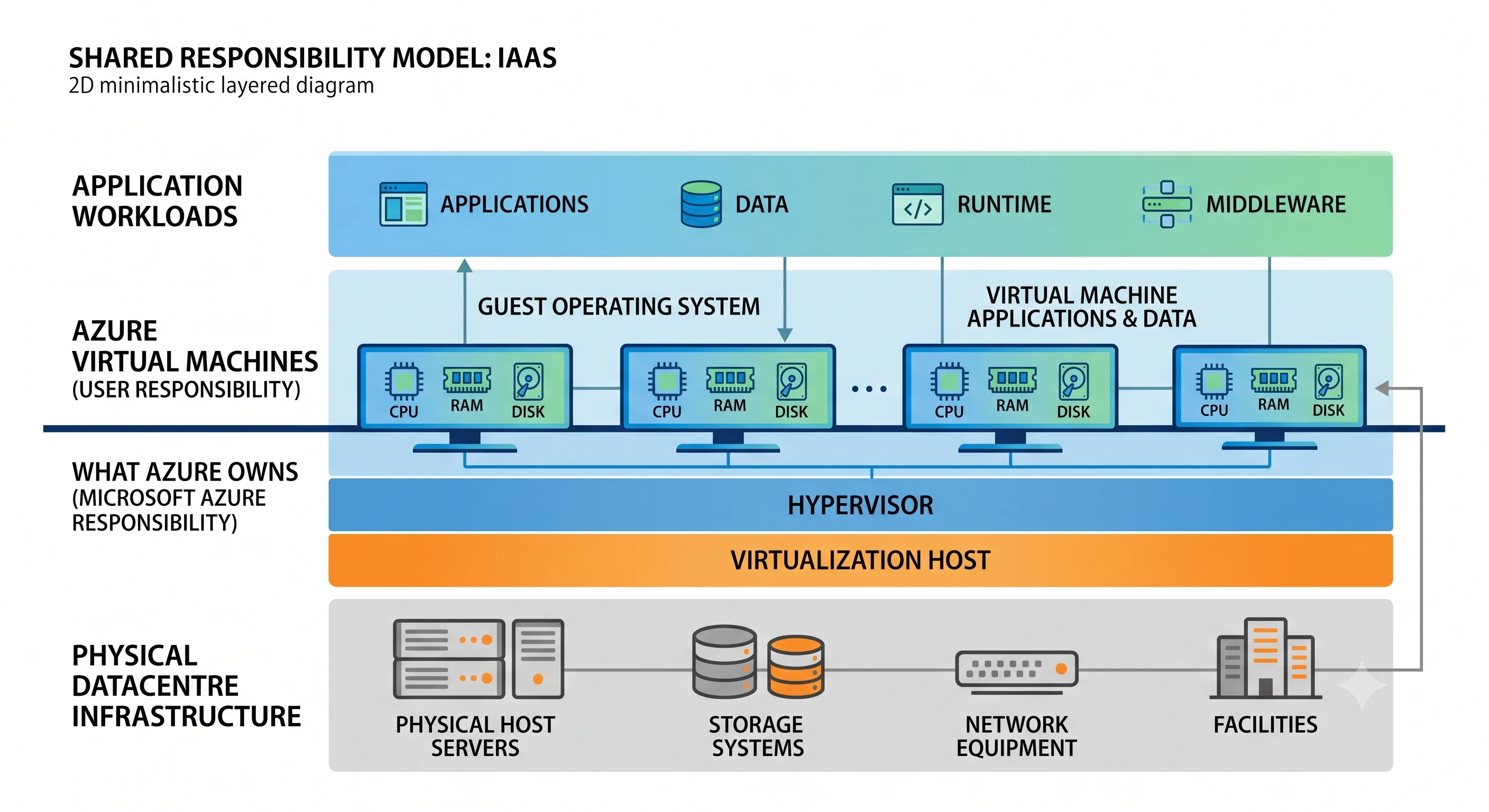
What you own, and what Azure owns
This is the whole IaaS bargain, and getting it wrong is how VMs become a liability.
| Layer | Owner |
|---|---|
| Datacentre, power, cooling, physical security | Azure |
| Physical host, network fabric, storage fabric | Azure |
| Hypervisor and host patching (including live migration) | Azure |
| Guest OS — patching, hardening, CIS baseline, antivirus | You |
| Runtime, middleware, application, configuration | You |
| Data on the disks, and its backup | You |
| Network rules you write (NSG, firewall, public exposure) | You |
Azure will patch the host underneath you and, for most maintenance, live-migrate your VM without a reboot. It will not patch your guest. Nothing in Azure automatically installs an OS update on your VM unless you deliberately turn on Azure Update Manager or a maintenance configuration. This is the line every other Azure compute service moves upward — App Service and Functions own the guest OS for you, which is exactly why they cost less operationally.
Where it sits in the catalogue
Azure's compute options overlap more than AWS's do, and "we'll just use a VM" is the most common default-by-familiarity mistake on the platform. Separate them like this:
| Service | You bring | Azure brings | Choose it when |
|---|---|---|---|
| Virtual Machines | The OS image and everything above it | Hypervisor, hardware, network | Something rules out the others: licensing, drivers, kernel access, lift-and-shift |
| VM Scale Sets | The same, multiplied | Autoscale, rolling upgrades, instance repair | You want more than one identical VM |
| App Service | Code or a container | OS, web server, TLS, scaling, slots | It's a web app or an API and you don't need the OS |
| Container Apps | A container image | A managed Kubernetes-shaped runtime, scale to zero, Dapr, KEDA | Microservices or event-driven containers without owning a cluster |
| AKS | Containers and Kubernetes manifests | A managed control plane (the nodes are still VMSS) | You genuinely want the Kubernetes API and have someone to run it |
| Azure Functions | A function | Everything, including scale to zero | Short, bursty, event-triggered work |
| Azure Batch | A job and an executable | Pool scheduling across many VMs | Embarrassingly-parallel HPC or render workloads |
Two clarifications people find useful:
- AKS is not an alternative to understanding VMs. AKS node pools are Virtual Machine Scale Sets. Node sizing, disk SKUs, zones, and quota all behave exactly as described in this topic.
- "Use a VM and install Docker" is almost never the right answer. It looks cheaper than Container Apps until you count the node patching, the registry auth, the restart policy, and the monitoring you now have to build.
The AWS analogue, and where it breaks
An Azure VM is an EC2 instance. That analogy is unusually good — better than most Azure/AWS pairings — and it will carry you a long way. Four places it breaks, all of which cost people a day each:
- The network interface is its own resource. In EC2 the ENI is an implementation detail most
people never touch. In Azure,
Microsoft.Network/networkInterfacesis a first-class ARM resource with its own ID, its own lifecycle, and its own place in a Terraform file. The NSG can attach to the NIC or the subnet, and understanding which one applies is a real skill. - Availability zones are opt-in per VM, not derived from the subnet. In AWS, the subnet you
choose determines the AZ. In Azure, subnets span the whole region, and you set
zone = "1"on the VM itself. Omit it and you get a VM with no zone guarantee at all — which is a different and weaker thing than "a zone Azure picked for you." - There's no instance profile. The equivalent is a managed identity — a system-assigned or user-assigned identity in Microsoft Entra ID, plus an Azure RBAC role assignment at a scope. It solves the same problem, but it's a tenant-level identity object rather than an attached IAM role, and user-assigned identities can be shared across many VMs.
- Stopping is two different things. EC2's "stop" always releases the instance. Azure distinguishes Stopped (guest shut down, hardware still held, still billed for compute) from Stopped (deallocated) (hardware released, compute charge stops). Shutting down from inside the guest gets you the first one. This is the most expensive footgun in the whole topic.
Beyond those: AMI ≈ image (marketplace, Azure Compute Gallery, or your own), EBS ≈ managed disk, security group ≈ NSG (though NSGs have explicit priority-numbered rules and default rules you should read), Auto Scaling Group ≈ VM Scale Set, Spot ≈ Spot VMs, Reserved Instances ≈ Reservations, Savings Plans ≈ Azure savings plan for compute, Systems Manager ≈ a mix of Azure Update Manager, Run Command, and VM extensions.
When NOT to use a VM
The anti-patterns, stated honestly:
- You picked it because it was familiar. If the workload is a stateless web app in a container or a language runtime App Service supports, a VM is a permanent operational tax you're choosing to pay for nothing.
- The workload scales to zero. A deallocated VM costs nothing in compute but still costs disk, and something has to decide to deallocate it. Functions and Container Apps do that for free.
- You need more than one and you're copying the resource block. That's a scale set. Copy-pasting three VM definitions gives up autoscale, automatic instance repair, and rolling upgrade — and guarantees the three drift apart.
- Nobody owns patching. An unpatched internet-facing VM is the most common route to a compromised Azure subscription. If no team will own the patch baseline, the correct architectural decision is a PaaS service, not a VM with good intentions.
- You're using it as a persistent pet. A VM that has been hand-configured over two years and can't be recreated from source is the exact thing the cloud was supposed to eliminate. If you can't destroy and re-apply it, you have a server, not infrastructure.
- You need sub-second start. VM boot is measured in tens of seconds to minutes. For request-triggered work, that's the wrong latency budget.
Where the money actually goes
Worth internalising before anything else, because it shapes every later decision:
- Compute — per second, while allocated. Deallocation is what stops it, not shutdown.
- Disks — per provisioned GiB per month, billed whether the VM runs or not, and billed after the VM is deleted if the disk is orphaned. Premium SSD in particular bills for the size tier you land in, not the bytes you use.
- Public IP and egress — small until they aren't. Standard SKU public IPs bill hourly whether attached or not.
- Licensing — a Windows VM includes a Windows licence in the hourly rate unless you bring your own via Azure Hybrid Benefit, which is one of the largest single-line savings available and is routinely left switched off.
The full treatment is in Production; the point here is that a VM's bill is at least four meters, and only one of them stops when you shut the machine down.
Next: Core Concepts →