
6. Integrations
APIM is a boundary service, so almost everything it does is an integration. This page covers the services it's nearly always paired with, and — more usefully — the glue: the specific mechanism that makes each pairing work.
Two mechanisms recur so often that they answer most "how do these talk to each other" questions:
- Managed identity + a role assignment — the keyless way APIM authenticates to another Azure
resource. APIM's identity gets an Azure RBAC role on the target; the
authentication-managed-identitypolicy fetches a token at request time. - Private endpoint + Private DNS zone — the way APIM reaches (or is reached by) another resource
without traversing the public internet. Always name the sub-resource the endpoint targets
(
vault,blob,sites,account) because the Private DNS zone follows from it.
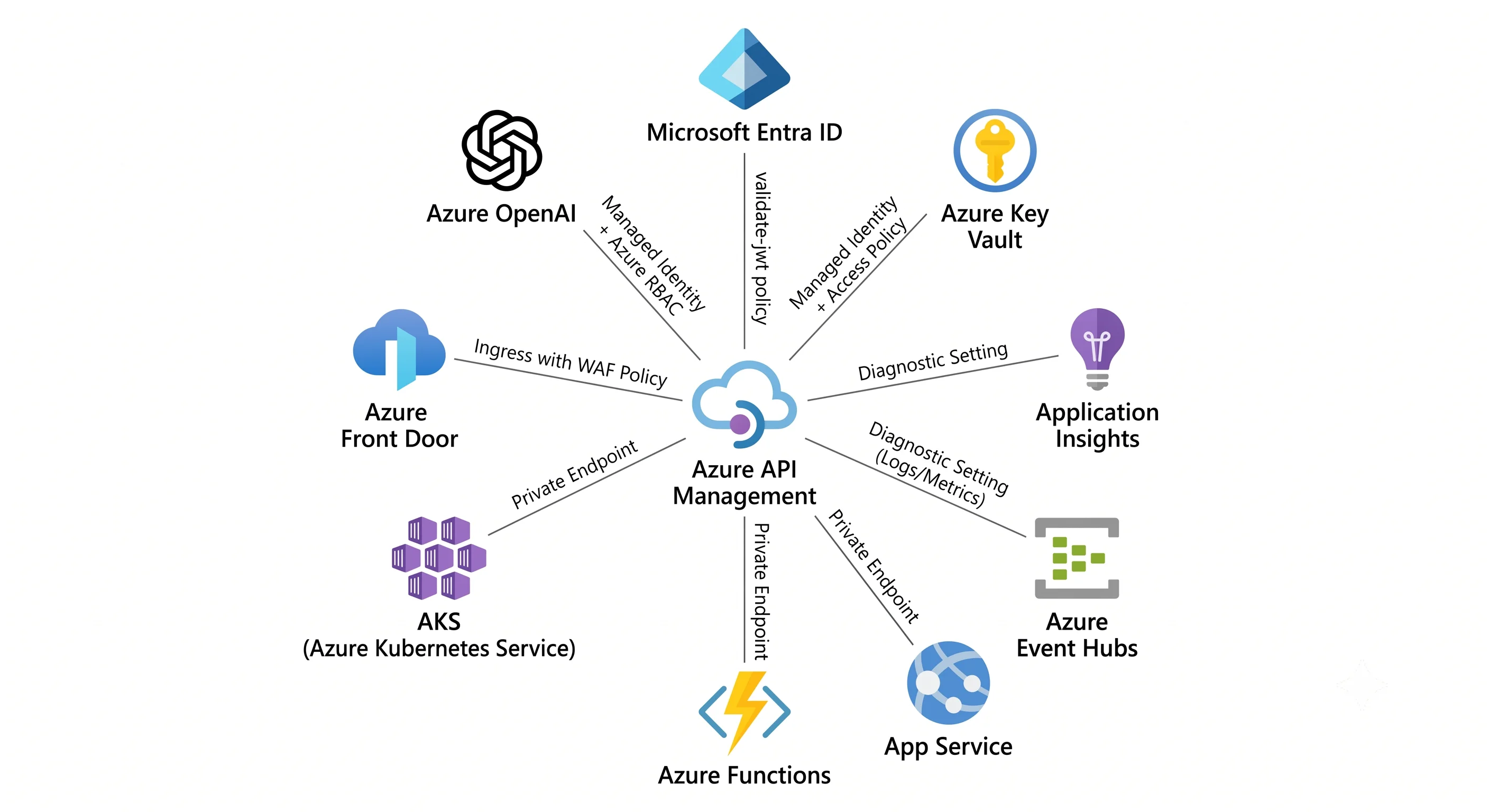
The short version
| Pairs with | Why | The glue |
|---|---|---|
| App Service / Functions / Container Apps / AKS | They are the backends | A backend entity with a URL, plus network isolation (private endpoint or VNet) and identity (authentication-managed-identity or a client certificate). Functions import brings the function key across automatically — replace it with an identity |
| Microsoft Entra ID | Real caller authentication | The validate-jwt policy against Entra's OIDC discovery document, checking issuer, audience, scopes and roles |
| Key Vault | Certificates and secrets that shouldn't be in config | Named values as Key Vault references and custom-domain certificates as Key Vault references, both resolved with APIM's managed identity, both auto-refreshing |
| Application Insights / Log Analytics | Knowing what happened | An APIM logger pointed at App Insights (per-API, with a sampling rate) plus a diagnostic setting for GatewayLogs |
| Event Hubs | High-volume custom telemetry and audit streams | An APIM logger of type azureEventHub plus the log-to-eventhub policy |
| Front Door / Application Gateway | WAF, global routing, and public exposure of an internal gateway | Origin/backend pool pointing at the APIM gateway, plus a shared secret header or client certificate so APIM only accepts traffic that came through the WAF |
| Azure OpenAI | APIM as an AI gateway | Backend pool with load balancing and circuit breaker, azure-openai-token-limit, azure-openai-emit-token-metric, and managed-identity auth to the OpenAI endpoint |
| Azure Cache for Redis | Shared, durable response caching | An external cache attached to the instance, used by cache-lookup / cache-store |
| Service Bus / Event Grid | Turning a synchronous API into an asynchronous one | send-request in policy, or a backend pointing at the Service Bus REST endpoint with a managed-identity token |
| Azure API Center | Knowing what APIs exist across the estate | Inventory sync from APIM into API Center; no traffic path |
| Azure DNS / Private DNS | Custom domains and internal-mode resolution | A CNAME (or A record for internal mode) plus, for VNet-injected instances, private zones for every private endpoint the gateway calls |
The rest of this page is the detail worth having.
Backends: how APIM actually calls your service
The default is a URL, and the default is wrong for production. Setting service_url on an API
is fine for a demo. A first-class backend entity gives you credentials, a client certificate,
a circuit breaker, and reuse across APIs, and it's what set-backend-service selects between.
Authenticating to the backend, best to worst:
Managed identity. APIM requests a token for the backend's Entra application and forwards it. No secret exists to leak.
<inbound>
  <base />
  <authentication-managed-identity resource="api://orders-backend"
                                   client-id="{{apim-uami-client-id}}"
                                   output-token-variable-name="backend-token" />
  <set-header name="Authorization" exists-action="override">
    <value>@("Bearer " + (string)context.Variables["backend-token"])</value>
  </set-header>
</inbound>
Note
client-id: with a user-assigned identity you must say which one. With system-assigned you omit it.Client certificate (mTLS). Upload or Key Vault–reference a certificate, attach it to the backend entity, and the backend validates it. The right answer for non-Entra backends.
A named value from Key Vault. A shared secret in a header. Acceptable when the backend has no better option; make it a Key Vault reference so rotation is automatic and it never appears in your Terraform state.
Nothing, plus network isolation. The backend has no public endpoint and only the APIM subnet can reach it. Defensible as a layer, dangerous as the only layer: anything else in that VNet can also reach it.
The Function App import trap. Importing a Function App into APIM in the portal creates a named
value containing the function key and wires it into a header. It works immediately, which is why
it survives into production. Replace it: give the Function App Entra authentication (App Service
Authentication / Easy Auth), give APIM a managed identity, and use validate-jwt on the Function
side. Otherwise your "keyless" architecture has a key in it.
Load balancing and resilience across backends:
<backend>
  <!-- Retry idempotent calls once on a transient failure. Do not do this for POSTs
       that aren't idempotent — you will duplicate orders. -->
  <retry condition="@(context.Response.StatusCode == 503)" count="2" interval="1" first-fast-retry="true">
    <forward-request timeout="30" />
  </retry>
</backend>
Backend pools with weighted or priority-based routing, plus circuit breaker rules on the
backend entity, are the declarative version of this and the better choice where supported
⚠️ verify current azurerm coverage; azapi covers it when the provider lags — see the backend
example in Deployment.
Microsoft Entra ID: authenticating the caller
Subscription keys meter consumers. Entra ID authenticates them. The validate-jwt policy is
where that happens, and getting it right is most of an APIM security review.
<validate-jwt header-name="Authorization"
              failed-validation-httpcode="401"
              failed-validation-error-message="Unauthorized"
              require-expiration-time="true"
              require-signed-tokens="true">
  <openid-config url="https://login.microsoftonline.com/{{tenant-id}}/v2.0/.well-known/openid-configuration" />
  <audiences>
    <audience>{{api-audience}}</audience>
  </audiences>
  <issuers>
    <issuer>https://login.microsoftonline.com/{{tenant-id}}/v2.0</issuer>
  </issuers>
  <required-claims>
    <claim name="roles" match="any">
      <value>Orders.Read</value>
    </claim>
  </required-claims>
</validate-jwt>
Four things that go wrong:
- Audience mismatch. A v1 token has a different
audthan a v2 token for the same app. If validation fails and everything looks right, decode the token and read the claims — don't guess. - Validating the signature but not the claims. A valid token from your tenant is not
authorisation. Check
rolesorscp. Otherwise any application in the tenant can call your API. - Checking scopes at the wrong scope. Put the tenant/audience check at global scope and the per-operation permission check at the operation scope, so a new operation doesn't inherit someone else's permission by accident.
- Forgetting
<base />in the API-level policy, which silently skips the globalvalidate-jwt. Lint for it — see the CI job in Deployment.
APIM can also acquire tokens on a caller's behalf via its credential manager / authorizations feature (OAuth 2.0 connections to third-party APIs, with token storage and refresh handled by APIM) ⚠️ verify the current feature name and availability — this one has been renamed.
For developer portal sign-in, Entra ID (or Entra External ID for consumer-facing scenarios) is configured as an identity provider so partners use their own corporate credentials rather than a portal-local password.
Key Vault: certificates and secrets
Two distinct integrations, both worth doing:
Custom-domain certificates. Reference the certificate by its versionless Key Vault secret ID and APIM re-reads it periodically, so a renewed certificate is picked up without a deployment ⚠️ verify the current refresh interval. Referencing a versioned ID pins you to one certificate and recreates the expiry outage you were trying to avoid. This is the single most valuable Key Vault integration APIM has, because certificate expiry is APIM's most common outage.
Named values as Key Vault references. Any secret a policy needs — a backend API key, a signing
secret, a partner credential — should be a Key Vault-referenced named value, not a secret = true
value with the literal in your Terraform.
Both require APIM's managed identity to have read access on the vault: Key Vault Secrets User and
Key Vault Certificate User under RBAC, or a get/list access policy on a vault still using the
legacy access-policy model. If the vault has a firewall, APIM must be allowed through — a private
endpoint on the vault (vault sub-resource) plus the privatelink.vaultcore.azure.net Private DNS
zone, or the trusted-Microsoft-services exception ⚠️ verify current requirements for VNet-injected
APIM.
Observability: Application Insights, Log Analytics, Event Hubs
Three destinations, three purposes, and none of them are on by default.
- Application Insights via an APIM logger attached at global or per-API scope, with a sampling percentage. This gives you request telemetry, dependency timing to backends, and an end-to-end trace when the backend also reports to App Insights. The sampling rate is the knob that matters: 100% on a busy gateway is a genuine cost and performance problem, and it's the default people leave in place. Start low, raise it for a specific API when you're investigating.
- Diagnostic settings → Log Analytics for
GatewayLogs(every request: status, latency, backend time, subscription, policy errors),WebSocketConnectionLogs, and platform metrics. This is the KQL surface you'll actually query in an incident ⚠️ verify the current category list per tier. - Event Hubs via the
log-to-eventhubpolicy for anything high-volume or custom — audit records, per-partner usage for billing, request bodies you must retain. It's asynchronous and doesn't block the request path, which is exactly why it's the right tool for custom logging rather thantrace.
You can also shape what's captured: the App Insights diagnostic settings on an API control whether headers and bodies are logged and at what size ⚠️ verify current limits. Logging request bodies is occasionally essential and always a data-protection decision — take it deliberately.
Front Door and Application Gateway: what sits in front
APIM has no WAF. If the gateway is internet-facing and the traffic is untrusted, something with a WAF belongs in front of it.
| Front | When | Notes |
|---|---|---|
| Azure Front Door (Premium) | Global audience, edge caching, Private Link to the origin, DDoS at the edge | Private Link origin support means the APIM instance need not be publicly reachable ⚠️ verify current support for APIM as a Private Link origin |
| Application Gateway (WAF v2) | Single region, and the standard partner for internal-mode APIM | Terminates public TLS, applies OWASP rules, forwards to APIM's private IP. Requires DNS in the VNet to resolve the APIM hostname to the private address, and the backend host name must match the certificate — the classic misconfiguration |
Lock the side door. Putting a WAF in front achieves nothing if callers can still hit
contoso.azure-api.net directly. Either make the gateway private (internal mode / Private Link), or
enforce at the gateway that traffic arrived through the WAF:
<inbound>
  <base />
  <check-header name="X-Front-Door-Id" failed-check-httpcode="403"
                failed-check-error-message="Direct access is not permitted"
                ignore-case="true">
    <value>{{expected-front-door-id}}</value>
  </check-header>
</inbound>
A header check is a weak control on its own — treat it as defence in depth alongside network isolation, not as the isolation itself.
APIM as an AI gateway
The fastest-growing reason to deploy APIM, and a genuinely good fit: the problems in front of an LLM endpoint are gateway problems.
- Token-based rate limiting. LLM cost is tokens, not requests, so a request-count limit is the
wrong unit.
azure-openai-token-limit(and the model-agnosticllm-token-limit) enforce tokens-per-minute per consumer. - Token metering.
azure-openai-emit-token-metricemits prompt/completion token counts as a custom metric dimensioned by subscription or client, which is how you charge back or spot the team that shipped a runaway agent loop. - Load balancing across deployments. A backend pool over several Azure OpenAI deployments
(multiple regions, or PTU plus pay-as-you-go) with priority and weight, plus a circuit breaker
that respects the upstream
Retry-Afteron a429. This is the single most valuable pattern here: it turns per-deployment quota into pooled capacity. - Semantic caching. Cache responses by embedding similarity rather than exact URL match, using a vector store and an embeddings deployment.
- Keyless backend auth. Give APIM's managed identity the Cognitive Services OpenAI User role
on the target resource, and use
authentication-managed-identitywithresource="https://cognitiveservices.azure.com"⚠️ verify the current role name and resource URI.
⚠️ Verify current policy names, availability and tier support for all of the above — this feature area is moving faster than any other part of APIM, and several of these policies were preview at the time of writing.
<inbound>
  <base />
  <azure-openai-token-limit tokens-per-minute="50000"
                            counter-key="@(context.Subscription.Id)"
                            estimate-prompt-tokens="true"
                            tokens-consumed-header-name="x-tokens-consumed"
                            remaining-tokens-header-name="x-tokens-remaining" />
  <azure-openai-emit-token-metric namespace="openai">
    <dimension name="Subscription" value="@(context.Subscription.Id)" />
    <dimension name="API" value="@(context.Api.Name)" />
  </azure-openai-emit-token-metric>
  <authentication-managed-identity resource="https://cognitiveservices.azure.com"
                                   client-id="{{apim-uami-client-id}}" />
</inbound>
Turning a synchronous API asynchronous
A common architectural job: the caller wants an HTTP response now, the work takes minutes.
send-request+return-response— the gateway drops a message on Service Bus or Storage Queue via its REST endpoint (authenticated with a managed identity) and immediately returns202 Acceptedwith a status URL. The backend never sees a hanging connection.- Event Grid — publish an event from policy and let subscribers fan out.
- Durable Functions / Logic Apps as the backend, with APIM exposing the start and status operations as a clean pair.
The gateway is a poor place for long-running work: it has request timeouts, and every in-flight request consumes capacity. Async is not a nicety here, it's a capacity decision — see Architecture.
Networking glue, in one place
For a VNet-injected instance, the integrations above each imply DNS and connectivity work:
- Private endpoints to backends — sub-resource
sitesfor App Service and Functions,vaultfor Key Vault,accountfor Azure OpenAI ⚠️ verify current sub-resource names — each with its Private DNS zone linked to the APIM VNet. - Outbound dependencies. A VNet-injected APIM instance needs outbound access to a set of Azure management endpoints (via service tags) or it enters a degraded state with unhelpful errors. Check the current required NSG rules and service tags before deploying ⚠️ verify — this list changes.
- Custom DNS. If the VNet uses custom DNS servers, they must resolve both Azure private zones and public names, or half the integrations on this page fail in ways that look like policy bugs.
Next: Production →
← Back to the Azure API Management overview · ← Previous: Deployment