
3. Architecture
The machinery most tutorials skip. Everything that surprises people in production — cold starts, throttling, duplicate executions, a firewalled storage account killing all triggers — falls out of the four mechanisms on this page.
The invocation path, end to end
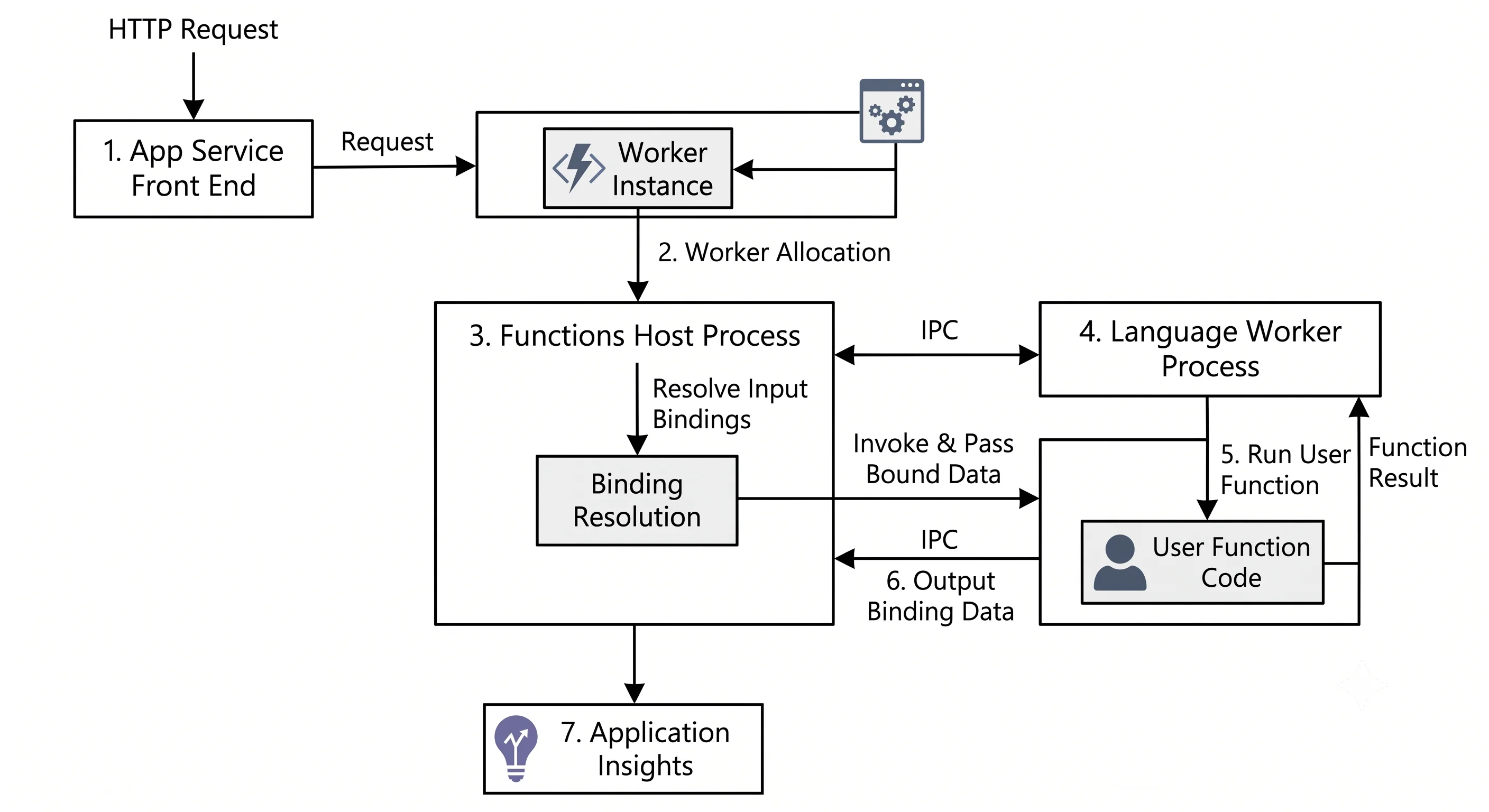
Trace one HTTP request through the system:
- DNS and the front end.
myapp.azurewebsites.netresolves to the App Service front-end fleet — a shared, multi-tenant layer of load balancers that terminates TLS and routes by hostname. Your app does not own this; it is the same front end App Service uses. - Site routing. The front end finds the worker(s) currently assigned to your site. If there are none — the app is scaled to zero — this is where the request waits while one is allocated.
- Worker allocation (cold path only). The platform picks a worker from a pool of pre-warmed VMs, mounts your app content, and starts the Functions host.
- Host start. The host reads
host.json, loads the binding extensions, and enumerates your functions and their triggers. - Language worker start. For non-.NET-in-process apps, a separate worker process starts — Node, Python, Java, or your isolated .NET process — and registers over gRPC. Your dependency tree loads here. This is usually the largest, most controllable slice of cold start.
- Binding resolution. Input bindings are evaluated: the blob is fetched, the Cosmos document read, the binding expressions substituted.
- Your code runs. Finally.
- Output bindings flush. Queue messages sent, blobs written, after your function returns successfully. A thrown exception means output bindings do not run — which is a feature, and also the reason a partially-completed function can look like it did nothing.
- Telemetry. The invocation, its dependencies, and its traces are sent to Application Insights,
sampled according to
host.json.
For a queue or event trigger, steps 1–2 are replaced by the scale controller noticing a backlog and the host's listener leasing a message — but steps 3–9 are identical.
The scale controller
The single most Azure-specific piece of this service, and the one with no Lambda equivalent.
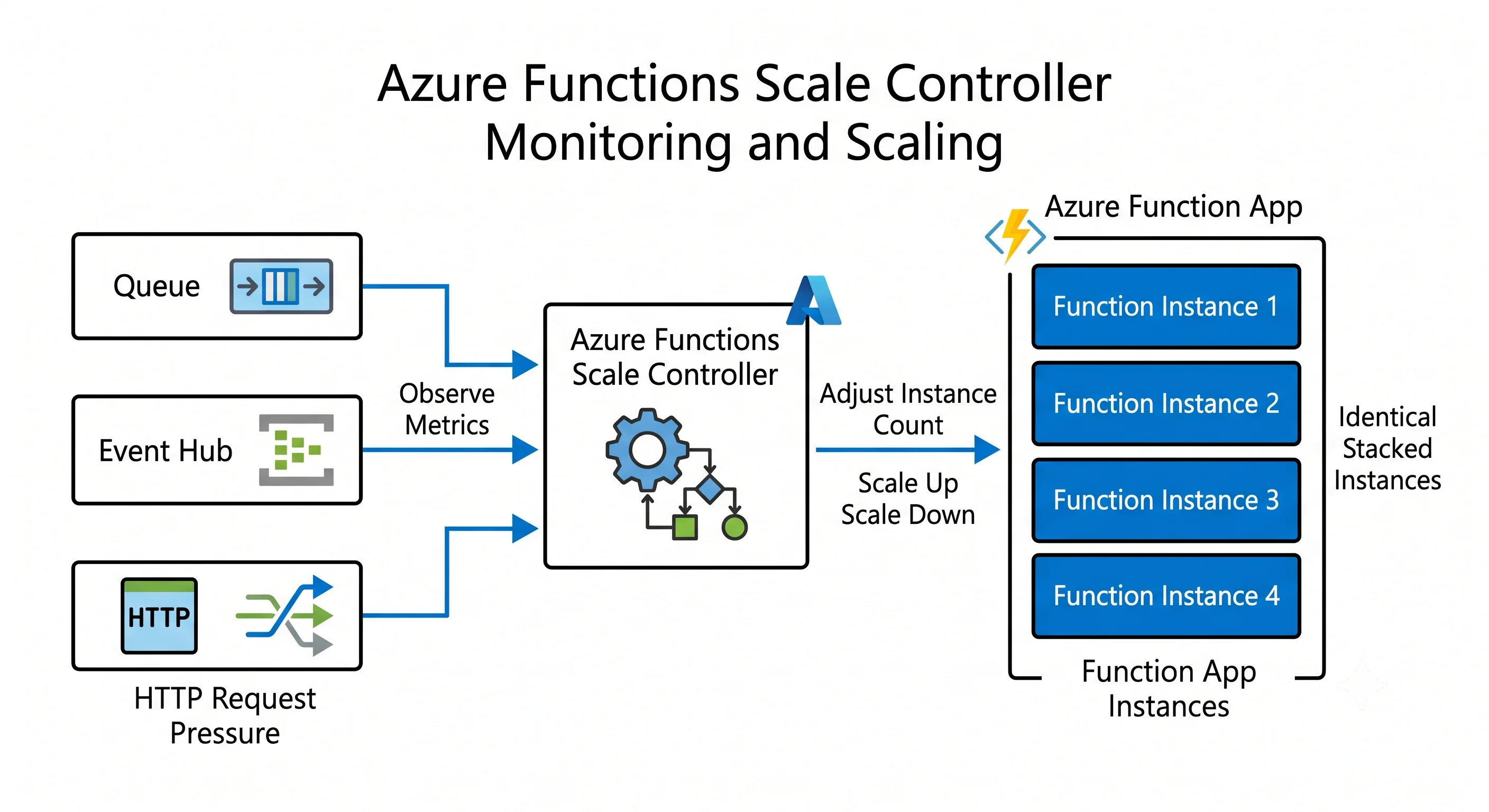
Your function app doesn't decide how many instances it needs. A separate Azure-managed component — the scale controller — watches your trigger sources on your behalf and adjusts the instance count. For a queue trigger it inspects queue length and the age of the oldest message; for Event Hubs it inspects the unprocessed event count per partition; for HTTP it watches request rate and latency.
Two implications people miss:
The scale controller reads your trigger source directly. It connects to the storage account, Service Bus namespace, or Event Hub itself, outside your function's execution. If you lock that source down to a private endpoint, the scale controller can lose visibility and your app stops scaling out even though the code works fine. The mitigation is runtime-driven scaling (where the host, inside your network, reports scale demand instead) — available on Premium and Flex ⚠️ verify current support matrix against current Azure docs. This is one of the top three production surprises in this service.
Scaling is per-app, not per-function. All functions in an app share one instance count. A busy queue-triggered function will scale out the app, and your rarely-used HTTP function comes along for the ride — inheriting its warm instances, which is sometimes a happy accident and sometimes a cost surprise. Conversely, one function's slow dependency can starve the others. Split apps by scaling characteristic.
Target-based scaling is the newer algorithm: rather than adding one instance per scaling
interval, the controller computes a target count from backlog ÷ per-instance concurrency and jumps
there. It reacts to spikes far faster than the older incremental approach, and it makes the
host.json concurrency settings genuinely load-bearing rather than advisory.
Bounds on all of this:
- Event Hubs and Cosmos DB change feed scale by partition. More instances than partitions is wasted; the partition count is your real parallelism ceiling.
- Service Bus sessions scale by session, similarly.
- HTTP scales by request pressure with no such natural bound, which is why an HTTP function in front of a small database is the classic way to melt the database.
Cold start, dissected
"Cold start" is four separate delays that people quote as one number. Knowing which one you have determines which fix works.
| Stage | What's happening | What reduces it |
|---|---|---|
| Worker allocation | The platform assigns a VM and mounts your content | Always-ready (Flex) or pre-warmed (Premium) instances. Nothing in your code helps |
| Host start | The Functions host boots and loads binding extensions | Fewer extensions; keeping the extension bundle current |
| Language worker + dependency load | Your runtime starts and imports your dependencies | Smaller packages, fewer imports, lazy initialisation, run-from-package deployment |
| First-call initialisation | Your own connection pools, HTTP clients, SDK clients | Create clients once at module/static scope, never per invocation |
Two practical rules that matter more than any platform setting:
- Never construct SDK clients inside the handler. A
new HttpClient()or a fresh Cosmos client per invocation is the single most common performance defect in Functions, and it also causes socket exhaustion under load. Hoist them to static/module scope so they're reused across invocations on the same instance. - Deploy as a package, not as loose files. Running from a mounted package (
WEBSITE_RUN_FROM_PACKAGEon classic plans, and the default deployment model on Flex Consumption) makes app content read-only and dramatically speeds start compared to synchronising thousands of files.
The "keep it warm with a timer ping" trick works on Consumption but is a workaround, not a design. If cold start genuinely violates your SLO, buy always-ready capacity and stop fighting the platform.
Control plane vs. data plane
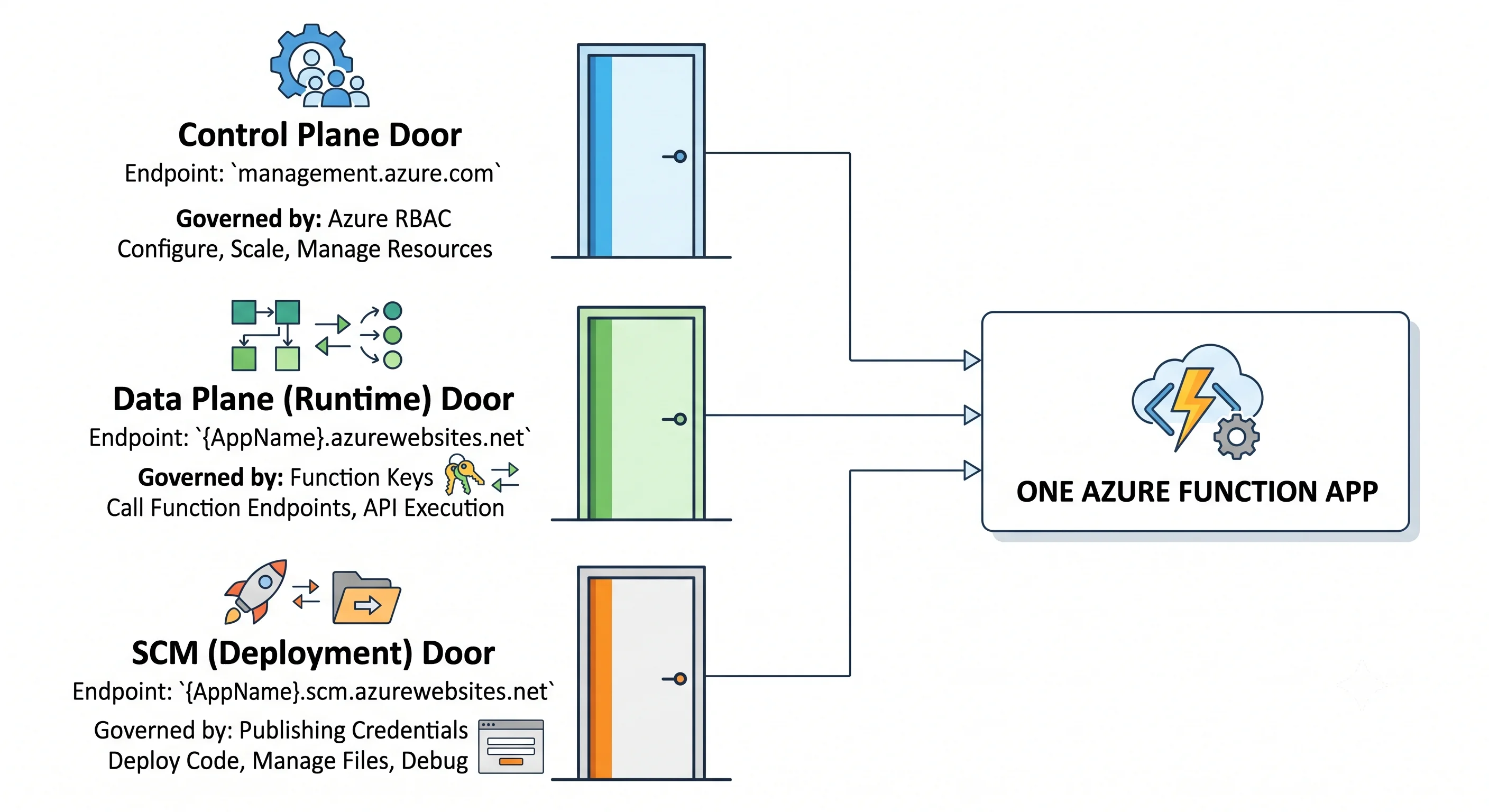
Azure's split is sharper than AWS's, and for Functions it's sharper than for most Azure services because there are effectively three planes.
| Plane | Endpoint | What it does | Who governs it |
|---|---|---|---|
| Control plane | management.azure.com (ARM) |
Create/update/delete the app and plan, read and write app settings, restart, swap slots, read the publishing credentials and keys | Azure RBAC — Contributor, Website Contributor |
| Data plane | myapp.azurewebsites.net |
Invoke your functions | Function/host keys by default, or Entra ID if you enable App Service Authentication. Azure RBAC does not apply here by default |
| SCM / Kudu plane | myapp.scm.azurewebsites.net |
Deploy, browse the file system, run console commands, read logs | Publishing credentials, or Entra ID with the right control-plane permission |
The classic mistake: granting someone Reader on the function app and expecting them to be
unable to call it — or granting Contributor and thinking that's a data-plane grant. Neither is
true. Reader cannot list the keys, so in practice it does limit invocation of a key-protected
function; Contributor can list the keys, and therefore can invoke anything. Control-plane
Contributor is, for a key-protected function app, effectively full data-plane access. Say that
plainly in a design review.
The second classic mistake: forgetting that the SCM plane is a separate front door with separate access rules. Locking the app's public network access without locking SCM leaves a deployment endpoint exposed; locking SCM without thinking leaves your CI/CD unable to deploy.
Where the keys actually live. Function and host keys are stored — by default — in blob storage in
the AzureWebJobsStorage account. They can instead be kept in Key Vault ⚠️ verify current support
and configuration against current Azure docs. This is another reason that storage account is more
security-relevant than it looks.
The storage account dependency
Worth its own section because it causes outages that look like code bugs.
The Functions host uses the account in AzureWebJobsStorage for:
- Trigger metadata and listener state — including blob receipts for the polling blob trigger.
- Timer schedules and singleton leases — so exactly one instance runs a scheduled occurrence.
- Event Hubs and Cosmos DB checkpoints/leases — where in the stream each partition has reached.
- Durable Functions task hubs — the entire orchestration history.
- Function and host keys, by default.
- The deployment package, on most deployment models.
Consequences:
- Firewalling the storage account without exceptions breaks the app. Not partially — timers stop
firing, Durable orchestrations stall, and key lookups fail. If you restrict it, you must configure
the app's network integration, private endpoints for the relevant sub-resources (
blob,file,queue,table), and — on classic plans using content share — the file share settings. Test this in a lower environment; it is fiddly and it fails at the worst time. - Two apps must not share a task hub name. Two function apps pointed at one storage account with default Durable configuration will interleave their orchestration state.
- Storage transactions are a real cost line. A polling blob trigger over a large container, or a chatty Durable orchestration, can generate more spend in storage transactions than in compute.
Consistency, delivery, and durability
- Delivery is at-least-once for the queue-shaped triggers (Storage queue, Service Bus, Event Hubs). Retries, host restarts, and scale-in can all cause a message to be processed twice. Idempotency is your responsibility — carry an idempotency key and make the write conditional.
- Ordering is not guaranteed except within an Event Hubs partition or a Service Bus session, and even then only if concurrency is constrained appropriately.
- Retries come from two places, and confusing them causes duplicated effort: the trigger's own
semantics (a Service Bus message is redelivered until max delivery count, then dead-lettered) and
the host's retry policy configured in
host.json. Prefer the trigger's native semantics where they exist; they're visible, countable, and have a dead-letter destination. - Output bindings are not transactional. A function that writes to two output bindings can fail between them. If you need atomicity, use one write and derive the rest, or adopt an outbox pattern.
- Durable Functions replay orchestrator code. This is not a retry — it is how the framework rebuilds in-memory state from an event history. Non-deterministic code in an orchestrator (timestamps, GUIDs, direct I/O) produces bugs that only appear after a restart.
Failure modes
The list to recognise on sight:
- HTTP 429 from your dependencies, not from Functions. Functions scaling out is precisely what
causes throttling downstream — Cosmos DB 429s, SQL connection-pool exhaustion, a rate-limited
third-party API. The fix is a concurrency ceiling in
host.jsonor a queue in front, not a bigger plan. Serverless compute in front of a non-serverless datastore is the single most common architectural failure in this service. - Cold-start latency spikes on a low-traffic HTTP app, seen as a p99 that is 50× the p50.
- SNAT port exhaustion. Outbound connections from an app share a limited pool of source ports. Creating a new client per invocation, or hammering an external endpoint, exhausts them and produces intermittent connection timeouts that look like the remote service is down ⚠️ verify current limits. Reused clients and private endpoints both help.
- Silent trigger failure after a network change. Timers stop, queues back up, no errors in your code. Look at storage account networking and scale-controller access first.
- Poison messages looping. A message that always fails is retried to the max, then dead-lettered
— or, for Storage queues, moved to a
-poisonqueue nobody monitors. Alert on dead-letter depth. - Host restarts mid-execution. Platform upgrades, scale-in, and configuration changes all restart the host. A long-running non-Durable function will be killed mid-flight. Design for resumption.
- Regional outage. A function app is a regional resource. Multi-region means two apps and a traffic manager in front — see Production.
Scaling ceilings and where they're counted
The Azure-specific part of "what's the limit" is always at what scope:
| Limit | Typical scope |
|---|---|
| Maximum scale-out instances | Per function app, varying by plan and OS |
| Instances available to you overall | Per subscription, per region — and shared with other App Service workloads |
| App Service Plan instance count | Per plan |
| Storage account transaction rate | Per storage account — shared by every app pointed at it |
| Event-driven parallelism | Per partition (Event Hubs, Cosmos DB) or per session (Service Bus) |
⚠️ Every number behind these rows varies by plan, operating system, region, and subscription type — verify against current Azure docs before designing to one. The durable lesson is the shape: your ceiling is usually your downstream dependency or your partition count, not the Functions plan.
Next: Getting Started →
← Back to the Azure Functions overview · ← Previous: Core Concepts