
1. What and Why
One sentence: Azure Virtual Network is a regional, software-defined private network that gives you a private IP address space, subnets to carve it into, and default isolation from everything you haven't explicitly connected it to.
The problem it kills
Networks used to be made of things you could trip over. Segmenting two applications meant a VLAN, a change window, and a network engineer who was booked out until Thursday. Giving a new service its own firewall zone meant buying an appliance, racking it, and licensing it per throughput tier. Connecting two datacentres meant a leased line and a six-week lead time. The network was the slowest part of every project, not because the packets were slow but because the changes were.
A VNet turns all of it into declarative resources. Think of it as being handed an empty building with a floor plan you draw yourself: you decide the address range (the building's postcode block), you decide the subnets (the floors), you decide who can walk between floors (NSGs), and you decide which doors lead outside (gateways, NAT, firewalls). Nothing is physical, everything is an API call, and the whole thing can be described in a Terraform file and recreated in a different region in minutes.
Two consequences matter more than the speed story:
Isolation is the default, not a configuration. Two VNets you haven't connected cannot reach each other, even in the same subscription, even in the same region, even with identical address spaces. There is no shared backplane to accidentally leave open. Compare this to a flat on-premises network, where "everything can reach everything" is the starting condition and segmentation is a project. Azure inverts the burden of proof, and that's worth more than it sounds.
Enforcement moved into the host. NSG rules aren't evaluated by an appliance the traffic passes through — they're evaluated by the hypervisor on the machine hosting your VM, in a component called the Virtual Filtering Platform, before the packet reaches a wire. That's why adding a hundred NSG rules costs you no bandwidth and no latency budget, why there is nothing to size or scale, and why there is also nothing to log into when you want to see what's happening. The trade is observability: you get flow logs and Network Watcher rather than a CLI on a router.
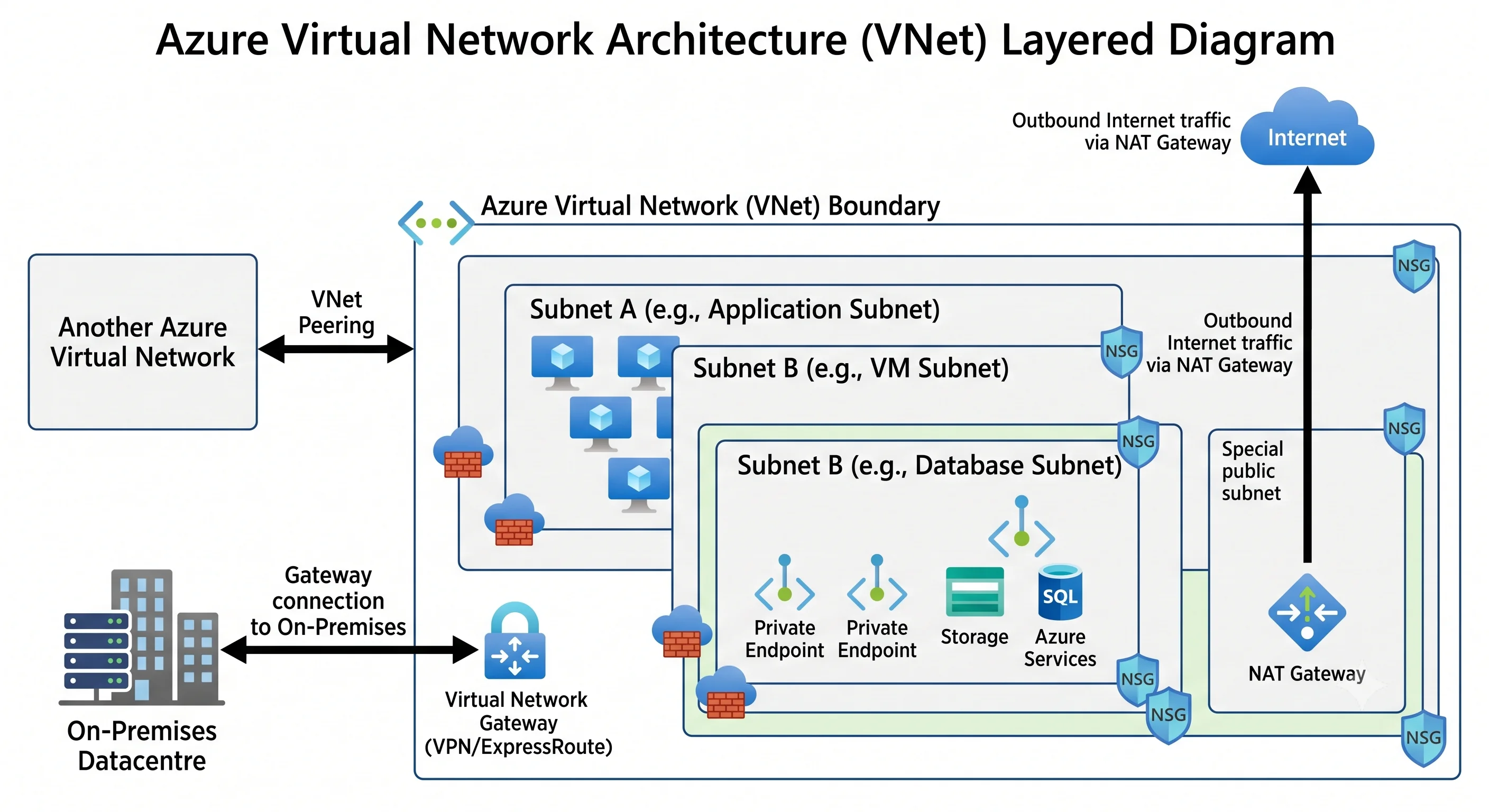
Where it sits
A VNet is the foundation layer of Azure networking, and almost everything in the Networking category is something you attach to one. Nothing else in the catalogue competes with it — the confusion is about the layer above it, the connectivity topology:
| Neighbour | What it is | Use it instead when |
|---|---|---|
| VNet peering | A direct, non-transitive link between two VNets, same or different region | You have a handful of VNets and a simple hub. It's the cheapest and lowest-latency option, and the default answer under about ten spokes |
| Azure Virtual WAN | A Microsoft-managed hub with built-in transitive routing, branch VPN, ExpressRoute, and firewall integration | You'd otherwise be hand-building hub-and-spoke across multiple regions, with dozens of spokes and branch offices. It replaces the hub VNet, not the spokes |
| Azure Private Link | A private IP inside your subnet that maps to a specific PaaS resource | Never instead of a VNet — it's the mechanism you use inside one to reach PaaS privately |
| Service endpoints | A route optimisation that keeps PaaS traffic on Azure's backbone using the service's public IP | You want free, coarse-grained PaaS access from a VNet and don't need on-premises reach. Being superseded by private endpoints in most designs |
| VNet integration (App Service, Functions) | An injected delegation that lets a PaaS app send outbound traffic into your VNet | You need a PaaS app to reach private resources but don't want to run it inside the VNet |
The rule of thumb: VNet peering until it hurts, then Virtual WAN. "It hurts" means you're managing more than a couple of dozen peerings by hand, you need branch-office VPN termination, or you need transitive any-to-any routing across regions.
The AWS analogue, and where it breaks
A VNet is a VPC. That mapping is close enough that experienced AWS engineers are productive in Azure networking in an afternoon — and close enough that the differences bite silently, because nothing errors, the design is just quietly wrong. Three of them matter:
1. Subnets are not zonal. In AWS, a subnet lives in exactly one Availability Zone, so you build
one subnet per AZ per tier and the subnet choice is the zone choice. In Azure, a subnet spans
every availability zone in the region. Zone placement is a property of the resource — you pass
--zone 1 when creating the VM, or zones = ["1","2","3"] on a zone-redundant load balancer. If
you build snet-app-zone1, snet-app-zone2, snet-app-zone3 in Azure you have created three
identical subnets and achieved nothing.
2. NSGs are ordered and can deny. A security group in AWS is allow-only and unordered; you get
the union of every rule. An NSG has numbered priorities from 100 upward, evaluates in ascending
order, and stops at the first match — which may be a Deny. It's stateful like a security group
(return traffic is allowed automatically) but expressive like a NACL. It also attaches to a
subnet or a NIC, and when both are present, inbound traffic is filtered by the subnet NSG first
and then the NIC NSG, with outbound in the reverse order. Both must allow.
3. Outbound internet has changed, and there is no Internet Gateway to attach. Azure has always
had a system route sending 0.0.0.0/0 to the internet, so routing "just works" — but a VM with only
a private IP needs a source NAT address to actually get replies back. Historically Azure supplied
one implicitly ("default outbound access"). That implicit behaviour has been retired for newly
created VNets and subnets, so you must now provide an explicit outbound method: a NAT Gateway
(the recommended one), a Standard Load Balancer with outbound rules, or an instance-level public IP.
⚠️ verify the current retirement status and the exact affected scenarios against current Azure docs.
The practical effect is that a subnet which worked in a 2023 tutorial will now fail to reach
apt-get and give you no useful error.
Smaller ones worth knowing: Azure has no Elastic IP concept (a Standard public IP is static and
billed whether attached or not); route tables attach to subnets like AWS's but Azure adds a
nextHopType of VirtualAppliance with a specific IP rather than an instance ID; and Azure's
equivalent of a VPC endpoint comes in two flavours (service endpoint and private endpoint) that are
genuinely different mechanisms, not two names for one thing.
When NOT to reach for one
- A pure PaaS app with no privacy requirement. If your Function app talks to Blob Storage and both are protected by Entra ID and RBAC, adding a VNet buys you private DNS zones, an outbound NAT decision, and a new category of "why can't it resolve that name" incidents. Add the network when you have a reason, not by reflex.
- As a security control by itself. A private endpoint moves a service off the public internet; it does not authenticate the caller. Anyone who reaches the subnet reaches the endpoint. Network isolation is a layer, and the layer that actually decides who may read the data is Azure RBAC on the data plane — see Architecture for where that line falls.
- One VNet per application. Non-transitive peering makes a full mesh of n VNets cost n(n−1)/2 peerings, and peering limits are real. Either hub-and-spoke it or use Virtual WAN, but don't let VNets accumulate one per team.
- A deliberately small address space. A
/26"because we only have four VMs" is fine until someone adds AKS with Azure CNI, where every pod takes a VNet IP, or adds a dozen private endpoints, or wants to peer to a partner network. Growing a VNet's address space is possible; not overlapping with a network you later need to reach is not something you can retrofit. - Copying a VPC design verbatim. See the three sharp edges above. The per-AZ subnet habit is the most common import and produces designs that look redundant and aren't.
What you're actually billed for
The VNet, its subnets, NSGs, ASGs, and route tables cost nothing. That fact quietly misleads people into thinking Azure networking is cheap. The bill comes from the attachments:
- VNet peering data, charged per GB on both the ingress and egress side, and charged more when the peering crosses regions. A chatty cross-region spoke pair can out-cost the VMs.
- NAT Gateway — an hourly resource charge plus a per-GB data-processed charge.
- Public IP addresses — billed hourly whether or not anything is attached. A subscription with two hundred orphaned public IPs from deleted VMs is a real and common finding.
- Gateways and firewalls — VPN Gateway, ExpressRoute Gateway, and especially Azure Firewall are billed per deployment-hour plus per GB processed, and run 24/7 by definition. Firewall is usually the largest line on an Azure network bill.
- Private endpoints — hourly per endpoint plus per GB in and out. Fine for ten; a design that creates one per storage account per environment adds up.
- Cross-region and internet egress — the standard bandwidth meters.
⚠️ All of these are per-region rates that change; verify current pricing against current Azure docs. The durable point is the shape: the network is free, the appliances are not, and the appliances bill while idle. The full treatment is in Production.
Next: Core Concepts →