
5. Naming and Tagging
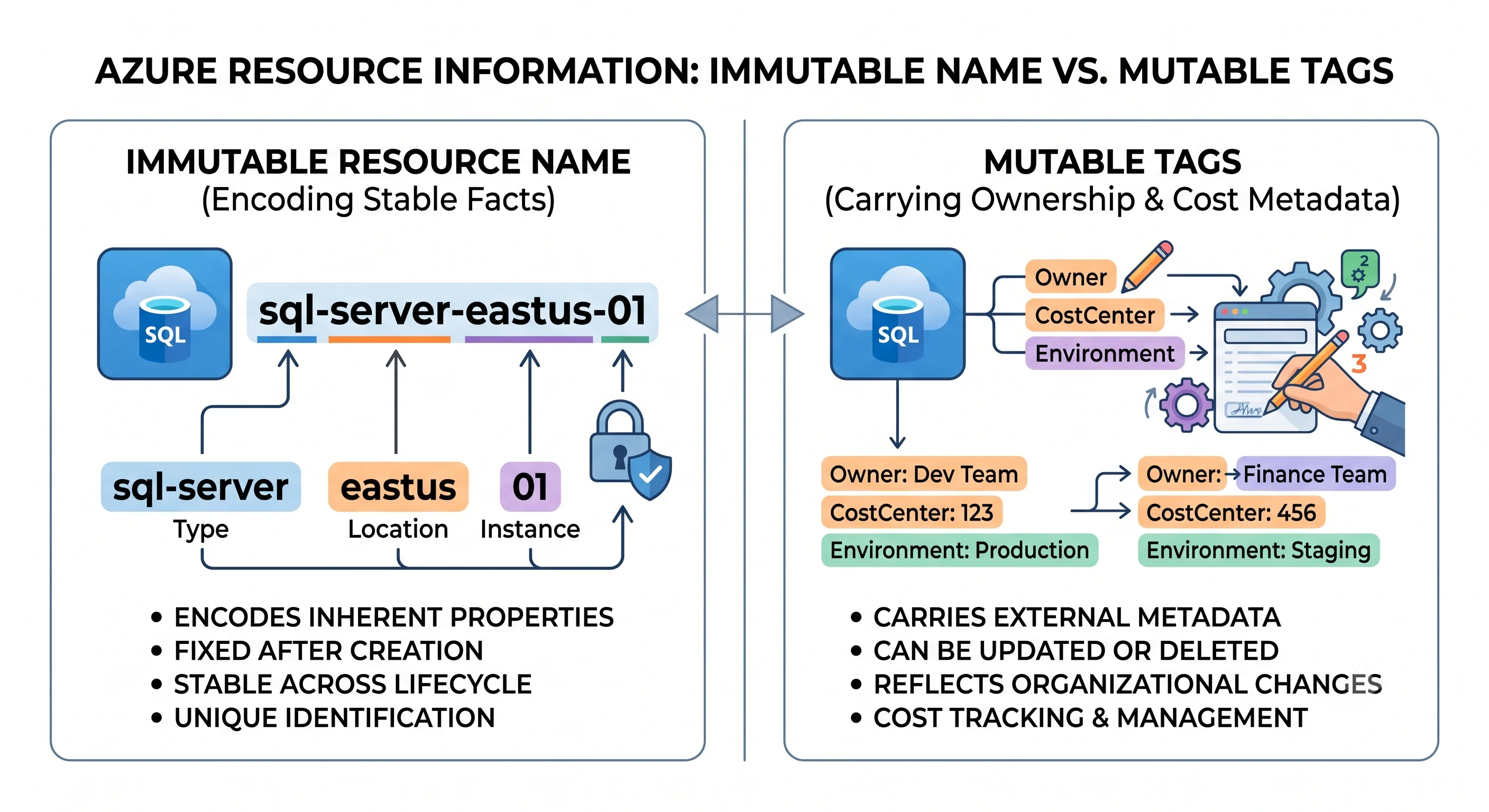
Naming feels like the least interesting decision in a cloud estate and is one of the least reversible. Azure resources cannot be renamed. There is no rename operation — you create a new resource with the new name, move the data, repoint everything, and delete the old one. For a storage account or a key vault that also means a DNS-addressable endpoint changes, which means every consumer changes too.
Tags are the opposite: cheap, changeable, and the only mechanism that answers "whose is this and why is it costing us money". Most estates get the naming roughly right and the tagging badly wrong, then discover the tagging gap six months later during a cost review, when backfilling it means touching four hundred resources.
Analogy: the name is the address stamped into the building's foundation. The tags are the labels on the door — easy to change, and the only reason anyone can find the right occupant.
Two rules carry most of the value on this page:
Encode only stable facts in the name. Put everything volatile in tags.
A team owner changes. A cost centre changes. A criticality rating changes. A resource's region, environment, and workload almost never change without the resource being rebuilt anyway. That line tells you exactly what belongs where.
Coming from AWS: two habits will hurt. First, AWS lets you name most things freely and rename many
of them, and S3 bucket names are the rare globally-unique exception — in Azure, globally-unique
DNS-addressable names are normal, not exceptional. Second, the Terraform AWS provider's
default_tags block means you can set tags once at the provider level; azurerm has no equivalent, so
tags are passed explicitly per resource ⚠️ verify current provider capability. Plan for a locals map
and discipline, not a provider setting.
Naming rules are per resource type, and they genuinely differ
There is no single Azure naming rule. Each resource type has its own constraints on length, allowed characters, case, and — crucially — the scope at which the name must be unique. That last one is the part people miss.
| Uniqueness scope | Means | Examples |
|---|---|---|
| Global | Unique across every Azure customer, because it becomes a public DNS name | Storage account, Key Vault, App Service, Container Registry, Cosmos DB account, SQL logical server, Service Bus namespace |
| Resource group | Unique within its group only | VM, NIC, NSG, virtual network, disk, App Service Plan |
| Subscription | Unique within the subscription | Resource group |
| Parent resource | Unique within the parent | Blob container, subnet, queue, topic |
Globally-unique names are the ones that hurt, because you're competing with every Azure customer on
Earth for storage1 and because the name lands in a hostname:
https://stpaymentsproduks.blob.core.windows.net
https://kv-payments-prod.vault.azure.net
https://app-payments-prod.azurewebsites.net
Which produces a rule people learn the hard way: don't put anything confidential in a name. Customer names, project codenames under embargo, and internal system names all end up in public DNS, in TLS certificates, and in certificate transparency logs. Assume the name is public, because it is.
The character rules vary more than seems reasonable. The two worst offenders, worth memorising because you'll meet them constantly:
- Storage account — lowercase letters and digits only. No hyphens, no underscores, no uppercase. 3–24 characters. Globally unique.
- Key Vault — letters, digits, and hyphens; must start with a letter; 3–24 characters. Globally unique.
⚠️ Verify exact lengths and character sets per type against the current Azure naming-rules documentation — they're stable but occasionally revised, and there are well over a hundred types.
A separate trap that isn't a naming rule but behaves like one: guest OS name limits. A Windows VM's
computer name is capped at 15 characters by NetBIOS, independent of the Azure resource name. You can
have an Azure VM resource called vm-payments-prod-uks-001 whose Windows hostname is truncated, which
makes correlating a monitoring alert to an Azure resource unexpectedly annoying. Keep the two aligned
if you can.
Soft delete squats on your name
This one is worth its own paragraph because it turns into a confusing failure at exactly the wrong moment. Several services support soft delete — Key Vault most notoriously — where a deleted resource is retained for a recovery window. During that window, the name is still taken. Recreating a vault with the same name fails until you either recover it or purge it:
az keyvault list-deleted -o table
az keyvault purge -n kv-payments-dev            # blocked if purge protection is on
And if purge protection is enabled, you cannot purge — you wait out the retention period. That's
the correct security posture for production and a genuine obstacle in a CI pipeline that creates and
destroys ephemeral vaults. The standard workaround is a random suffix on ephemeral resource names, which
is also the standard reason ephemeral resources accumulate untidily. Pick your poison deliberately;
terraform destroy will not save you from either.
The same shape appears elsewhere — soft-deleted storage accounts, recovery vaults with backup items,
resources behind a CanNotDelete lock. Every Deployment page in this article names what destroy will
not remove for its service, and this is why.
A convention worth adopting
Microsoft's Cloud Adoption Framework publishes recommended abbreviations, and using them buys you the one thing a convention is for: someone unfamiliar with your estate can read a resource ID and know what they're looking at. The pattern:
<type>-<workload>-<environment>-<region>-<instance>rg-payments-prod-uks resource group
vnet-payments-prod-uks virtual network
snet-payments-prod-uks-app subnet
vm-payments-prod-uks-001 virtual machine
kv-payments-prod-uks key vault
st paymentsproduks → stpaymentsproduks storage account (no hyphens allowed)
app-payments-prod-uks app service
plan-payments-prod-uks app service plan
law-payments-prod-uks log analytics workspaceCommon abbreviations: rg, vnet, snet, nsg, vm, vmss, st, kv, app, func, plan,
aks, acr, sql, cosmos, sb, evh, law, appi, agw, afd, pip, nic, lb.
Three honest observations about conventions in general:
The type prefix is redundant and worth keeping anyway. The resource ID already contains
Microsoft.Storage/storageAccounts. But names appear stripped of context — in alert emails, cost
reports, CLI output, KQL results, Terraform plans — and stpaymentsproduks is self-describing where
paymentsproduks isn't.
Character limits will break your convention, and that's fine. A 24-character storage account name
cannot hold st + workload + environment + region + instance for any real workload name. Shorten the
workload (pay), drop the region if you're single-region, drop the instance number. Consistency
matters more than completeness, and a documented exception beats an undocumented improvisation.
Don't encode ownership or cost centre in the name. Those change; the name can't. They're tags.
Two more things worth deciding once: case (use lowercase everywhere — some types demand it, none
forbid it, and mixed case creates lookup errors that are invisible on screen) and numbering (use
001 not 1, so sorting works).
Tags
Technically: a tag is a key–value string pair attached to a resource, resource group, or subscription, stored by ARM, queryable, and surfaced in Cost Management as a grouping dimension. Limits are roughly 50 tags per resource, key up to 512 characters, value up to 256 ⚠️ verify against current Azure docs; storage accounts have a lower key length limit.
Two facts that shape everything else about tags:
Tags are not inherited. A tag on a resource group does not appear on the resources inside it.
Cost Management can group by resource-group tags in some views, but the tag itself doesn't propagate.
This surprises everyone once. The fix is Azure Policy with the modify effect and the
Inherit a tag from the resource group built-in definition, which writes the tag onto resources — and
remediate tasks to backfill existing ones.
Not every resource type supports tags. Some child resources and classic resources don't. A tagging policy that assumes universal support will produce non-compliance you can't fix.
A tag set that earns its keep
Five tags cover most needs. More than about eight and compliance decays.
| Tag | Why | Example |
|---|---|---|
env |
Filtering, policy targeting, cost splitting | prod, staging, dev |
owner |
Who to contact. The single highest-value tag | payments-team or a distribution list |
costCenter |
Chargeback — the reason finance cares about any of this | CC-4471 |
workload |
Groups resources into an application across resource groups | payments-api |
managedBy |
Distinguishes IaC-managed from hand-built | terraform, manual |
owner and costCenter are the two that justify the effort. When a resource shows up in a cost
anomaly report or an unused-resource review, those two tags are the difference between a five-minute
decision and a three-week email chain. managedBy earns its place the first time you need to know
whether deleting something will be reverted by the next pipeline run.
Optional additions when they're genuinely used: dataClassification (if you have a classification
scheme with teeth), criticality (if it drives an actual paging policy), expiresOn (if something
actually reaps them — otherwise it's decoration).
Tags in Terraform
No provider-level default tags in azurerm, so the pattern is a locals map merged per resource:
locals {
  common_tags = {
    env        = var.environment
    owner      = var.owner
    costCenter = var.cost_center
    workload   = var.workload
    managedBy  = "terraform"
  }
}

resource "azurerm_storage_account" "this" {
  name                     = "st${var.workload_short}${var.environment}"
  resource_group_name      = azurerm_resource_group.this.name
  location                 = azurerm_resource_group.this.location
  account_tier             = "Standard"
  account_replication_type = "LRS"

  tags = merge(local.common_tags, { component = "artifacts" })
}
One gotcha that produces permanent Terraform drift: if Azure Policy appends or inherits tags, Terraform sees tags it didn't write and plans to remove them, every run, forever. Either exclude those keys from Terraform's view or, more bluntly:
lifecycle {
  ignore_changes = [tags["inheritedCostCenter"]]
}
The cleaner resolution is to pick one owner of each tag key — policy or Terraform, never both. Splitting ownership by key is fine; overlapping it is a permanent nuisance. This is the most common policy-versus-IaC conflict in Azure and it's entirely avoidable at design time.
Enforcing both with Azure Policy
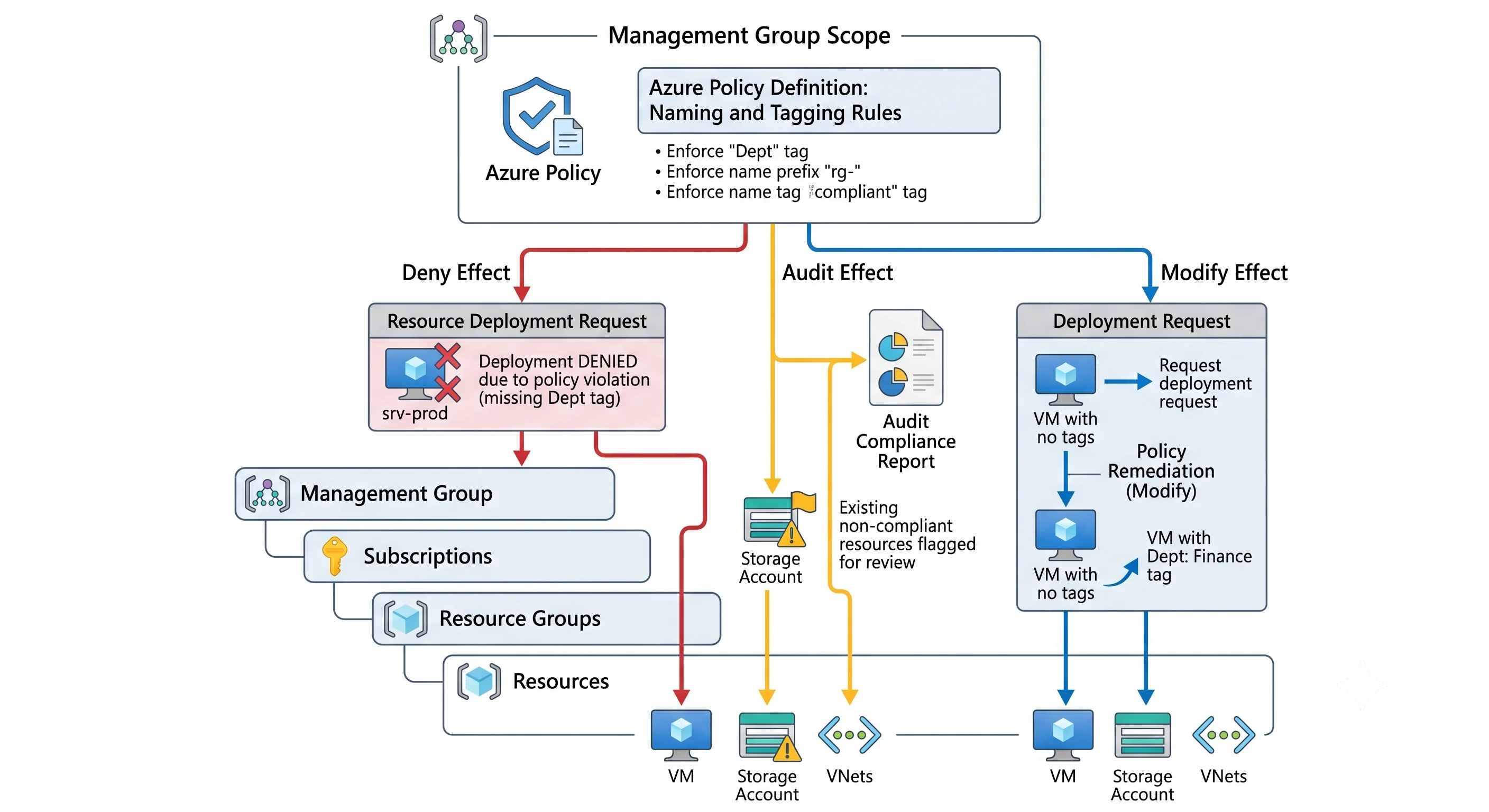
Conventions that aren't enforced decay within a quarter. Azure Policy is the enforcement mechanism, and it has more range here than AWS SCPs do — it can deny, audit, modify in flight, and deploy missing configuration (why that matters).
The three assignments worth having from day one:
Require the tags you actually use. Require a tag on resources in deny mode for env and
owner, at the management group covering your landing zones. Deny is deliberate — audit mode for
required tags produces a compliance dashboard nobody reads.
Inherit from the resource group. Inherit a tag from the resource group in modify mode for
costCenter and workload, plus a remediation task to backfill. This is how you get inheritance that
Azure doesn't give you natively, and it turns tagging from per-resource discipline into per-group
discipline.
Enforce the naming convention. A custom policy denying names that don't match a pattern:
{
  "if": {
    "allOf": [
      { "field": "type", "equals": "Microsoft.Storage/storageAccounts" },
      { "field": "name", "notMatch": "st??????????" }
    ]
  },
  "then": { "effect": "deny" }
}
Azure Policy's match / notMatch uses # for a digit, ? for a letter, and . for any character
— not regex, and the source of much confusion. There's also matchInsensitively. Start with
audit for naming policies rather than deny: a naming policy in deny mode that's slightly wrong
blocks all deployments, and unlike a tag you can't remediate a name after the fact.
Then verify with Resource Graph, which queries the whole tenant at once:
# Untagged resources, by subscription
az graph query -q "Resources | where isnull(tags.owner) | summarize count() by subscriptionId, type" -o table

# Everything a team owns, across every subscription
az graph query -q "Resources | where tags.owner =~ 'payments-team' | project name, type, resourceGroup, location" -o table

# Names that break the convention
az graph query -q "Resources | where type =~ 'microsoft.storage/storageaccounts' and name !startswith 'st' | project name, resourceGroup" -o table
Those three queries are the whole feedback loop. Run the first one before deciding your tagging is working.
The mistakes worth pre-empting
Assuming you can rename. You can't. Recreate, migrate, repoint, delete.
Putting something confidential in a globally-unique name. It becomes public DNS and lands in certificate transparency logs.
Encoding volatile facts in the name. Owner, cost centre, and criticality all change. Names don't.
Designing a convention that doesn't fit a storage account. 24 characters, lowercase alphanumeric. Test the convention against the tightest type before adopting it.
Forgetting soft delete holds the name. Especially Key Vault, especially with purge protection on, especially in a pipeline that creates and destroys.
Expecting tags to inherit. They don't. Use a policy with the modify effect.
Letting both Terraform and Policy own the same tag key. Permanent drift. One owner per key.
Requiring twelve tags. Compliance collapses. Require two, inherit two, and make them ones people actually query.
Enforcing naming with deny before auditing. A slightly-wrong naming policy in deny mode stops every deployment in its scope, and names can't be remediated after creation the way tags can.
That's the Foundations topic complete. Every service topic in this article assumes these five pages and links back to them in a line rather than re-explaining — so from here, pick a service and start.
Next: Back to the article's table of contents →
← Back to the Foundations overview · ← Previous: Regions and Availability