
6. Integrations
Functions is glue by design — it is almost never the whole architecture, and it is almost never deployed alone. This page covers the services it's genuinely always paired with, and the two mechanisms that answer most "how do these talk to each other?" questions.
The two glue mechanisms
Learn these once and most integration questions on this page answer themselves.
Managed identity + a role assignment — the keyless way one Azure resource authenticates to another. The function app gets a system-assigned (or user-assigned) identity in Microsoft Entra ID; you assign that identity a data-plane role at the narrowest useful scope; the SDK or binding picks up the identity automatically. No connection string, nothing to rotate, nothing to leak.
# The pattern, once. Everything below is a variation on it.
PRINCIPAL=$(az functionapp identity show -g rg-demo-prod -n func-demo-prod --query principalId -o tsv)
az role assignment create \
  --assignee-object-id $PRINCIPAL --assignee-principal-type ServicePrincipal \
  --role "Storage Blob Data Contributor" \
  --scope /subscriptions/$SUB/resourceGroups/rg-demo-prod/providers/Microsoft.Storage/storageAccounts/stdemoprod
Note --assignee-object-id with --assignee-principal-type rather than --assignee: it avoids
a race where the freshly-created identity hasn't replicated through Entra ID yet, which produces a
"principal not found" error that goes away on retry and confuses everyone.
Private endpoint + Private DNS zone — the way one Azure resource reaches another without
traversing the public internet. A private endpoint places a NIC with a private IP in your VNet,
targeting a specific sub-resource of the destination (blob, queue, table, vault,
sites, namespace), and a Private DNS zone rewrites the public hostname to that private IP. Two
directions matter for Functions and people conflate them:
- Outbound — your function reaching a private database. Needs VNet integration on the app, which requires Flex Consumption, Premium, or Dedicated. Consumption cannot do this at all.
- Inbound — callers reaching your function privately. Needs a private endpoint on the function
app (sub-resource
sites) pluspublicNetworkAccess = Disabled. Remember the SCM endpoint is a separate sub-resource; lock it down and your CI/CD needs a path in.
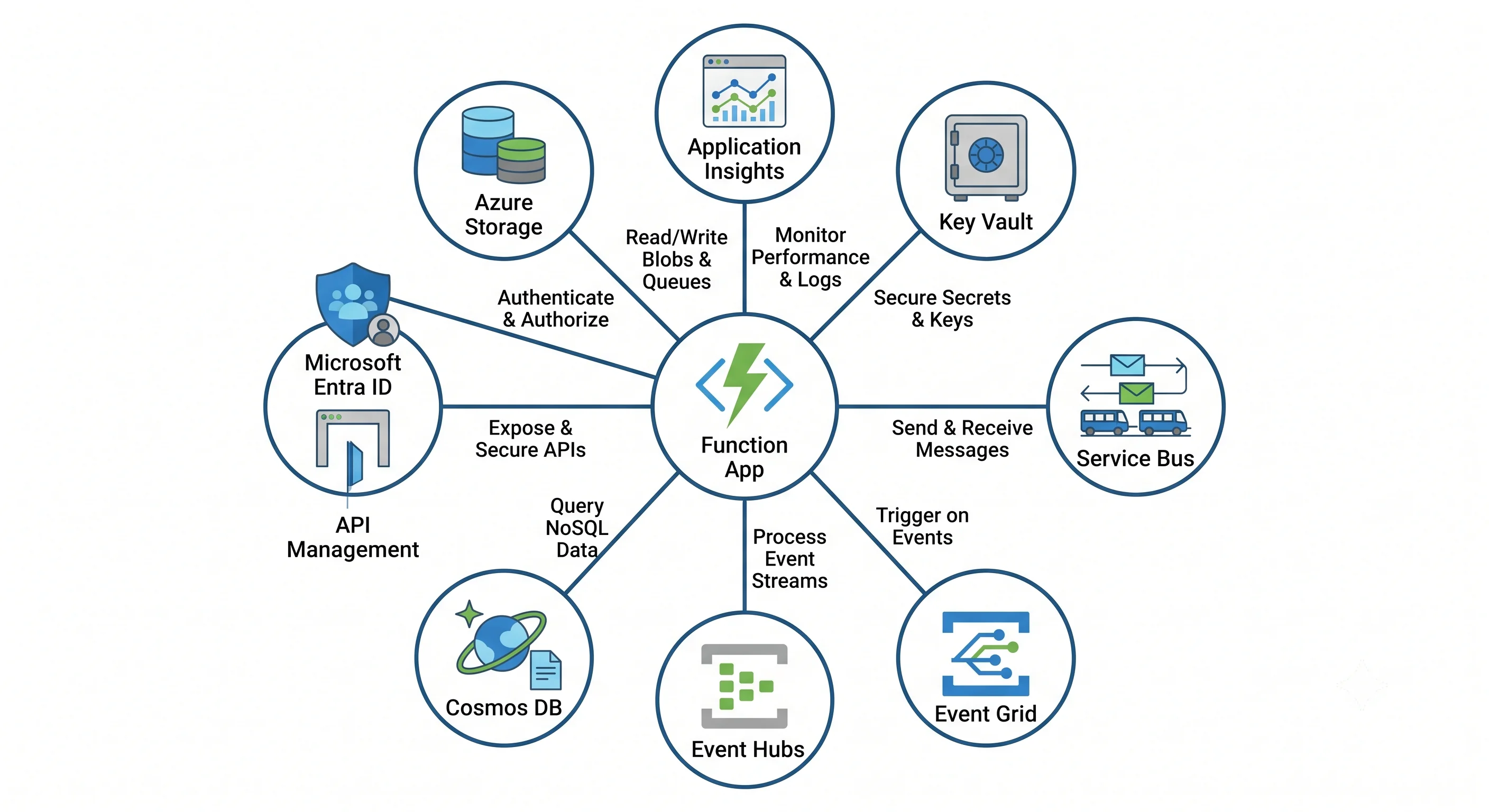
The companions
| Pairs with | Why | The glue |
|---|---|---|
| Azure Storage | Mandatory host dependency, plus the most common trigger and output target | AzureWebJobsStorage (identity-based), blob/queue/table bindings, Storage Blob Data Owner + Storage Queue Data Contributor + Storage Table Data Contributor on the identity |
| Application Insights | Without it, a failed invocation is nearly invisible | APPLICATIONINSIGHTS_CONNECTION_STRING app setting; the Functions host emits requests, dependencies, traces, and live metrics automatically |
| Key Vault | Holds the secrets that shouldn't be in app settings | Key Vault reference in an app setting, resolved by the app's managed identity at startup: @Microsoft.KeyVault(SecretUri=https://kv-x.vault.azure.net/secrets/db-password/). Needs Key Vault Secrets User |
| Service Bus | The grown-up queue: sessions, dead-lettering, scheduled delivery, transactions | Service Bus trigger/output binding + Azure Service Bus Data Receiver / Data Sender on the identity |
| Event Grid | Push-based reaction to Azure resource events — including the modern blob trigger | Event Grid system topic → event subscription → function endpoint (or the Event Grid–based blob trigger) |
| Event Hubs | High-throughput streaming ingestion | Event Hubs trigger with checkpointing in AzureWebJobsStorage; Azure Event Hubs Data Receiver. Parallelism is bounded by partition count |
| Cosmos DB | Serverless compute in front of serverless data | Change-feed trigger with a lease container (a real container you pay for), or input/output bindings; Cosmos DB Built-in Data Contributor |
| API Management | Puts a real API in front of key-protected functions — versioning, rate limits, Entra ID validation, a stable hostname | Import the function app as an API; APIM holds the function key and presents proper auth outward |
| Azure SQL / PostgreSQL | The relational store the function writes to | Managed identity as a database user, plus VNet integration + private endpoint; watch connection-pool exhaustion under scale-out |
| Front Door / Application Gateway | Global routing, WAF, TLS, caching in front of HTTP functions | Origin pointing at the app, with access restrictions so the app only accepts traffic from the front door |
| Microsoft Entra ID | Replaces function keys with real identity on inbound calls | App Service Authentication (Easy Auth) validating tokens before your code runs |
| Durable Functions | Long-running, stateful orchestration without a long-running function | An extension on the same app, with its task hub in AzureWebJobsStorage — name it per environment or two apps will corrupt each other |
| Azure Monitor / Log Analytics | Where the diagnostic logs and metrics go, and where KQL lives | Diagnostic setting on the app → Log Analytics workspace. Off by default |
Four patterns worth knowing by name
1. Event Grid → Function, not Blob trigger → Function. The original blob trigger polls the container and scans for changes. On a large or busy container it lags — sometimes by minutes — and it costs storage transactions to do it. The Event Grid–based blob trigger is push-driven, near-real-time, and scales with the event system rather than with a scan. If you are writing a new blob-reactive function, use the Event Grid path. If you inherit a polling blob trigger with a latency complaint, this is your first suspect.
2. Queue in front of the sensitive dependency.
The default Functions failure mode is scaling out enthusiastically into a database that cannot take
it. Putting Service Bus between the ingress and the work turns an unbounded burst into a bounded
drain: the queue absorbs the spike, per-instance concurrency and maxConcurrentCalls in host.json
cap the pressure, and the dead-letter queue catches what fails. This is the single most useful
architectural pattern in this topic.
3. API Management in front, function keys behind. Function keys are shared secrets with no identity, no rate limiting, and no expiry. Fronting the app with API Management lets you present OAuth or subscription keys outward while APIM holds the function key inward, and gives you throttling, versioning, and a hostname that survives moving the backend. The cost is a substantial extra service — for one function, use Easy Auth instead; for an API surface several teams consume, APIM pays for itself.
4. Durable fan-out/fan-in instead of a long-running function. When the work is "process 5,000 items and then summarise", the wrong answer is one function with a raised timeout. The right one is an orchestrator that fans out 5,000 activity invocations, each of which is short and independently retried, and fans the results back in. You get checkpointing, parallelism, and a resumable workflow. The cost lands in storage transactions, not compute — budget accordingly.
The integration anti-patterns
- Connection strings in app settings. They're encrypted at rest but visible to anyone with control-plane access to the app, they appear in ARM exports, and nobody rotates them. Use managed identity; where a service genuinely has no identity support, use a Key Vault reference so the secret has one home and one rotation story.
- Granting
Contributorbecause a data-plane role didn't work.Contributoris a control-plane role. For storage it does not grant blob data access — that'sStorage Blob Data Contributor— and reaching forContributorto "make it work" grants far more than you intended while often not fixing the actual problem. - A private endpoint without the Private DNS zone. The endpoint exists, the name still resolves publicly, the traffic still leaves. The DNS zone link to the VNet is half the mechanism and it's the half people forget.
- Firewalling the trigger source without runtime-driven scaling. Covered in Architecture: the scale controller reads your trigger source directly. Lock it to a private endpoint and the app can stop scaling while the code appears fine.
- One function app integrating with everything. Each integration adds identity, network reach, and failure surface to a single app that scales as one unit. Split by blast radius.
Next: Production →
← Back to the Azure Functions overview · ← Previous: Deployment