
2. Core Concepts
Every noun you'll meet in the portal, defined. The pattern is the same throughout: term → analogy → precise definition, because an analogy without the mechanics underneath is how people end up confidently wrong about labels.
The resource: a configuration store
Analogy: a shared settings file that lives at its own URL, with a lock on the door and a version-history sidebar.
Technically: a configuration store is an ARM resource of type
Microsoft.AppConfiguration/configurationStores, created inside a resource group, pinned to a
region. Its name is globally unique because it becomes a DNS label: the data-plane endpoint is
https://<store-name>.azconfig.io. The store owns the tier, the network rules, the identity, the
encryption settings, the soft-delete policy, and the replicas. Everything else in this page is a
child of it or a property on it.
Scoped like every other Azure resource — see the scope hierarchy — with one wrinkle worth naming now: the store is an ARM resource, but the key-values inside it are reached through a different endpoint with different permissions. That split gets its own treatment in Architecture.
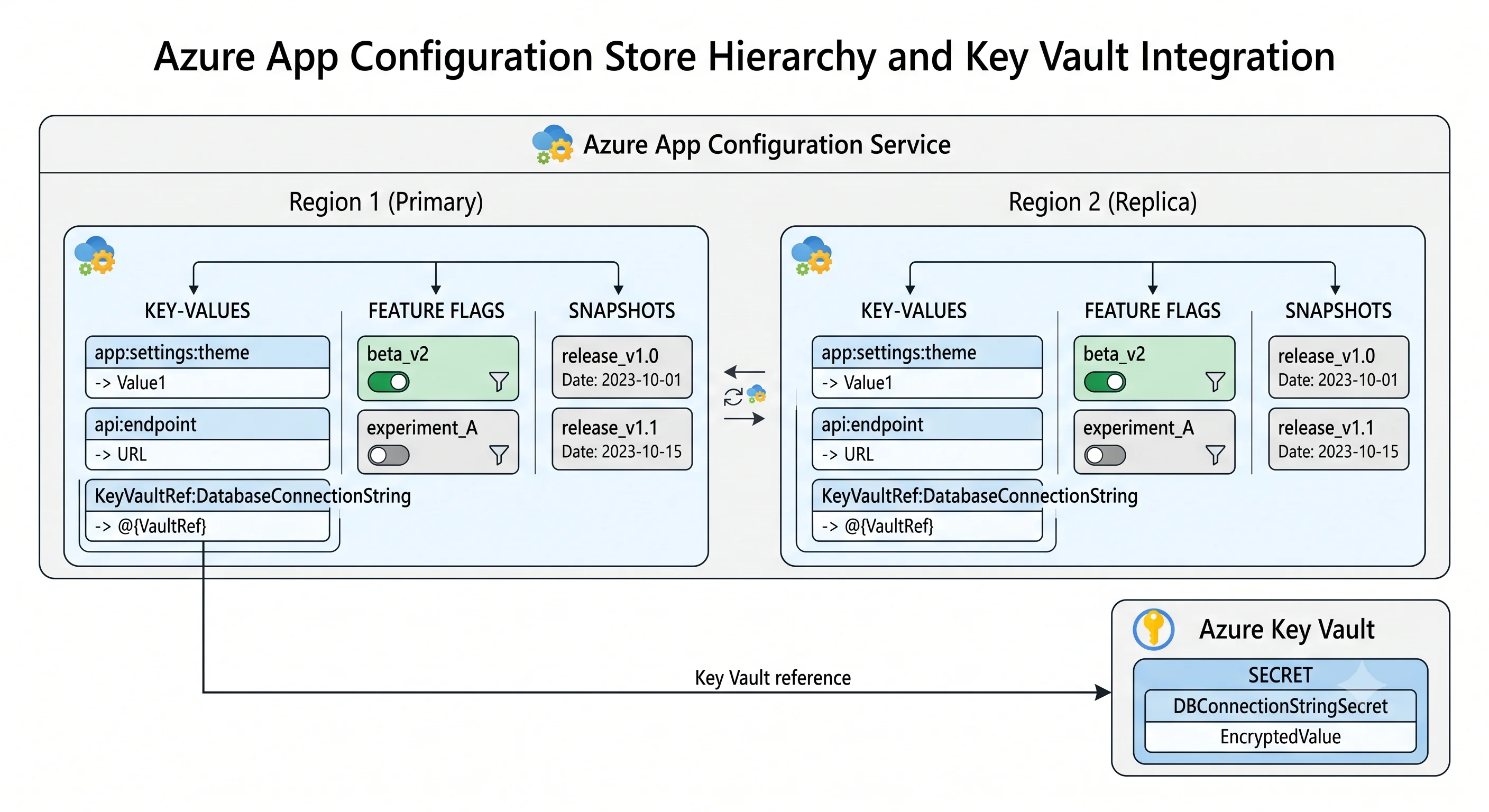
The unit of data: the key-value
Analogy: one line in that settings file.
Technically: a key-value is the atomic item in the store. It has five parts that matter:
| Part | What it is |
|---|---|
| key | The name. A string, case-sensitive, with a length cap. Conventionally hierarchical using : — Api:Timeout, Logging:LogLevel:Default — because .NET's configuration binder maps : to nested objects. To the service it is one flat string; there is no real hierarchy |
| value | The payload. A string. Structured values are JSON in the string, distinguished only by the content type |
| label | The second dimension. Optional. null (no label) is a distinct, valid, and dangerous value — see below |
| content_type | A MIME-type string. Mostly advisory, except for two magic values that change client behaviour completely (feature flags and Key Vault references) |
| tags and etag | Arbitrary metadata, and the concurrency token used for conditional writes and for cheap "has anything changed?" polling |
The identity of a key-value is (key, label) — not key alone. This is the single most important
sentence in this page. Writing Api:Timeout with label prod does not touch Api:Timeout with no
label; they are two rows.
Size limits apply per key-value (key + value + label + metadata combined) and to the store's total storage, and both vary by tier. ⚠️ Verify current limits against current Azure docs; the durable point is that they are small enough to rule out using this as a data store, and the per-key-value cap is measured in single-digit kilobytes.
The label: the concept that makes the service work
Analogy: a coloured sticky note on the line. Same setting name, different note, different value.
Technically: a label is an optional string attached to a key-value, forming half of its
identity. Clients select key-values with a key filter and a label filter at read time. The
canonical use is environment (dev, staging, prod) or release version (v2.4.1), and the reason
it beats prefixing the key is layering: a client can read the no-label set and then the prod set,
with the second overriding the first. One store holds shared defaults plus per-environment overrides,
and the app expresses that as an ordered pair of selects.
Three sharp edges:
- No label is not "the default label". The service has no notion of a default. A client that omits the label filter gets only key-values whose label is null — often somebody's local development values. Decide up front whether no-label means "shared across all environments" or "forbidden", write it down, and enforce it in review.
- Label filters support a trailing wildcard and a comma-separated list, not arbitrary patterns.
prod*works;*proddoes not. ⚠️ Verify current filter syntax. Design labels so the useful queries are prefix queries. - Labels are not access-control boundaries. You cannot grant someone read access to
dev-label key-values and notprod-label ones with built-in roles. Data-plane RBAC scopes to the store (and to key/label patterns only in newer, more granular arrangements — ⚠️ verify what the current built-in roles support). If two environments must be cryptographically separated, that's two stores, not two labels. This is the strongest argument for store-per-environment and it comes up in Deployment.
The content type: three values, two of which are magic
Analogy: the file extension. Mostly a hint to humans — except twice, where it changes what the reader does.
Technically: content_type is a free-text MIME string on each key-value. Clients treat three
families specially:
application/json— tells the client the value is JSON and may be bound to a structured object rather than a string. Optional; useful for arrays and nested settings.application/vnd.microsoft.appconfig.keyvaultref+json;charset=utf-8— a Key Vault reference. The value is a JSON document containing auripointing at a Key Vault secret. The store never sees the secret; the client resolves it, using the client's own identity against Key Vault. Two consequences people miss: the app needs a Key Vault Secrets User role assignment of its own, and if you pin the URI to a specific secret version, rotation will not reach the app.application/vnd.microsoft.appconfig.ff+json;charset=utf-8— a feature flag. Combined with the reserved key prefix.appconfig.featureflag/, this is what makes the portal render a Feature Manager row rather than a key-value row.
Everything else is inert metadata that only your code reads.
Feature flags
Analogy: a light switch with a timer and a dimmer, mounted outside the building so you can reach it without going in.
Technically: a feature flag is a normal key-value with the reserved prefix
.appconfig.featureflag/<FeatureName> and the feature-flag content type. Its value is a JSON schema
describing an id, an enabled boolean, and a set of conditions/client filters. The store does
not evaluate any of it — the store hands the JSON to the client, and a feature-management library
(Microsoft.FeatureManagement for .NET, FeatureManagement packages for Python, JavaScript, and
Spring) evaluates the filters in-process.
The filters that ship built-in:
| Filter | What it does | The trap |
|---|---|---|
| Percentage / Targeting (rollout percentage) | Enables the feature for a proportion of evaluations | With no user context it's random per evaluation, so the same user can flip between states on consecutive requests. You need the targeting filter with a stable user id for sticky assignment |
| Targeting | Enables for named users, named groups, and a default percentage per group | Requires you to supply a TargetingContext (user id + groups) from your app. It is only as good as the identity plumbing you give it |
| Time window | Enables between a start and end time | Times are absolute; think about time zones and about what happens to a long-running process that cached the flag before the window opened |
| Custom | Your own class implementing the filter interface | The escape hatch. Keep it deterministic and cheap — it runs on every evaluation |
Variants extend a flag from boolean to multi-valued: a flag can define several variants with allocation percentages, so the library returns "which variant" rather than "on or off". That's the A/B-testing primitive, and with the telemetry hooks enabled the assignment can be emitted to Application Insights. It is a genuine capability and still thinner than a dedicated experimentation platform — see the comparison in What & Why.
The important architectural point: flag evaluation is client-side and local. Latency is nanoseconds, the store is not on the request path, and the price is that a flag change reaches your app only as fast as your refresh interval.
Snapshots
Analogy: a photograph of the settings file, framed and nailed to the wall. Nobody can edit the photograph.
Technically: a snapshot is a named, immutable child resource composed at creation time from a set of key and label filters. Once created, its contents never change. Clients can load a snapshot by name instead of running live filters, which gives you something the rest of the service doesn't: a versioned configuration artifact.
Why it matters:
- Reproducible releases. Release
2026.7.3loads snapshot2026.7.3. Redeploying that release next month gets byte-identical configuration, regardless of what anyone has changed since. - Rollback that actually works. Re-point a deployment at the previous snapshot; you do not have to reconstruct what the values were.
- A composition boundary. A snapshot can pull from several key prefixes and labels, so "the config for service X in prod" is one artifact rather than four filters the client must get right.
The trade-off is the obvious one: a snapshot cannot be patched. Dynamic refresh and snapshots pull in opposite directions — a snapshot-pinned app does not pick up a changed value, by design. Most teams use both: snapshots for the settings that should move only with a release, live filters for the operational dials and the flags. Snapshots have a retention/archival policy and count against the store's storage. ⚠️ Verify current snapshot limits and retention behaviour.
Revisions and soft delete
Analogy: the version-history sidebar, and the recycle bin.
Technically: every write to a key-value creates a revision — an immutable historical entry
you can list and read as of a point in time (az appconfig revision list, and point-in-time restore
of key-values). Retention is time-bounded and tier-dependent ⚠️ verify current retention
windows. This gives you two things: an audit trail of what a value used to be, and a genuine
undo for a bad edit.
Separately, the store itself has soft delete: deleting the resource moves it to a recoverable state for a retention period rather than removing it. Two consequences that bite in Deployment:
- A soft-deleted store still holds its globally unique name, so recreating it with the same name fails until you either recover or purge it.
- Purge protection, where enabled, prevents purging before the retention period expires — so a
destroy-and-recreate cycle in CI is blocked, not merely slow. Terraform's
azurermprovider has a dedicatedfeatures {}block for exactly this.
Replicas and geo-replication
Analogy: the same settings file mirrored to a second office, each office with its own address.
Technically: on tiers that support it, a store can have replicas in other regions. Each
replica is a child resource with its own endpoint (https://<store>-<replica>.azconfig.io or a
regional variant ⚠️ verify current endpoint naming). Writes to any replica propagate
asynchronously to the others. Consequences:
- Within one replica, you get read-after-write consistency for your own writes.
- Across replicas, consistency is eventual. Write to the West Europe replica and read immediately from the East US one and you may get the old value. Convergence is fast but it is not zero.
- Client failover is a client-library feature, not a DNS trick: the SDK is given the origin endpoint, discovers replicas, and fails over between them. If you hand-roll HTTP calls you get no failover.
- Each replica bills as its own store. Geo-replication roughly multiplies the daily charge.
The SKU / tier axis
Azure services are defined more by their tier than by anything else, and this one is no exception — the tier gates storage, request quota, networking, replication, encryption, and whether you have an SLA at all. There are four: Free, Developer, Standard, and Premium.
⚠️ Tier names, inclusions, and every number below have changed and will change again — verify against current Azure docs before you commit a design to one. What follows is the durable shape of the axis, deliberately stated without invented figures.
| Axis | How it moves across tiers |
|---|---|
| Storage capacity | Tens of megabytes at the bottom, around a gigabyte at the top. Never enough to be a database, always enough for real configuration |
| Request quota | Free has a hard daily request cap and throttles for the rest of the day when you hit it. Paid tiers have a much larger included allowance and then charge overage rather than cutting you off |
| Stores per subscription per region | Free is capped at a small number (this is the quota people hit first). Paid tiers are effectively unbounded for normal use |
| Private endpoints | Not on Free. Available on the higher paid tiers. If your compliance posture requires no public endpoint, that requirement chooses your tier |
| Geo-replication | Paid tiers only, and the higher tiers are where it's intended |
| Customer-managed keys | Paid tiers only. Platform-managed encryption at rest applies everywhere |
| Soft delete & point-in-time restore | Longer retention on higher tiers; effectively absent on Free |
| Availability zones | Zone redundancy comes with the higher paid tiers, in regions that support it |
| SLA | No SLA on Free. Paid tiers carry an availability SLA |
Which one is the trap? Free, in two directions. It is the right choice for a demo, a
tutorial, or a personal project — and it is the wrong choice for anything a team depends on, because
of the hard daily request cap and the absence of an SLA. The failure is not gradual: you get 429s
for the rest of the UTC day. The second half of the trap is subtler — teams pick Free for a
"temporary" store, wire three services to it, and then discover that the tier upgrade path and the
networking features they now need mean creating a new store and migrating.
The counter-trap is over-provisioning. This is a cheap service; the top tier is still a rounding error next to a single App Service Plan. If you need private endpoints or geo-replication, buy them — but don't buy geo-replication for a single-region workload just because the box is there. Each replica is another daily charge and another endpoint to fail over between.
Authentication: two ways in, one right answer
Analogy: a keycard tied to your identity, or a spare key under the mat that anyone holding can use.
Technically:
- Microsoft Entra ID — the client obtains a bearer token (via managed identity in Azure, or a
developer's own credentials locally through
DefaultAzureCredential) and calls the data plane with it. Authorisation is Azure RBAC. This is the correct answer. - Access keys / connection strings — the store issues primary and secondary read-write and read-only keys, used to sign requests with HMAC. Simple, portable, and a long-lived credential in your configuration, which is precisely the thing App Configuration was supposed to help you stop doing.
Local (key-based) auth can be disabled on the store — the local_auth_enabled property in
Terraform, disableLocalAuth in ARM. Do it, for the reason spelled out in
Architecture: as long as access keys work, anyone who can read the store's
keys through ARM has full data access, which quietly turns the control-plane Contributor role into a
data-plane owner.
Term reference
| Term | Analogy | Technical definition |
|---|---|---|
| Configuration store | The shared settings file, at its own URL | Regional ARM resource Microsoft.AppConfiguration/configurationStores, globally-unique name, owns tier, network, identity, encryption, replicas |
| Key-value | One line in the file | The atomic item, identified by the pair (key, label), with a value, content type, tags, and etag |
| Key | The setting's name | Case-sensitive string; : separators are convention for .NET binding, not real hierarchy |
| Label | A coloured sticky note on the line | Optional second half of the identity; the environment/version dimension, selected by filter at read time. null is a distinct value, not a default |
| Content type | The file extension | MIME string; advisory except for the Key Vault reference and feature-flag magic values |
| Key Vault reference | A forwarding address instead of the letter | Key-value whose value is a JSON uri to a Key Vault secret, resolved by the client using the client's own identity |
| Feature flag | A switch with a timer and a dimmer | Key-value under the reserved .appconfig.featureflag/ prefix with the flag content type; conditions evaluated client-side by a feature-management library |
| Client filter | The condition on the switch | Percentage, targeting, time-window, or custom predicate evaluated in-process at flag-check time |
| Variant | Several switch positions, not two | Multi-valued flag with allocation percentages, used for A/B assignment and experimentation |
| Snapshot | A framed photograph of the file | Immutable, named child resource composed from key/label filters at creation; the versioned configuration artifact |
| Revision | The version-history sidebar | Immutable historical entry created on every key-value write; supports point-in-time listing and restore within a tier-dependent retention window |
| Soft delete | The recycle bin | Deleted store is recoverable for a retention period and still holds its globally unique name; purge protection prevents early purge |
| Replica | The same file mirrored to another office | Regional child resource with its own endpoint; asynchronous replication, eventual cross-replica consistency, client-library failover, billed separately |
| Access key / connection string | The spare key under the mat | Long-lived HMAC credential; disable via local_auth_enabled = false and use managed identity instead |
| Sentinel key | The "I've finished editing" flag | A conventional single key clients watch for change, so a batch of related edits is picked up atomically rather than half-applied. See Architecture |
| Provider / configuration provider | The adapter that plugs the store into your app | The client library (.NET, Java Spring, Python, JavaScript, Kubernetes) that loads, caches, refreshes, and binds key-values into the app's native configuration system |
Next: Architecture →
← Back to the Azure App Configuration overview · ← Previous: What & Why