
2. Resource Manager
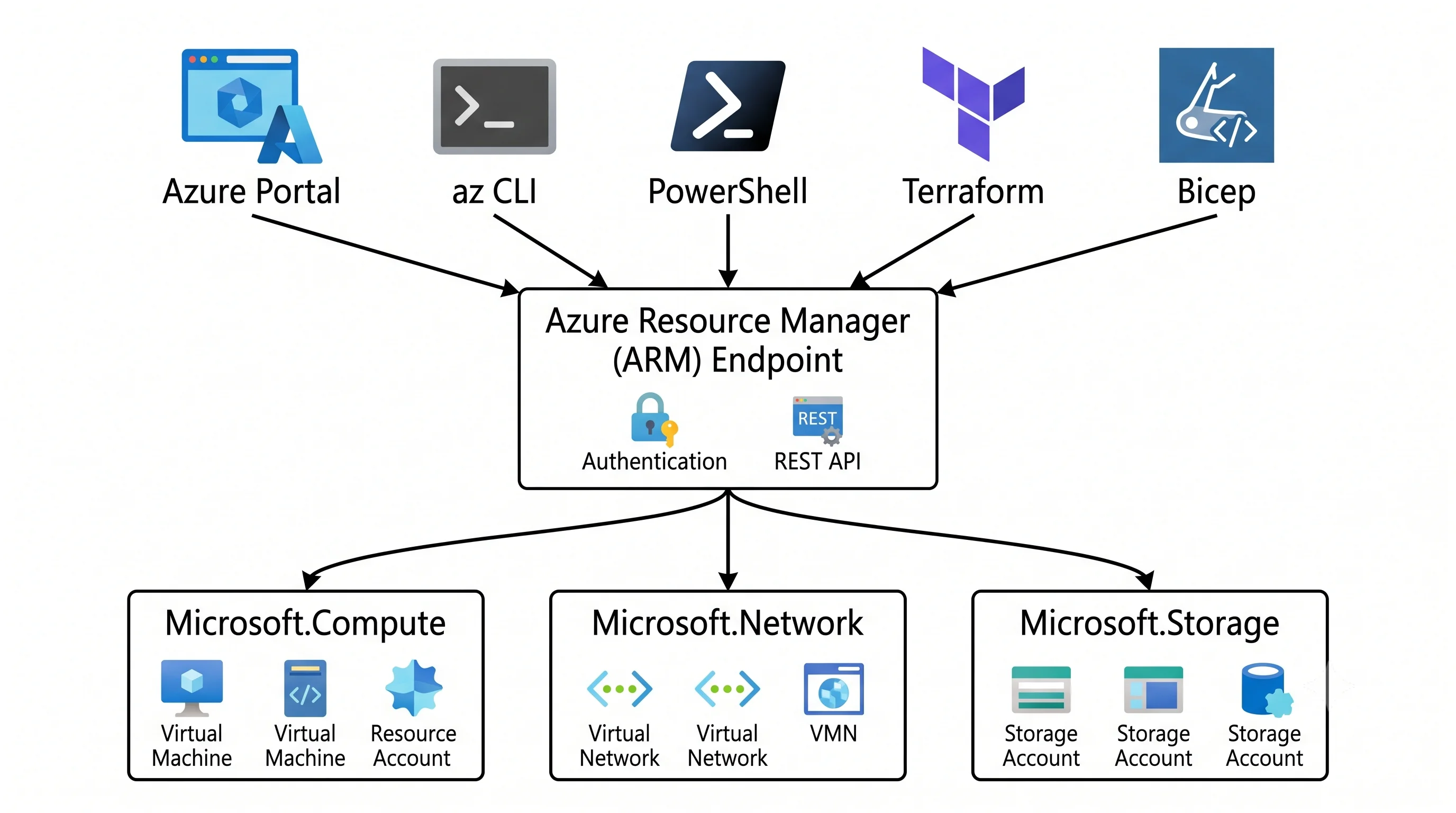
Every way you have of changing something in Azure — clicking in the portal, typing az, running
terraform apply, deploying a Bicep file, calling an SDK — ends up making the same HTTPS request to
the same endpoint. That endpoint is Azure Resource Manager (ARM), and it lives at
management.azure.com.
Analogy: ARM is the front desk of a very large building. You don't walk into the rooms yourself. You hand a form to the desk saying "I'd like room 402 to look like this", the desk checks you're allowed, checks the request against house rules, and dispatches it to whichever department owns that floor. Every visitor — the tourist with a map, the contractor with blueprints, the automated delivery robot — uses the same desk.
Technically: ARM is a single, global, REST control plane. It handles authentication (via Microsoft Entra ID), authorization (Azure RBAC), governance (Azure Policy), auditing (the activity log), templating (deployments), and dispatch to the resource provider that actually implements the service. It is not a service you deploy. It's the layer every service is deployed through.
The practical consequence: your tools differ in ergonomics, not in capability. If Terraform can do something the portal can't, it's because the portal hasn't built a form for it — not because Terraform has extra powers. And when a deployment behaves strangely, the explanation is almost always something ARM or the provider did, not something your tool did. That single reframe turns most "weird Azure behaviour" into something you can reason about.
Coming from AWS: there is no equivalent unification. In AWS each service has its own API endpoint
(s3.amazonaws.com, ec2.amazonaws.com), its own error conventions, and its own quirks, and
CloudFormation is a service that calls those APIs on your behalf. In Azure, templating is built
into the control plane itself: a "deployment" is a first-class ARM resource with a history you can
list, not a separate stack object managed by a separate service.
Resource providers — who actually does the work
ARM doesn't know how to create a virtual machine. It knows how to authenticate you, authorise you,
validate the request, and hand it to Microsoft.Compute, which does.
A resource provider is a namespaced service that supplies a set of resource types. You've been reading them all along in resource IDs:
| Provider | Supplies |
|---|---|
Microsoft.Compute |
virtualMachines, disks, virtualMachineScaleSets |
Microsoft.Storage |
storageAccounts |
Microsoft.Network |
virtualNetworks, publicIPAddresses, networkSecurityGroups |
Microsoft.Web |
sites (App Service and Functions), serverfarms (App Service Plans) |
Microsoft.KeyVault |
vaults |
Microsoft.DocumentDB |
databaseAccounts (Cosmos DB — the name predates the rename) |
Two of those rows are jokes at the reader's expense, and both are real: a Function App is a
Microsoft.Web/sites, and Cosmos DB still answers to Microsoft.DocumentDB. Provider namespaces are
permanent even when marketing names aren't. When a topic in this article gives you the resource
provider in its facts table, that's why — it's the name that never changes, and it's what you'll
search for in policy definitions and role scopes.
Registration — the failure that looks like a bug
A provider must be registered in a subscription before you can create its resources. Registration is per subscription, one-time, and free.
az provider list --query "[?registrationState=='Registered'].namespace" -o tsv
az provider show -n Microsoft.ContainerService --query registrationState -o tsv
az provider register -n Microsoft.ContainerService --wait
Modern subscriptions auto-register common providers on first use, so most people never see this. You
meet it on a fresh subscription, in a locked-down enterprise where auto-registration is disabled by
policy, or with a less-common service. The error message —
MissingSubscriptionRegistration — is at least honest about it. In a landing-zone pipeline, register
the providers you need explicitly rather than relying on the implicit path.
API versions — the dial nobody shows you
Every resource type has dated API versions (2023-05-01), and every request picks one. This is
why a Terraform provider release can suddenly expose a property that "wasn't there before": it moved
to a newer API version. It's also why azurerm lags new Azure features — the provider has to add
support for the newer version and surface the fields.
az provider show -n Microsoft.Storage \
  --query "resourceTypes[?resourceType=='storageAccounts'].apiVersions[0:5]" -o tsv
When a brand-new or preview feature isn't in azurerm yet, the escape hatch is the azapi
Terraform provider, which lets you write against the raw ARM API version directly. Every Deployment
page in this article names azapi where it's currently the only option — and flags that as a
point-in-time statement, because coverage moves.
What actually happens when you create a resource
Trace one az storage account create end to end. It's the same path for every tool.
- Token. The CLI presents an Entra ID access token for the ARM audience
(
https://management.azure.com/). Whether you're a user, a service principal, or a managed identity, the token is the only thing ARM cares about. - Request. A
PUTto the resource ID path with an API version and a JSON body:PUT /subscriptions/{sub}/resourceGroups/{rg}/providers/Microsoft.Storage/storageAccounts/{name}?api-version=… - Authorization. ARM evaluates Azure RBAC at that scope, walking up the hierarchy — resource, resource group, subscription, management groups, root. Any matching allow grants access; a deny assignment (rare, used by managed applications and Blueprints) overrides an allow.
- Policy. Azure Policy evaluates the request. This is where it gets more interesting than AWS
SCPs: policy can deny the request, audit it, modify it in flight (append a tag, force
minimumTlsVersion), or deployIfNotExists a companion resource afterwards. A resource that arrives with tags you didn't write, or with a diagnostic setting you didn't ask for, was probably touched by policy — check policy assignments before assuming your template is haunted. - Validation and dispatch. ARM validates the shape against the provider's schema and hands off
to
Microsoft.Storage. - Async. Most creates return
201 Createdor202 Acceptedimmediately with aAzure-AsyncOperationorLocationheader pointing at a polling URL. The resource exists in ARM with aprovisioningStateofCreating, moving toSucceededorFailed. Your CLI is polling that URL — which is exactly what--no-waitskips. - Audit. The operation lands in the activity log for the subscription: who, what, when, from which IP, with a correlation ID. This is the control-plane audit trail, and it's on by default — unlike diagnostic settings, which are not.
Two things follow that are worth internalising.
PUT is declarative and idempotent-ish. You send the desired state of the whole resource, not a diff. Send it twice with the same body and the second call is a no-op. Send it with a property missing and — depending on the provider — that property may be reset to its default. This is exactly why "someone deployed an old template and the firewall rules vanished" is a real Azure incident shape.
provisioningState: Succeeded means ARM finished, not that the thing works. A VM can be
Succeeded and unbootable. A Function App can be Succeeded with no code deployed. Control-plane
success is not data-plane health, which brings us to the split that catches everyone.
Control plane vs. data plane
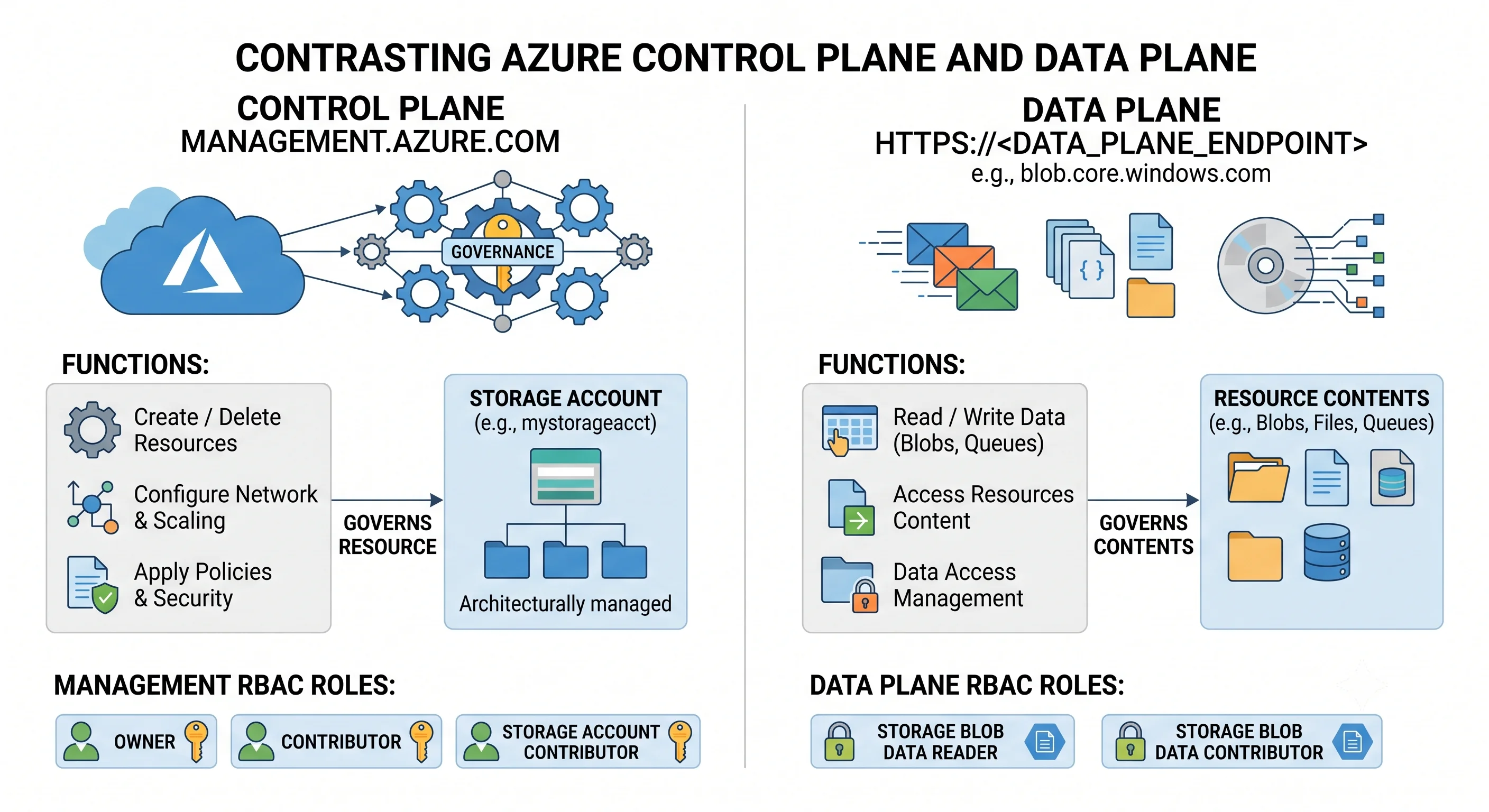
This is the single highest-value idea in Azure, and it's why it appears in every topic of this article rather than only here.
| Control plane | Data plane | |
|---|---|---|
| Endpoint | management.azure.com |
Service-specific: {account}.blob.core.windows.net, {vault}.vault.azure.net, {db}.database.windows.net |
| Governs | The resource: create, resize, configure, delete, read properties | The contents: read a blob, get a secret, run a query, send a message |
| Authorises via | Azure RBAC control-plane actions (Microsoft.Storage/storageAccounts/write) |
Azure RBAC data actions, or the service's own auth (keys, SAS, SQL logins) |
| Typical roles | Owner, Contributor, service-specific Contributor | Storage Blob Data Reader, Key Vault Secrets User, Azure Service Bus Data Sender |
| Audited in | Activity log — on by default | Resource logs — off until you create a diagnostic setting |
The classic mistake, stated plainly: being Owner on a storage account does not let you read a
blob. Being Key Vault Contributor does not let you read a secret. Both are control-plane roles.
You need a data-plane role — Storage Blob Data Reader, Key Vault Secrets User — and they are
separate assignments.
Two follow-on facts that make it worse before they make it better. First, an Owner can usually get
to the data anyway by granting themselves the data role, or by reading the account keys
(Microsoft.Storage/storageAccounts/listKeys/action) — which is precisely why disabling key-based
auth matters, and why listKeys is a permission worth auditing. Second, data-plane role assignments
propagate on a delay, so "I granted the role and it still 403s" is often just impatience
⚠️ propagation time varies; treat a few minutes as normal.
The az CLI surfaces this split as the --auth-mode flag on data commands. --auth-mode login uses
your Entra identity against the data plane; the default on some commands is still key-based, which
silently works when your data-plane RBAC doesn't. Every hands-on section in this article uses
--auth-mode login deliberately.
Deployments — templating built into the control plane
A deployment is an ARM resource that represents "apply this template at this scope". You don't
need a template to use ARM — a single PUT is fine — but deployments give you a unit of work with a
history, an output contract, and dependency ordering.
They're what Bicep and ARM JSON compile into. Terraform does not use them: it makes individual resource calls and tracks desired state in its own state file. That's the fundamental difference between the two approaches, and it explains most of their other differences.
az deployment group create -g rg-app --template-file main.bicep --parameters env=dev
az deployment group list -g rg-app -o table          # the deployment history
az deployment group show -g rg-app -n main --query properties.outputs
Deployments exist at four scopes, and the CLI verb changes with the scope:
| Scope | Command | For |
|---|---|---|
| Resource group | az deployment group create |
The everyday case |
| Subscription | az deployment sub create |
Creating resource groups, subscription-level policy and RBAC |
| Management group | az deployment mg create |
Policy and RBAC across many subscriptions |
| Tenant | az deployment tenant create |
Rare; management group creation |
A template can't create the resource group it deploys into — that's why subscription-scope deployments exist, and why landing-zone templates live at subscription or management-group scope.
Deployment mode — the footgun that deserves its own paragraph
Every ARM/Bicep deployment runs in one of two modes.
- Incremental (the default). Resources in the template are created or updated. Resources in the resource group but not in the template are left alone.
- Complete. Resources in the resource group that are not in the template are deleted.
Complete mode is a legitimate tool — it's how you make a resource group exactly match a template and reap resources someone added by hand. It is also how people delete production. If you deploy a template describing one storage account into a resource group containing a database, in complete mode, the database goes.
az deployment group create -g rg-app --template-file main.bicep --mode CompleteTwo mitigations, both worth adopting: run what-if first (below), and put a CanNotDelete lock on
resource groups holding stateful resources — locks are evaluated by ARM and will block the deletion
even in complete mode.
Note the asymmetry with Terraform: terraform apply will destroy resources it previously created and
that have since left the configuration, but it ignores resources it never knew about. Complete mode
doesn't care who created what. Different failure shapes, both worth respecting.
what-if — the preview
az deployment group what-if -g rg-app --template-file main.bicep --parameters env=devARM's answer to terraform plan. It returns Create / Modify / Delete / NoChange / Ignore per
resource with a property-level diff. It's genuinely useful and genuinely less precise than Terraform's
plan — some providers under-report changes, and it can show noisy modifications on properties the
service normalises server-side. Trust it for "will this delete something", verify by eye for "will
this change exactly this field".
Template Specs and Deployment Stacks
Two ARM-native features worth knowing by name, because they're what Azure offers instead of a module registry:
- Template Specs — a versioned template stored as an ARM resource, shareable via RBAC. The Azure-native answer to "where does the shared module live".
- Deployment Stacks — a managed group of resources deployed as a unit, with a deny setting that blocks out-of-band changes and a defined behaviour for resources removed from the definition. This is the intended replacement for the deprecated Azure Blueprints, and it's the closest ARM gets to Terraform's state-driven lifecycle management.
Terraform is primary throughout this article, so these appear in the collapsible Bicep/ARM block of each Deployment page rather than as the main path — but if you're in an Azure-DevOps-native shop, they're the reason the Bicep path is a real choice and not a formality.
Throttling, correlation, and reading errors
Throttling. ARM rate-limits per subscription, per principal, per region, and providers add their
own limits on top. You get 429 Too Many Requests with a Retry-After header and, on read
operations, x-ms-ratelimit-remaining-subscription-reads counting down. Exact limits vary by
operation and subscription type ⚠️ verify against current Azure docs. In practice you meet this with a
CI job that lists every resource in a loop, or a large parallel terraform apply. Both SDKs and the
CLI retry with backoff; the fix is usually fewer, broader calls — or Azure Resource Graph for reads,
which has its own, more generous, budget.
Correlation IDs. Every operation carries one, returned in the x-ms-correlation-request-id
header and stored in the activity log. When you open a support case, that ID is the first thing asked
for. az surfaces it with --debug.
Reading an ARM error. They're nested but predictable. The useful signal is code, not message:
| Code | Usually means |
|---|---|
AuthorizationFailed |
RBAC — the message names the principal, the action, and the scope. Read all three |
MissingSubscriptionRegistration |
Provider not registered in this subscription |
RequestDisallowedByPolicy |
Azure Policy denied it; the message names the assignment |
ScopeLocked |
A resource lock, likely inherited from the resource group |
InvalidTemplateDeployment |
Provider-level validation; the inner details has the real reason |
ResourceGroupBeingDeleted |
A previous teardown is still running |
QuotaExceeded |
Subscription-per-region quota, not a resource group limit |
AuthorizationFailed and RequestDisallowedByPolicy look similar and have completely different
fixes — one is a role assignment, the other is a governance rule someone wrote on purpose. Reading
the code first saves an hour.
Choosing a tool, honestly
All four talk to the same API, so the choice is about the workflow around it.
| Tool | Best at | Worst at |
|---|---|---|
| Portal | Learning a service, one-off investigation, reading state | Repeatability. Nothing you click is recorded anywhere useful |
az CLI |
Scripting, glue, hands-on learning, anything imperative | Managing long-lived desired state |
| Terraform | Desired-state infrastructure across clouds, rich plan, mature modules | State is yours to protect; azurerm lags new features (use azapi) |
| Bicep / ARM | Day-one feature support, no external state, deployment stacks, Azure DevOps shops | Azure-only; what-if is weaker than plan |
This article commits to an order and keeps it everywhere: Terraform primary, Ansible secondary for day-two and in-guest configuration, Bicep/ARM third in a collapsible block. The ordering is a practical choice for portability and plan quality, not a claim that Bicep is worse — on a greenfield Azure-only estate governed by deployment stacks, Bicep is a defensible primary.
One portal habit worth keeping regardless: the Export template button on any resource or deployment. It's the fastest way to see the ARM shape of something you built by clicking, and a good starting point for the Bicep version.
The mistakes worth pre-empting
Assuming the portal can do things your CLI can't. It can't. If a setting seems portal-only, you're looking for it under a different property name or a newer API version.
Deploying in complete mode without what-if. Or without a lock. Preferably neither.
Reading provisioningState: Succeeded as "it works". It means ARM finished the control-plane
operation. Health is a data-plane question.
Confusing an RBAC denial with a policy denial. Different codes, different owners, different fixes.
Redeploying an older template and losing configuration. ARM PUT is whole-object. Properties
absent from the template can revert to defaults. This is the strongest argument for keeping the
template as the only way anything is changed.
Forgetting the activity log exists. "Who deleted this?" is answerable for every control-plane operation, without any setup. "Who read this secret?" is not — that needs a diagnostic setting you had to create in advance.
Next: Identity and RBAC →
← Back to the Foundations overview · ← Previous: The Resource Hierarchy