
3. Architecture
Most tutorials stop at "the user signs in and gets a token". That sentence hides the three things you actually need in order to debug identity: what the token contains and who checks it, where policy is evaluated, and how long a decision takes to become untrue. This page traces the machinery.
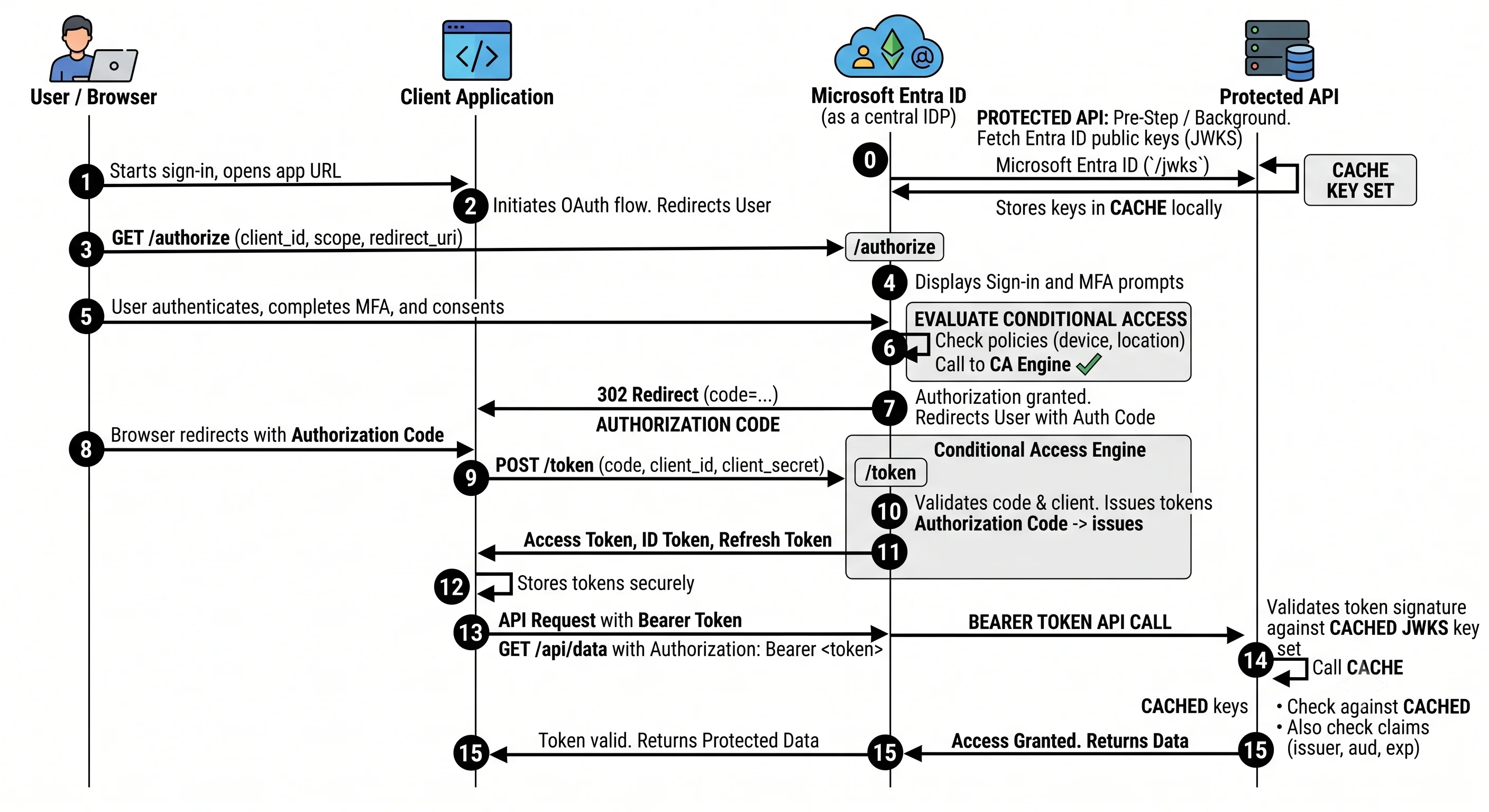
The request path: an authorisation-code sign-in, end to end
Take the most common real flow — a user opening a web application that calls an API on their behalf. Authorisation Code flow with PKCE, which is the correct choice for essentially every interactive client today (implicit flow is deprecated; ROPC should never be used).
- The application redirects. The browser is sent to
https://login.microsoftonline.com/{tenant}/oauth2/v2.0/authorizecarryingclient_id,redirect_uri,scope,state,response_type=code, and a PKCEcode_challenge. The{tenant}segment is the authority: a tenant GUID, a verified domain,organizations,common, orconsumers. It decides which directory is asked and is a real security control —commonaccepts any Microsoft identity, which is almost never what a single-tenant application wants. - Home realm discovery. The token service works out which directory the user belongs to, from the authority or from the domain part of the username they type. If that domain is federated, the user is redirected onward to the external IdP and comes back with a SAML assertion.
- Credential collection. Password, passkey, certificate, or an existing Primary Refresh Token from a joined device that lets the whole step be skipped silently. This is why a compliant corporate laptop signs in without prompting.
- Conditional Access evaluation. Every policy whose assignments match this (user, application, condition) tuple is evaluated. All are evaluated; any block wins; grants are combined. The result is either "issue", "issue after satisfying additional controls" (step-up MFA, compliant device), or "block". Risk signals from Identity Protection are consulted here if P2 is present.
- The authorisation code is returned to the registered
redirect_uri. It is single-use, short-lived, and useless without the PKCEcode_verifier. - The application redeems the code at
/oauth2/v2.0/token, presenting its own credential (secret, certificate, or federated credential) plus thecode_verifier. It receives an ID token (proof of authentication, for the app), an access token (for the requested API audience), and a refresh token. - The application calls the API with
Authorization: Bearer <access token>. - The API validates the token locally. This is the step people miss: the resource does not
call Entra ID. It fetches the signing keys once from the tenant's JWKS endpoint
(
/discovery/v2.0/keys, discoverable from the OIDC metadata document at/.well-known/openid-configuration), caches them, and then verifies signature,iss,aud,exp/nbf, and thescporrolesclaims — entirely offline.
Step 8 is the whole reason tokens are short-lived and the whole reason revocation isn't instant. Hold onto it.
What's actually in the token
An access token is a JWT — a base64url header, payload, and signature. Decode one (jwt.ms, or
az account get-access-token and paste it) the first time you debug an authorisation problem;
it converts guesswork into reading.
| Claim | Means | Why you care |
|---|---|---|
iss |
Issuer — the tenant's STS URL, containing the tenant GUID | Validating this pins the token to your directory. Not validating it is a cross-tenant vulnerability |
aud |
Audience — the API this token is for | A token for Microsoft Graph is not valid for ARM. "Wrong audience" is the most common cause of a bewildering 401 |
tid |
Tenant ID | Multi-tenant apps must check this against an allow-list; the token being signed correctly says nothing about whether you want that tenant |
oid |
Object ID of the principal | The stable identifier. Role assignments reference this. Use it, not the email, as the key in your own database |
sub |
Subject — pairwise, unique per (user, application) | Deliberately not correlatable across apps; not the same as oid |
appid / azp |
The client application that requested the token | Lets an API distinguish its callers |
scp |
Delegated scopes, space-separated | Present when a user is involved |
roles |
App roles / application permissions | Present when the app acts as itself, or when app roles are assigned to the user |
amr |
Authentication methods used (pwd, mfa, rsa, fido) |
How you tell whether MFA actually happened |
exp, nbf, iat |
Expiry, not-before, issued-at | The offline validity window |
oid vs. sub vs. UPN, once and for all. oid is the directory object — stable across
renames, the same in every application, the thing role assignments point at. sub is
app-specific and deliberately unlinkable. The UPN/email is a display attribute that changes when
someone marries or the company rebrands. Every identity system that keyed on email eventually has
a bad week.
Control plane vs. data plane
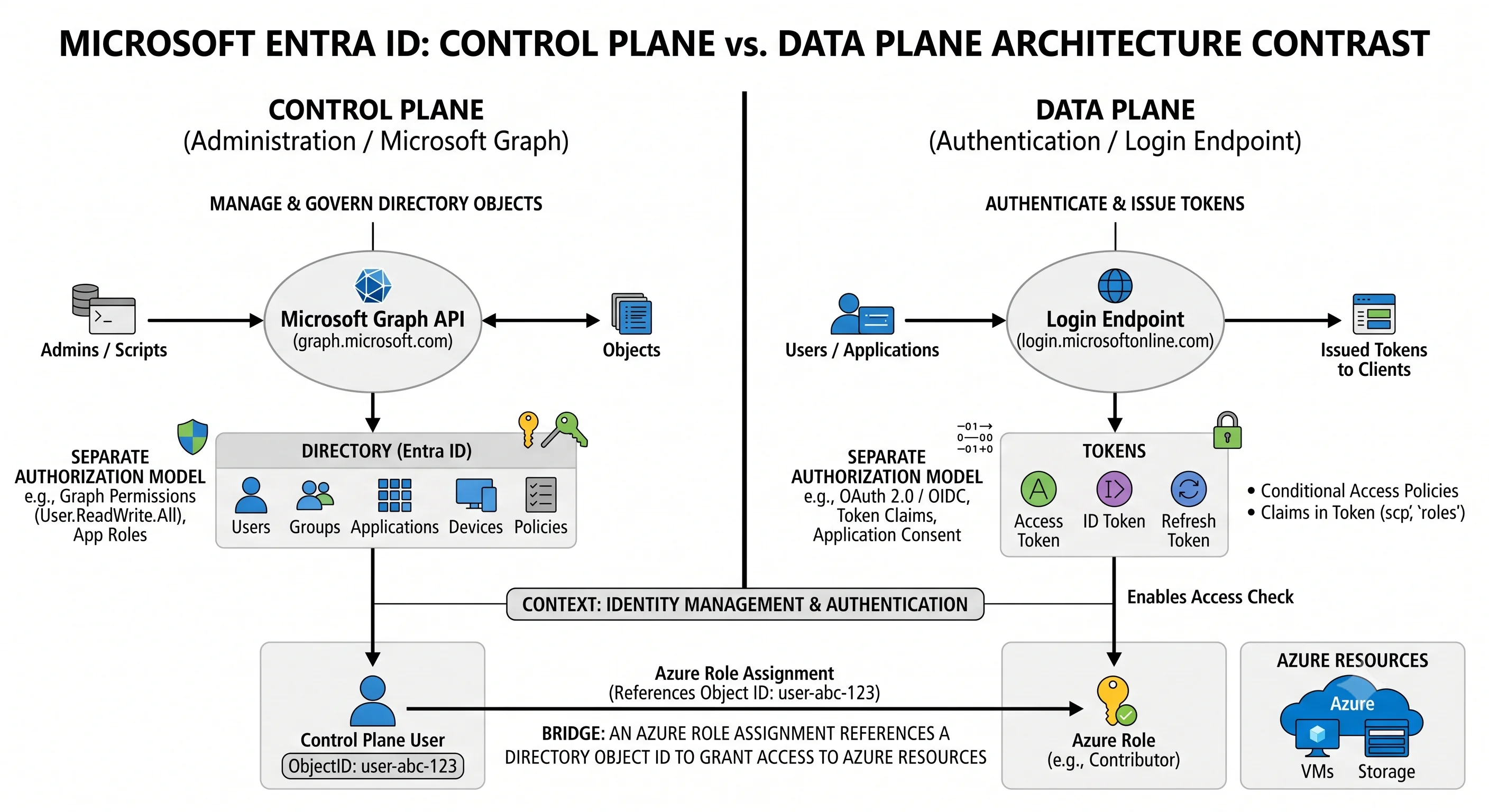
Azure's control/data split catches people everywhere, and in Entra ID it takes an unusual form because neither plane is Azure Resource Manager.
| Control plane | Data plane | |
|---|---|---|
| Endpoint | https://graph.microsoft.com |
https://login.microsoftonline.com/{tenant} |
| What it does | Creates, reads, updates, deletes directory objects: users, groups, apps, policies | Authenticates principals and issues tokens |
| Authorisation model | Directory roles + Graph permissions (delegated scopes / application permissions granted by consent) | Credentials + Conditional Access |
| Typical tools | az ad, Microsoft Graph PowerShell, azuread Terraform provider, the Entra admin centre |
MSAL, browser redirects, az login |
| Failure looks like | 403 Authorization_RequestDenied from Graph |
AADSTS… error codes on the sign-in page |
Three consequences that cause most real confusion:
Azure RBAC has no authority over the directory. Owner at the root management group cannot list
users. The two systems intersect at exactly one point: Microsoft.Authorization/roleAssignments
is an ARM resource that references an Entra object ID. Creating one requires User Access
Administrator or Owner in ARM — plus the ability to look up the principal in Entra ID,
which is a directory read. Automation that can create role assignments but cannot resolve a
service principal's object ID is failing on the directory side while every error message points at
ARM.
Directory roles have no authority over Azure resources. A Global Administrator cannot read a storage blob or restart a VM until they use the elevation toggle to grant themselves User Access Administrator at root — a logged, alertable action.
Managed identities straddle both. The identity is a directory object (data plane issues its
tokens), created and deleted through ARM (Microsoft.ManagedIdentity/userAssignedIdentities).
That's why a freshly-created managed identity sometimes can't be found by a role assignment in the
same Terraform apply: ARM created it, but directory replication hasn't caught up. This is a real,
routine race and Deployment covers the mitigation.
Conditional Access evaluation, precisely
Because "the policy didn't apply" is a weekly question:
- The token service assembles the signal set for this request: user, group memberships, directory roles, target application, client app type, device state and compliance, IP and named location, sign-in risk and user risk (P2), and the authentication flow in use.
- Every enabled policy is evaluated independently. There is no order and no priority.
- Policies whose assignments don't match are skipped. Assignment is
includeminusexclude, and exclude always wins over include — this is how break-glass accounts stay out. - If any matching policy says block, the sign-in fails. Immediately, regardless of what else granted.
- Otherwise all matching grant controls are unioned and must all be satisfied. Within a single policy, controls can be combined with "require all" or "require one".
- Session controls are applied to the resulting session: sign-in frequency, persistent browser, app-enforced restrictions, Continuous Access Evaluation.
Consequences worth internalising:
- Adding a policy can only make access harder, never easier. There is no "allow" that overrides a block.
- Report-only policies are fully evaluated and logged under
conditionalAccessStatusin the sign-in log, but not enforced. Use it for every new policy, every time. - The What If tool in the portal simulates evaluation for a given user/app/condition set. It is the fastest way to answer "why did this apply".
- Policies target resources (applications), and "All cloud apps" genuinely means all — including the ones you use to fix a mistake. This is how tenants get locked out.
Consistency, replication, and why revocation isn't instant
Entra ID is a globally distributed, eventually consistent directory. Writes go to a primary replica and propagate; reads may be served from a nearby replica that hasn't caught up.
Two practical effects:
Creation lag. A just-created service principal or group may not resolve for a short window. Any automation that creates a principal and immediately assigns it a role must tolerate this — retry, or an explicit wait. It is not a bug and it will not go away.
Revocation lag. Because resources validate access tokens offline against cached signing
keys, disabling a user does not invalidate their outstanding access token. It remains valid until
exp. What actually happens when you disable an account:
- The refresh token is revoked, so no new access tokens can be minted.
- Existing access tokens keep working until they expire — historically a window of up to about an hour ⚠️ verify current default lifetimes against current Microsoft docs.
Continuous Access Evaluation (CAE) is the fix, and it changes the architecture: participating resources (Microsoft Graph, Exchange Online, SharePoint, and a growing set) subscribe to critical events — account disabled, password changed, token revoked, high user risk, network location change — and reject the token in near-real-time, sending the client a claims challenge that forces a fresh token. CAE-aware tokens are deliberately issued with a longer lifetime precisely because they can be killed on demand.
⚠️ Verify which resources support CAE against current Microsoft docs; the list grows. The rule to
carry: for a genuine compromise, disabling the account is necessary but not instantaneous on
non-CAE resources. Revoke sessions explicitly (Revoke-MgUserSignInSession /
az ad user revoke-sign-in-sessions) and treat any non-CAE resource as exposed for one token
lifetime.
Scaling model and throttling
Entra ID is one of the largest identity systems in existence and you do not scale it — but you can absolutely be throttled by it, and the two surfaces behave differently.
Sign-in (data plane). Effectively unbounded from a tenant's perspective. Protective controls exist against abuse: smart lockout distinguishes real users from password-spray attempts and locks the attacker rather than the account, and there are per-IP and per-account protections against brute force.
Microsoft Graph (control plane). Genuinely throttled, and this is where automation breaks.
Graph applies limits per app per tenant, per resource type, with a mix of request-count and
resource-unit budgets over sliding windows. When you exceed one you get HTTP 429 with a
Retry-After header. ⚠️ Verify current specific limits against the Microsoft Graph throttling
guidance — they vary by workload and change.
What to do about it, in priority order:
- Honour
Retry-After. Always. Exponential backoff with jitter on top. - Use
$selectand$filterso you pay for fewer resource units per call. - Use delta queries to fetch changes rather than re-reading the world.
- Batch with
$batch— but note the batch's inner requests still count individually. - Don't poll the directory in a loop. The most common cause of a throttled tenant is a script enumerating all users every five minutes to build a report that could have been a delta query.
Directory object limits are also real, and their scope matters:
| Limit | Scope | Note |
|---|---|---|
| Objects in a directory | Per tenant | Default in the hundreds of thousands, raisable by support ⚠️ verify |
| Objects a single non-admin user may create | Per user | Small by default; this is what stops a compromised user filling the directory ⚠️ verify |
| Group memberships per user | Per user | Large but finite; matters for token size, see below ⚠️ verify |
| Owners per application/group | Per object | Small ⚠️ verify |
| Custom directory roles | Per tenant | Requires P1 ⚠️ verify |
The group-overage claim deserves its own paragraph because it breaks applications in
production. Group memberships are emitted in the token's groups claim — but only while they fit.
Past a threshold (~150 for SAML, ~200 for JWT ⚠️ verify current values), Entra ID drops the claim
entirely and substitutes a _claim_names / _claim_sources overage claim pointing at a Graph
endpoint the application must call to enumerate groups. Applications that authorise on groups
work perfectly for every developer and then fail for the one director who is in 300 groups. The
robust fix is to authorise on app roles rather than raw group membership, or to configure
group claims to emit only groups assigned to the application.
Failure modes worth recognising
| Symptom | Usual cause | Where to look |
|---|---|---|
AADSTS50011 redirect URI mismatch |
The redirect_uri isn't registered, exactly — scheme, host, port, trailing slash |
App registration → Authentication |
AADSTS65001 consent required |
The app has requested a permission nobody has consented to | Enterprise application → Permissions |
AADSTS700016 application not found in directory |
Right client ID, wrong tenant — or no service principal exists in this tenant yet | Authority segment; create the SP |
AADSTS50076 / 50079 |
Conditional Access requires MFA / requires MFA registration | Sign-in log → Conditional Access tab |
AADSTS53003 blocked by Conditional Access |
A policy matched and blocked | Sign-in log; use What If to reproduce |
AADSTS7000215 invalid client secret |
Expired secret, or the secret ID was pasted instead of the value | App registration → Certificates & secrets |
401 with a valid-looking token |
Wrong aud — token minted for a different resource |
Decode the token; check the scope requested |
403 from Graph, Authorization_RequestDenied |
Token is fine; the permission isn't granted, or it's delegated where application was needed | Check scp vs. roles in the token |
403 on an Azure resource with the right directory role |
Directory role ≠ Azure RBAC | The 403 checklist |
429 from Graph |
Throttling | Honour Retry-After; stop polling |
| Works for everyone except one senior user | Group overage claim | Switch to app roles |
| Managed identity 403 immediately after creation | Directory replication lag | Retry; add an explicit dependency |
| Legacy client can't sign in after enabling MFA | Legacy auth doesn't support MFA — by design | Block legacy auth explicitly rather than leaving it half-working |
Reliability of the service itself
Entra ID is a global service with no regional knob for you to turn, so "reliability" here means understanding what happens when it has a problem.
- The backup authentication service. Microsoft runs a separate, functionally-limited authentication path that can serve token requests when the primary is unhealthy, transparently and mostly for existing sessions. It reduces but does not eliminate the impact of an identity outage ⚠️ verify current coverage and conditions against current Microsoft docs.
- An identity outage is a total outage. Because everything depends on tokens, there is no meaningful application-level mitigation. The realistic preparations are: long-lived sessions for already-signed-in users where policy permits, cached tokens with sensible lifetimes, break-glass accounts you have actually tested, and an incident process that doesn't require signing into the portal to start.
- Your own dependencies matter more than Microsoft's. If you chose federation (AD FS) or pass-through authentication, your on-premises infrastructure is now on the critical path for cloud sign-in. Password hash sync is the topology that survives your own datacentre failing.
- Tenant-level self-inflicted outage is the likeliest failure. A Conditional Access policy applied to All users and All cloud apps without an exclusion is the classic. Report-only mode and break-glass accounts exist because this happens regularly.
What to carry forward
Tokens are validated offline, which is why revocation lags and why CAE exists. Conditional Access is evaluated at issuance with blocks always winning. Graph is the control plane and it throttles. And Azure RBAC and directory roles touch at exactly one point — the role assignment that references an object ID.
Next, the smallest end-to-end thing that proves all of it works.
Next: Getting Started →
← Back to the Microsoft Entra ID overview · ← Previous: Core Concepts