
5. Deployment
Getting Started proved the objects exist. This page makes them repeatable, reviewable, and reversible — and confronts the two things that make Entra ID genuinely different from every other topic in this article:
- The directory is not ARM. Bicep and ARM templates cannot, in general, manage Entra ID objects. That's not an omission below; it's the honest state of the platform, and this page says what you get instead.
- A tenant is a singleton. You cannot spin up a dev tenant the way you spin up a dev resource group. "Environments" therefore means something different here, and getting it wrong is expensive to undo.
Tool order for this topic
| Rank | Tool | What it does here | Where it falls down |
|---|---|---|---|
| 1. Primary | Terraform, azuread provider (plus azurerm for role assignments and managed identities, azapi for ARM preview surfaces) |
The full worked example: applications, service principals, groups, federated credentials, app roles, Conditional Access policies | Provider coverage of newer Entra features (governance, entitlement management, some CA conditions) lags Graph; state holds secret values in plaintext |
| 2. Secondary | Ansible, azure.azcollection |
Day-2 and imperative operations: onboarding users, group membership reconciliation, bulk attribute changes, ad-hoc rotation | Entra module coverage is much thinner than its Azure-resource coverage; no drift reconciliation |
| 3. Third | Bicep / ARM — mostly not applicable | ARM manages the adjacent resources (managed identities, role assignments) and, via the Microsoft Graph Bicep extension, a limited subset of directory objects | The Graph extension has been in preview with a narrow resource list ⚠️ verify current availability and supported types against current Microsoft docs. Plain ARM/Bicep cannot create a user, a group, or a Conditional Access policy |
Stating it plainly, because the template asks for all three: for Microsoft Entra ID, the
Bicep/ARM path is partial by design, not omitted. Use Bicep for Microsoft.ManagedIdentity and
Microsoft.Authorization/roleAssignments, which are real ARM resources; use Terraform's azuread
provider or Graph directly for everything in the directory. Anyone claiming a pure-Bicep Entra
deployment is either using the preview Graph extension or managing only the ARM-side half.
The Terraform module
A realistic shape: a reusable module that provisions a workload identity — an application, its service principal, a federated credential for CI/CD, a security group, and the Azure role assignments that make it useful.
variables.tf
variable "environment" {
  type        = string
  description = "dev | staging | prod"
  validation {
    condition     = contains(["dev", "staging", "prod"], var.environment)
    error_message = "environment must be dev, staging or prod."
  }
}

variable "name_prefix" {
  type        = string
  description = "Short workload identifier, e.g. orders-api"
}

variable "github_repo" {
  type        = string
  description = "owner/repo that may federate into this application"
}

variable "target_scope_id" {
  type        = string
  description = "ARM resource ID this identity gets a role on"
}

variable "role_definition_name" {
  type    = string
  default = "Reader"
}

variable "owner_object_ids" {
  type        = list(string)
  description = "Directory object IDs that own the app registration. Never leave this empty."
  validation {
    condition     = length(var.owner_object_ids) > 0
    error_message = "An application with no owners can only be managed by a Global Administrator."
  }
}
That last validation is not decoration. An app registration with no owners becomes administratively orphaned — only a privileged directory role can touch it — and it is one of the most common findings in a tenant review.
main.tf
terraform {
  required_version = ">= 1.6"
  required_providers {
    azuread = { source = "hashicorp/azuread", version = "~> 3.0" }
    azurerm = { source = "hashicorp/azurerm", version = "~> 4.0" }
  }
}

provider "azuread" {}

provider "azurerm" {
  features {
    key_vault {
      # if this module ever touches a vault, decide purge behaviour explicitly
      purge_soft_delete_on_destroy    = false
      recover_soft_deleted_key_vaults = true
    }
  }
}

data "azuread_client_config" "current" {}

locals {
  app_name = "${var.name_prefix}-${var.environment}"
  tags     = ["managed-by:terraform", "env:${var.environment}"]
}

# ---------------------------------------------------------------- application

resource "azuread_application" "this" {
  display_name     = local.app_name
  owners           = var.owner_object_ids
  sign_in_audience = "AzureADMyOrg" # single tenant. Widening this later is a security decision.
  tags             = local.tags

  # An app role this application publishes, for callers to be granted.
  app_role {
    id                   = "1b1f4b0e-4c4e-4d9c-9f7e-8a2f0c1d3e5a" # stable GUID; never regenerate
    allowed_member_types = ["Application"]
    display_name         = "Orders.Read"
    description          = "Read access to the orders API"
    value                = "Orders.Read"
    enabled              = true
  }

  required_resource_access {
    resource_app_id = "00000003-0000-0000-c000-000000000000" # Microsoft Graph

    resource_access {
      id   = "e1fe6dd8-ba31-4d61-89e7-88639da4683d" # User.Read (delegated)
      type = "Scope"
    }
  }

  lifecycle {
    prevent_destroy = true # see "Rollback and blast radius"
  }
}

resource "azuread_service_principal" "this" {
  client_id                    = azuread_application.this.client_id
  owners                       = var.owner_object_ids
  app_role_assignment_required = true # deny-by-default: users must be assigned
  tags                         = local.tags
}

# ------------------------------------------------- credential: NO SECRET HERE

resource "azuread_application_federated_identity_credential" "github" {
  application_id = azuread_application.this.id
  display_name   = "github-${var.environment}"
  audiences      = ["api://AzureADTokenExchange"]
  issuer         = "https://token.actions.githubusercontent.com"
  subject        = "repo:${var.github_repo}:environment:${var.environment}"
}

# ------------------------------------------------------------------- grouping

resource "azuread_group" "consumers" {
  display_name     = "app-${local.app_name}-consumers"
  owners           = var.owner_object_ids
  security_enabled = true
}

# ------------------------------------------------------ Azure-side authorisation

resource "azurerm_role_assignment" "this" {
  scope                = var.target_scope_id
  role_definition_name = var.role_definition_name
  principal_id         = azuread_service_principal.this.object_id
  principal_type       = "ServicePrincipal" # skips the directory lookup; avoids the replication race
}
Four details that are not obvious and cost real time:
app_role.idis a GUID you choose and must never change. Regenerating it destroys and recreates the role, which silently revokes every assignment of it. Hard-code it; treat it like a primary key.- The Graph permission IDs are GUIDs, not names.
User.Readise1fe6dd8-ba31-4d61-89e7-88639da4683din every tenant. Look them up withaz ad sp show --id 00000003-0000-0000-c000-000000000000 --query "oauth2PermissionScopes[].{v:value,id:id}". required_resource_accessrequests permission; it does not grant it. Consent is a separate step (azuread_service_principal_delegated_permission_grant, oraz ad app permission admin-consent), and admin consent needs a privileged directory role that your pipeline probably should not hold. Splitting "declare the permission" from "consent to it" across two approvals is a feature, not friction.principal_type = "ServicePrincipal"tells ARM not to look the principal up in the directory, which is what makes freshly-created identities assignable without the replication race from Architecture.
outputs.tf
output "client_id" {
  value       = azuread_application.this.client_id
  description = "Use for AZURE_CLIENT_ID in the pipeline"
}

output "object_id" {
  value       = azuread_service_principal.this.object_id
  description = "Use for role assignments"
}

output "tenant_id" {
  value = data.azuread_client_config.current.tenant_id
}
No secret output. That's the point — there is no secret.
The loop
terraform init -backend-config=backends/prod.hcl
terraform plan  -var-file=envs/prod.tfvars -out=tfplan
terraform apply tfplan
Provider authentication — the bootstrap problem
The azuread provider needs a token with Microsoft Graph permissions, and the azurerm
provider needs one for ARM. In CI these come from the same federated credential, but note the
asymmetry: the pipeline identity needs directory permissions (typically the
Application Administrator directory role, or narrower Graph application permissions such as
Application.ReadWrite.OwnedBy) and Azure permissions (User Access Administrator at the
target scope to create role assignments). Neither implies the other.
Application.ReadWrite.OwnedBy over Application.ReadWrite.All is the meaningful hardening:
it lets the pipeline manage only applications it owns, so a compromised pipeline cannot rewrite the
credentials of every application in the tenant. It requires the pipeline identity to be an owner of
what it creates — which is why owners is a required variable above.
And the genuine chicken-and-egg: something must create the very first app registration and federated credential, and it can't be the pipeline that doesn't exist yet. Do it once, by hand, as a named human, and record it. A bootstrap step that pretends to be automated is worse than an honest manual one.
Remote state and locking
terraform {
  backend "azurerm" {
    resource_group_name  = "rg-tfstate"
    storage_account_name = "sttfstateprod"
    container_name       = "tfstate"
    key                  = "entra-orders-api.tfstate"
    use_azuread_auth     = true # authenticate with your identity, not a storage key
  }
}
The azurerm backend uses native blob leases for locking. There is no DynamoDB-equivalent
lock table to create — a genuine simplification over the AWS setup, and worth knowing so you don't
go looking for one.
use_azuread_auth = true deserves emphasis on this topic in particular: the alternative is a
storage account key, and a pipeline that holds a storage key which unlocks state that contains
directory credentials has concentrated the entire blast radius into one string.
Why local state is a footgun here specifically. Terraform state for Entra objects contains
client secrets and, for some resources, certificate material in plaintext. A local terraform.tfstate
in a repo is a credential leak, not a hygiene problem. Encrypt the storage account, restrict it
with Storage Blob Data Contributor to the pipeline identity and a small human group only, enable
versioning and soft delete, and never terraform show on a shared screen.
Workspaces vs. directory-per-environment. Use directory-per-environment with separate state files and separate backends. Workspaces share a backend and a provider configuration, which for a resource type whose environments may live in different tenants is exactly the wrong sharing.
Environments — the part that's different here
There is no "dev tenant" the way there is a dev resource group. Three honest options:
| Strategy | What it means | When it's right |
|---|---|---|
| One tenant, name-scoped objects | orders-api-dev, orders-api-prod app registrations in the same directory, distinguished by naming, groups, and role-assignment scope |
The default for most organisations. Simple, and the directory objects are cheap |
| Separate tenants per environment | A genuinely separate directory for non-production | When you need to test Conditional Access, tenant-wide settings, or B2B behaviour without risking production sign-in. The only way to test tenant-level policy safely |
| Hybrid | Production tenant plus one shared non-production tenant, with the same Terraform module applied to both | The pragmatic middle, and what most mature setups converge on |
The decision hinges on one question: are you changing tenant-wide settings? Conditional Access, authentication methods, consent policy, and cross-tenant access settings have no scope smaller than the tenant. Testing them in production is testing in production, in the literal sense — a bad policy locks out everyone at once. If you manage those as code, you need a second tenant. If you only manage applications and groups, one tenant with naming discipline is fine.
Where Azure Policy fits — and doesn't. Azure Policy governs ARM resources, so it can deny a role assignment or require a managed identity on a resource. It cannot govern the directory. The Entra-side equivalents are separate mechanisms: application consent policies, cross-tenant access settings, authentication method policies, Conditional Access, and access reviews. Reaching for Azure Policy to control directory objects is a category error worth naming out loud, because the two words "policy" invite it.
Environment differences belong in .tfvars:
# envs/prod.tfvars
environment          = "prod"
name_prefix          = "orders-api"
github_repo          = "contoso/orders-api"
role_definition_name = "Key Vault Secrets User"
owner_object_ids     = ["<platform-team-group-object-id>"]
Note the owner is a group, not a person. People leave.
Conditional Access as code
Worth its own section because it is the highest-risk thing you can put in a pipeline, and also the thing most worth version-controlling.
resource "azuread_conditional_access_policy" "require_mfa_for_admins" {
  display_name = "CA001 - Require phishing-resistant MFA for admin portals"
  state         = "enabledForReportingButNotEnforced" # start here. Always.

  conditions {
    client_app_types = ["all"]

    applications {
      included_applications = ["MicrosoftAdminPortals"]
    }

    users {
      included_roles = [
        "62e90394-69f5-4237-9190-012177145e10", # Global Administrator
      ]
      excluded_groups = [var.break_glass_group_object_id] # non-negotiable
    }
  }

  grant_controls {
    operator                          = "OR"
    authentication_strength_policy_id = var.phishing_resistant_strength_id
  }
}
Three rules for this resource, learned the hard way by many people:
statestarts atenabledForReportingButNotEnforced. Promote toenabledin a separate, deliberate commit after reading the sign-in logs. A Conditional Access change is not a deployment; it is a change window.- The break-glass exclusion is part of the resource, not a manual afterthought. If it's not in
the code, the next
applyremoves it. - A policy targeting all users and all apps can lock out the pipeline itself, including the workload identity that would roll it back. Exclude the automation identity explicitly, or accept that recovery is a manual break-glass sign-in.
Ansible — day-2 operations
Ansible's Entra coverage is thinner than Terraform's and it does not reconcile drift, so use it for what it's genuinely good at: imperative, ordered, repeatable operations over lists of things.
# onboard-team.yml — idempotent group and user membership reconciliation
- name: Reconcile application access group membership
  hosts: localhost
  connection: local
  gather_facts: false

  vars:
    group_name: "app-orders-api-prod-consumers"
    members:
      - alice@contoso.com
      - bob@contoso.com

  tasks:
    - name: Ensure the security group exists
      azure.azcollection.azure_rm_adgroup:
        display_name: "{{ group_name }}"
        mail_enabled: false
        security_enabled: true
        mail_nickname: "{{ group_name }}"
        state: present
      register: grp

    - name: Ensure members are present
      azure.azcollection.azure_rm_adgroup:
        object_id: "{{ grp.object_id }}"
        present_members:
          - "user@{{ item }}"
        state: present
      loop: "{{ members }}"

    - name: Show what changed
      ansible.builtin.debug:
        msg: "group changed: {{ grp.changed }}"
Authentication uses the same principle as everywhere else — a service principal via environment
variables (AZURE_CLIENT_ID, AZURE_TENANT_ID, and ideally a federated token rather than
AZURE_SECRET), or a managed identity when the playbook runs on an Azure VM or container.
Idempotency, demonstrated: run it twice.
ansible-playbook onboard-team.yml
# PLAY RECAP ... changed=2

ansible-playbook onboard-team.yml
# PLAY RECAP ... changed=0
The second run reporting changed=0 is the whole contract. If it doesn't, the module is
comparing something it shouldn't — usually a case-sensitivity or ordering difference — and you
should not put it in a schedule until you know why.
What Ansible is genuinely better at here: bulk user operations driven by a CSV or an HR feed, group membership reconciliation from an external source of truth, and one-off remediations like "revoke sessions for these forty accounts". Those are loops over data, not declarations of state, and forcing them into Terraform produces a state file that is really a database.
⚠️ Verify current azure.azcollection module coverage for Entra objects before designing around
it; several directory operations still have no module and require ansible.builtin.uri against
Microsoft Graph directly.
Bicep / ARM — what you actually get
The ARM-side half: user-assigned managed identity and role assignment
This is genuine, fully-supported ARM. It manages the identity and its authorisation — but not app registrations, users, groups, or policy.
targetScope = 'resourceGroup'

param location string = resourceGroup().location
param environment string
param namePrefix string

resource identity 'Microsoft.ManagedIdentity/userAssignedIdentities@2023-01-31' = {
  name: 'id-${namePrefix}-${environment}'
  location: location
}

@description('Key Vault Secrets User')
var roleId = '4633458b-17de-408a-b874-0445c86b69e6'

resource vault 'Microsoft.KeyVault/vaults@2023-07-01' existing = {
  name: 'kv-${namePrefix}-${environment}'
}

resource assignment 'Microsoft.Authorization/roleAssignments@2022-04-01' = {
  scope: vault
  // deterministic GUID: re-deploying must not create a duplicate assignment
  name: guid(vault.id, identity.id, roleId)
  properties: {
    roleDefinitionId: subscriptionResourceId(
      'Microsoft.Authorization/roleDefinitions', roleId)
    principalId: identity.properties.principalId
    principalType: 'ServicePrincipal'
  }
}

output principalId string = identity.properties.principalId
Preview it before deploying:
az deployment group what-if \
  -g rg-orders-prod \
  -f identity.bicep \
  -p environment=prod namePrefix=orders-api
⚠️ Deployment modes — the footgun. az deployment group create defaults to incremental,
which leaves resources not mentioned in the template alone. --mode Complete deletes every
resource in the resource group that the template does not declare. On a resource group holding a
managed identity, complete mode will delete the identity, and every role assignment across the
subscription that referenced it becomes an unresolvable GUID. There is no undo, because the
recreated identity gets a new principal ID. Never use complete mode on a shared resource group,
and never in a pipeline without an explicit, reviewed reason.
The Microsoft Graph Bicep extension — the partial directory story
Microsoft ships a Bicep extension that can declare a subset of directory objects
(Microsoft.Graph/applications, servicePrincipals, groups and a few others) in a Bicep file:
extension microsoftGraphV1

resource app 'Microsoft.Graph/applications@v1.0' = {
  uniqueName: 'orders-api-prod'
  displayName: 'orders-api-prod'
}

resource sp 'Microsoft.Graph/servicePrincipals@v1.0' = {
  appId: app.appId
}
⚠️ Verify current availability, supported resource types, and preview status against current
Microsoft docs before relying on this. As of writing it covers materially less than the azuread
Terraform provider, and preview features carry no SLA. The honest recommendation stands: manage the
directory with Terraform's azuread provider, and use Bicep for the ARM resources it's genuinely
good at.
CI/CD — GitHub Actions with workload identity federation
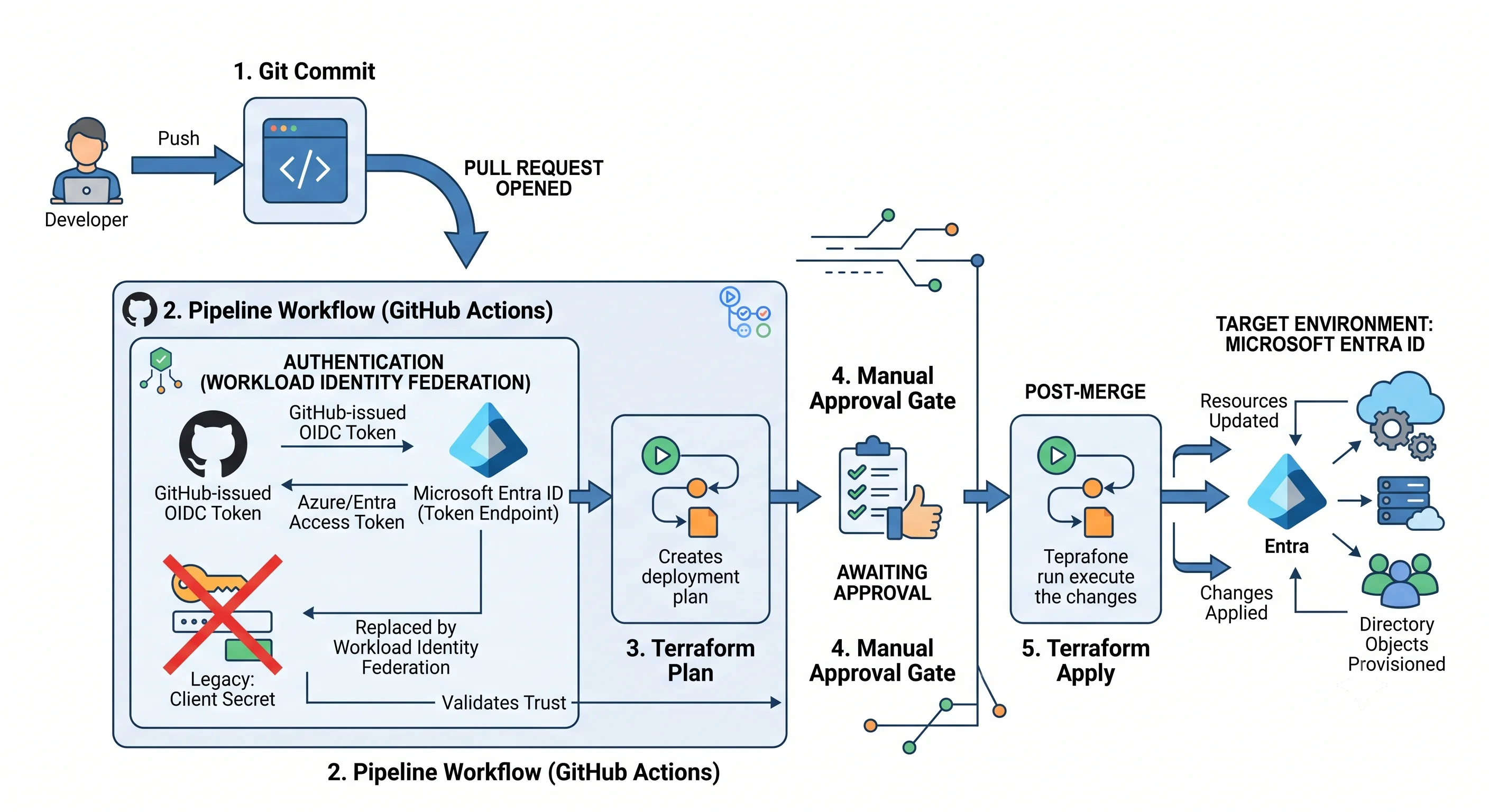
No client secret. No publish profile. The federated credential created in the Terraform module above is what makes this work: GitHub mints an OIDC token, Entra ID validates issuer + subject + audience against the registered credential, and exchanges it for an access token.
name: entra-infra

on:
  pull_request:
    paths: ['infra/entra/**']
  push:
    branches: [main]
    paths: ['infra/entra/**']

permissions:
  id-token: write      # required to request the OIDC token
  contents: read
  pull-requests: write

jobs:
  plan:
    runs-on: ubuntu-latest
    environment: prod-plan
    env:
      ARM_USE_OIDC: true
      ARM_CLIENT_ID: ${{ vars.AZURE_CLIENT_ID }}
      ARM_TENANT_ID: ${{ vars.AZURE_TENANT_ID }}
      ARM_SUBSCRIPTION_ID: ${{ vars.AZURE_SUBSCRIPTION_ID }}
    steps:
      - uses: actions/checkout@v4
      - uses: hashicorp/setup-terraform@v3
      - run: terraform init -backend-config=backends/prod.hcl
        working-directory: infra/entra
      - run: terraform plan -var-file=envs/prod.tfvars -out=tfplan
        working-directory: infra/entra

  apply:
    needs: plan
    if: github.ref == 'refs/heads/main'
    runs-on: ubuntu-latest
    environment: prod          # <- manual approval gate lives on this environment
    env:
      ARM_USE_OIDC: true
      ARM_CLIENT_ID: ${{ vars.AZURE_CLIENT_ID }}
      ARM_TENANT_ID: ${{ vars.AZURE_TENANT_ID }}
      ARM_SUBSCRIPTION_ID: ${{ vars.AZURE_SUBSCRIPTION_ID }}
    steps:
      - uses: actions/checkout@v4
      - uses: hashicorp/setup-terraform@v3
      - run: terraform init -backend-config=backends/prod.hcl
        working-directory: infra/entra
      - run: terraform apply -auto-approve -var-file=envs/prod.tfvars
        working-directory: infra/entra
Two things this deliberately gets right:
The subject claim is the security control. The federated credential above matched
repo:contoso/orders-api:environment:prod. That means only a job running against the GitHub
prod environment can obtain the token — and GitHub environments are what carry the approval gate.
A credential matched on repo:owner/repo:ref:refs/heads/main is weaker, and one matched on
repo:owner/repo:pull_request lets any fork's PR authenticate. Get the subject wrong and you have
built a public-write pipeline.
The azuread provider needs Graph permission separately. ARM_* variables authenticate both
providers, but the permissions are granted in two places: a directory role or Graph app
permission for the directory objects, and Azure RBAC at the target scope for role assignments.
A pipeline that plans cleanly and fails at apply with Authorization_RequestDenied is missing the
directory half.
For Azure DevOps, the equivalent is an Azure Resource Manager service connection using workload identity federation plus an environment with approvals and checks.
Rollback and blast radius
"Undo" for a directory object is not the same as for a VM, and the differences are where the damage happens.
What rollback actually means
| Change | Rollback | Cost |
|---|---|---|
| Added an app role, a permission request, a group | Revert the commit, re-apply | Clean |
| Changed a redirect URI | Revert and re-apply | Clean, but sign-ins fail in between |
| Rotated a client secret | Re-apply the previous version — the old secret value is gone | Every consumer holding the old secret is broken until reconfigured |
| Deleted an app registration | Restore from soft-delete within the retention window | Recoverable if you're quick |
| Deleted and recreated a service principal | Not a rollback — new object ID | Every role assignment and every consent grant now points at a dead GUID |
| Enabled a Conditional Access policy that locked everyone out | Break-glass account → disable the policy | Recoverable only if break-glass exists and works |
| Consented to a malicious application | Revoke consent, revoke sessions, delete the service principal | Refresh tokens may already be exfiltrated; treat as incident |
The operations that force replacement
These are the ones that silently destroy and recreate, changing the object ID:
- Changing
azuread_application.display_namedoes not force replacement — but changing the application'ssign_in_audiencein some directions does ⚠️ verify against the current provider documentation before applying. - Removing and re-adding any resource in the configuration, including a rename of the Terraform
address without a
movedblock.terraform state mvor amoved {}block is the fix. - Changing an
app_role.id— replaces the role and revokes every assignment of it. - Deleting a user-assigned managed identity and recreating it — new principal ID, all role assignments orphaned.
Read every # forces replacement line in a plan touching identity as if it said "revokes access
for everyone". For most resource types replacement is a brief outage. For an identity it is a
permanent loss of every reference to it, held in systems Terraform cannot see.
Soft delete and purge
Entra ID soft-deletes applications, service principals, users, and Microsoft 365 groups ⚠️ verify which object types and the current retention window against current Microsoft docs. Practical consequences:
- Soft-deleted objects still consume directory quota.
- A soft-deleted object retains its identifiers, so recreating something with the same
uniqueNamecan conflict until it's purged. - Restore is possible:
az ad app list --show-deleted/ the Deleted applications blade, andRestore-MgDirectoryDeletedItem. - Security groups (non-M365) are not soft-deleted in the same way — deleting one is closer to
permanent. Check before you
terraform destroya group that carries role assignments.
Resource locks — and where they don't help
CanNotDelete and ReadOnly locks are ARM locks. They protect the managed identity and the
role assignment. They do not protect an app registration, a group, or a Conditional Access
policy, because those aren't ARM resources. The directory-side equivalents are weaker and worth
naming honestly:
lifecycle { prevent_destroy = true }in Terraform — protects against your own pipeline only.- Restricted management administrative units — can genuinely protect a set of directory objects from all but a designated set of admins ⚠️ verify licensing and current capability.
- Ownership hygiene and PIM on the roles that could delete the object.
A lock on a resource group tells you nothing about whether the app registration inside your Terraform state is protected. It isn't.
Blast radius, ranked
- A tenant-wide Conditional Access policy. Everyone, instantly, including you.
- Changing consent or authentication method policy. Everyone, at their next token request.
- Deleting or replacing a widely-referenced service principal. Every dependent workload, with errors that point at the resources, not the identity.
- Rotating a secret without coordinating consumers. Only that application, but completely.
- Adding a group or an app role. Contained.
Design your approvals to match that ranking. A pipeline that treats a Conditional Access change and a group membership change with the same gate is under-gating one and over-gating the other.
Drift
Directory drift is more likely than resource drift, because the portal is easy, incidents are urgent, and "just add them to the group for now" is a sentence everyone has said.
How to detect it:
terraform planon a schedule in CI, failing the build on a non-empty diff. This is the primary control and it costs one cron entry.The Entra audit log, which records every directory write with actor, target, and old/new values. Route it to Log Analytics (see Production) and alert on writes to the objects you manage as code:
AuditLogs
| where TimeGenerated > ago(1d)
| where OperationName has_any ("Update application", "Add app role assignment",
                               "Update conditional access policy", "Add owner to application")
| extend actor = tostring(InitiatedBy.user.userPrincipalName)
| where isnotempty(actor)                 // exclude the pipeline's service principal
| where actor !in (dynamic(["terraform-pipeline@contoso.com"]))
| project TimeGenerated, OperationName, actor, TargetResources
Access reviews for group membership drift — the governance-flavoured answer, which asks the owner to re-attest rather than asking an engineer to read a diff.
az ad app show/ Graph compared against the committed configuration, for the fields Terraform doesn't track.
What to do about it. The two legitimate responses are re-apply (the config is right, the portal change was wrong) and import (the portal change was right, the config is stale) — and the choice is a conversation, not a policy. What is not legitimate is leaving it: an emergency group membership added in the portal and never reconciled is exactly the finding an access review is designed to catch six months too late.
The structural fix is to remove the temptation: if people are clicking in the portal because the pipeline takes forty minutes, fix the pipeline. Drift is usually a symptom of friction.
Teardown
terraform destroy -var-file=envs/dev.tfvarsNote that prevent_destroy on the application will block this deliberately; removing it is a
conscious act, which is the point.
What terraform destroy will not remove:
- Soft-deleted applications, service principals, and users — they remain for the retention window, still consuming quota and still holding their names. Purge explicitly if you need the name back.
- Consent grants made outside the state file. An admin who clicked "Grant admin consent" in the
portal created an
oauth2PermissionGrantTerraform never saw. - Role assignments created outside this configuration — including any the application itself created at runtime, and any scoped above the target resource.
- Sign-in and audit log entries. They persist for the workspace's retention period, which is correct and occasionally reassuring.
- The service principals of multi-tenant applications that were consented to in your tenant. Those were never yours; they were created by consent and are removed by revoking it.
- Anything under an ARM
CanNotDeletelock — the destroy fails with an error that reads like a permissions problem and isn't. Check locks first when an apply or destroy fails inexplicably.
Verify the directory is actually clean, not just the subscription:
az ad app list --display-name orders-api-dev -o table
az ad app list --show-deleted --query "[?contains(displayName,'orders-api-dev')].displayName" -o tsv
az role assignment list --all --query "[?principalName==null].{scope:scope, role:roleDefinitionName}" -o table
That last command lists role assignments whose principal no longer resolves — the orphans. Finding some is normal in an established tenant. Leaving them is how a resurrected object silently inherits permissions it was never granted.
Next: Integrations →
← Back to the Microsoft Entra ID overview · ← Previous: Getting Started