
1. What and Why
One sentence: Azure App Configuration is a managed, regional key-value store for the settings and feature flags your application reads at runtime, so that changing a setting stops being a deployment.
The problem it kills
Every application has two kinds of truth. There's the code, which changes when someone merges a pull request and is reviewed, tested, and versioned. And there's the configuration — the timeout, the endpoint, the batch size, the flag that turns the new checkout flow on — which changes when reality changes, often urgently, often by someone who is not the author of the code.
Put the second kind inside the first and you inherit all of the first kind's ceremony. Raising a
timeout from 30 seconds to 60 becomes: edit appsettings.Production.json, open a PR, wait for CI,
wait for the build, wait for the deployment, wait for the rolling restart. Twenty minutes at best,
during which the incident is still an incident. And because that's painful, people route around it —
a pipeline variable nobody can see the history of, a manual edit in the App Service portal blade that
the next deployment silently overwrites, an environment variable set on one of four instances.
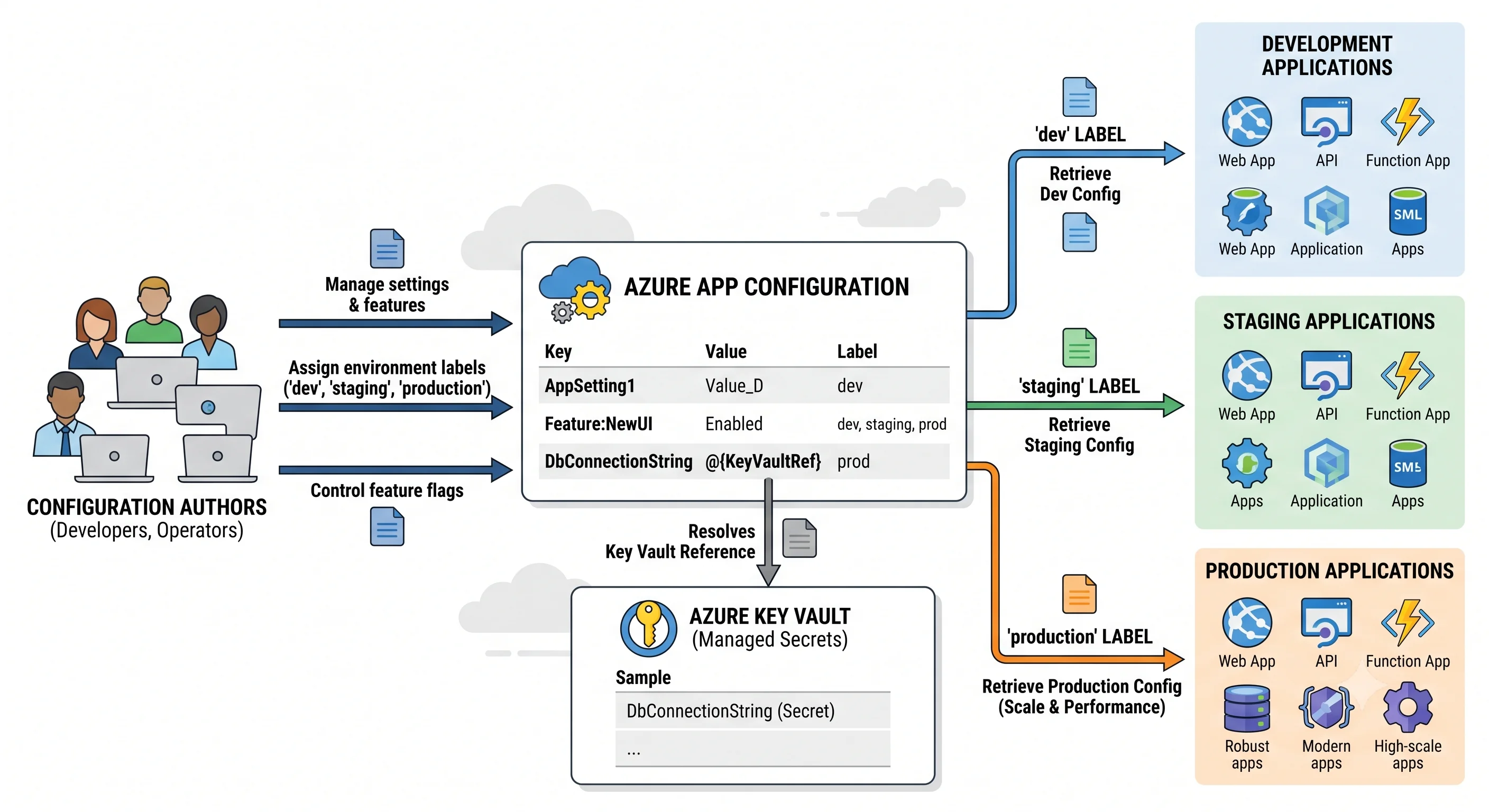
Think of App Configuration as a shared settings file that lives at a URL, with version history and
access control. Your app fetches it at startup, holds it in memory, and re-checks on an interval. A
setting change is a PUT against an HTTP endpoint; within your refresh interval, every instance of
every app that reads that key has the new value, with no restart and no deployment.
Three consequences matter more than the convenience:
Configuration becomes auditable. Every write creates a revision. "Who raised that timeout, and when" has an answer, and — with diagnostic settings enabled — so does "which identity did it". A pipeline variable and a portal text box give you neither.
One store can serve many environments without becoming a mess. A label is a second dimension
on the key: Api:Timeout with label dev and Api:Timeout with label prod are distinct
key-values, and the client picks its label at read time. You don't get one store per environment
unless you want one (and there are good reasons to want one — see
Deployment); you get one namespace with an environment axis built in.
Feature flags stop being deployment-shaped. Turning a feature on for 10% of users, or for
everyone in the beta-testers group, or between 09:00 and 17:00 on Tuesday, becomes a filter you
configure rather than logic you write, test, and ship. The kill switch you need during an incident is
already there, and it takes effect in seconds rather than a deployment cycle.
Where it sits
App Configuration is in Azure's developer-tools and application-platform corner: a small supporting service, not a workload host. It has no compute, no queue, no storage tier to pick. Its entire job is to hold a few thousand short strings and hand them out quickly and safely.
Azure's catalogue overlaps itself here more than in most places, so name the neighbours and separate them in a line each:
- Azure Key Vault — for secrets, and only secrets. Key Vault has per-secret RBAC, HSM-backed key options, expiry dates, rotation events, and certificate lifecycle management; it is also slower and more expensive per read, with its own tight throttling limits. Use both: the secret lives in Key Vault, and App Configuration holds a Key Vault reference so the application looks everything up in one place. Putting a password directly into App Configuration is the single clearest misuse of the service.
- App Service / Functions application settings — the per-app environment-variable store, injected by the platform. Free, already there, and genuinely sufficient for one application with a handful of settings. It has no sharing between apps, no label dimension, no history, and no story for feature flags. The two are complementary: the one setting you should keep in application settings is the endpoint of your App Configuration store.
- Azure Automation variables / Automation account assets — a config store for runbooks, not for applications. Different audience, different access model. If your configuration consumers are PowerShell runbooks, this may genuinely be the simpler answer.
- Kubernetes ConfigMaps and Secrets — not a competitor. The App Configuration Kubernetes Provider watches a store and materialises the values into ConfigMaps and Secrets, so pods keep reading Kubernetes objects while the source of truth is central and audited. See Integrations.
- Azure Cache for Redis / Azure Managed Redis — a cache people occasionally repurpose as a config store because it's already in the architecture. No history, no RBAC granularity, no UI, no schema. It will work and you will regret it.
- Dedicated feature-flag platforms (LaunchDarkly, Split, Unleash, Flagsmith) — App Configuration's feature management is real: boolean flags, percentage and targeting filters, time windows, variants for A/B assignment, and telemetry hooks. It is still a thinner product than a platform built for experimentation, with less in the way of metrics pipelines, significance testing, and audit workflow. If experimentation is a discipline in your organisation rather than an occasional rollout, evaluate the specialists honestly.
The one-line decision rules worth memorising: secret → Key Vault. One app, five settings → app settings. Many apps, many environments, or any feature flag → App Configuration.
The AWS analogue, and where it breaks
The closest AWS mapping is two services in one: SSM Parameter Store for the key-value half, and AWS AppConfig for the feature-flag and typed-configuration half. If you're carrying AWS instincts, three of them will mislead you.
Labels have no Parameter Store equivalent. In AWS, people encode environment into the parameter
path — /prod/api/timeout. Azure gives you an orthogonal label field, so the key stays
Api:Timeout and the environment is a filter. This is better in practice, and it introduces the
service's most common bug: read without a label filter and you get the no-label key-value, which is
a genuinely different thing from "the default one". There is no "current environment" concept —
whatever your client asks for is what it gets.
There is no service-side deployment strategy. AWS AppConfig can roll a configuration version out over ten minutes, watch a CloudWatch alarm, and automatically roll back. App Configuration has no equivalent — it is a store, not a deployer. Progressive rollout in Azure happens client-side, inside your feature-flag filters (percentage filters, targeting filters), and rollback is you flipping a flag or re-pointing a snapshot. Expecting the service to manage the rollout is the mistake.
Hierarchy is a naming convention, not a structure. Parameter Store paths are real and support
GetParametersByPath recursion; Azure's : separators in Api:Timeout are just characters. Key
selection is prefix and wildcard matching over a flat namespace. The : convention exists because
.NET's configuration binder maps it onto nested objects — it means nothing to the service.
One thing that transfers cleanly: like Parameter Store, this is a control-plane-and-data-plane service where the IAM/RBAC story is split, and like Parameter Store, the correct credential is a platform identity (IAM role there, managed identity here) rather than a key in a config file.
When NOT to use it
The honest anti-patterns — this is the part a marketing summary leaves out:
- As a secret store. Covered above, and worth repeating because it is the most common misuse. App Configuration encrypts at rest, supports customer-managed keys on higher tiers, and can be locked behind a private endpoint — none of which gives you per-secret access scoping, expiry, or rotation.
- As a runtime database. A key-value is capped at single-digit kilobytes
(⚠️ verify the current limit against current Azure docs), the store's total capacity is measured
in megabytes to a gigabyte depending on tier, and requests are quota-metered. Reading a key
per-user-request rather than per-process-startup is how you meet
429 Too Many Requestsand a surprise overage line on the bill. - For high-churn values. Anything changing every few seconds is state, not configuration. Use a cache, a queue, or a database. The client refresh model is built around polling on a timer measured in seconds-to-minutes, and it is deliberately not real-time.
- With no fallback plan. Configuration is read at startup, which is exactly the wrong moment to discover a dependency is unavailable. A throttled or unreachable store turns into failed pod starts, not degraded requests. This is the one new failure mode the service introduces, and it deserves a deliberate answer — see the failure-modes section of Architecture.
- When you only have one app and five settings. Adding a network dependency, an identity, a role assignment, and a Terraform resource to replace five entries in a text box is not an improvement. Graduate to it when the second consumer or the second environment arrives.
- Expecting it to enforce anything. There is no schema, no type validation beyond the content-type
string, and no referential integrity.
Api:Timeout = "banana"is a perfectly valid key-value; your application finds out at parse time. Validation is your job, in code or in a pipeline check.
What it costs, briefly
There are no per-key charges and no compute to size. The shape is:
- A daily charge per store on paid tiers, charged per replica where geo-replication is used — so a store with two replicas costs roughly twice the store with one. This is the line people forget.
- Request overage beyond the tier's included daily allowance, charged per block of requests. The usual cause of overage is a client with an aggressive refresh interval multiplied by a large instance count, or a codebase reading config per request instead of caching it.
- The Free tier has no daily charge and a hard daily request cap — when you hit it, you get throttled for the rest of the day, which is a fine trade for a demo and unacceptable for anything real. There is also a limit on how many Free stores a subscription may hold per region.
⚠️ All specific figures here vary by tier and region and change over time; verify against current Azure pricing. The durable point is the shape: you pay for the store existing and for reading it too often, not for what you put in it. The full treatment is in Production.
Next: Core Concepts →