
3. Identity and RBAC
Formerly: Microsoft Entra ID was Azure Active Directory (Azure AD) until its 2023 rename; Azure AD B2C is now Microsoft Entra External ID. The old names still appear in SDK class names, error messages, PowerShell modules, and roughly every Stack Overflow answer. They mean the same thing.
Azure splits a job that AWS IAM does alone across two systems that look alike and are not:
Microsoft Entra ID decides who you are. Azure RBAC decides what you may do to a resource.
Everything confusing about Azure permissions comes from that seam. A Global Administrator — the most powerful directory role there is — has, by default, no access to any virtual machine in any subscription. An Owner of a subscription cannot create a user. Both statements surprise people, and both follow directly from the split.
Analogy: Entra ID is the building's pass office. It knows every employee, issues the badges, and decides how hard it is to get one (MFA, device compliance, location). Azure RBAC is the set of card readers on individual doors. The pass office manager can print any badge in the building — and still can't open the server-room door, because nobody programmed that reader to accept her badge.
Technically: Entra ID is a tenant-scoped identity provider that issues OAuth 2.0 / OpenID Connect tokens. Azure RBAC is an authorization system built into Azure Resource Manager that evaluates role assignments — a triple of security principal + role definition + scope — against every request, walking up the resource hierarchy. They meet at exactly one point: the token Entra issues carries an object ID, and RBAC assignments are made against that object ID.
Coming from AWS: IAM users, roles, and policies are all one service scoped to an account. Azure puts identity at the tenant (above subscriptions, shared across all of them) and authorization at the resource hierarchy. The closest AWS mental model is "IAM Identity Center for identity, plus resource-level IAM policies for authorization" — but even that undersells how separate they are here. IAM policies are documents attached to principals; Azure role assignments are separate objects that point at a principal, a role, and a scope, and they inherit downward automatically.
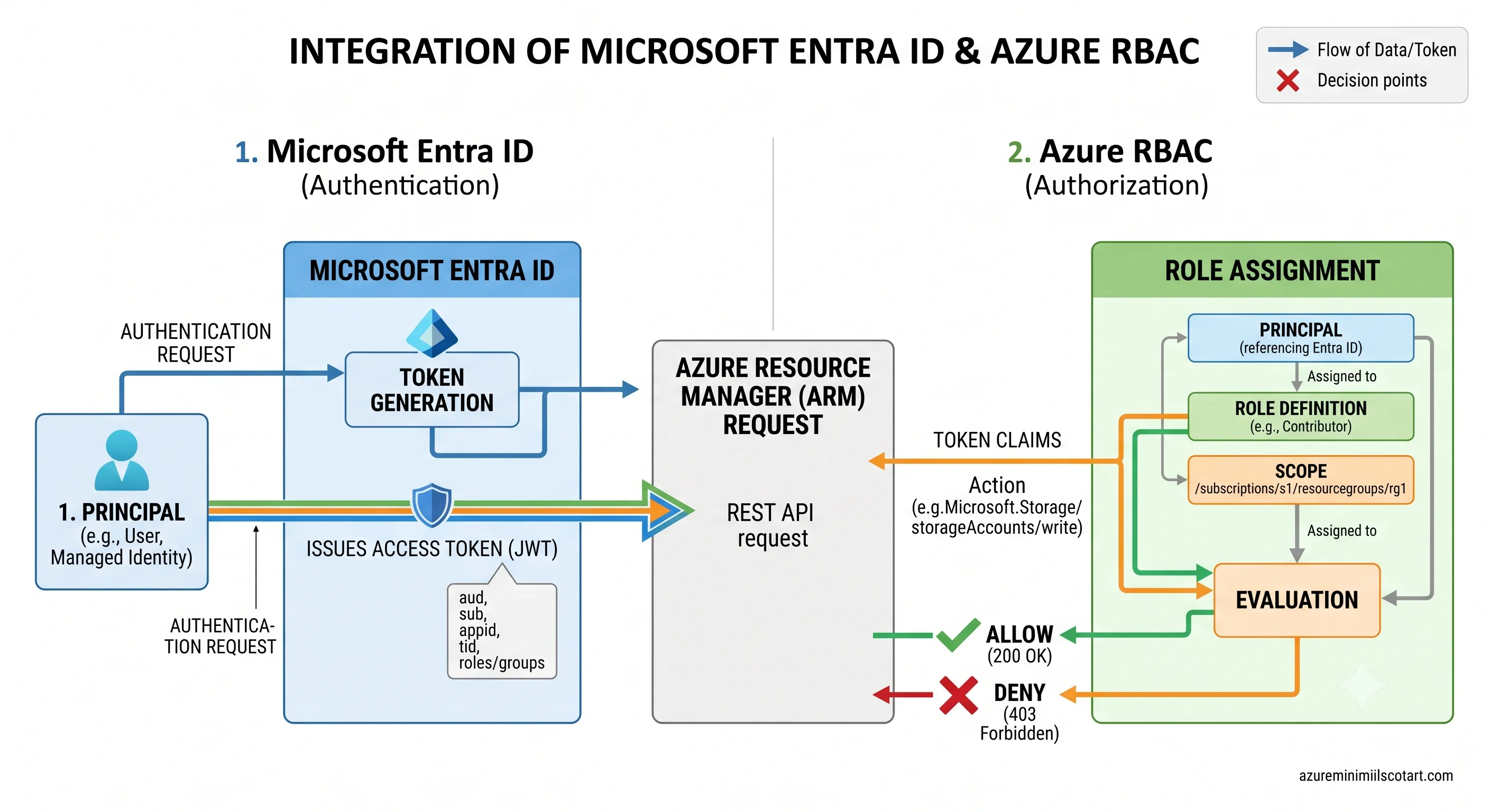
Security principals — the four things that can hold a role
A security principal is anything that can be assigned a role. There are four, and picking the wrong one is a design smell.
| Principal | What it is | Use it for |
|---|---|---|
| User | A human identity in the tenant (member or guest) | People. Rarely the target of a direct role assignment — see below |
| Group | A collection of users and/or service principals | The default target for role assignments. Membership changes without touching Azure |
| Service principal | The identity of an application in this tenant | External automation, third-party tools, anything outside Azure |
| Managed identity | A service principal that Azure creates and whose credentials Azure rotates | Anything running inside Azure. This is the right answer almost always |
Assign roles to groups, not to users. A role assignment is a resource; thousands of them are hard to audit and there's a ceiling on how many a subscription can hold ⚠️ verify the current limit against Azure docs. Group-based assignment turns access review into membership review, which is a question the business can actually answer.
App registration vs. service principal — the distinction that confuses everyone
An app registration is the global definition of an application: its ID, its redirect URIs, its API permissions, its credentials. It lives in the tenant where it was created.
A service principal is the local instance of that application in a tenant — the object that actually holds role assignments and gets tokens. Creating an app registration in your own tenant creates a service principal alongside it, which is why the two get conflated. For a multi-tenant app, there's one registration and one service principal per tenant that consented to it.
The portal shows them in different blades ("App registrations" and "Enterprise applications"), which is the single most common source of "I granted the permission but it doesn't work" — the permission went on the wrong object.
Managed identity — the default answer to "where do the credentials go"
The answer is: nowhere. That's the whole feature.
A managed identity is a service principal that Azure creates for a resource and whose credentials Azure manages and rotates. The resource fetches tokens from a local endpoint; no secret ever exists in your configuration, your repository, or your key vault.
Two flavours, and the choice matters:
| System-assigned | User-assigned | |
|---|---|---|
| Lifecycle | Created with the resource, deleted with it | Its own ARM resource, independent lifecycle |
| Sharing | One resource, one identity | Many resources can share one identity |
| Best for | A single resource with its own distinct permissions | A fleet — scale sets, many function apps, anything where you want to grant the role once |
| The trap | Delete and recreate the resource and you get a new object ID; every role assignment must be redone | Nothing stops it outliving everything that used it — orphaned identities accumulate |
The system-assigned trap is a real Terraform problem: any change that forces resource replacement gives you a new principal, and role assignments referencing the old object ID silently point at nothing. If a resource is recreated with any regularity, use user-assigned.
Inside a VM, container, or app, the identity is reachable at the Instance Metadata Service — a
link-local address that isn't routable from outside — and every Azure SDK's DefaultAzureCredential
knows how to use it. That's the whole integration:
from azure.identity import DefaultAzureCredential
from azure.storage.blob import BlobServiceClient

# No keys, no connection string. Locally this uses your az login;
# in Azure it uses the managed identity.
client = BlobServiceClient(
    account_url="https://stprodukscore.blob.core.windows.net",
    credential=DefaultAzureCredential(),
)
DefaultAzureCredential tries a chain of sources — environment variables, managed identity, Azure
CLI login, and others. That's convenient and occasionally maddening: it can succeed locally with your
own generous permissions and fail in Azure where the managed identity has less. When debugging a
403, check which identity the token belongs to before checking the role.
Workload identity federation — managed identity for things outside Azure
A GitHub Actions runner isn't an Azure resource, so it can't have a managed identity. The old answer was a client secret in a repository secret, rotated by whoever remembered. The current answer is workload identity federation: you configure an Entra app registration to trust tokens issued by an external OIDC provider (GitHub, Azure DevOps, GitLab, Kubernetes) for a specific subject — repository, branch, environment. The runner presents its own OIDC token; Entra exchanges it for an Azure token. No secret exists.
Every Deployment page in this article uses OIDC and never a client secret or publish profile. It's not a nicety — a leaked publish profile is a full compromise of the resource, and they leak.
Directory roles vs. Azure RBAC roles
Two systems, similar names, different jobs. This table is worth memorising.
| Entra directory roles | Azure RBAC roles | |
|---|---|---|
| Govern | The directory: users, groups, app registrations, tenant settings, licences | Azure resources: VMs, storage, key vaults, subscriptions |
| Scoped to | The tenant (or an administrative unit) | Management group / subscription / resource group / resource |
| Examples | Global Administrator, User Administrator, Application Administrator | Owner, Contributor, Reader, Storage Blob Data Reader |
| Managed in | Microsoft Entra ID blade | Access control (IAM) blade on any resource |
| Assigned via | Entra ID / Graph API | ARM |
They are almost entirely disjoint. The one connection: a Global Administrator can elevate access
to become User Access Administrator at the root scope (/), which grants the ability to assign RBAC
roles anywhere in the tenant. It's a deliberate break-glass path, it's logged in the activity log,
and it should be alarmed on. If someone asks why their Global Admin can't see the subscriptions, this
is the answer — and "just elevate" is usually the wrong one.
Anatomy of a role assignment
Three things, always:
role assignment = principal (who) + role definition (what) + scope (where)Nothing else. There's no policy document attached to the identity; the assignment object is the grant.
The role definition
{
  "roleName": "Storage Blob Data Reader",
  "assignableScopes": ["/"],
  "permissions": [{
    "actions":        ["Microsoft.Storage/storageAccounts/blobServices/containers/read"],
    "notActions":     [],
    "dataActions":    ["Microsoft.Storage/storageAccounts/blobServices/containers/blobs/read"],
    "notDataActions": []
  }]
}
Four arrays, and the split between two pairs of them is the control-plane / data-plane line made literal:
actions— control-plane operations, evaluated by ARM. Managing the resource.dataActions— data-plane operations, evaluated by the service's own endpoint. Touching the contents.notActions/notDataActions— subtractions, not denials. They remove permissions from this role only. Another role assignment granting the same action still wins. This is the most misunderstood field in Azure RBAC:notActionsis not a deny.
Azure RBAC is additive with no deny. The effective permission set is the union of every assignment that applies at or above the scope. There is one exception — deny assignments — which are created by the platform (Azure managed applications, and formerly Blueprints) and cannot be authored directly. You'll see them; you can't write them.
The three roles that cover most of everything
| Role | Grants | Notably does not grant |
|---|---|---|
| Owner | Everything, including assigning roles | Nothing on the control plane — but still no data access by default |
| Contributor | Everything except assigning roles | Role assignment. And data access |
| Reader | Read all control-plane properties | Any write. Any data |
Contributor is the workhorse and the trap. It can create, modify, and delete every resource in
its scope — including deleting the production database — while being unable to grant anyone else
access. Teams reach for it because "they're not Owner, so it's fine", which is a misreading. The
narrower path is a service-specific Contributor role (Storage Account Contributor, Virtual Machine Contributor) plus the specific data role needed, and it's usually not much more work.
And the line that bears repeating from Azure Resource Manager: Owner
does not let you read a blob. Data access needs a dataActions role — Storage Blob Data Reader,
Key Vault Secrets User, Azure Service Bus Data Sender. An Owner can grant it to themselves, or
read the account keys, which is why disabling key-based auth is a real control and not theatre.
Scope and inheritance
Assignments inherit downward and only downward:
/                                        ← root scope; elevate to see it
└── /providers/Microsoft.Management/managementGroups/mg-corp
    └── /subscriptions/{sub}
        └── /subscriptions/{sub}/resourceGroups/rg-app
            └── .../providers/Microsoft.Storage/storageAccounts/stapp
A Reader assignment at the subscription makes you a Reader on every resource group and resource inside it, forever, including ones created tomorrow. You cannot subtract at a lower scope — there's no deny — so an over-broad assignment high up cannot be walked back locally. It has to be removed where it was made.
The practical rule: assign at the narrowest scope that works, and assign high only for platform roles. Resource group is the right default for a workload team.
# Who has access here, and where did it come from?
az role assignment list -g rg-app --include-inherited -o table

# Grant a data-plane role at the narrowest sensible scope
az role assignment create \
  --assignee-object-id $(az webapp identity show -g rg-app -n app-payments --query principalId -o tsv) \
  --assignee-principal-type ServicePrincipal \
  --role "Storage Blob Data Contributor" \
  --scope $(az storage account show -g rg-app -n stapp --query id -o tsv)

# What can I actually do?
az role assignment list --assignee <object-id> --all -o table
--include-inherited is the flag that answers "why does this person have access" when the assignment
isn't visible on the resource itself.
Going narrower: conditions and custom roles
ABAC conditions let a single assignment be restricted by attributes evaluated at request time —
most usefully blob tags and path prefixes, so one Storage Blob Data Reader assignment can be
limited to blobs under a given prefix instead of the whole container. Support is per-service and
still expanding ⚠️ verify current coverage against Azure docs. Where it works, it's a much better
answer than proliferating containers to fit the permission model.
Custom roles are the fallback when no built-in role fits. You author the same four arrays plus
assignableScopes (which management groups or subscriptions the role may be used in).
az role definition list --custom-role-only true -o table
az provider operation show -n Microsoft.Storage   # every action string you can put in a role
Write one when a built-in role is genuinely too broad for a standing grant — a support team that needs to restart VMs but not resize or delete them is the canonical case. Don't write one to shave a single permission off Contributor; you now own a role definition that has to be maintained as Azure adds operations, and drift there fails closed in confusing ways. There's a cap on custom roles per tenant ⚠️ verify against current Azure docs.
Privileged Identity Management (PIM) is the other direction: instead of narrowing the role, make it temporary. Eligible-but-not-active assignments that require activation with justification, approval, and a time limit, for both directory roles and Azure RBAC. It requires a premium Entra licence, and it's the correct answer to "who should be a standing Owner" — nobody, they should activate it for four hours when they need it.
Conditional Access sits earlier in the chain, at token issuance: require MFA, a compliant device, or a trusted network before Entra will issue a token at all. It applies to the Azure management plane like any other application, so "require MFA to touch the Azure portal or ARM" is a Conditional Access policy, not an RBAC one. Also premium-licensed.
Together these are three different levers on the same problem — narrower (custom roles, ABAC), shorter (PIM), harder to obtain (Conditional Access) — and the strongest posture uses all three rather than pushing any one to its limit.
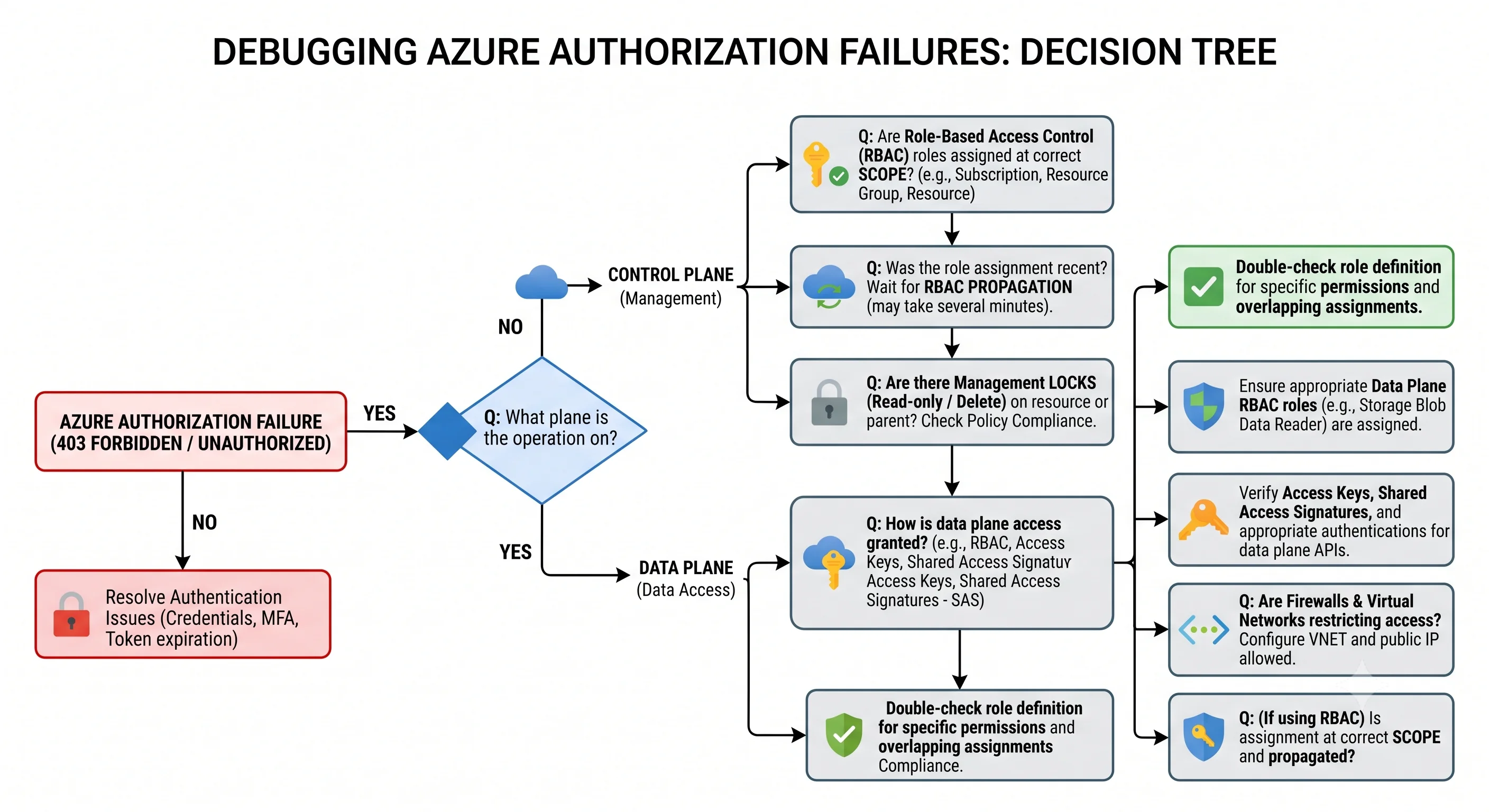
Debugging a 403 in the right order
Azure's authorization errors are unusually informative. AuthorizationFailed names the principal
object ID, the action, and the scope. Read all three before doing anything else, then work down this
list:
- Which identity is this? Not who you are — which token was used.
DefaultAzureCredentialmay have picked a different one than you assume.az account show, or decode the token'soidclaim. - Is this a control-plane or data-plane action? If the endpoint in the error is
*.blob.core.windows.netor*.vault.azure.net, no amount of Owner will help. You need adataActionsrole. - Is the role assigned at a scope that covers this resource? Run with
--include-inherited. Assigning at the resource group won't cover a resource in a sibling group. - Has it propagated? Fresh assignments take a short while, and cached tokens are worse — a token already issued carries the old claims until it expires. Sign out and back in, or force a token refresh.
- Is it actually a policy denial?
RequestDisallowedByPolicyis not an RBAC problem and no role will fix it. Different code, different owner. - Is it a lock?
ScopeLockedlooks like a permissions failure and is aCanNotDeleteorReadOnlylock, quite possibly inherited from the resource group.
Steps 5 and 6 are there because they're the two failures most often misdiagnosed as RBAC, and both waste an afternoon if you start by granting roles.
The mistakes worth pre-empting
Confusing Global Administrator with Owner. Different systems. Neither implies the other.
Assigning roles to users instead of groups. It works and it doesn't scale, and access review becomes archaeology.
Reaching for Contributor by default. It can delete everything in scope. Service-specific Contributor plus the data role is usually a short walk away.
Expecting notActions to deny. It subtracts from one role. Another assignment can grant the same
action right back.
Storing a client secret for CI. Use workload identity federation. If a secret exists, it will eventually be committed, logged, or shared.
Using system-assigned identity on a resource that gets replaced. New resource, new object ID, dead role assignments — with no error until runtime.
Granting at the subscription because the resource group scope "didn't work". It usually did; the resource was in a different group, or the token was stale.
Next: Regions and Availability →
← Back to the Foundations overview · ← Previous: Azure Resource Manager