
1. What and Why
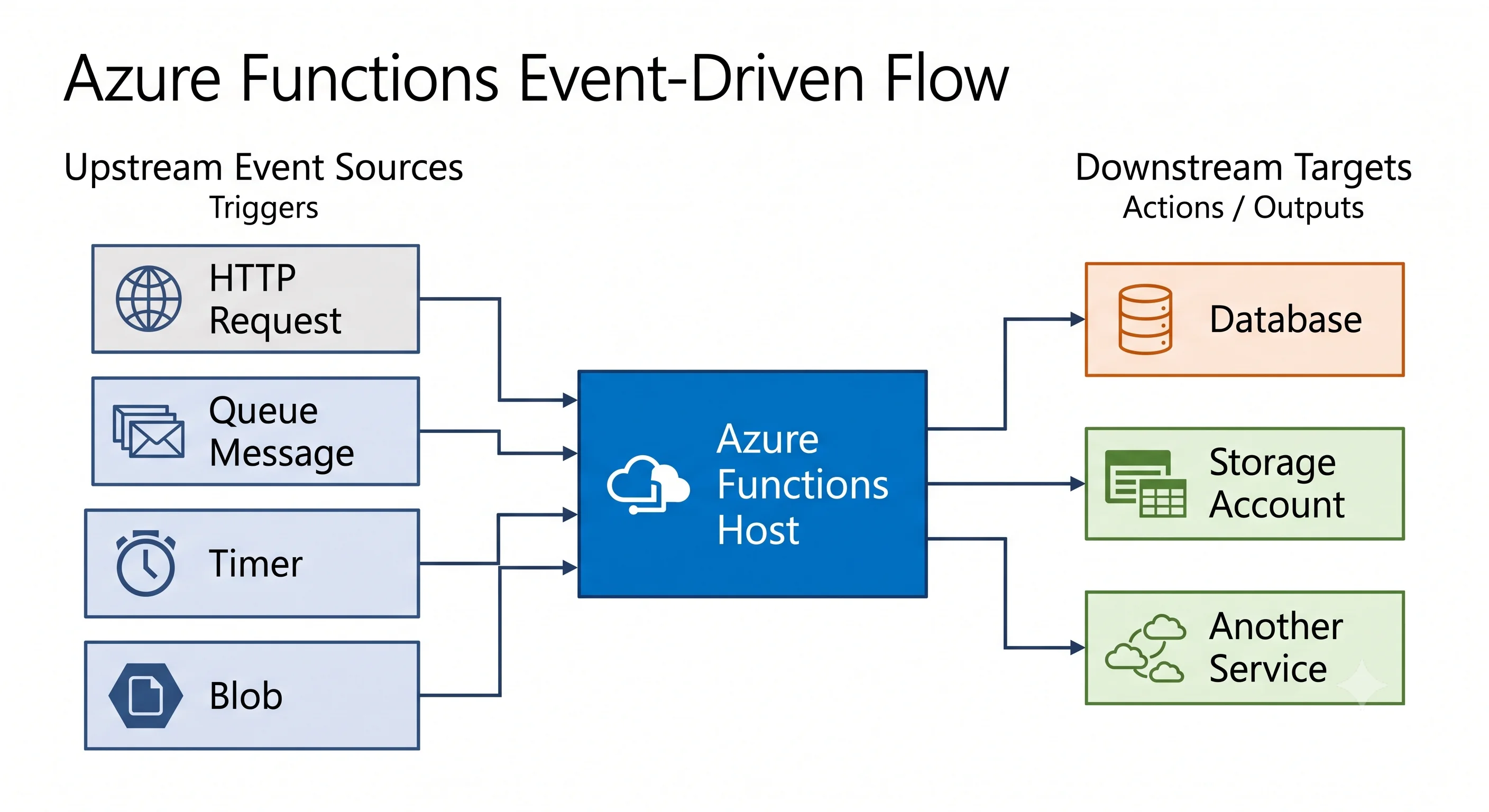
One sentence: Azure Functions is a regional, event-driven serverless compute service that runs a single unit of your code in response to a trigger, scaling the number of running instances up and down — including to zero — without you provisioning, naming, or patching a server.
The problem it kills
Before serverless, running a small piece of event-driven code cost you a whole server's worth of thinking. Suppose the requirement is "when a customer uploads an invoice, generate a thumbnail." The pre-serverless answer was: provision a VM, install a runtime, write a daemon that polls a queue, write the retry logic, write the poison-message handling, write a health check, configure a process supervisor so it restarts, put it in an autoscaling group so it survives a host failure, decide how many instances to run at 3 a.m. when nobody uploads anything, and then patch that VM every month for the next three years. The actual thumbnail code was thirty lines.
Think of a function as a doorbell rather than a doorman. A doorman is a person you pay to stand in the hallway all day whether or not anyone arrives. A doorbell costs nothing until someone presses it, and then it does exactly one thing. Functions replace the standing process with a declaration: this code, when that happens. The infrastructure between the event and your code is Azure's problem.
Two consequences matter more than the cost saving, and they're what people underrate:
The trigger becomes the interface. Because the trigger is declared rather than coded, the plumbing that used to be the bulk of the program — polling, batching, checkpointing, lease renewal, dead-lettering — is now configuration on a binding. A Service Bus function that processes messages with retries and dead-lettering is genuinely a function signature and an attribute. This is a real reduction in code you own, not just code you write.
Scaling stops being a design activity and becomes a constraint you inherit. You no longer choose the instance count; you inherit a scaling algorithm and design around it. That's a good trade when the workload is bursty and a bad one when you need precise control — which is exactly the shape of the "when not to use it" list below.
What you own, and what Azure owns
This is the serverless bargain, and it's the same table as the VM one with the line drawn much higher.
| Layer | Owner |
|---|---|
| Datacentre, hardware, hypervisor | Azure |
| Guest OS and its patching | Azure |
| Language runtime and the Functions host | Azure (you pick the major version) |
| Scaling decisions and instance lifecycle | Azure (you set bounds, not counts) |
| Trigger polling, retries, checkpoints, leases | Azure (you configure them) |
| Your function code and its dependencies | You |
| The plan you chose, and therefore the cost and the cold-start behaviour | You |
| Identity, network exposure, keys, and what your function is allowed to reach | You |
| Idempotency and correctness under at-least-once delivery | You |
That last row is the one that bites. Most Functions triggers give at-least-once delivery. The platform will happily run your function twice for the same message after a transient failure. Nothing in the service makes your handler idempotent; that's yours, and it's the most common production defect in serverless systems.
Where it sits in the catalogue
Azure has at least five ways to run code, and picking by familiarity is the usual mistake. Separate them like this:
| Service | You bring | Azure brings | Choose it when |
|---|---|---|---|
| Azure Functions | A function and a trigger declaration | The host, the scaling, the trigger plumbing, scale to zero | Work is event-driven, short, and bursty |
| App Service | A web application | OS, web server, TLS, slots, autoscale | It's a conventional HTTP app with steady traffic |
| Container Apps | A container image | A managed Kubernetes-shaped runtime, KEDA scaling, Dapr, scale to zero | You have a container, need multiple processes, or want microservice networking |
| AKS | Containers plus Kubernetes manifests | A managed control plane | You want the Kubernetes API and have someone to run it |
| Logic Apps | A workflow in a designer | 1,000+ connectors, stateful orchestration | The work is integration between SaaS systems, not custom code |
| Azure Batch | A job and an executable | Pool scheduling across many VMs | Embarrassingly-parallel, long-running compute |
Three clarifications people find useful:
- Functions and App Service are the same resource type. A function app is a
Microsoft.Web/sitesresource. This is why they share app settings, slots, Kudu, custom domains, and the App Service Plan. It also means most App Service documentation applies. - Functions can run on Container Apps. The boundary between them is a product decision, not a technical one. If your team already runs Container Apps, hosting Functions there keeps one networking and observability story. ⚠️ verify current feature parity against current Azure docs.
- Durable Functions is not a separate service. It's an extension that adds stateful orchestration — fan-out/fan-in, human approval waits, long-running sagas — on top of ordinary functions, using storage for its state. Reach for it before you reach for Logic Apps when the workflow is code.
The AWS analogue, and where it breaks
Azure Functions is Lambda. For the programming model — a handler, a trigger, an event object, environment configuration, scale-out by concurrent execution — the analogy is good and will carry you through Core Concepts. Five places it breaks, each of which costs someone a day:
There is a plan underneath, and it is the most important decision. Lambda has no equivalent. In Azure you choose Consumption, Flex Consumption, Premium, or Dedicated, and that choice — not your code — determines cold start, maximum timeout, VNet access, and whether you're billed while idle. An engineer with Lambda instincts will not think to ask this question and will get the default.
There is a storage account, and it is a hard dependency. The Functions host keeps trigger state, timer schedules, singleton locks, and Event Hub checkpoints in the account named by the
AzureWebJobsStoragesetting — and typically the deployment package too. Lambda has nothing like this. Firewalling that storage account without the right exceptions silently stops your triggers.Many functions live in one app. A function app is a deployment unit, a scaling unit, a configuration unit, and a security boundary containing many functions. In Lambda, each function is its own resource with its own memory setting, its own IAM role, and its own concurrency. In Azure, functions in one app share the identity, the app settings, the plan, and the scale decision. Grouping is therefore an architectural choice, not an organisational one.
Authorisation defaults to a shared key, not IAM. An HTTP-triggered function defaults to
authLevel: function— a query-string or header key, a shared secret. It is not Entra ID, it is not RBAC, and it is not rotated for you. The Lambda instinct ("the caller's IAM role governs this") is simply wrong here; identity-based auth requires App Service Authentication or fronting the app with API Management.Concurrency is not a per-function dial. Lambda's reserved and provisioned concurrency have no direct equivalent. Azure scales instances of the whole app via a scale controller, with per-instance concurrency settings that vary by trigger type and plan. "Limit this one function to 10 concurrent executions" is not a checkbox.
Beyond those: Lambda layers ≈ your deployment package or a container image; EventBridge ≈ Event Grid; SQS ≈ Service Bus queues or Storage queues; Kinesis ≈ Event Hubs; Step Functions ≈ Durable Functions (code-first) or Logic Apps (connector-first); CloudWatch Logs ≈ Application Insights; API Gateway ≈ API Management (a much heavier product).
When NOT to use Functions
The anti-patterns, stated honestly:
- The work is long-running. Every plan caps execution time, and on Consumption the cap is
measured in minutes. Raising
functionTimeoutto paper over a 40-minute job is a decision you will regret during a platform restart. Decompose it with Durable Functions, or move it to Container Apps jobs or Batch. - Low-traffic HTTP with a tight latency SLO. With no warm instance, the first request pays for worker allocation, runtime start, and dependency load. If you must remove that, you must pay for always-ready instances — and then you should honestly compare the bill against App Service.
- Steady, high-volume load. Per-execution pricing is a premium you pay for elasticity. If load is flat and predictable, you're buying an option you never exercise.
- Anything stateful in memory. Instances are created and destroyed without warning. In-process caches are best-effort; static variables are not a data store.
- A single app that has become a monolith. Thirty unrelated functions in one function app share one scale controller decision, one deployment, one identity, and one failure. Split by scaling characteristic and by blast radius, not by team convenience.
- Heavy or exotic dependencies. A 400 MB package with native binaries makes cold starts worse and fights the platform. That's a container.
- You need per-function network isolation or per-function identity. Those are app-level properties. If two workloads need different network reach or different permissions, they need different function apps.
Where the money actually goes
Worth internalising before anything else, because it shapes every later decision:
- Consumption / Flex Consumption — executions plus GB-seconds (memory consumed × execution duration). There is a monthly free grant ⚠️ verify the current figure against current Azure docs. Idle costs effectively nothing, which is the entire point.
- Premium (
EP1–EP3) — per-instance, per-hour, with a minimum instance count that never goes to zero. You are buying warm instances and VNet integration. AnEP1plan forgotten in a dev subscription is one of the most common surprise line items in Azure. - Dedicated (App Service Plan) — the plan bills hourly regardless of function activity. This can be free at the margin if you already run an App Service app on that plan and add functions to it.
- The dependencies — the storage account (transactions add up fast for storage-triggered and Durable functions), Application Insights data ingestion (frequently larger than the compute bill on a chatty app), and outbound data transfer.
The full treatment is in Production; the point here is that a function app's bill has at least three meters, and on the plans people reach for by default, one of them never stops.
Next: Core Concepts →