
Foundations
Every Azure resource lives inside the same skeleton: a tenant that owns identity, a subscription that owns billing and quota, a resource group that owns lifecycle, and a single control plane — Azure Resource Manager — that every tool talks to. Learn the skeleton once and every service you meet afterwards is just a new organ hanging off it.
Formerly: the identity half of this topic was called Azure Active Directory (Azure AD) until its rename to Microsoft Entra ID. Azure AD B2C is now Microsoft Entra External ID. Both old names still appear across the portal, error messages, SDKs, and half the internet — this topic uses the current names and flags the old ones where they still leak through.
Why this topic exists
Most cloud articles start at the first interesting service — object storage, or functions — and explain the account model inline in a paragraph. That works for AWS, where the account/region model is genuinely thin: an account is a billing and isolation boundary, a region is a place, and that's most of it.
Azure's isn't thin. Before you can reason about a single storage account, you need to know that it
sits in a resource group (which is a lifecycle boundary, not just a folder), inside a subscription
(which is where quota is counted and where the bill lands), inside a tenant (which is where identity
lives, and which is emphatically not the same boundary). You need to know that the tool you're
using — portal, az, Terraform, Bicep — is a client of one REST API, and that this API governs the
resource while a completely separate endpoint governs the data inside it, with separate
permissions. You need to know that "delete the resource group" is the most powerful and most
dangerous command in Azure.
Repeating all of that in thirty service topics would be worse than writing it once. So it's here. Every later topic links back to this page in a line and moves on.
If you're coming from AWS, the single most useful reframe is this: an AWS account does the job that Azure splits across three things — the tenant (identity), the subscription (billing, quota, and the practical isolation boundary), and the resource group (lifecycle and blast radius). Trying to map "account → subscription" one-to-one will work for about a week and then quietly mislead you.
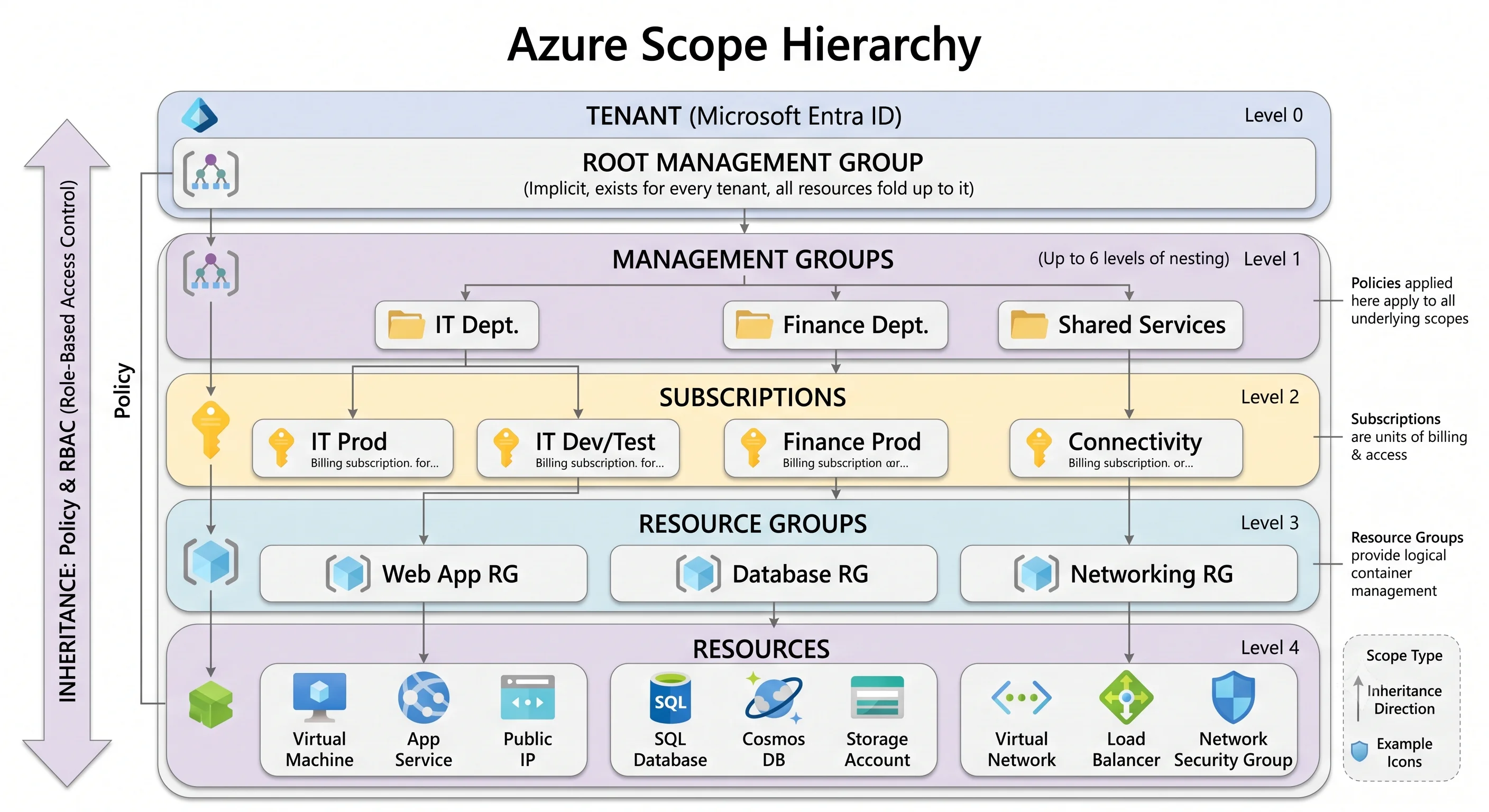
The four things that are true of every resource
1. It sits somewhere in the scope hierarchy. Tenant → management group → subscription → resource group → resource. That chain determines where Azure Policy applies, where an RBAC role assignment inherits down from, where quota is counted, and what a delete actually removes. Scope is not paperwork; it's the mechanism.
2. It was created through Azure Resource Manager. ARM is the one control plane. The portal is a
web client for it. az, PowerShell's Az module, Terraform's azurerm provider, Bicep, and every
language SDK are all clients for it. They differ in ergonomics, not in capability — and when a
deployment behaves strangely, the explanation is almost always something ARM did, not something your
tool did.
3. Someone or something authenticated to Microsoft Entra ID to touch it. Identity is a tenant-level concern, separate from the subscription. A user, group, service principal, or managed identity presents a token; Azure RBAC decides what that token may do at a given scope. Directory roles (Global Administrator) and Azure RBAC roles (Owner, Contributor) are two different systems that look confusingly alike.
4. It exists in a region — or deliberately doesn't. Most resources are regional. Some are zonal (pinned to one availability zone), some zone-redundant (spread across three), and a handful are global (Entra ID, Traffic Manager, Front Door, DNS zones). Which one a service is determines what an outage does to you.
Key facts at a glance
| Category | Platform fundamentals — not a service you deploy |
| Control plane | Azure Resource Manager, at management.azure.com |
| Scopes, outermost in | Tenant → management group → subscription → resource group → resource |
| Identity provider | Microsoft Entra ID (tenant-scoped, formerly Azure AD) |
| Authorization model | Azure RBAC — role definition + principal + scope, inherited downward |
| Billing boundary | The subscription |
| Quota boundary | Usually subscription-per-region ⚠️ verify per service against current Azure docs |
| Lifecycle boundary | The resource group |
| Governance mechanism | Azure Policy, assigned at management group / subscription / resource group |
| Native IaC | ARM templates, and Bicep as the readable language that compiles to them |
| AWS rough analogue | Organizations + accounts + IAM + CloudFormation, split differently |
What this topic covers
| Sub-topic | What it covers |
|---|---|
| The Resource Hierarchy | Tenant, management group, subscription, resource group, resource — what each boundary actually enforces, how to design the layout, and why "delete the resource group" is the sharpest knife in the drawer |
| Azure Resource Manager | The one control plane: resource providers, resource IDs, deployments, incremental vs. complete mode, what-if, and why every tool converges on the same REST API |
| Identity and RBAC | Microsoft Entra ID vs. Azure RBAC, directory roles vs. resource roles, role assignments and inheritance, managed identities, and the control-plane / data-plane split that catches everyone |
| Regions and Availability | Regions, availability zones, availability sets, paired regions, zonal vs. zone-redundant vs. global services, and what each redundancy choice actually protects against |
| Naming and Tagging | Naming rules that differ per resource type, globally-unique names, a convention worth adopting, tags and their limits, and how Azure Policy enforces both |
The three ideas that pay for themselves immediately
The resource group is a lifecycle boundary, not a folder. Resources in one resource group should
share a fate: deployed together, updated together, deleted together. az group delete removes
everything inside, which makes it the cleanest teardown in any cloud — and the reason you should
never put your production database in the same group as a demo. There's no AWS equivalent with this
much power.
The control plane and the data plane are different systems with different permissions. ARM
governs the resource: create it, resize it, delete it, read its properties. A separate endpoint
governs the data: read the blob, get the secret, query the database. They have separate RBAC role
definitions. Being Owner on a storage account does not, by itself, let you read a blob — you need
a data-plane role like Storage Blob Data Reader. This is the single most common source of "but I'm
an admin, why is it 403" in Azure, and every service topic in this article says explicitly where the
line falls.
Managed identity is the default answer to "where do the credentials go". The answer is: nowhere. An Azure resource gets an identity in Entra ID, you grant that identity a role, and it fetches tokens itself. No connection strings, no keys in app settings, no secret rotation. If a topic in this article shows you a key-based auth path, it also tells you to turn it off.
When you can skip ahead
You can go straight to a service topic if you already know, without looking them up: what a management group is for, what a resource ID looks like and why role assignments are written against it, the difference between a directory role and an Azure RBAC role, and what complete deployment mode will do to a resource group. If any of those made you pause, the twenty minutes here is the highest-leverage twenty minutes in the article.
Reading paths
New to Azure entirely — read all five pages in order. They're written as a sequence and each one assumes the last.
Coming from AWS — The Resource Hierarchy and Identity and RBAC first; those are where your instincts will mislead you most. Azure Resource Manager next, because CloudFormation habits transfer imperfectly. Regions and naming will feel familiar.
Preparing for an interview or certification — Azure Resource Manager and Identity and RBAC carry the most exam weight, and the control-plane / data-plane distinction comes up in nearly every Azure interview above junior level.
Setting up a real subscription for a team — The Resource Hierarchy for the management-group and subscription layout, then Naming and Tagging, then Regions and Availability for the resilience decision. These are the choices that are painful to reverse later.
Next: The Resource Hierarchy →