
2. Core Concepts
Every noun you'll meet in the portal, in that order: the container resources first, then the code model, then the things that scale and cost money. Nothing here is left as jargon.
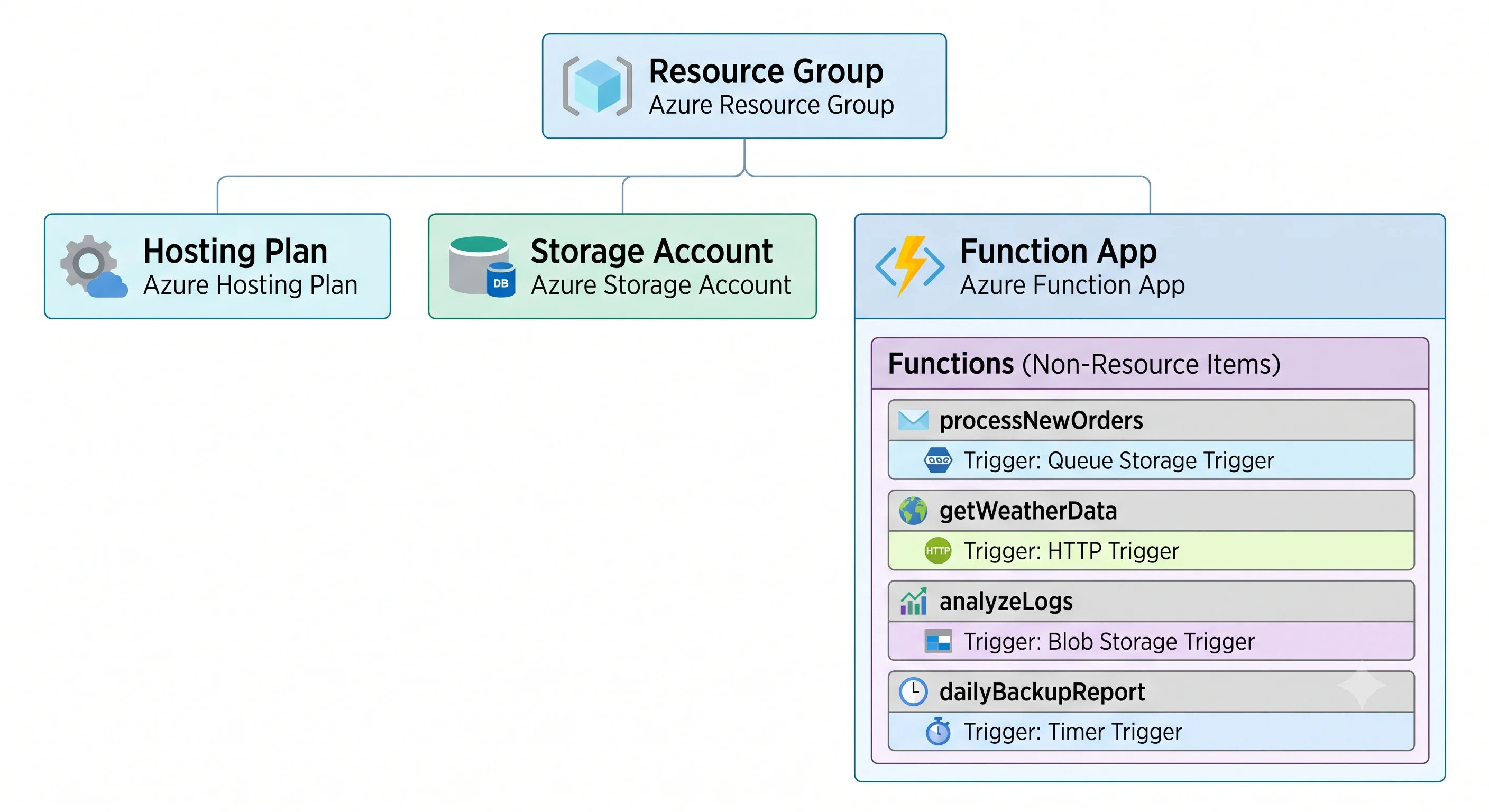
The resource hierarchy
| Term | Analogy | Technical definition |
|---|---|---|
| Function app | The building | A Microsoft.Web/sites ARM resource with kind = functionapp. The deployment unit, the scaling unit, the configuration unit, and the identity boundary. Owns the hostname, the app settings, the managed identity, and the runtime version |
| Function | One doorbell in that building | A named handler inside the app with exactly one trigger and zero or more bindings. Not an ARM resource — you cannot assign RBAC to it, scale it independently, or give it its own identity |
| Hosting plan | The lease on the building | A Microsoft.Web/serverfarms resource (or, on Flex Consumption, properties on the app itself) that determines the compute you get: cold-start behaviour, timeout ceiling, VNet support, scale limits, and the billing model |
| Storage account | The building's utility connection | A general-purpose v2 storage account named by AzureWebJobsStorage. Holds trigger metadata, timer schedules, singleton and partition leases, Durable state, and usually the deployment package. Not optional |
| Application Insights | The building's CCTV | The Azure Monitor component that collects traces, requests, dependencies, and live metrics. Technically optional; practically mandatory, because without it a failed invocation is nearly invisible |
| Deployment slot | A second, identical building you can swap the address plate onto | A parallel instance of the site with its own code and (unless marked sticky) its own settings, swappable with production in a near-atomic operation |
The resource ID makes the shape explicit — the function app sits in a resource group, in a subscription, exactly like everything else (scope hierarchy):
/subscriptions/{sub}/resourceGroups/{rg}/providers/Microsoft.Web/sites/{functionAppName}
/subscriptions/{sub}/resourceGroups/{rg}/providers/Microsoft.Web/serverfarms/{planName}
Note what's missing: there is no resource ID for an individual function. That single fact explains most of the "why can't I…" questions in this topic.
The SKU axis: hosting plans
This is the most consequential table in the topic. Azure services are defined by their tier, and Functions more than most.
| Plan | Scales to zero | Cold start | VNet integration | Max timeout | Billed for |
|---|---|---|---|---|---|
| Consumption | Yes | Yes, and unmitigated | No | Short — minutes ⚠️ verify | Executions + GB-seconds |
| Flex Consumption | Yes | Yes, but reducible with always-ready instances | Yes | Longer, and configurable ⚠️ verify | Executions + GB-seconds, plus any always-ready baseline |
Premium (EP1–EP3) |
No — minimum 1 instance | Removed by pre-warmed instances | Yes | Long / effectively unbounded ⚠️ verify | Per instance, per hour, always |
| Dedicated (App Service Plan) | No | None if Always On is enabled | Yes | Unbounded ⚠️ verify | The plan, hourly, regardless of function activity |
| App Service Environment | No | None | Fully isolated | Unbounded | The ASE, substantially |
| Container Apps hosting | Yes | Yes, reducible with minimum replicas | Yes | Container Apps semantics | Container Apps meters |
What each tier actually unlocks. Consumption gives you the cheapest possible idle and nothing else. Flex Consumption is the modern default: it keeps scale-to-zero economics while adding the two things Consumption always lacked — virtual network integration and a way to buy away cold start instance-by-instance. Premium buys you guaranteed warm capacity and predictable networking at the price of a floor you can never go below. Dedicated is the right answer in exactly one common case: you already run an App Service Plan and there is headroom on it.
Which one is the trap. Two, in opposite directions:
- Consumption is the trap when you need a private network. Teams build on Consumption, then discover the database is behind a private endpoint and the plan simply cannot reach it. The migration path is a plan change and a redeploy — survivable, but it lands at the worst moment. This is the specific gap Flex Consumption exists to close.
- Premium is the trap when nobody is watching the bill. It never scales to zero. An
EP1created "just to test VNet integration" bills every hour of every month until someone deletes it. Search any long-lived Azure subscription for orphaned Elastic Premium plans and you will find one.
Changing plans is not free either: the app moves, the hostname stays, but scaling behaviour, IP addresses, and networking all change. Treat it as a deployment, not a setting.
Triggers and bindings
The heart of the programming model, and the reason Functions is less code than a daemon.
| Term | Analogy | Technical definition |
|---|---|---|
| Trigger | What rings the doorbell | The one event source that causes a function to run. Exactly one per function. Also supplies the payload |
| Input binding | Something handed to you on the way in | A declarative read from another service, resolved before your code runs — a Cosmos DB document, a blob, a table row |
| Output binding | An out-tray emptied for you | A declarative write performed after your code returns — a queue message, a blob, a SignalR message |
| Binding expression | A mail-merge field | {queueTrigger}, {name}, %AppSettingName% — placeholders resolved from the trigger payload or app settings when the binding is evaluated |
| Extension bundle | The plug adapters that come with the appliance | A versioned set of binding extensions declared in host.json for non-.NET languages, so you don't install binding packages by hand |
The common triggers, and the thing about each that isn't obvious:
- HTTP — synchronous request/response. Authorisation defaults to a function key, not identity.
- Timer — CRON schedule. The platform guarantees a single instance runs a given occurrence, using a lease in the storage account. A missed occurrence during a scale-in isn't automatically replayed unless you enable schedule monitoring ⚠️ verify current behaviour.
- Queue (Storage) — polls with exponential backoff, moves to a poison queue after a configured number of attempts. Cheap, simple, no ordering guarantee.
- Service Bus — sessions, dead-lettering, ordering with sessions, and much richer delivery semantics. This is the trigger you want for real work; the Storage queue trigger is the one you use because it was already there.
- Event Hubs — partition-based, checkpointed, batch-oriented. Scale is bounded by partition count; more instances than partitions buys you nothing.
- Event Grid — push-based, near-real-time, the modern replacement for the polling Blob trigger. If a page tells you to use a Blob trigger for a high-volume container, it's out of date; the Event Grid–based blob trigger exists precisely because the polling one scans and lags.
- Cosmos DB — reads the change feed with a lease container. That lease container is a real Cosmos container you pay for, which surprises people.
- Durable — orchestrator, activity, and entity functions, described below.
The rule that matters: bindings are convenience, not architecture. They're excellent for straightforward reads and writes and awkward the moment you need retries with custom policy, transactions, or a client you configure yourself. Using the SDK directly with a managed identity is a completely legitimate choice, and often the better one for output paths.
Runtime, languages, and the execution model
| Term | Analogy | Technical definition |
|---|---|---|
| Functions runtime version | The engine block | The major version of the host, currently v4. Set by FUNCTIONS_EXTENSION_VERSION. Not a thing you change casually |
| Language worker | The specialist you hired | A separate process per language (Node, Python, Java, PowerShell) that the host communicates with. Your code does not run inside the host process |
| Isolated worker model (.NET) | Your own office next door | The current .NET model: your code runs in its own process, with its own DI container and its own .NET version, talking to the host over gRPC |
| In-process model (.NET) | A desk inside the host's office | The legacy model, where your assembly loads into the host and must match its .NET version. Being retired ⚠️ verify the retirement date against current Azure docs — new work should be isolated |
| Custom handler | Bring your own appliance | A lightweight HTTP server in any language, which the host forwards events to. The escape hatch for Go, Rust, and anything unsupported |
host.json |
The building rules | App-wide host configuration: timeout, concurrency, retry policy, logging sampling, extension settings |
local.settings.json |
Your notes at home | Local-development settings and connection strings. Never deployed, and its values must exist as app settings in Azure or the app breaks in ways that look mysterious |
| App settings | The fuse box labels | Environment variables on the app, which is where connection strings, feature flags, and AzureWebJobsStorage live. They are not secret storage — see Integrations for Key Vault references |
The isolated-vs-in-process split is worth understanding even if you don't write C#, because it
explains why .NET Functions samples on the internet contradict each other. If the sample uses
[FunctionName] and takes an ILogger from the host, it's in-process-era. If it uses [Function]
and a FunctionContext, it's isolated.
Keys, identity, and access
| Term | Analogy | Technical definition |
|---|---|---|
| Function key | A key cut for one door | A shared secret scoped to one function, passed as ?code= or the x-functions-key header. The default for HTTP triggers |
| Host key | A master key for the building | A shared secret valid for every function in the app |
| Master key | The key to the key cabinet | A host key with administrative reach, including the admin API. Treat it as the most dangerous secret in the app |
authLevel |
The lock grade on that one door | Per-HTTP-function setting: anonymous (no key), function (function key, the default), admin (host/master key) |
| Managed identity | A staff pass issued by the building's owner | A Microsoft Entra ID identity attached to the function app — system-assigned (lifecycle tied to the app) or user-assigned (shared across apps). The correct way for the function to authenticate outbound |
| App Service Authentication ("Easy Auth") | A receptionist checking ID at the door | Platform-level identity checking on inbound requests, before your code runs — the way to replace function keys with Entra ID |
Note the direction of travel: keys govern who calls your function; managed identity governs what your function may call. They are unrelated mechanisms and conflating them is a standard interview trip-wire.
Scaling and concurrency vocabulary
| Term | Analogy | Technical definition |
|---|---|---|
| Instance | One rented worker unit | A host running your app's code. The unit of scale-out and, on Consumption/Flex, the unit of memory in the GB-seconds calculation |
| Scale controller | The dispatcher watching the queue | An Azure-managed component that monitors trigger sources and decides how many instances the app should have. Not something you can see or configure directly |
| Target-based scaling | Dispatching by backlog size, not by gut feel | The newer scaling algorithm that computes a target instance count from queue depth and per-instance concurrency, rather than adding one instance at a time |
| Always-ready instances (Flex) | Staff rostered before opening | A baseline of pre-provisioned instances that removes cold start for the first N concurrent executions, billed even when idle |
| Pre-warmed instances (Premium) | A spare worker kept in the wings | An extra warmed instance held ready for the next scale-out, so growth doesn't pay a cold start |
| Always On (Dedicated) | Leaving the lights on | An App Service Plan setting that stops the site being unloaded when idle. Required for timer triggers on Dedicated plans, and a classic missing-setting bug |
| Per-instance concurrency | How many jobs one worker takes at once | How many invocations a single instance handles simultaneously, configured per trigger type in host.json (maxConcurrentRequests, batchSize, and friends) |
| Scale-out limit | The size of the labour pool | The maximum instance count for the app. Defaults differ by plan and operating system, and are counted per app, with additional limits per subscription-per-region ⚠️ verify all numbers |
GB-seconds, since it decides your bill: memory observed on an instance, rounded up, multiplied by execution duration. You do not set memory the way you set Lambda's — it's measured. The practical consequence is that reducing memory footprint reduces cost on Consumption plans directly, and that a memory leak is a billing event as well as a stability one.
Durable Functions
| Term | Analogy | Technical definition |
|---|---|---|
| Orchestrator function | The project manager's checklist | Deterministic code that schedules other functions and awaits them. Replays from an event-sourced history, which is why it must be deterministic — no DateTime.Now, no random, no direct I/O |
| Activity function | The person doing the actual work | An ordinary function called by the orchestrator; where all real side effects belong |
| Entity function | A sticky note with a running total | A small piece of addressable, durable state with operations, for counters and aggregations |
| Task hub | The project's filing cabinet | The set of storage queues, tables, and blobs holding orchestration state. Two apps sharing a task hub name will corrupt each other's state — name it explicitly per environment |
Durable is how you do long-running work without one long-running function: fan-out/fan-in, waiting days for a human approval, chaining steps with checkpoints. Its cost profile is dominated by storage transactions, not compute, which is not obvious until the first bill.
The vocabulary trap list
Five pairs people conflate, collected in one place because they account for most confusion:
- Function app ≠ function. The app is the ARM resource; the function is a handler inside it.
- Plan ≠ app. Deleting the app leaves the plan billing.
- Function key ≠ managed identity. Inbound secret vs. outbound identity.
- App setting ≠ secret store. App settings are encrypted at rest but readable by anyone with control-plane access to the app. Use Key Vault references.
- Consumption ≠ Flex Consumption. They bill similarly and behave differently where it matters most — networking and cold start.
Next: Architecture →
← Back to the Azure Functions overview · ← Previous: What & Why