
6. Integrations
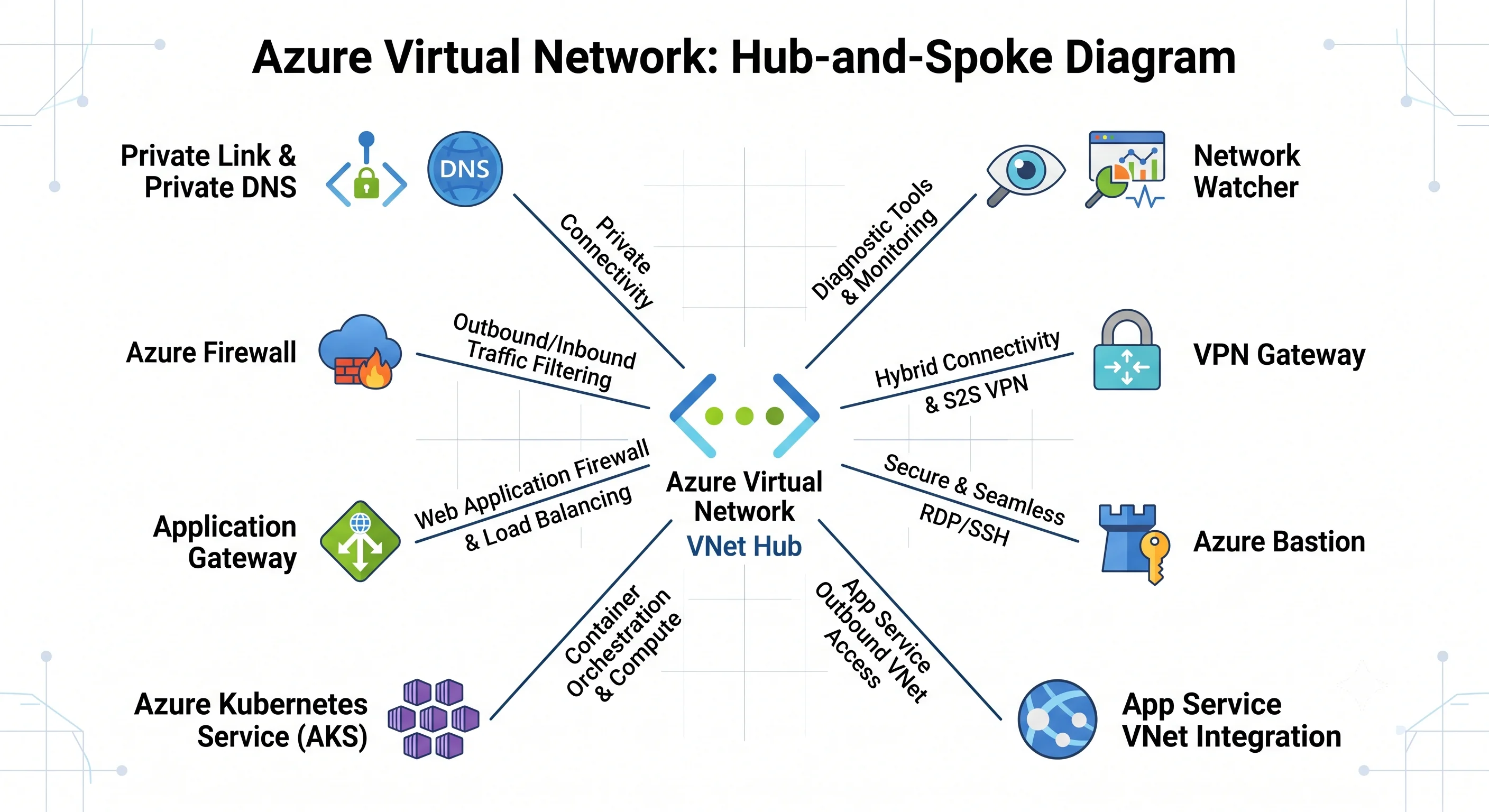
A VNet is the thing everything else plugs into, so this page is inverted relative to other topics: it isn't "the three services this pairs with", it's "the layers you attach and the glue that makes each one work".
The two glue mechanisms
Almost every "how do these talk to each other" question in Azure resolves to one of two answers, and both show up constantly around VNets:
Managed identity + a role assignment — the keyless way one Azure resource authenticates to another. Note carefully that this is an identity mechanism, not a network one. It answers "may this caller read the secret"; it says nothing about whether the packet can reach the vault.
Private endpoint + Private DNS zone — the network mechanism. It answers "can the packet reach the vault privately", and says nothing about who the caller is.
You need both, and confusing them is the most common architectural error on the platform. A private endpoint with the account key still in an app setting is not secure; a managed identity reaching a publicly-exposed storage account is not private.
The integration map
| Pairs with | Why | The glue |
|---|---|---|
| Azure Private Link | Reach PaaS (Storage, Key Vault, SQL, Cosmos DB) on a private IP with no public exposure | A private endpoint NIC in a dedicated subnet, plus a privatelink.* Private DNS zone linked to the VNet |
| Azure Private DNS | Make the PaaS hostname resolve to the private IP | A virtual network link per zone per VNet; auto-registration for VM records |
| Azure Firewall | Inspect, log, and filter egress by FQDN and threat intelligence | A /26 AzureFirewallSubnet in the hub, plus a UDR in each spoke sending 0.0.0.0/0 to the firewall's private IP |
| Azure Load Balancer | L4 distribution and zone-redundant fronting | A Standard LB with a backend pool of NICs, a health probe, and (if outbound) explicit outbound rules |
| Application Gateway / WAF | L7 routing, TLS termination, OWASP rules | A dedicated subnet, a backend pool of private IPs, and an NSG that must allow the Gateway Manager service tag |
| Azure Kubernetes Service | The cluster's nodes and, with Azure CNI, its pods live in your subnets | Node pool subnet plus (CNI) pod IPs from the same or an overlay range; a UDR if egress is firewalled |
| App Service / Functions | Let a PaaS app reach private resources | Regional VNet integration into a delegated subnet for outbound; a private endpoint for inbound |
| Azure Bastion | Browser or native RDP/SSH without a public IP on the VM | An AzureBastionSubnet (/26) and a Standard public IP on the Bastion host |
| VPN Gateway / ExpressRoute | Attach on-premises | A GatewaySubnet, plus allowGatewayTransit on the hub peering and useRemoteGateways on each spoke |
| Azure Monitor / Log Analytics | See what the network is doing | VNet flow logs → storage → Traffic Analytics → workspace; diagnostic settings on gateways and firewalls |
| Network Watcher | Diagnose reachability without guessing | Automatically enabled per region; IP flow verify, next hop, connection monitor, packet capture |
| Microsoft Entra ID | Control who may change the network | Azure RBAC — Network Contributor, and the subnets/join/action grant application teams need |
| Azure Policy | Enforce network rules on resources not in your state file | Assignments at the management group above the subscriptions |
Private Link and Private DNS — the pairing to get right
This is the integration that fails most often, and it always fails the same way. Walk the chain:
Create a private endpoint for the target resource, naming the sub-resource. This matters: a storage account has separate sub-resources for
blob,file,queue,tableanddfs, and each needs its own endpoint. One endpoint does not cover the account.The endpoint gets a private IP from your subnet. That subnet should have
private_endpoint_network_policiesset toDisabledif you want the endpoint to work with a UDR-heavy design, andEnabledif you want NSGs to apply to it ⚠️ verify current semantics against current Azure docs — this flag's behaviour has changed.Create the Private DNS zone with the exact prescribed name. Not a name you like:
Service Zone Blob Storage privatelink.blob.core.windows.netKey Vault privatelink.vaultcore.azure.netAzure SQL privatelink.database.windows.netCosmos DB (SQL API) privatelink.documents.azure.comService Bus / Event Hubs privatelink.servicebus.windows.netACR privatelink.azurecr.io⚠️ Verify the current zone name per service against current Azure docs; they are prescribed and getting one character wrong produces a silent public-IP fallback.
Link the zone to the VNet (
azurerm_private_dns_zone_virtual_network_link). This is the step everyone forgets. Without it the zone exists, the A record exists, and the VM still resolves the public IP because it was never told to look in that zone.Disable public network access on the target resource. Otherwise you've added a private path without removing the public one, which buys you cost and complexity and no security.
How the resolution actually works, so you can debug it: the public name
mystorage.blob.core.windows.net resolves to a CNAME
mystorage.privatelink.blob.core.windows.net. If the private zone is linked, that name resolves to
your endpoint's private IP; if it isn't, it falls through to the public Azure DNS answer. That's why
the failure is silent and why nslookup from inside the VNet is always the first diagnostic:
nslookup mystorage.blob.core.windows.net
# 10.20.3.4      → correct: the private zone is linked
# 20.150.x.x     → the zone is missing, unlinked, or your custom DNS isn't forwarding
From on-premises, add an Azure DNS Private Resolver with an inbound endpoint in the hub and point your corporate DNS at it with a conditional forwarder. This replaces the old pattern of running two DNS forwarder VMs and is worth migrating to.
Hub-and-spoke, assembled
The reference topology, and how the pieces above fit together:
hub VNet  10.0.0.0/22          (platform team's subscription)
├── AzureFirewallSubnet  10.0.0.0/26   → Azure Firewall  (private IP 10.0.0.4)
├── GatewaySubnet        10.0.1.0/27   → ExpressRoute / VPN Gateway
├── AzureBastionSubnet   10.0.2.0/26   → Bastion
└── snet-dns             10.0.3.0/28   → DNS Private Resolver inbound endpoint

spoke: prod  10.20.0.0/20     (application subscription)
├── snet-app          → UDR: 0.0.0.0/0 → 10.0.0.4
├── snet-db           → NSG: 1433 from snet-app only
├── snet-pe           → private endpoints; Private DNS zones linked
└── snet-integration  → delegated to Microsoft.Web/serverFarms
The flags that make it work, and the order they fail in when missing:
- On the hub→spoke peering:
allowForwardedTraffic = true,allowGatewayTransit = true. - On the spoke→hub peering:
allowForwardedTraffic = true,useRemoteGateways = true. - In each spoke: a UDR sending
0.0.0.0/0to the firewall's private IP — because peering alone is non-transitive and gives you no path to anything but the hub itself. - On the firewall: rules permitting spoke-to-spoke traffic. The route gets the packet there; the firewall still has to allow it. A "connected but no traffic" report is usually here.
- Private DNS zones linked to every spoke VNet, not just the hub. Zone links are per-VNet and do not inherit through peering — a genuinely surprising fact that costs people hours.
The recurring mistake: teams build the peering, see Connected, and expect spoke-to-spoke to
work. It doesn't, and the fix is never on the peering. Check the UDR, then the firewall rule, then
allowForwardedTraffic, in that order.
AKS — where networking gets opinionated
AKS is the integration that most constrains your address plan, so decide early:
- Azure CNI (traditional) — every pod gets a VNet IP. Pods are directly routable from
on-premises, which is excellent, and you will run out of addresses, which is not. Sizing is
roughly
nodes × (max pods per node + 1), so a 30-node cluster at 30 pods each needs about 930 addresses — a/22, for one cluster. - Azure CNI Overlay — pods get addresses from a private overlay range that doesn't consume VNet space; only nodes take VNet IPs. This is the current default recommendation and the right choice unless you specifically need pods routable from outside.
- kubenet — the legacy low-IP option, being retired ⚠️ verify current status against current Azure docs. Don't start here.
Also: an AKS cluster with a UDR-based egress path needs outboundType = userDefinedRouting and a
firewall rule set permitting the control-plane FQDNs, or the nodes never join. And AKS writes back
into your subnet, which is the drift source called out in Deployment.
App Service and Functions — two directions, two mechanisms
The single most confused pairing in Azure networking, because "VNet integration" sounds like it should do both:
| I want… | Use | Notes |
|---|---|---|
| The app to reach private resources (outbound) | Regional VNet integration into a delegated subnet | Delegated to Microsoft.Web/serverFarms, dedicated to this app service plan, sized /26 or larger. Requires an appropriate plan tier |
| The app to be reachable only privately (inbound) | Private endpoint on the app | Disables public access; you now need private DNS for privatelink.azurewebsites.net |
They are independent. Wanting both means configuring both. Also note that by default VNet integration only routes RFC 1918 traffic into the VNet — routing all outbound traffic through the VNet (so it hits your firewall) is a separate setting ⚠️ verify the current property name against current Azure docs.
Network Watcher — the diagnostic toolkit
Enabled automatically per region. These are the tools that replace the router CLI you don't have:
| Tool | Answers |
|---|---|
| IP flow verify | "Would this specific flow be allowed?" — returns Allow/Deny and the deciding rule name |
| NSG diagnostics | The same, but evaluates both the subnet and NIC NSGs together and shows the full path |
| Next hop | "Where would Azure send this packet?" — settles every UDR argument |
| Connection troubleshoot | An actual end-to-end test between two resources, with the hop that failed |
| Connection monitor | The same, continuously, with alerting — the right tool for "is the ExpressRoute path healthy" |
| Packet capture | tcpdump on a VM, triggered remotely, written to storage |
| Effective security rules | The merged view of every NSG rule applying to a NIC |
| Effective routes | The merged routing table a NIC actually sees, including BGP-learned routes |
The last two are underused and should be your first stop in any "why can't it reach it" ticket — they show you the resolved state, not the configuration you think you applied.
Flow logs and Traffic Analytics
VNet flow logs record allowed and denied flows at the VNet level. They supersede NSG flow logs, which have been retired ⚠️ verify the current retirement status against current Azure docs — if you have NSG flow logs configured in old Terraform, that's a migration you owe yourself.
Flow logs land in a storage account. Traffic Analytics is the layer on top that processes them into a Log Analytics workspace with topology, geography, and malicious-IP enrichment. Raw flow logs are nearly unusable by hand; Traffic Analytics is what makes them answer questions. It costs processing money, so enable it in prod and skip it in dev.
Azure Policy — enforcing what Terraform can't see
Terraform governs what's in your state file. Policy governs everything else, which in a shared VNet is a lot. The assignments that earn their keep:
- Deny inbound NSG rules from
*orInterneton management ports (22, 3389) and database ports (1433, 3306, 5432). - Deny subnets without an NSG association.
- Deny public IP creation in spoke subscriptions.
- DeployIfNotExists flow logs and diagnostic settings on every new VNet.
- Audit peerings to VNets outside the tenant.
Assign at the management group above the environment subscriptions so the policy exists before anyone creates a resource under it — see the scope hierarchy.
Next: Production →
← Back to the Virtual Network overview · ← Previous: Deployment