
3. Architecture
The part most tutorials skip. App Configuration looks trivial from the outside — an HTTP GET that
returns strings — and almost every production problem with it comes from one of four things this page
covers: the RBAC split between the two planes, the caching and refresh model, cross-replica
consistency, and what happens at startup when the store says 429.
The read path, end to end
Trace one application start-up:
- The app resolves the endpoint. It gets
https://<store>.azconfig.iofrom somewhere that isn't App Configuration — an environment variable, an App Service application setting, a Kubernetes env var. There is always exactly one bootstrap value you cannot store in the store. - The client acquires a credential. With
DefaultAzureCredential, the SDK walks its chain: managed identity when running in Azure, environment variables, then developer credentials locally. It requests an Entra token for the App Configuration resource audience. (With a connection string instead, this step is replaced by HMAC request signing using the embedded key — see the auth section below for why you shouldn't.) - The client discovers replicas. Given the origin endpoint, the SDK performs replica discovery and builds an ordered list of endpoints to try. ⚠️ The discovery mechanism has changed across SDK versions; verify current behaviour for your language. Hand-rolled HTTP clients skip this and therefore have no failover.
- The client issues its selects. Not one request — one per configured
(key filter, label filter)pair, paginated. A typical .NET setup issues two:Select("*", null)for shared defaults andSelect("*", "prod")for overrides. The service returns matching key-values with their etags. - The service authorises the request. The data plane checks the Entra token against Azure RBAC
assignments scoped to the store (
App Configuration Data Reader/Data Owner) — not against the control-plane roles. - Magic content types are resolved. Key Vault references are not resolved by the store. The client sees the reference content type, extracts the secret URI, and makes a second call, to Key Vault, with its own identity. If that role assignment is missing, this is where startup fails — and the error surfaces as a Key Vault authorisation failure, which sends people to debug the wrong service.
- Values are layered and bound. Later selects override earlier ones by key. Prefixes are
trimmed,
:separators are mapped to nested objects, JSON content types are parsed, and the result is merged into the app's native configuration system —IConfigurationin .NET,Environmentin Spring, a dict in Python. - Everything is cached in memory with a per-key etag and a cache expiry. From here on, no request your application serves touches App Configuration. That is the intended design.
- A background refresh polls. On the configured interval, the client issues conditional requests
using the stored etags. Unchanged means
304 Not Modified— cheap, but still a billable request. Changed means the affected values are re-fetched and change tokens fire.
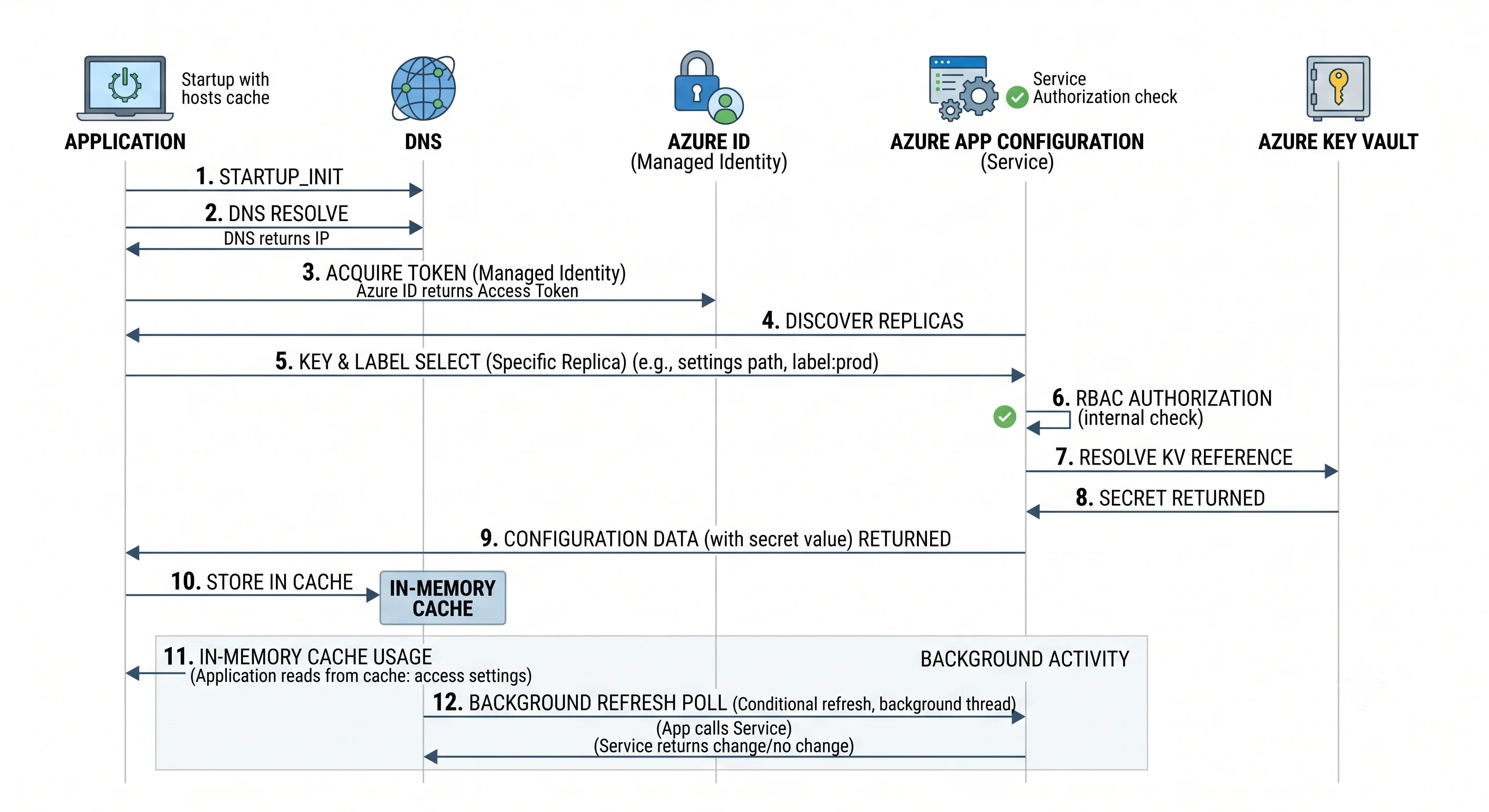
The shape to remember: two round trips at startup (store, then Key Vault), then nothing per request,
then a cheap poll on a timer. Any deviation from that shape — a read on the request path, a
one-second refresh interval, a client per request — is a design bug that shows up as 429s and
overage.
Control plane vs. data plane — and the seam that leaks
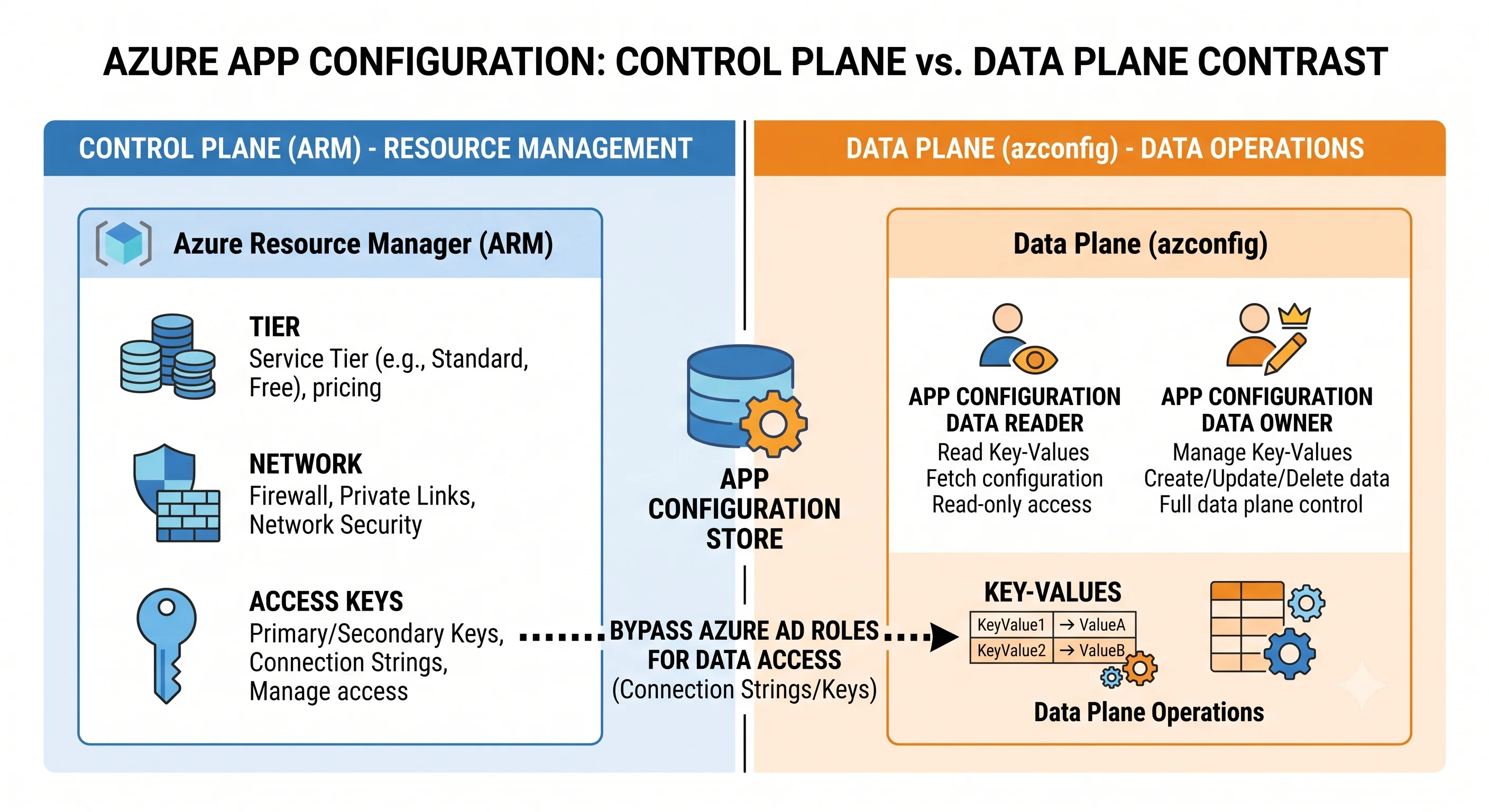
Azure's plane split is sharper than AWS's and it catches people constantly. On this service it is also a security boundary that quietly isn't one, which makes it the highest-value thing on this page.
| Control plane | Data plane | |
|---|---|---|
| Endpoint | ARM — management.azure.com |
https://<store>.azconfig.io |
| Governs | Creating the store, tier, network rules, identity, encryption, replicas, soft-delete policy, and the access keys | Reading and writing key-values, feature flags, snapshots, revisions |
| Callers | Portal (resource blades), az appconfig create/update/show, Terraform azurerm_app_configuration, Bicep configurationStores |
Portal (Configuration explorer / Feature manager blades), az appconfig kv *, Terraform azurerm_app_configuration_key, client SDKs |
| Typical built-in roles | App Configuration Contributor (manage the resource), plus generic Owner/Contributor/Reader | App Configuration Data Owner (read/write key-values), App Configuration Data Reader (read only) |
| Audited in | Activity log | Diagnostic settings (HttpRequest/Audit log categories ⚠️ verify current category names) |
The rule: being Owner or Contributor on the store does not grant you permission to read a key-value through the data plane. Open the Configuration explorer blade as a Contributor with no data role and — depending on how the portal falls back — you will either be told you're unauthorised or find that the portal quietly used an access key on your behalf. Conversely, an identity with App Configuration Data Reader and nothing else can read every setting and cannot see the resource in the portal's resource list.
And here is the leak. The access keys are a control-plane property. Microsoft.AppConfiguration/ configurationStores/ListKeys/action is a control-plane permission, and it is included in
Contributor and App Configuration Contributor. So a Contributor can list the keys and then use
them to sign data-plane requests as a full data owner. The plane separation is real for Entra-based
access and completely bypassed by key-based access.
The fix is one property:
az appconfig update -n <store> -g <rg> --disable-local-auth truelocal_auth_enabled = falseWith local auth disabled, the keys stop working, the data plane is Entra-only, and the plane split becomes an actual boundary. Do this on every store that holds anything you'd mind a resource-group Contributor reading. Enforce it with Azure Policy across the subscription — see Production.
Caching, refresh, and the sentinel key
The client library's cache is not an optimisation you can ignore — it is the mechanism by which the service is safe to depend on, and its configuration is where most "it's reading the wrong value" reports come from.
The model is polling, not push. There is no persistent connection, no long poll, no webhook into your process. The client stores an etag per watched item and re-checks after the cache expiration / refresh interval elapses, and only when something in your app asks the refresher to try. Two things follow:
- A change takes up to one refresh interval to appear, plus however long your process takes to notice. There is no "config updated" guarantee and no way to make it instant through this path. (You can get near-real-time by subscribing to Event Grid change events and triggering a refresh — see Integrations — but that's a system you build, not a feature you toggle.)
- Every poll is a billable request per watched item per instance. A 30-second interval, watching
20 keys, across 50 instances, is a lot of requests per day. This is the number-one cause of overage
and of
429s. Watch a sentinel key, not twenty keys, and set the interval in tens of seconds at the fastest.
The sentinel-key pattern solves the atomicity problem. Suppose a change requires editing three related keys. If clients watch all three independently, an instance can easily observe key 1's new value alongside keys 2 and 3's old values — a torn read of your configuration. Instead:
- Clients register one key for refresh — conventionally
Sentinel— and mark it as the trigger. - On refresh, if the sentinel's etag changed, the client re-loads all configured selects.
- An operator edits the three keys, then edits the sentinel last (typically to a version string or timestamp).
The result is that clients see the whole batch or none of it, and you pay for one watched key rather than twenty.
// .NET — the shape that matters, not the boilerplate
builder.Configuration.AddAzureAppConfiguration(options =>
{
    options.Connect(new Uri(endpoint), new DefaultAzureCredential())
           .Select("*", null)          // shared defaults
           .Select("*", environment)   // environment overrides win
           .ConfigureKeyVaultReference(kv => kv.SetCredential(new DefaultAzureCredential()))
           .ConfigureRefresh(refresh => refresh
               .Register("Sentinel", refreshAll: true)
               .SetRefreshInterval(TimeSpan.FromSeconds(30)))
           .UseFeatureFlags(ff => ff.SetRefreshInterval(TimeSpan.FromSeconds(30)));
});
⚠️ Method names on the client libraries have shifted between major versions (SetCacheExpiration →
SetRefreshInterval, and the feature-flag options surface has changed); verify against the current
SDK for your language. The pattern — one sentinel, refreshAll, an interval in tens of seconds —
is stable.
Two further caching notes:
- Snapshot-pinned config does not refresh. By design: a snapshot is immutable. If your app loads a snapshot, a value change reaches it only via a new snapshot and a new deployment. Most teams pin the release-shaped settings to a snapshot and leave the operational dials on live selects.
- The refresh is opportunistic. In ASP.NET Core the middleware triggers it per request; in a
worker or a console app you must call
TryRefreshAsyncyourself on a timer. A background service that never calls it will hold its startup values forever, which looks exactly like a caching bug and is actually a missing call.
Consistency and durability
- Within a single replica: read-after-write consistency for your own writes. Write a key-value, read it back from the same endpoint, get the new value. Conditional operations on the etag give you optimistic concurrency, so two writers editing the same key can be made to conflict loudly rather than silently last-write-wins.
- Across replicas: eventual. Replication is asynchronous. Write to the West Europe replica and read immediately from the East US replica and you may see the old value. Convergence is fast, but design for it: don't build a workflow that writes to one region and validates from another.
- Durability: the store is replicated within its region by the platform, with zone redundancy on the higher paid tiers in regions that support zones. Revisions give you point-in-time recovery of key-values within a tier-dependent retention window, and soft delete protects the store resource itself. ⚠️ Verify current zone-redundancy behaviour, retention windows, and SLA figures.
- What is not backed up: nothing here is a substitute for exporting your configuration. The
authoritative copy of your configuration should be in git and applied by a pipeline; treat the store
as a cache of your repository, not as the only place the values exist.
az appconfig kv exportexists for exactly this and belongs in a scheduled job.
Scaling model
There is nothing to scale. No instance count, no throughput units, no partition key. The store is a multi-tenant managed service and your only levers are:
- The tier, which sets storage capacity and the included request allowance.
- Replicas, which add regional endpoints and additional request capacity, at a proportional cost.
- Your client behaviour, which is where all the real variance lives: refresh interval, number of watched keys, number of selects, instance count, and whether anybody is reading per-request.
The ceiling you actually hit is the request quota, and its scope matters: request allowance is counted per store (and per replica), while the "how many Free-tier stores may I have" limit is counted per subscription per region. A number without a scope is useless in Azure — the full table is in Production.
Failure modes
Throttling (429). The service returns HTTP 429 with a retry-after-ms header when you exceed
the tier's request rate or, on Free, the daily cap. The SDKs implement retry with backoff and honour
the header; hand-rolled clients typically don't. Causes, in the order you'll actually meet them:
- A refresh interval set to a second or two, multiplied by instance count.
- Reading configuration per request instead of from the cached provider.
- Registering many individual keys for refresh instead of a sentinel.
- A Free-tier store in something that isn't a demo, hitting the daily cap mid-afternoon.
- A CI pipeline importing thousands of key-values in a tight loop (use
az appconfig kv import, which batches, rather than a loop ofkv set).
Startup failure. The one genuinely new failure mode the service introduces. Config is read at process start, so an unavailable or throttled store means a process that doesn't start — and under Kubernetes or App Service, a deployment that doesn't come up. Mitigate deliberately:
optional: trueon the configuration source so an unreachable store doesn't throw, if your app can run on baked-in defaults. Be honest about whether it can.- A local fallback — an
appsettings.jsonlayered underneath App Configuration holding last-known-good values for the settings that must exist. - Geo-replication with client failover for anything where a regional App Configuration incident must not stop deployments.
- A startup timeout and a clear log line. "Timed out loading configuration from
<store>.azconfig.io" saves an hour compared with a generic dependency-injection stack trace. - Snapshots, which reduce the blast radius of a bad edit but not of an unreachable store.
Authorisation failures that point at the wrong service. Two classics: a missing data-plane role (the app has Contributor, which is useless here) and a missing Key Vault Secrets User role on the referenced vault (the failure is reported by Key Vault, not App Configuration). Both look like outages and are neither.
Network isolation failures. With a private endpoint and public access disabled, anything not on
the VNet — including a GitHub-hosted CI runner and, notably, your own laptop — cannot reach the data
plane. Portal access needs a path in too. This surfaces as a timeout rather than a 403, which sends
people looking for a permissions problem. See Production.
Torn configuration reads. Covered above: the reason the sentinel key exists. Symptoms are intermittent, environment-specific, and maddening.
Soft-delete name collisions. A store you deleted an hour ago still owns its globally unique name. Recreating it fails until you recover or purge. In CI this looks like a flaky pipeline; it isn't. See Deployment.
Next: Getting Started →
← Back to the Azure App Configuration overview · ← Previous: Core Concepts