
3. Architecture
Most networking tutorials stop at "attach an NSG and it works". This page is about what actually happens to a packet, why the answers to "why can't A reach B" are so consistent, and where the ceilings are.
There is no network device
Start here, because everything else follows from it. When a VM in snet-app sends a packet to a VM
in snet-db, that packet does not traverse a virtual router, a virtual switch, or a virtual
firewall. It is processed by the host the VM is running on.
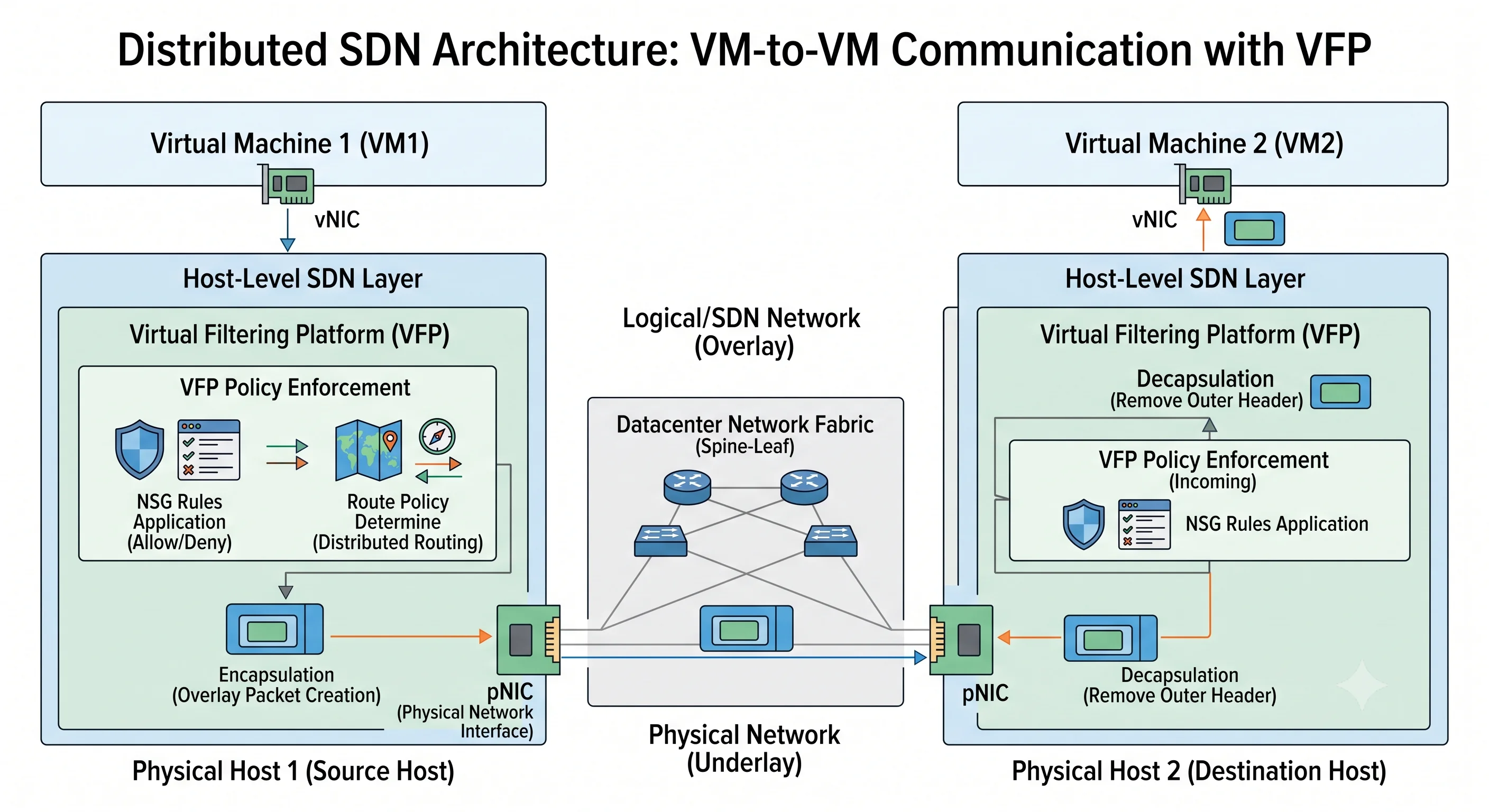
Each Azure host runs a software-defined-networking stack whose packet-processing component is the
Virtual Filtering Platform (VFP) — a programmable match-action engine sitting in the virtual
switch, offloaded onto Accelerated Networking hardware (a SmartNIC / FPGA) where the VM size
supports it. Azure's control plane pushes your VNet's policy — the address mappings, the NSG
rules, the routes — down to every host that has a NIC in that VNet. The host rewrites and filters
in place, then sends the packet across the physical datacentre network encapsulated so the physical
fabric never needs to know about your 10.20.0.0/16.
Three consequences you can reason from:
- NSG rules are free. They're evaluated in the host datapath, largely in hardware. A hundred rules cost you nothing in throughput. There is no appliance to size, scale, or fail over.
- There is nothing to log into. No routing table to
show, no interface counters. Your entire observability surface is flow logs, Network Watcher, and metrics. Plan for that. - Layer-2 tricks don't exist. No broadcast, no multicast, no GRE or IP-in-IP, no promiscuous mode, no ARP spoofing, no virtual MAC failover. Clustering software that relies on gratuitous ARP or a floating virtual IP needs the Azure-native pattern instead (a load balancer with a health probe, or Azure's floating-IP feature).
The path of one packet
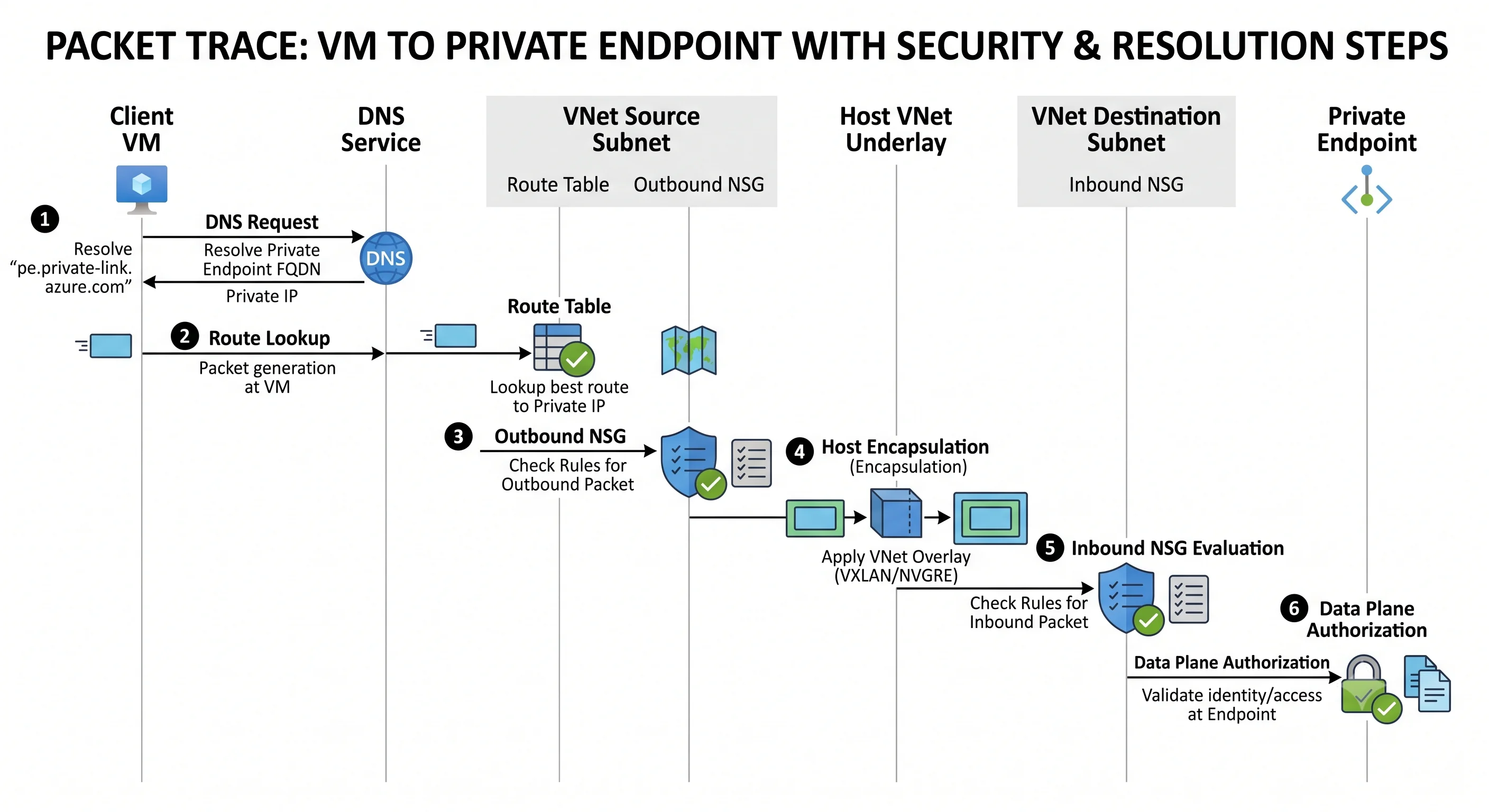
Trace a VM in snet-app (10.20.1.10) reaching a private endpoint for a storage account
(10.20.3.4) in snet-pe of the same VNet:
- DNS first. The VM asks its configured resolver for
mystorage.blob.core.windows.net. By default that resolver is Azure-provided DNS at168.63.129.16(see below). Because a Private DNS zone namedprivatelink.blob.core.windows.netis linked to this VNet, the CNAME chain terminates at an A record of10.20.3.4. If the zone isn't linked, this step returns the public IP and everything after it goes wrong — this is the single most common private endpoint failure. - Route lookup on the host. The destination
10.20.3.4falls inside the VNet's own address space, so the system routeVirtualNetworkwins unless a UDR overrides it. Selection order is below. - Outbound NSG evaluation. NIC NSG first, then subnet NSG. Both must allow. The default
AllowVnetOutBoundat 65000 permits this unless you've written something tighter. - Encapsulation and transit. The host maps
10.20.3.4to the physical address of the host holding that endpoint and sends the encapsulated packet across the datacentre fabric. - Inbound NSG evaluation on arrival. Subnet NSG first, then NIC NSG. Note that private endpoint NICs ignore NSGs by default unless the subnet has network policies for private endpoints enabled — a real, deliberate exception worth knowing, because people write a deny rule and are surprised it has no effect ⚠️ verify current default behaviour against current Azure docs.
- The service's own data-plane authorisation. Reaching the endpoint is not reading the blob.
Azure Storage still evaluates the caller's Entra ID token against the
Storage Blob Data Readerrole, or a SAS, or the account key. Network reach and authorisation are two independent gates.
Route selection order
When several routes could match a destination, Azure resolves it deterministically:
- Longest prefix match wins. A route for
10.20.3.0/24beats one for10.0.0.0/8, regardless of where either came from. This is the rule people forget when their0.0.0.0/0 → firewallUDR appears not to apply to VNet-internal traffic — it doesn't, because the system route for the VNet's own prefix is longer. - On a tie, source precedence decides: UDR beats BGP (routes learned from ExpressRoute or a VPN gateway) beats system route.
Practical readings of that:
- To force VNet-internal traffic through a firewall you must write a UDR at least as specific as
the VNet's own system route — usually a per-subnet
/24route, not a0.0.0.0/0. - A UDR for
0.0.0.0/0 → VirtualApplianceoverrides the system internet route, which is exactly what forced tunnelling means and exactly how people accidentally black-hole Azure management traffic. Service-tag routes (AzureCloud → Internet) are the usual exemption mechanism. - On-premises advertising
0.0.0.0/0over BGP will silently override your internet route for the whole subnet unless a UDR beats it.
The fastest way to settle any argument about this is az network watcher show-next-hop, which tells
you what Azure will actually do with a given source and destination.
NSG evaluation order
Within one NSG: ascending priority, first match wins, evaluation stops. There is no "most
specific rule" logic and no implicit precedence for Deny — a Deny at 200 loses to an Allow at
100. This is the opposite of most people's intuition from firewall products that put denies first.
Across the two attachment points:
| Direction | Order |
|---|---|
| Inbound to a VM | Subnet NSG → NIC NSG |
| Outbound from a VM | NIC NSG → Subnet NSG |
Both must allow. Because they're evaluated independently, a subnet NSG that allows and a NIC NSG that denies produces a drop that looks identical to a routing failure. Network Watcher's NSG diagnostics and IP flow verify tell you which rule, in which NSG, made the decision — use them before you start guessing.
Stateful means the return flow is implicit. You do not write a matching outbound rule for inbound HTTP. You do need to think about it for UDP-based protocols with long idle gaps, where the flow state expires (default idle timeout is on the order of minutes ⚠️ verify current value) and the next packet is treated as a new flow.
Control plane vs. data plane
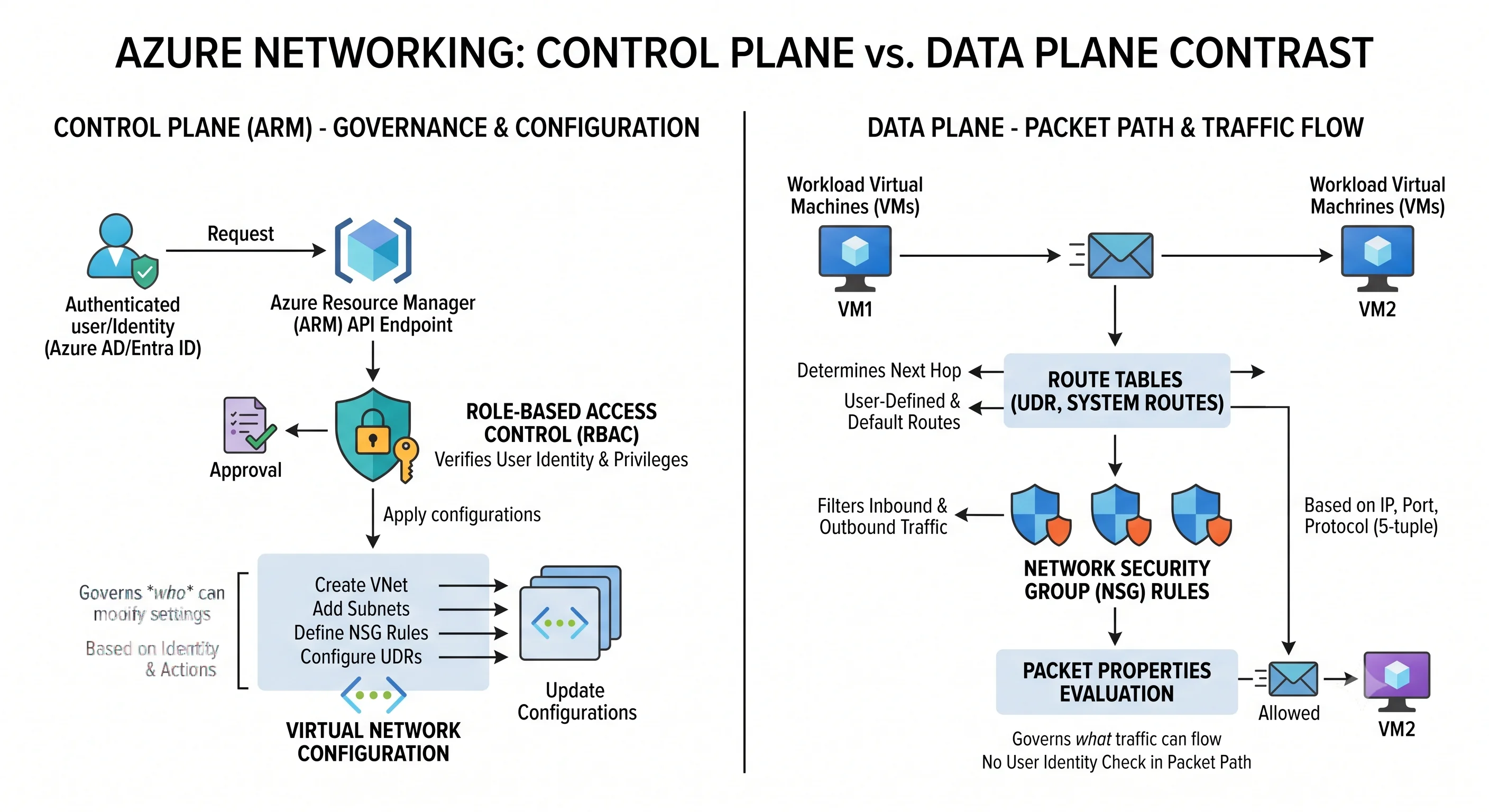
The split is unusually clean here, and unusually consequential.
The control plane is ARM. Creating a VNet, adding a subnet, writing an NSG rule, attaching a
route table — all are Microsoft.Network/* operations against management.azure.com, governed by
Azure RBAC. The relevant built-in roles:
| Role | Covers |
|---|---|
| Network Contributor | Full management of networking resources — VNets, subnets, NSGs, route tables, load balancers, gateways. Does not grant access to the VMs inside |
| Contributor | Everything Network Contributor does, plus everything else in scope |
| Reader | View configuration only |
The data plane is the packet path — and it has no RBAC. There is no identity attached to a TCP SYN. Nobody is "authorised" to send a packet; the packet is permitted or dropped by NSG rules, routes, and firewall policy. Azure RBAC governs who may change the rules, never who may traverse them. This is the cleanest example in Azure of network controls and identity controls being genuinely orthogonal, and the reason "it's behind a private endpoint" is a defence-in-depth statement rather than an access-control statement.
The classic mistake — join/action. Deploying a VM into a subnet requires the
Microsoft.Network/virtualNetworks/subnets/join/action permission on the VNet, not on the VM's
resource group. In hub-and-spoke estates the VNet usually lives in a central networking resource
group or a different subscription, so an application team with Contributor on their own resource
group gets:
Resource 'vnet-hub-prod' does not exist or one of its queried
reference-property objects are not present.
— a message that reads like the VNet is missing and actually means "you can't see it". The fix is a
role assignment scoped to the VNet or subnet, typically Network Contributor on the subnet, or a
custom role granting only join/action and read. This is the single most common Azure networking
RBAC issue and a reliable interview question.
DNS: the magic IP
168.63.129.16 is a special Azure address, identical in every VNet and every region. It is:
- the Azure-provided DNS resolver, mapped into each subnet via the two reserved addresses
(
x.x.x.2andx.x.x.3); - the source of load balancer health probes;
- the endpoint the VM agent uses for platform communication and heartbeat.
Because it's virtual and host-local, it is reachable from every VM regardless of NSGs — the default
AllowAzureLoadBalancerInBound rule exists to keep probe traffic flowing. Block it with an
over-enthusiastic deny rule and you break health probes, DHCP lease renewal, and the guest agent
simultaneously, which manifests as an assortment of unrelated-looking failures.
Your DNS options, in ascending order of effort:
- Azure-provided DNS (default). Resolves public names and, within a VNet, the internal names of VMs. Cannot be used from on-premises.
- Private DNS zones linked to the VNet. This is how private endpoints work; the zone name is
prescribed per service (
privatelink.blob.core.windows.net,privatelink.vaultcore.azure.net,privatelink.database.windows.net). Linking with auto-registration also gives you VM name records. - Custom DNS servers set on the VNet — your own resolvers, usually domain controllers. Note
this is a VNet-level setting, applied to VMs at DHCP lease renewal, so existing VMs need a
restart or
ipconfig /renewto pick it up. Custom resolvers must forward to168.63.129.16to keep Azure name resolution working. - Azure DNS Private Resolver. A managed service with inbound and outbound endpoints, letting on-premises resolve Azure private names and vice versa without running DNS VMs. This is the modern answer to hybrid DNS and replaces the old "two DNS forwarder VMs in the hub" pattern.
Outbound connectivity and SNAT
A VM with only a private IP that wants to reach the internet needs a public source address to receive replies at. Azure gives you three explicit ways, in descending order of preference:
- NAT Gateway on the subnet. Best scale, on-demand port allocation across all its public IPs, simplest to reason about. The recommended default.
- Standard Load Balancer outbound rules. Works if the VM is already in a backend pool. Pre-allocates a fixed block of SNAT ports per instance from each frontend IP, which is where exhaustion comes from.
- An instance-level public IP on the NIC. No SNAT sharing at all, but a public IP per VM, and an inbound exposure you now have to defend with NSGs.
Azure's historic implicit outbound access has been retired for newly created VNets and subnets, so a new subnet with none of the above has no internet egress ⚠️ verify the current retirement scope and dates against current Azure docs.
SNAT port exhaustion is the classic Azure networking incident and worth understanding precisely. A SNAT mapping is per destination IP-and-port, so a workload making many connections to a single destination — a payment API, a single Redis endpoint, a shared SQL server — burns through its port allocation while a workload spreading calls across many destinations doesn't. Symptoms: connections that hang and then time out at exactly the same rate every day at peak, with the application logs blaming the remote service. Fixes, in order: connection pooling and keep-alive in the application (this is the real fix, and the one people skip), a NAT Gateway, more public IPs on the NAT Gateway, or a private endpoint / service endpoint to the destination so the traffic never needs SNAT at all.
Scaling and where the ceilings are
The VNet itself has no throughput to provision — bandwidth is a property of the VM size, not the
network. A Standard_D2s_v5 has a lower network cap than a D16s_v5; that's the ceiling you'll hit
first, and Accelerated Networking (on by default for supported sizes) is what gets you the rest of
the way by bypassing the software switch.
The limits that actually constrain designs, and — critically — the scope each is counted at:
| Limit | Approximate default | Counted at |
|---|---|---|
| VNets | ~1,000 | Per subscription per region |
| Subnets per VNet | ~3,000 | Per VNet |
| Private IPs per VNet | ~65,536 | Per VNet |
| Peerings per VNet | ~500 | Per VNet |
| NSGs | ~5,000 | Per subscription per region |
| Rules per NSG | ~1,000 | Per NSG |
| Route tables | ~200 | Per subscription per region |
| Routes per route table | ~400 | Per route table |
| Public IPs (Standard) | ~1,000 | Per subscription per region |
| NICs | ~65,536 | Per subscription per region |
⚠️ Every number in this table is a default that varies by subscription type and region and changes over time — verify against current Azure docs before designing to it. The durable content is the right-hand column: most Azure networking quotas are per subscription per region, which is why "one subscription per environment" is the standard blast-radius and quota strategy and why a single shared subscription for everything hits ceilings in surprising places.
Most are soft limits raisable through a quota request in the portal or az quota; peerings per VNet
and routes per table are the ones you're most likely to design around rather than raise.
Failure modes worth recognising on sight
| Symptom | Usual cause |
|---|---|
Peering shows Initiated, not Connected |
Only one side of the peering was created |
Peering is Connected but traffic doesn't flow |
Missing UDR (non-transitive hub), or allowForwardedTraffic not set |
| Peering worked, then a new subnet became unreachable | Address space was extended after peering; needs az network vnet peering sync on both sides |
| Two VNets can never be peered | Overlapping address space. There is no fix short of renumbering one |
| Private endpoint created, app still hits the public IP | Private DNS zone not linked to the VNet, or a custom DNS server not forwarding |
| Outbound internet fails from a new subnet | No explicit outbound method — add a NAT Gateway |
| Connections to one destination time out at peak | SNAT port exhaustion; fix pooling first, then add a NAT Gateway |
| Traffic vanishes after adding a UDR | 0.0.0.0/0 to an NVA with no return path, or asymmetric routing through a firewall |
| NVA passes no traffic | enableIPForwarding not set on its NIC |
| Deployment fails with "VNet does not exist" | Missing subnets/join/action — an RBAC problem wearing a 404's clothing |
| Health probes fail for no visible reason | An NSG rule blocking AzureLoadBalancer or 168.63.129.16 |
| Subnet can't be deleted | Resources still in it, or a lingering delegation or service association link |
terraform apply wants to destroy every subnet |
Inline subnet blocks and standalone azurerm_subnet resources both managing the same VNet — see Deployment |
Next: Getting Started →
← Back to the Virtual Network overview · ← Previous: Core Concepts