
1. Resource Hierarchy
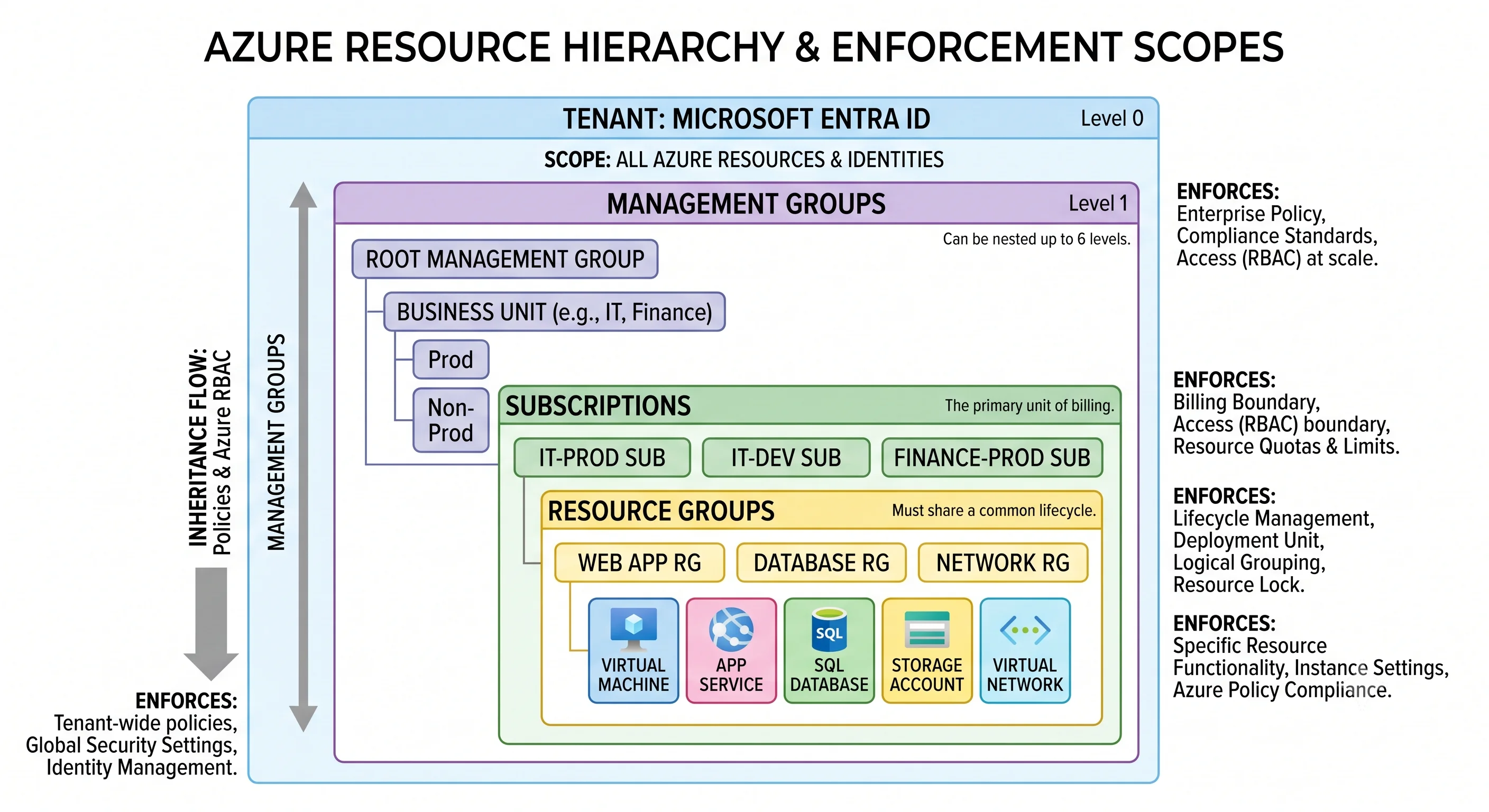
Every Azure resource has an address, and that address is not decoration. It decides who can touch the resource, which rules apply to it, whose budget it lands on, and what happens to it when someone runs a delete. The address has four levels above the resource itself:
Tenant → management group → subscription → resource group → resource
Think of it as a filing system where each drawer enforces something different. The tenant is the organisation. The management group is a policy folder. The subscription is the chequebook and the quota allowance. The resource group is a box you can throw away in one motion. Nothing here is cosmetic — each level is a real enforcement boundary for a different thing, which is exactly why people get it wrong.
Coming from AWS: an AWS account does the work of an Azure subscription and part of the tenant and part of the resource group. Organizations + OUs map roughly to tenant + management groups, but the resource group has no AWS counterpart at all — the closest thing is a CloudFormation stack, and even that's a weak analogy because a resource group is a permanent, first-class container that exists whether or not you deploy through a template.
Tenant — the identity boundary
Analogy: the company itself. One organisation, one directory of people.
Technically: a tenant is a dedicated instance of Microsoft Entra ID (formerly Azure Active
Directory) — a directory holding users, groups, service principals, application registrations, and
the policies that govern how they authenticate. It's identified by a GUID (the tenant ID) and
usually also by a default domain like contoso.onmicrosoft.com.
The critical property: a tenant is not a billing boundary and not a resource container. It holds no virtual machines. It holds identities, and it's the authority that issues the tokens every other layer trusts. A tenant can own many subscriptions; a subscription trusts exactly one tenant at a time for authentication.
This separation is the thing AWS doesn't have an equivalent for, and it produces a very Azure-shaped failure mode: you can be a Global Administrator in the tenant — the most powerful directory role there is — and still have zero access to any resource in any subscription, because directory roles and Azure RBAC roles are different systems. (There's an escape hatch: a Global Admin can elevate themselves to User Access Administrator at the root scope, which is exactly as dangerous as it sounds and shows up in the activity log.) Identity and RBAC covers this split properly.
Tenants matter operationally when you have more than one — acquisitions, dev/prod separation at the directory level, or B2B guest access. Moving a subscription between tenants is possible but disruptive: role assignments are scoped to principals in the old directory and don't come along. Treat it as a migration, not a setting change.
Management group — the governance boundary
Analogy: folders you put subscriptions into, so a rule written once applies to all of them.
Technically: a management group is a container for subscriptions and other management groups. Its purpose is to be a scope — somewhere to attach an Azure Policy assignment or an RBAC role assignment so that everything beneath inherits it. It does nothing else. No billing, no quota, no resources.
Every tenant has a root management group whose ID is the tenant ID. Every subscription is under it, whether or not you've ever opened the management group blade. The root is a genuinely dangerous scope: a policy assigned there applies to every resource in the organisation, and a role assignment there grants access to everything. It's also not visible by default — you have to elevate to see it.
Management groups nest, so a typical enterprise layout looks like:
Root (tenant ID)
├── Platform
│   ├── Identity        (subscription)
│   ├── Management      (subscription)
│   └── Connectivity    (subscription)
├── Landing Zones
│   ├── Corp
│   │   ├── prod-app-a  (subscription)
│   │   └── prod-app-b  (subscription)
│   └── Online
│       └── ...
├── Sandbox
└── Decommissioned
That shape is essentially the Azure Landing Zones reference architecture, and it exists because of one design rule: put subscriptions in a management group because they should share governance, not because they belong to the same team. The Sandbox group exists so experimental subscriptions can be exempted from strict policy without carving exceptions into a shared assignment. The Decommissioned group exists so a subscription being wound down can be locked read-only.
Constraints worth knowing:
- A subscription has exactly one parent management group.
- A management group has exactly one parent (it's a tree, not a graph).
- Nesting depth is limited — around six levels below root ⚠️ verify against current Azure docs.
- The limit on management groups per tenant is in the low thousands ⚠️ verify against current Azure docs.
You rarely need more than three or four levels. Deep hierarchies make it hard to answer "why does this policy apply here", which is the question you'll actually be asking at 2 a.m.
Coming from AWS: management groups ≈ Organizational Units, and Azure Policy ≈ Service Control Policies — but the analogy undersells Azure. SCPs can only deny. Azure Policy can deny, audit, modify a resource as it's created (append a tag, force TLS 1.2), and deploy a missing companion resource (turn on diagnostic settings automatically). That's a much larger surface, and correspondingly easier to surprise yourself with.
Subscription — the billing, quota, and isolation boundary
Analogy: a chequebook with a credit limit and a set of allowances attached to it.
Technically: a subscription is a container for resources that is simultaneously three things:
- The billing boundary. The invoice is per subscription (rolled up to a billing account). Cost Management reports naturally along this line.
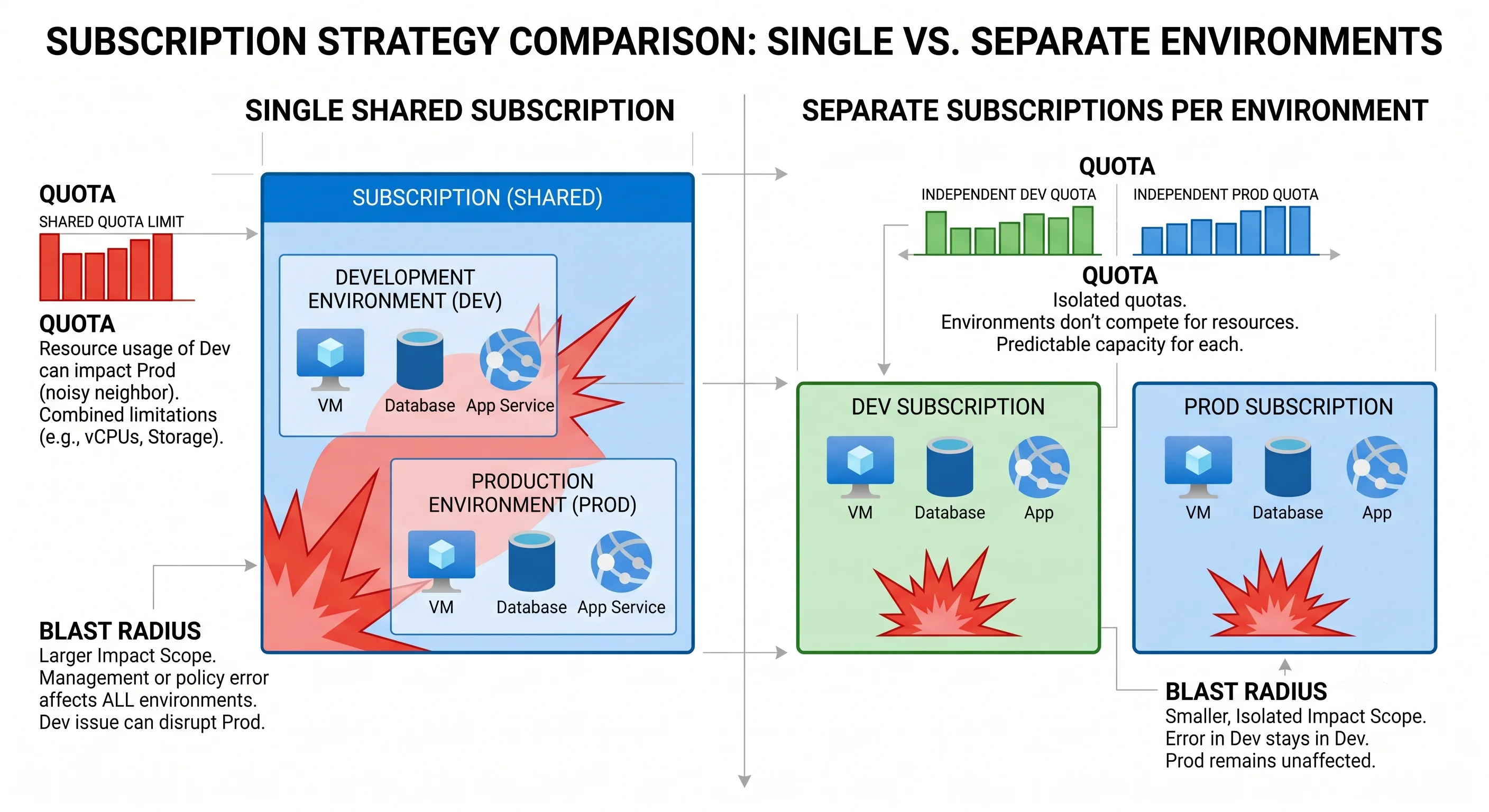
- The quota boundary. This is the one people underestimate. Most Azure limits are counted per subscription, per region — vCPU cores by VM family, public IP addresses, storage accounts, network interfaces. Two teams in the same subscription and region compete for the same vCPU quota. Actual numbers vary by region and by subscription type (pay-as-you-go, EA, MSDN, CSP) ⚠️ verify against current Azure docs.
- The practical blast-radius boundary. It's the largest thing you can hand someone and say "you own everything in here", and the largest thing that can be cleanly cancelled.
A subscription is associated with exactly one Entra tenant. It has an ID (a GUID) that appears at the front of every resource ID in it.
The design rule that follows from quota: in Azure, one subscription per environment is the answer far more often than one account per environment is in AWS. Because quota is subscription-scoped, putting dev and prod in the same subscription means a runaway dev deployment can exhaust the vCPU quota that prod needs to scale out. Because billing is subscription-scoped, mixing them makes chargeback guesswork. Because RBAC inherits from the subscription, mixing them means granting anyone subscription-level access to dev also gives them prod.
Splitting subscriptions further is normal and cheap — subscriptions themselves cost nothing. Common axes: environment, business unit, workload criticality, and data residency. The cost is coordination: cross-subscription networking (peering), shared services, and identity plumbing all need deliberate design.
Resource group — the lifecycle boundary
Analogy: a moving box. Everything in it travels together, and you can throw the whole box out in one motion.
Technically: a resource group is a container for resources within a single subscription. Every resource belongs to exactly one, and every resource must belong to one — there is no "loose" resource. Resource groups do not nest.
The property that makes it useful and dangerous:
az group delete -n rg-demo --yes --no-waitThat deletes everything inside. It's the cleanest teardown any major cloud offers and worth pointing out once as a genuine Azure advantage — the Getting Started page of every topic in this article ends with it. It's also why the design rule is share a fate, share a group: resources in one group should be deployed together, updated together, and deleted together. A production database sharing a resource group with a demo web app is an accident waiting for a tired engineer.
Three subtleties that trip people up:
A resource group has a location, and it isn't what you think. The location stores the group's
metadata, not its resources. A resource group in uksouth can contain a VM in westeurope
perfectly well. It matters in exactly one scenario: if the resource group's metadata region is in an
outage, you may be unable to manage those resources (create, update, delete) even though they're
running fine elsewhere. So co-locating the group with its resources is a reasonable default, not a
rule.
Resources can move between groups and subscriptions — sometimes. az resource move works for
many types and not for others; some services support it with caveats, and the resource ID changes,
which breaks anything referencing the old ID (role assignments at that scope, policy exemptions,
monitoring rules, Terraform state). Which types support it changes over time
⚠️ verify against current Azure docs. Design as if moving is hard; it usually is.
Deletion order is inferred, not guaranteed to succeed. ARM works out dependencies, but resources protected by a lock, a soft-delete policy, or purge protection will fail the delete and can leave the group half-emptied. Key Vault is the classic: a deleted vault holds its name in a soft-deleted state and blocks recreating a vault with the same name until it's purged.
Resource locks live here (and above). A CanNotDelete or ReadOnly lock can be applied at
subscription, resource group, or resource scope, and it inherits downward. Locks are the correct
tool for production safety and a frequent cause of mysterious failures: a terraform apply that
errors with what looks like a permissions problem is very often a ReadOnly lock inherited from the
resource group. Locks are also independent of RBAC — an Owner is still blocked by a lock until they
remove it.
Resource — the thing itself
Analogy: the actual object in the box.
Technically: a resource is an instance of a type offered by a resource provider, with a globally unique ARM resource ID. The ID is the string that every role assignment, policy assignment, error message, and Terraform import is written against:
/subscriptions/{subscriptionId}/resourceGroups/{rgName}/providers/{provider}/{type}/{name}For example:
/subscriptions/00000000-0000-0000-0000-000000000000/resourceGroups/rg-prod-uks/providers/Microsoft.Storage/storageAccounts/stprodukscoreChild resources extend the path (.../storageAccounts/stprodukscore/blobServices/default/containers/data).
Some resources sit at subscription scope rather than in a resource group (policy assignments, role
assignments at subscription level) and their IDs simply omit the resourceGroups segment.
Read that ID left to right and you've read the whole hierarchy. Azure Resource
Manager unpacks resource providers and what happens when you PUT to one
of these paths.
What each level actually enforces
The one table worth memorising:
| Level | Enforces | Does not enforce | Deleting it |
|---|---|---|---|
| Tenant | Identity, authentication, directory roles, Conditional Access | Billing, quota, resource access | Effectively the whole organisation — not a routine operation |
| Management group | Policy inheritance, RBAC inheritance | Billing, quota, networking | Only possible when empty; harmless |
| Subscription | Billing, quota, RBAC inheritance, policy scope, practical isolation | Identity (that's the tenant), lifecycle grouping | Cancels everything inside; recoverable within a limited window ⚠️ verify against current Azure docs |
| Resource group | Lifecycle, RBAC inheritance, policy scope, locks | Billing, quota, network isolation | Deletes every resource inside, in one command |
| Resource | Its own data-plane behaviour and RBAC | Anything above it | Deletes that resource — subject to locks and soft delete |
Two rows deserve emphasis because they're where AWS instincts break:
- Quota is at the subscription, not the resource group. Splitting workloads into separate resource groups gives you zero quota isolation. Only a separate subscription does.
- Lifecycle is at the resource group, not the subscription. There's no AWS command that deletes a coherent slice of an account this cleanly.
And one that isn't in the table at all: network isolation is orthogonal to the whole hierarchy. A virtual network is just a resource in a resource group. Two resources in the same resource group have no special network relationship, and two resources in different subscriptions can share a network via peering. Don't use the hierarchy to reason about connectivity.
Designing a layout that survives contact
A workable default for a team standing up Azure properly:
- Management groups: root →
Platform,Landing Zones(withCorp/Onlinebeneath),Sandbox,Decommissioned. Assign your baseline policy at Landing Zones, exempt Sandbox explicitly rather than by omission. - Subscriptions: one per environment per workload domain (
sub-payments-prod,sub-payments-nonprod), plus platform subscriptions for identity, connectivity, and management. Start coarse; splitting later is easier than merging. - Resource groups: one per workload per environment per region —
rg-payments-prod-uks. Add a separate group for genuinely long-lived shared things (the hub network, the shared Key Vault) so a workload teardown can't take them with it. - RBAC: assign at the resource group for workload teams, at the subscription only for platform roles, and never at the root management group unless you've thought very hard about it.
- Locks:
CanNotDeleteon production resource groups holding stateful resources. Document that they exist, because the person debugging a failed apply at 2 a.m. won't guess.
The honest trade-off: more subscriptions and groups buy isolation and blast-radius control, and cost you coordination — networking, shared services, cross-scope role assignments, and a landing-zone pipeline to keep them consistent. Small teams over-split more often than they under-split. Start with the smallest layout that separates production from everything else, and let real pain drive further division.
Working with the hierarchy from the CLI
# Where am I?
az account show -o table                       # current subscription + tenant
az account list -o table                       # all subscriptions you can see
az account set --subscription "sub-payments-prod"

# Management groups
az account management-group list -o table
az account management-group show -n mg-landing-zones -e -r   # expand + recurse

# Resource groups
az group create -n rg-payments-prod-uks -l uksouth --tags env=prod owner=payments
az group list -o table
az group delete -n rg-demo --yes --no-wait     # the sharp knife

# Locks
az lock create --name no-delete --lock-type CanNotDelete -g rg-payments-prod-uks
az lock list -g rg-payments-prod-uks -o table

# Ask questions across the whole estate (Azure Resource Graph — fast, cross-subscription)
az graph query -q "Resources | summarize count() by subscriptionId, type" -o table
That last one is worth adopting early. az resource list queries one subscription at a time; Azure
Resource Graph queries the entire tenant in one go with KQL, and it's how you answer "where on earth
is that storage account" without clicking through the portal.
The mistakes worth pre-empting
Treating resource groups as folders. Grouping by team or by resource type ("all the databases") feels tidy and defeats the purpose. Group by fate.
Assuming a resource group isolates quota. It doesn't. If a scale-out is failing with a quota error, the answer is at the subscription, per region.
Assuming Global Administrator means access to resources. It doesn't, until someone elevates or grants an Azure RBAC role. Conversely, an Owner on a subscription cannot manage users in the directory.
Putting stateful and disposable resources in the same group. The whole value of the resource
group is that az group delete is safe to run. Keep it safe.
Forgetting the resource group's own location. Rare, but during a regional management-plane incident it's the difference between "degraded" and "we can't even fix it".
Assigning policy or RBAC at the root management group "just to be consistent". Root applies to everything, forever, including subscriptions that don't exist yet. Assign one level lower and leave yourself an escape route.
Next: Azure Resource Manager →