
4. Getting Started
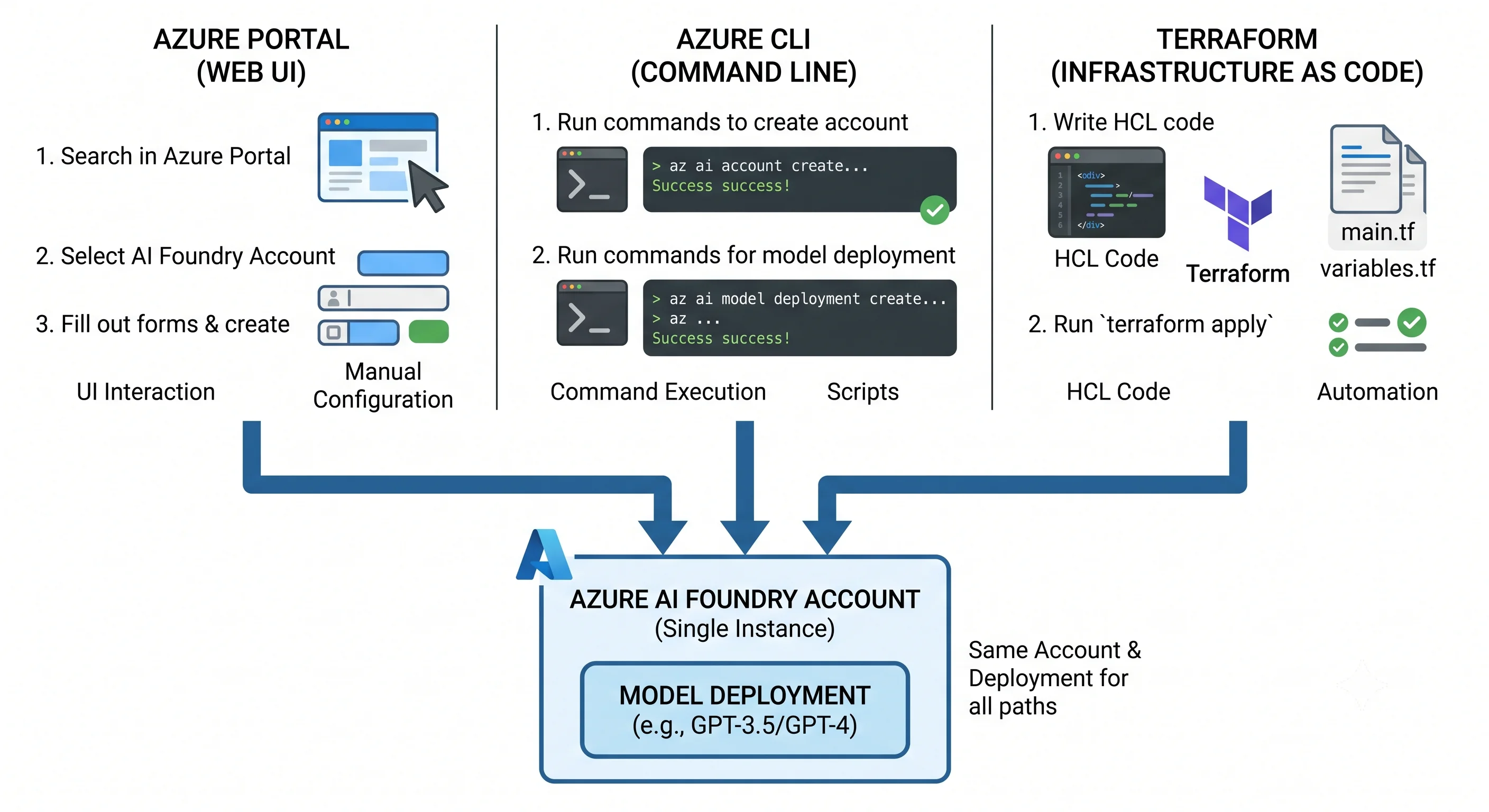
The task: create a Foundry resource, deploy one chat model, and get one completion back. Three ways — portal, CLI, and Terraform — then delete it all.
This page is deliberately throwaway. Hard-coded names, public network access, default everything. Nothing here should survive contact with a pull request; the production-shaped version lives in Deployment.
Everything goes in one throwaway resource group so teardown is a single command. That is a genuine advantage of Azure's resource-group model and it is worth using every time you experiment.
Before you start: three things that will stop you
- Model access and region. Not every model is available in every region, and availability differs by deployment type. Pick your region after checking where the model you want is offered. ⚠️ Verify current regional model availability against current Azure docs.
- Quota. A brand-new subscription may have little or no TPM quota for a given model. If deployment creation fails with a quota error, that is not a bug — request quota or choose another model or region.
- The name is globally unique and soft-deleted.
<name>.services.ai.azure.commust be unique across Azure, and deleting the account reserves the name until it is purged. Use a name with a random suffix for demos, or you will fight your own deleted resource on the second run.
1. Azure Portal
Fastest to understand, least repeatable.
- In the Azure portal, search Azure AI Foundry (branded Microsoft Foundry in newer portal builds) and create a new resource — choose the Foundry resource option, not the classic hub.
- Set subscription, a throwaway resource group, a region where your model is offered, and a name.
- Leave networking public and identity defaults on for now; create.
- Open the resource and choose Go to Foundry portal. A default project is created for you.
- In the Foundry portal, go to the Model catalog, pick a chat model, and Deploy. Give the
deployment a job-shaped name —
chat-default— choose a deployment type, and accept a small capacity. - Open the Chat playground, select that deployment, and send a message.
That is the whole loop: resource → project → deployment → call. The portal quietly did three things you will have to do yourself in code — it created the project, it assigned you the data-plane role, and it attached the default content filter.
2. Azure CLI
Repeatable and scriptable. The CLI still speaks the resource provider's language, so you will be typing
cognitiveservices, not foundry.
# --- variables -------------------------------------------------------------
RG=rg-foundry-demo
LOC=eastus2                       # pick a region that offers your model
ACC=aifdemo$RANDOM                # must be globally unique
DEPLOY=chat-default
MODEL=gpt-4.1                     # verify the model name and version are offered here
MODELVER=2025-04-14               # verify against `az cognitiveservices model list`

# --- what's actually available in this region ------------------------------
az cognitiveservices model list -l $LOC \
  --query "[?kind=='AIServices'].{model:model.name, version:model.version, sku:model.skus[0].name}" \
  -o table

# --- resource group and Foundry account ------------------------------------
az group create -n $RG -l $LOC

az cognitiveservices account create \
  -n $ACC -g $RG -l $LOC \
  --kind AIServices \
  --sku S0 \
  --custom-domain $ACC \
  --assign-identity \
  --yes

# --- deploy one model ------------------------------------------------------
az cognitiveservices account deployment create \
  -n $ACC -g $RG \
  --deployment-name $DEPLOY \
  --model-name $MODEL \
  --model-version $MODELVER \
  --model-format OpenAI \
  --sku-name GlobalStandard \
  --sku-capacity 10          # capacity is in thousands of TPM for standard types

# --- grant YOURSELF the data-plane role (control-plane Owner is not enough) --
ACC_ID=$(az cognitiveservices account show -n $ACC -g $RG --query id -o tsv)
ME=$(az ad signed-in-user show --query id -o tsv)
az role assignment create \
  --assignee-object-id $ME --assignee-principal-type User \
  --role "Cognitive Services OpenAI User" \
  --scope $ACC_ID

# --- call it, with a token, not a key --------------------------------------
ENDPOINT=$(az cognitiveservices account show -n $ACC -g $RG --query properties.endpoint -o tsv)
TOKEN=$(az account get-access-token --resource https://cognitiveservices.azure.com --query accessToken -o tsv)

curl -s "${ENDPOINT}openai/deployments/${DEPLOY}/chat/completions?api-version=2024-10-21" \
  -H "Authorization: Bearer $TOKEN" \
  -H "Content-Type: application/json" \
  -d '{"messages":[{"role":"user","content":"Say hello in one short sentence."}],"max_tokens":50}'
⚠️ Model names, model versions, --sku-name values, and the inference api-version all move. Verify
each against current Azure docs or the az cognitiveservices model list output above before assuming a
copy-paste works.
Note what just happened at step "grant yourself". You created the resource, so you are Owner, and
you still could not call the model until a data-plane role existed. That is not a quirk of the CLI —
it is the control-plane/data-plane split from Architecture showing up on your
first attempt. The portal hid it by assigning the role for you.
PowerShell shops: the Az.CognitiveServices module has New-AzCognitiveServicesAccount and
New-AzCognitiveServicesAccountDeployment with the same shape. Foundry is not especially
PowerShell-first, so the az path above is the one most examples use.
3. Terraform — minimal
The smallest thing that produces a callable deployment. No variables, no remote state, no modules — all of that is in Deployment.
terraform {
  required_providers {
    azurerm = {
      source  = "hashicorp/azurerm"
      version = "~> 4.0"
    }
  }
}

provider "azurerm" {
  features {}
}

resource "azurerm_resource_group" "demo" {
  name     = "rg-foundry-demo-tf"
  location = "eastus2"
}

resource "azurerm_cognitive_account" "demo" {
  name                = "aifdemotf001" # globally unique
  resource_group_name = azurerm_resource_group.demo.name
  location            = azurerm_resource_group.demo.location

  kind                       = "AIServices"
  sku_name                   = "S0"
  custom_subdomain_name      = "aifdemotf001"
  project_management_enabled = true # makes this a Foundry account rather than a bare AI Services one

  identity {
    type = "SystemAssigned"
  }
}

resource "azurerm_cognitive_deployment" "chat" {
  name                 = "chat-default"
  cognitive_account_id = azurerm_cognitive_account.demo.id

  model {
    format  = "OpenAI"
    name    = "gpt-4.1"
    version = "2025-04-14"
  }

  sku {
    name     = "GlobalStandard"
    capacity = 10
  }
}

output "endpoint" {
  value = azurerm_cognitive_account.demo.endpoint
}
terraform init
terraform plan
terraform applyTwo things this minimal snippet deliberately leaves out, both of which are load-bearing in real life:
the project (the azurerm provider's coverage of Foundry projects has lagged the API — azapi or
the CLI is the reliable path, shown in Deployment) and the data-plane role
assignment, without which the resource exists and nothing can use it.
⚠️ Verify current azurerm support for azurerm_ai_foundry-style project resources versus
azurerm_cognitive_account projects before choosing an approach — this area is changing.
Note also that azurerm_ai_foundry and azurerm_ai_foundry_project in the provider refer to the
classic hub architecture (Microsoft.MachineLearningServices), not to the account above. The names
are misleading and cost people an afternoon.
Teardown — and the purge that everyone forgets
az group delete -n rg-foundry-demo --yes --no-wait
# or, for the Terraform copy:
terraform destroy
Deleting the resource group removes the account — but Cognitive Services accounts are soft-deleted. The name stays reserved, and recreating it with the same name fails with a confusing conflict. Purge it:
az cognitiveservices account list-deleted -o table

az cognitiveservices account purge \
  -n $ACC -g $RG -l $LOC
⚠️ Verify the current soft-delete retention period against current Azure docs. Also note that
terraform destroy will not purge for you, and a subsequent apply with the same name will fail —
which is exactly the drift-and-rollback scenario discussed in Deployment.
Half of all surprise cloud bills come from forgotten demo resources; on this service the specific one to watch for is a provisioned (PTU) deployment, which bills per hour from the moment it exists whether or not you ever call it. If you experimented with provisioned throughput, check it is gone.
Next: Deployment →
← Back to the Azure AI Foundry overview · ← Previous: Architecture