
5. Deployment
Getting Started proved a VM exists. This page makes it repeatable, reviewable, and reversible — parameterised, in remote state, configured by a playbook, shipped by a pipeline that holds no secrets, and rollable-back at 2 a.m. by someone who didn't write it.
VMs are the one Azure service where all three IaC tools genuinely earn their place, because a VM has two halves: the resource (Terraform's job) and the guest (Ansible's job). Getting that split right is most of the craft here.
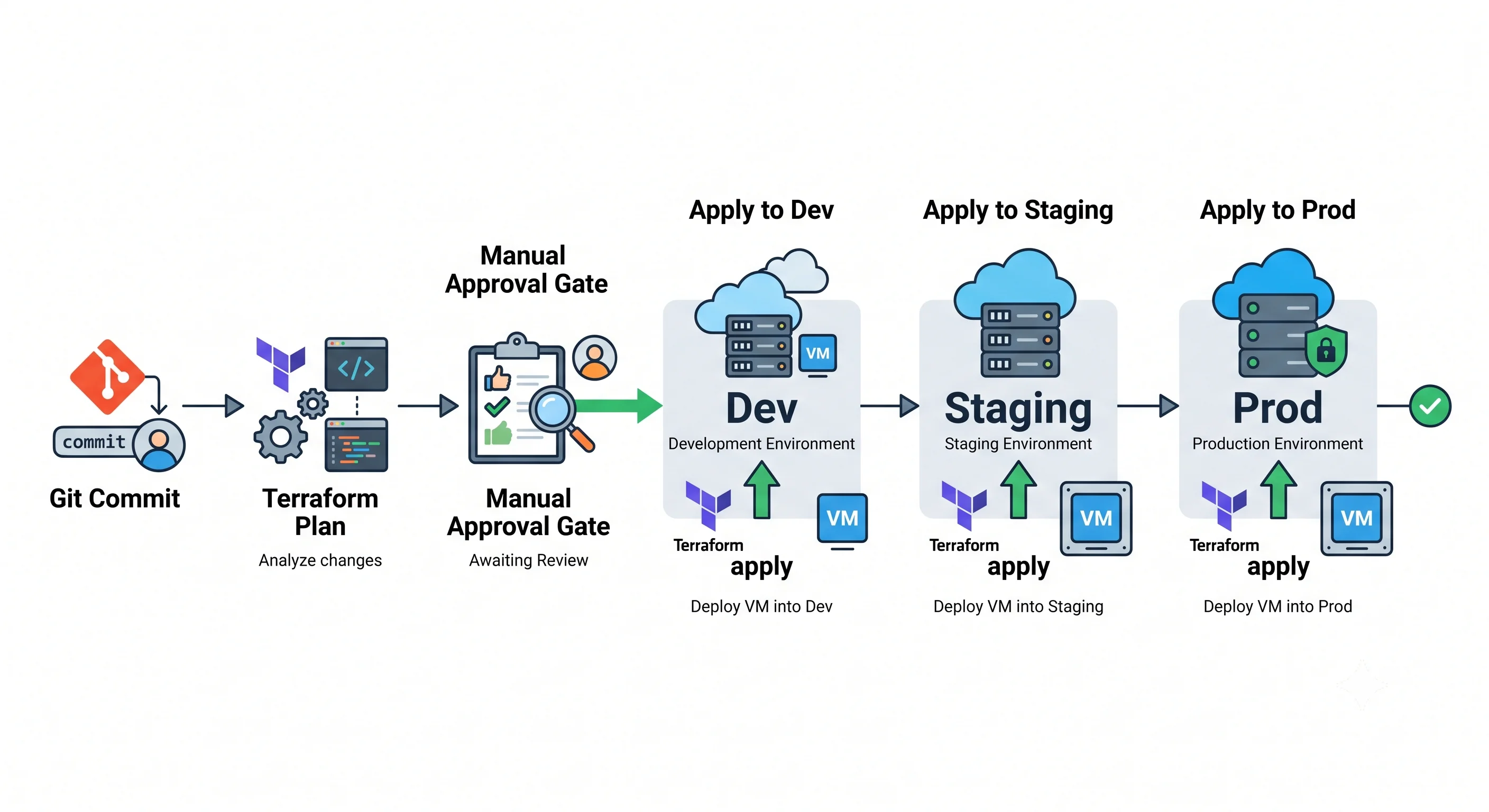
Tool order
| Rank | Tool | What it does here | Where it's the wrong choice |
|---|---|---|---|
| 1. Primary | Terraform (azurerm, azapi for gaps) |
Provisions the VM, disks, NIC, NSG, identity, and role assignments; owns their desired state and detects drift | State is yours to protect; azurerm lags brand-new VM features by weeks-to-months — that's azapi's job |
| 2. Secondary | Ansible (azure.azcollection) |
Configures inside the guest — packages, users, services, hardening — and does day-2 ops like a rolling restart. This is where Ansible is at its strongest in the whole Azure catalogue | Poor at long-lived infrastructure state; it can create VMs but won't reconcile drift the way Terraform does |
| 3. Third | Bicep / ARM | The Azure-native path, first-class support for new VM features on day one, deployment stacks, and what Microsoft's own docs and exams assume | Azure-only; no plan as rich as Terraform's, though what-if is close |
The division of labour worth adopting: Terraform owns everything with an ARM resource ID.
Ansible owns everything inside the filesystem. Where they meet — installing an agent — prefer a
Terraform-declared VM extension for platform agents (Azure Monitor Agent, Entra login) and
Ansible for application configuration. Custom scripts stuffed into custom_data are a third path
that's fine for bootstrap and terrible as a config-management strategy, because nothing reconciles
them afterwards.
The better answer, stated once: for most production workloads the honest recommendation is immutable infrastructure — bake a golden image with Packer or Azure Image Builder, publish it to an Azure Compute Gallery, and have Terraform deploy a scale set that references an image version. Then "configuration management" becomes "build a new image and roll the scale set", and drift stops being possible. The Ansible section below is the right answer for the large population of workloads that aren't there yet, and for genuine day-2 operations.
Terraform module shape
A parameterised module, split the conventional way.
variables.tf
variable "name_prefix" {
  type        = string
  description = "Short workload identifier, e.g. 'app'. Used in every resource name."
}

variable "environment" {
  type        = string
  description = "dev | staging | prod"
  validation {
    condition     = contains(["dev", "staging", "prod"], var.environment)
    error_message = "environment must be dev, staging, or prod."
  }
}

variable "location" {
  type    = string
  default = "uksouth"
}

variable "vm_size" {
  type        = string
  description = "VM SKU. Note the 's' suffix is required for premium disks."
  default     = "Standard_D2s_v5"
}

variable "subnet_id" {
  type        = string
  description = "Existing subnet. Networking is owned by the platform team, not this module."
}

variable "admin_ssh_public_key" {
  type = string
}

variable "zones" {
  type        = list(string)
  description = "Availability zones to spread instances across."
  default     = ["1", "2", "3"]
}

variable "instance_count" {
  type    = number
  default = 2
}
main.tf
terraform {
  required_version = ">= 1.6"
  required_providers {
    azurerm = {
      source  = "hashicorp/azurerm"
      version = "~> 4.0"
    }
  }
}

provider "azurerm" {
  features {
    virtual_machine {
      # Delete the OS disk when the VM is destroyed. Without this you accumulate
      # orphaned, still-billing disks on every replace.
      delete_os_disk_on_deletion     = true
      graceful_shutdown              = false
      skip_shutdown_and_force_delete = false
    }
    resource_group {
      # Refuse to destroy a resource group that still contains resources
      # Terraform doesn't know about. This has saved production more than once.
      prevent_deletion_if_contains_resources = true
    }
  }
}

locals {
  suffix = "${var.name_prefix}-${var.environment}"

  tags = {
    Environment = var.environment
    Workload    = var.name_prefix
    ManagedBy   = "terraform"
    CostCentre  = "platform"
  }

  # Environment drives the resilience and cost posture in one place.
  os_disk_type    = var.environment == "prod" ? "Premium_LRS" : "StandardSSD_LRS"
  effective_count = var.environment == "prod" ? var.instance_count : 1
}

resource "azurerm_resource_group" "this" {
  name     = "rg-${local.suffix}"
  location = var.location
  tags     = local.tags
}

resource "azurerm_user_assigned_identity" "this" {
  name                = "id-${local.suffix}"
  resource_group_name = azurerm_resource_group.this.name
  location            = azurerm_resource_group.this.location
  tags                = local.tags
}

resource "azurerm_network_security_group" "this" {
  name                = "nsg-${local.suffix}"
  location            = azurerm_resource_group.this.location
  resource_group_name = azurerm_resource_group.this.name
  tags                = local.tags

  # No SSH rule. Access is via Bastion or Run Command; see the Integrations page.
  security_rule {
    name                       = "allow-https-from-vnet"
    priority                   = 100
    direction                  = "Inbound"
    access                     = "Allow"
    protocol                   = "Tcp"
    source_port_range          = "*"
    destination_port_range     = "443"
    source_address_prefix      = "VirtualNetwork"
    destination_address_prefix = "*"
  }
}

# A Flexible scale set, not N copies of a VM resource. You get autoscale,
# rolling upgrades, and automatic instance repair for roughly the same code.
resource "azurerm_orchestrated_virtual_machine_scale_set" "this" {
  name                        = "vmss-${local.suffix}"
  resource_group_name         = azurerm_resource_group.this.name
  location                    = azurerm_resource_group.this.location
  platform_fault_domain_count = 1
  zones                       = var.zones
  instances                   = local.effective_count
  sku_name                    = var.vm_size
  tags                        = local.tags

  os_profile {
    linux_configuration {
      admin_username                  = "azureuser"
      disable_password_authentication = true

      admin_ssh_key {
        username   = "azureuser"
        public_key = var.admin_ssh_public_key
      }
    }
  }

  source_image_reference {
    publisher = "Canonical"
    offer     = "ubuntu-24_04-lts"
    sku       = "server"
    # Pin the version in prod. 'latest' is not reproducible and will silently
    # change what you deploy between a plan and an apply weeks later.
    version = var.environment == "prod" ? "24.04.202405230" : "latest"
  }

  os_disk {
    storage_account_type = local.os_disk_type
    caching              = "ReadWrite"
  }

  identity {
    type         = "UserAssigned"
    identity_ids = [azurerm_user_assigned_identity.this.id]
  }

  network_interface {
    name                          = "nic-${local.suffix}"
    primary                       = true
    network_security_group_id     = azurerm_network_security_group.this.id
    enable_accelerated_networking = true

    ip_configuration {
      name      = "internal"
      primary   = true
      subnet_id = var.subnet_id
    }
  }

  boot_diagnostics {} # managed storage account — enable this on everything

  # Roll instances a batch at a time instead of all at once.
  upgrade_mode = "Rolling"

  rolling_upgrade_policy {
    max_batch_instance_percent              = 20
    max_unhealthy_instance_percent          = 20
    max_unhealthy_upgraded_instance_percent = 20
    pause_time_between_batches              = "PT2M"
  }

  automatic_instance_repair {
    enabled      = true
    grace_period = "PT10M"
  }

  lifecycle {
    # Autoscale owns the instance count at runtime; don't fight it on every apply.
    ignore_changes = [instances]
  }
}
outputs.tf
output "scale_set_id" {
  value = azurerm_orchestrated_virtual_machine_scale_set.this.id
}

output "identity_principal_id" {
  description = "Grant this principal RBAC roles on the resources the VM needs."
  value       = azurerm_user_assigned_identity.this.principal_id
}

output "resource_group_name" {
  value = azurerm_resource_group.this.name
}
The features {} block matters here
Two settings above are doing real work and are easy to miss:
delete_os_disk_on_deletion = true. Without it, every VM replacement leaves an orphaned OS disk behind, still billing, forever. Over a year of rolling deploys this is a real number.prevent_deletion_if_contains_resources = true. Refuses to destroy a resource group holding resources Terraform doesn't manage. The default behaviour — delete everything — is how adestroyin dev takes out something a colleague created by hand.
The features {} block is also where the Key Vault soft-delete/purge behaviour lives, which matters
the moment this module starts storing anything in a vault.
The loop
terraform init -backend-config=backends/prod.hcl
terraform plan  -var-file=env/prod.tfvars -out=tfplan
terraform show -no-color tfplan | tee plan.txt   # this is what a reviewer reads
terraform apply tfplan
Always plan -out and then apply the saved plan file. Applying without it re-plans against whatever
state exists at apply time, which is exactly the gap where a hand-made portal change sneaks in
between review and execution.
Remote state and locking
Local state on a team is a footgun: it's on one laptop, it isn't backed up, it contains secrets in plaintext, and two people applying at once corrupt it.
terraform {
  backend "azurerm" {
    resource_group_name  = "rg-tfstate"
    storage_account_name = "sttfstateprod"
    container_name       = "tfstate"
    key                  = "virtual-machines/prod.tfstate"
    use_azuread_auth     = true # Entra ID auth, not a storage account key
  }
}
Locking is free and automatic. The azurerm backend uses native blob leases — no separate
lock table, unlike AWS's DynamoDB requirement. A concurrent apply simply blocks. One less thing to
build.
The state storage account should be treated as production infrastructure regardless of which
environment it serves: versioning on, soft delete on, a CanNotDelete resource lock applied, public
network access off, and access via Entra ID rather than account keys. State contains secrets; it is
not a build artifact.
Per-environment separation — the two honest options:
| Approach | How | When it's right |
|---|---|---|
| Directory per environment | env/dev/, env/prod/, each with its own backend key |
The default recommendation. Explicit, reviewable, hard to apply to the wrong place, allows genuine per-environment divergence |
| Terraform workspaces | One directory, terraform workspace select prod |
Tempting and compact, but one wrong select applies dev's plan to prod. Acceptable for near-identical short-lived environments; risky for production |
Pick directory-per-environment. The extra files are cheaper than the incident.
Ansible — the guest half
This is where Ansible earns its keep on VMs specifically: Terraform can create the machine but has no good way to converge what's inside it.
inventory_azure_rm.yml — dynamic inventory, so you never hand-maintain a host list:
plugin: azure.azcollection.azure_rm
include_vmss_resource_groups:
  - rg-app-prod
auth_source: auto          # managed identity on a build agent, az CLI locally
keyed_groups:
  - prefix: tag
    key: tags.Workload
hostvar_expressions:
ansible_host: private_ipv4_addresses[0]site.yml:
- name: Configure application VMs
  hosts: tag_app
  become: true
  gather_facts: true
  serial: "20%"        # roll through the fleet, don't restart everything at once

  vars:
    app_version: "1.4.2"

  tasks:
    - name: Ensure required packages are present
      ansible.builtin.apt:
        name:
          - nginx
          - chrony
          - unattended-upgrades
        state: present
        update_cache: true
        cache_valid_time: 3600

    - name: Deploy application configuration
      ansible.builtin.template:
        src: templates/app.conf.j2
        dest: /etc/app/app.conf
        owner: root
        group: root
        mode: "0644"
      notify: Restart app          # handler only fires when the file actually changed

    - name: Ensure the service is running and enabled
      ansible.builtin.systemd:
        name: app
        state: started
        enabled: true

  handlers:
    - name: Restart app
      ansible.builtin.systemd:
        name: app
        state: restarted
Demonstrating idempotency is the whole point, and it's the thing to actually verify rather than assume:
ansible-playbook -i inventory_azure_rm.yml site.yml
# PLAY RECAP: ok=5 changed=4 unreachable=0 failed=0

ansible-playbook -i inventory_azure_rm.yml site.yml
# PLAY RECAP: ok=5 changed=0 unreachable=0 failed=0   ← changed=0 is the assertion
A second run reporting changed=0 is what makes a playbook safe to run on a schedule. Any task
reporting changed every time — a bare command or shell without a creates/changed_when
guard — breaks that property and will fire handlers, and therefore restart services, on every run.
Authentication: on a build agent, use auth_source: auto with a managed identity on the
agent VM, or workload identity federation for a hosted runner. Never a service principal secret
in a variable file. The identity needs Reader on the resource groups it inventories, plus whatever
the tasks require.
Ansible for day-2 ops is the other half of its value here — a rolling restart, an emergency patch, a certificate rotation, a log collection sweep. Those are imperative, ordered operations Terraform has no vocabulary for.
Bicep / ARM equivalent
The same VM in Bicep, plus what-if
targetScope = 'resourceGroup'

@description('Short workload identifier')
param namePrefix string

@allowed(['dev', 'staging', 'prod'])
param environment string

param location string = resourceGroup().location
param vmSize string = 'Standard_D2s_v5'
param subnetId string

@secure()
param adminSshPublicKey string

var suffix = '${namePrefix}-${environment}'
var tags = {
  Environment: environment
  Workload: namePrefix
  ManagedBy: 'bicep'
}

resource nsg 'Microsoft.Network/networkSecurityGroups@2023-11-01' = {
  name: 'nsg-${suffix}'
  location: location
  tags: tags
  properties: {
    securityRules: [
      {
        name: 'allow-https-from-vnet'
        properties: {
          priority: 100
          direction: 'Inbound'
          access: 'Allow'
          protocol: 'Tcp'
          sourcePortRange: '*'
          destinationPortRange: '443'
          sourceAddressPrefix: 'VirtualNetwork'
          destinationAddressPrefix: '*'
        }
      }
    ]
  }
}

resource nic 'Microsoft.Network/networkInterfaces@2023-11-01' = {
  name: 'nic-${suffix}'
  location: location
  tags: tags
  properties: {
    networkSecurityGroup: { id: nsg.id }
    enableAcceleratedNetworking: true
    ipConfigurations: [
      {
        name: 'internal'
        properties: {
          subnet: { id: subnetId }
          privateIPAllocationMethod: 'Dynamic'
        }
      }
    ]
  }
}

resource vm 'Microsoft.Compute/virtualMachines@2024-07-01' = {
  name: 'vm-${suffix}'
  location: location
  tags: tags
  zones: ['1']
  identity: { type: 'SystemAssigned' }
  properties: {
    hardwareProfile: { vmSize: vmSize }
    storageProfile: {
      imageReference: {
        publisher: 'Canonical'
        offer: 'ubuntu-24_04-lts'
        sku: 'server'
        version: 'latest'
      }
      osDisk: {
        createOption: 'FromImage'
        deleteOption: 'Delete'   // the Bicep equivalent of the Terraform features{} setting
        caching: 'ReadWrite'
        managedDisk: {
          storageAccountType: environment == 'prod' ? 'Premium_LRS' : 'StandardSSD_LRS'
        }
      }
    }
    osProfile: {
      computerName: 'vm-${suffix}'
      adminUsername: 'azureuser'
      linuxConfiguration: {
        disablePasswordAuthentication: true
        ssh: {
          publicKeys: [
            {
              path: '/home/azureuser/.ssh/authorized_keys'
              keyData: adminSshPublicKey
            }
          ]
        }
      }
    }
    networkProfile: {
      networkInterfaces: [
        { id: nic.id, properties: { deleteOption: 'Delete' } }
      ]
    }
    diagnosticsProfile: { bootDiagnostics: { enabled: true } }
    securityProfile: {
      securityType: 'TrustedLaunch'
      uefiSettings: { secureBootEnabled: true, vTpmEnabled: true }
    }
  }
}

output vmId string = vm.id
output principalId string = vm.identity.principalId
# Preview before committing — the closest thing ARM has to terraform plan
az deployment group what-if \
--resource-group rg-app-prod \
--template-file main.bicep \
--parameters namePrefix=app environment=prod subnetId="$SUBNET_ID"
az deployment group create \
--resource-group rg-app-prod \
--template-file main.bicep \
--parameters @prod.bicepparam⚠️ Deployment modes — incremental vs. complete
az deployment group createdefaults to incremental mode: resources in the template are created or updated, and anything else in the resource group is left alone.Complete mode (
--mode Complete) deletes every resource in the resource group that is not in the template. Used deliberately, it's a powerful way to guarantee the resource group matches the template exactly. Used accidentally — or with a template that omits one resource someone added later — it removes production infrastructure with no confirmation prompt beyond the standard one.Always run
what-ifbefore a complete-mode deployment, and read the Delete section of the output specifically. It's the only warning you get.
Deployment stacks are the modern Azure-native answer to this problem: a stack tracks the set of resources it manages, so removing a resource from the template removes it from Azure without the blast radius of complete mode, and the stack can deny-delete its own resources. If your organisation is Azure-native and Bicep-first, stacks are a better lifecycle primitive than complete mode.
When Bicep is genuinely the better choice for VMs: brand-new hardware SKUs or security features
that azurerm hasn't shipped support for yet (though azapi closes most of that gap), teams living
entirely in Azure DevOps, and anything governed by deployment stacks or template specs.
CI/CD — OIDC, never a secret
The deploy stage in GitHub Actions, using workload identity federation. No client secret, no service principal password, no publish profile — nothing long-lived exists to leak.
name: deploy-vm-infra

on:
  pull_request:
    paths: ['infra/virtual-machines/**']
  push:
    branches: [main]
    paths: ['infra/virtual-machines/**']

permissions:
  id-token: write        # required for OIDC — the whole mechanism hinges on this
  contents: read
  pull-requests: write

jobs:
  plan:
    runs-on: ubuntu-latest
    environment: prod-plan
    defaults:
      run:
        working-directory: infra/virtual-machines
    steps:
      - uses: actions/checkout@v4

      - uses: azure/login@v2
        with:
          client-id: ${{ vars.AZURE_CLIENT_ID }}
          tenant-id: ${{ vars.AZURE_TENANT_ID }}
          subscription-id: ${{ vars.AZURE_SUBSCRIPTION_ID }}

      - uses: hashicorp/setup-terraform@v3

      - run: terraform init -backend-config=backends/prod.hcl
        env:
          ARM_USE_OIDC: true
          ARM_USE_AZUREAD: true

      - run: terraform plan -var-file=env/prod.tfvars -out=tfplan
        env:
          ARM_USE_OIDC: true

      - uses: actions/upload-artifact@v4
        with:
          name: tfplan
          path: infra/virtual-machines/tfplan

  apply:
    needs: plan
    if: github.ref == 'refs/heads/main'
    runs-on: ubuntu-latest
    environment: prod          # ← the manual approval gate lives on this environment
    defaults:
      run:
        working-directory: infra/virtual-machines
    steps:
      - uses: actions/checkout@v4
      - uses: actions/download-artifact@v4
        with:
          name: tfplan
          path: infra/virtual-machines
      - uses: azure/login@v2
        with:
          client-id: ${{ vars.AZURE_CLIENT_ID }}
          tenant-id: ${{ vars.AZURE_TENANT_ID }}
          subscription-id: ${{ vars.AZURE_SUBSCRIPTION_ID }}
      - uses: hashicorp/setup-terraform@v3
      - run: terraform init -backend-config=backends/prod.hcl
        env: { ARM_USE_OIDC: true, ARM_USE_AZUREAD: true }
      - run: terraform apply -auto-approve tfplan
        env: { ARM_USE_OIDC: true }
The Entra side, once:
az ad app create --display-name gh-vm-infra
APP_ID=$(az ad app list --display-name gh-vm-infra --query "[0].appId" -o tsv)
az ad sp create --id "$APP_ID"

# The federated credential: trust GitHub's token for THIS repo and THIS environment only.
az ad app federated-credential create --id "$APP_ID" --parameters '{
  "name": "gh-main-prod",
  "issuer": "https://token.actions.githubusercontent.com",
  "subject": "repo:my-org/my-repo:environment:prod",
  "audiences": ["api://AzureADTokenExchange"]
}'

# Scope the role at the resource group, not the subscription.
az role assignment create --assignee "$APP_ID" \
  --role "Contributor" \
  --scope "/subscriptions/$SUB/resourceGroups/rg-app-prod"
Two details people get wrong: the subject string must match exactly — a mismatch produces an
opaque authentication failure with no hint that the subject is the problem — and id-token: write
must be granted in the workflow's permissions block or the token is never issued at all.
plan on pull request, apply on merge, and the manual approval gate implemented as a GitHub
environment protection rule (or an Azure DevOps approvals-and-checks gate) on the prod
environment. The gate belongs on the environment, not in a job condition, so it can't be bypassed by
editing the workflow file in the same PR.
Environments
How dev, staging, and prod differ, and where the difference is enforced rather than merely intended:
| Layer | Mechanism |
|---|---|
| Values | env/dev.tfvars, env/staging.tfvars, env/prod.tfvars — size, instance count, disk SKU, zones |
| State | Separate backend key per environment, ideally separate storage accounts for prod |
| Resource groups | Always separate. rg-app-dev, rg-app-prod |
| Subscriptions | Separate subscriptions per environment is the right default in Azure |
| Enforcement | Azure Policy assigned at the management group above each subscription |
| Identity | A distinct federated credential and service principal per environment, each scoped only to its own resource groups |
Why subscription-per-environment, specifically for VMs. In AWS, account-per-environment is a good idea. In Azure it's a stronger one, because the subscription is simultaneously the quota boundary, the billing boundary, and the practical blast-radius boundary. For VMs the quota point is decisive: regional vCPU quota is counted per subscription-per-region, so a dev environment that autoscales badly can exhaust the quota production needs to recover into. That is a genuine outage mechanism, not a theoretical one, and no amount of naming convention prevents it.
Where Azure Policy enforces it, rather than a code review:
# Prod: only approved VM sizes
az policy assignment create \
  --name "allowed-vm-skus-prod" \
  --policy "cccc23c7-8427-4f53-ad12-b6a63eb452b3" \
  --scope "/subscriptions/$PROD_SUB" \
  --params '{"listOfAllowedSKUs":{"value":["Standard_D2s_v5","Standard_D4s_v5","Standard_E4s_v5"]}}'
Policies worth having on a VM estate: allowed VM SKUs, allowed locations, required tags, deny public
IPs on VM NICs, require managed disks, audit VMs without the Azure Monitor Agent, and deny or audit
NSG rules allowing inbound from * on 22/3389. Set them to Audit first and read the compliance
report before switching to Deny, or you'll break a deployment nobody expected to be
non-compliant.
Rollback and blast radius
What "undo" actually means here, in increasing order of pain.
Re-apply the previous commit. The default and usually correct answer: revert the change in git, let the pipeline plan and apply. Works cleanly for configuration changes. Read the plan — the question is always whether the revert updates in place or forces a replacement.
Roll back the image version. With a scale set and a pinned image version, changing the version back and letting the rolling upgrade run is a genuine, fast, low-risk rollback. This is the single strongest argument for the immutable-image approach.
Redeploy the previous ARM deployment. ARM keeps deployment history per resource group; you can re-submit a prior deployment. Useful when the change wasn't made through Terraform.
Restore from backup. Azure Backup restores a VM or individual disks to a recovery point. The slowest option and the only one that recovers data. Untested restores are not backups — the restore drill belongs in Production.
Operations that replace rather than update
These are the ones to look for in a plan, because replacement means the VM is destroyed and recreated, and everything not on a persistent disk is gone:
| Change | Effect |
|---|---|
| Changing the OS disk image reference on a VM | Forces replacement |
| Changing the admin username | Forces replacement |
| Changing availability zone or availability set membership | Forces replacement — zone is fixed at creation |
| Changing the subnet of an existing NIC | Forces NIC replacement, and therefore VM disruption |
Changing os_disk.storage_account_type in some paths |
May force replacement ⚠️ verify against your provider version's plan output |
| Changing VM size | Update in place, but with a restart — and a deallocation if the target hardware isn't in the current cluster |
| Changing tags, NSG rules, data disk attachments | Update in place, no disruption |
Terraform marks these with # forces replacement in the plan. That string is the single most
important thing to grep for in a VM plan, and a plan.txt artifact posted to the pull request is
what makes it reviewable.
The two Azure-specific traps
Soft delete and purge protection. Not on VMs themselves, but on the things around them. A Key
Vault holding your disk-encryption key is soft-deleted on destroy — it still holds its name and
blocks recreating a vault with the same name until it's purged, and with purge protection on it
cannot be purged at all until the retention window expires. A terraform destroy followed by
terraform apply will fail on the vault, and the error is not obviously about soft delete. Same
story for Recovery Services vaults with backup items in them.
Resource locks. CanNotDelete and ReadOnly locks are set at resource, resource group, or
subscription scope and are not visible in a Terraform plan. An apply that hits one fails with a
message that reads like a permissions problem, which sends people to RBAC for an hour. Check for
locks first:
az lock list --resource-group rg-app-prod -o tableReadOnly locks are especially painful because they block updates too, not just deletes, and they
inherit downward from the resource group.
Drift detection
Someone will resize a VM in the portal at 3 a.m. during an incident. That's not a process failure — it's a Tuesday. The failure is not knowing about it afterwards.
Scheduled terraform plan in CI. The primary mechanism: a nightly workflow running
terraform plan -detailed-exitcode, which returns 2 when there are changes. Fail the job on 2
and notify.
  drift:
    runs-on: ubuntu-latest
    steps:
      # ...azure/login with OIDC, terraform init...
      - id: plan
        run: terraform plan -detailed-exitcode -var-file=env/prod.tfvars
        continue-on-error: true
      - if: steps.plan.outputs.exitcode == '2'
        run: echo "::warning::Infrastructure drift detected in prod" && exit 1
Azure Policy compliance state. Catches drift Terraform can't see, because it evaluates every resource including ones created outside your state file.
The activity log answers who and when, which terraform plan cannot:
az monitor activity-log list \
  --resource-group rg-app-prod \
  --start-time 2026-07-01T00:00:00Z \
  --query "[?contains(operationName.value, 'Microsoft.Compute/virtualMachines/write')].{time:eventTimestamp, caller:caller, op:operationName.localizedValue}" \
  -o table
What to do about drift — a policy worth agreeing in advance, because deciding during the incident goes badly:
- If the manual change was wrong, re-apply and let Terraform correct it.
- If it was right, bring it into code, plan, and apply so state and reality agree.
- Either way,
terraform planshould show no changes by the end of the day. Tolerated drift compounds until nobody trusts the plan output, and at that point you no longer have infrastructure as code — you have a text file that resembles your infrastructure.
For resources created by hand that should be managed, terraform import (or an import block in
modern Terraform) brings them into state without recreating them.
Teardown
terraform destroy -var-file=env/dev.tfvarsWhat destroy will not remove:
- Soft-deleted Key Vaults and their secrets — they hold the name until purged, and cannot be purged at all while purge protection is on.
- Resources behind a
CanNotDeletelock — the destroy fails partway, leaving a half-destroyed environment and a state file that no longer matches reality. - Recovery Services vault backup items — the vault won't delete while it holds recovery points; backup protection must be stopped and the data deleted first.
- Managed disks and NICs created without the delete options set, or detached before the destroy.
This is exactly what the
features {}block above prevents. - Role assignments and diagnostic settings created outside the state file — including ones the portal created for you.
- Azure Compute Gallery image versions referenced by the VM, if the gallery is managed elsewhere.
- Anything created by hand inside the resource group, which is precisely why
prevent_deletion_if_contains_resources = trueis set.
After a destroy in a shared subscription, check for orphans:
az disk list --query "[?diskState=='Unattached'].{name:name, rg:resourceGroup, gb:diskSizeGb, sku:sku.name}" -o table
az network nic list --query "[?virtualMachine==null].{name:name, rg:resourceGroup}" -o table
az network public-ip list --query "[?ipConfiguration==null].{name:name, rg:resourceGroup, sku:sku.name}" -o table
az keyvault list-deleted -o table
Those four commands are worth running monthly regardless. Unattached disks and unassociated Standard public IPs bill indefinitely and appear on no dashboard anyone looks at.
Next: Integrations →
← Back to the Virtual Machines overview · ← Previous: Getting Started