
4. Getting Started
The smallest thing that proves you understand a VNet: one VNet, two subnets, an NSG that actually denies something, a NAT Gateway for egress, and a VM you can reach to test it. Built three ways, then deleted.
This page is deliberately throwaway — hard-coded names, no variables, no remote state, no pipeline. Anything you'd want in a pull request lives in Deployment.
What you need: an Azure subscription, the az CLI logged in (az login), and Contributor on a
subscription or resource group. Everything below uses uksouth; substitute your region.
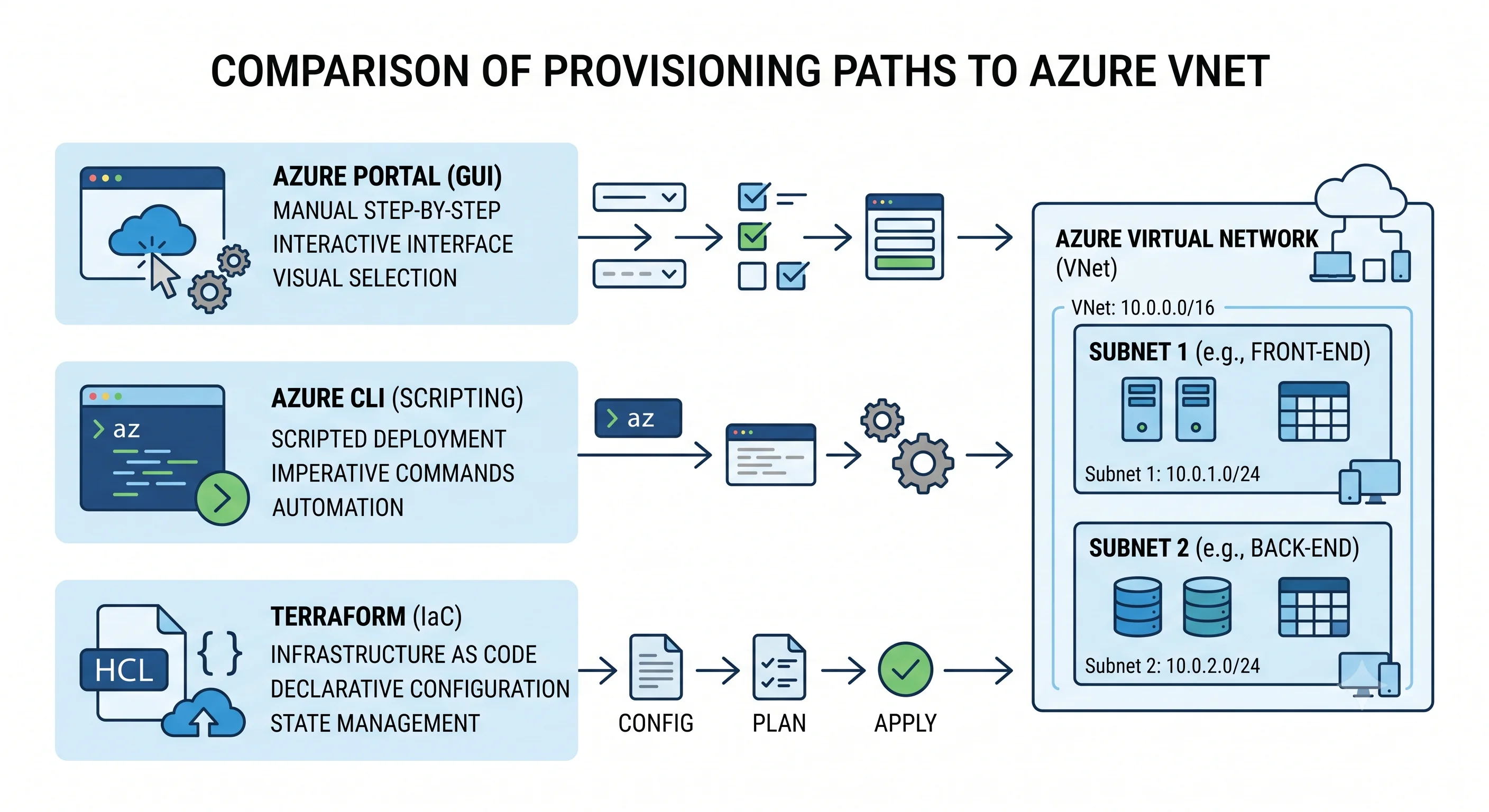
The target
vnet-demo  10.10.0.0/16
├── snet-app   10.10.1.0/24   → NSG (allow SSH from your IP only) + NAT Gateway
└── snet-db    10.10.2.0/24   → NSG (allow 5432 from snet-app only, deny everything else)
Two subnets so you can prove segmentation; an NSG on each so you can prove the default flat posture is something you have to override; a NAT Gateway because a new subnet has no outbound internet without one.
Path 1 — Azure Portal
Fast to grasp, impossible to repeat. Blade names are stable; exact button labels are not.
- Virtual networks blade → Create. Set the resource group to a new
rg-vnet-demo, namevnet-demo, region UK South. - On the IP addresses tab, set the address space to
10.10.0.0/16, delete the default subnet, and addsnet-app(10.10.1.0/24) andsnet-db(10.10.2.0/24). Note the portal showing you 251 usable addresses per/24, not 254 — those are the five reserved addresses. - Create → the VNet exists in under a minute.
- Network security groups blade → Create →
nsg-dbin the same resource group and region. Open it, Inbound security rules → Add: priority 100, sourceIP Addresses10.10.1.0/24, destinationAny, port5432, protocol TCP, Allow. Then add priority 4000, sourceAny, destinationAny, any port, Deny. - Back on the NSG's Subnets blade → Associate →
vnet-demo/snet-db. - NAT gateways blade → Create →
natgw-demo, create a new public IP, and on the Subnet tab ticksnet-app.
Worth pausing on what you just saw: before you added the deny rule, snet-db was fully reachable
from snet-app on every port, because AllowVnetInBound permits everything inside a VNet. Flat is
the default.
Path 2 — Azure CLI
Copy-pasteable, and the version you should actually use to learn. Create the throwaway resource group first so teardown is one command.
# --- setup -------------------------------------------------------------
RG=rg-vnet-demo
LOC=uksouth
MYIP=$(curl -s https://ifconfig.me)      # your current public IP, for the SSH rule

az group create -n $RG -l $LOC

# --- the VNet and its subnets ------------------------------------------
az network vnet create \
  -g $RG -n vnet-demo -l $LOC \
  --address-prefixes 10.10.0.0/16 \
  --subnet-name snet-app --subnet-prefixes 10.10.1.0/24

az network vnet subnet create \
  -g $RG --vnet-name vnet-demo -n snet-db --address-prefixes 10.10.2.0/24

# --- NSG for the app subnet: SSH from you only -------------------------
az network nsg create -g $RG -n nsg-app -l $LOC

az network nsg rule create -g $RG --nsg-name nsg-app -n allow-ssh-from-me \
  --priority 100 --direction Inbound --access Allow --protocol Tcp \
  --source-address-prefixes $MYIP --destination-port-ranges 22

az network vnet subnet update -g $RG --vnet-name vnet-demo -n snet-app \
  --network-security-group nsg-app

# --- NSG for the db subnet: 5432 from the app subnet, deny the rest ----
az network nsg create -g $RG -n nsg-db -l $LOC

az network nsg rule create -g $RG --nsg-name nsg-db -n allow-pg-from-app \
  --priority 100 --direction Inbound --access Allow --protocol Tcp \
  --source-address-prefixes 10.10.1.0/24 --destination-port-ranges 5432

az network nsg rule create -g $RG --nsg-name nsg-db -n deny-all-inbound \
  --priority 4000 --direction Inbound --access Deny --protocol '*' \
  --source-address-prefixes '*' --destination-port-ranges '*'

az network vnet subnet update -g $RG --vnet-name vnet-demo -n snet-db \
  --network-security-group nsg-db

# --- outbound internet for the app subnet ------------------------------
az network public-ip create -g $RG -n pip-natgw -l $LOC \
  --sku Standard --allocation-method Static

az network nat gateway create -g $RG -n natgw-demo -l $LOC \
  --public-ip-addresses pip-natgw --idle-timeout 10

az network vnet subnet update -g $RG --vnet-name vnet-demo -n snet-app \
  --nat-gateway natgw-demo
Prove it works
Drop a VM into each subnet and test. (The --nsg "" avoids az vm create helpfully attaching a
second NSG at the NIC level, which would then also have to allow your traffic — a good
illustration of the two-attachment-point model from Architecture.)
az vm create -g $RG -n vm-app --image Ubuntu2204 --size Standard_B1s \
  --vnet-name vnet-demo --subnet snet-app --nsg "" \
  --public-ip-sku Standard --generate-ssh-keys

az vm create -g $RG -n vm-db --image Ubuntu2204 --size Standard_B1s \
  --vnet-name vnet-demo --subnet snet-db --nsg "" \
  --public-ip-address "" --generate-ssh-keys

APP_IP=$(az vm show -d -g $RG -n vm-app --query publicIps -o tsv)
DB_PRIV=$(az vm show -d -g $RG -n vm-db --query privateIps -o tsv)

ssh azureuser@$APP_IP

# on vm-app:
curl -s ifconfig.me     # → the NAT Gateway's public IP, not the VM's
nc -zv $DB_PRIV 5432    # → connection refused (nothing listening) = the NSG ALLOWED it
nc -zv $DB_PRIV 22      # → hangs, then times out = the NSG DROPPED it
That last pair is the lesson of the whole page. "Connection refused" means the packet arrived and nothing was listening — the NSG let it through. A hang followed by a timeout means the packet was silently dropped — an NSG or route killed it. Azure never sends a rejection; drops are always silent. Learn to read that difference and you've diagnosed half of all Azure networking tickets.
Ask Azure instead of guessing
The two Network Watcher commands you'll use for the rest of your career:
NIC_ID=$(az vm show -g $RG -n vm-app --query 'networkProfile.networkInterfaces[0].id' -o tsv)

# "Would this connection be allowed, and by which rule?"
az network watcher test-ip-flow \
  --vm vm-app -g $RG --nic $NIC_ID \
  --direction Outbound --protocol TCP \
  --local 10.10.1.4:12345 --remote $DB_PRIV:5432

# "Where would Azure actually send this packet?"
az network watcher show-next-hop \
  --vm vm-app -g $RG --nic $NIC_ID \
  --source-ip 10.10.1.4 --dest-ip 8.8.8.8
test-ip-flow returns Allow/Deny plus the name of the rule that decided, which ends most
arguments immediately. show-next-hop returns the next-hop type and IP, which ends the rest.
Minimal PowerShell equivalent
Included here because Azure networking is disproportionately run by Windows-first shops with
existing Az module tooling:
New-AzResourceGroup -Name rg-vnet-demo -Location uksouth

$app = New-AzVirtualNetworkSubnetConfig -Name snet-app -AddressPrefix 10.10.1.0/24
$db  = New-AzVirtualNetworkSubnetConfig -Name snet-db  -AddressPrefix 10.10.2.0/24

New-AzVirtualNetwork -Name vnet-demo -ResourceGroupName rg-vnet-demo `
  -Location uksouth -AddressPrefix 10.10.0.0/16 -Subnet $app, $db
Path 3 — Terraform (minimal)
The same thing declaratively. This is deliberately not the production shape — no variables, no backend, no module. That's Deployment.
terraform {
  required_providers {
    azurerm = {
      source  = "hashicorp/azurerm"
      version = "~> 4.0"
    }
  }
}

provider "azurerm" {
  features {}
}

resource "azurerm_resource_group" "demo" {
  name     = "rg-vnet-demo"
  location = "uksouth"
}

resource "azurerm_virtual_network" "demo" {
  name                = "vnet-demo"
  resource_group_name = azurerm_resource_group.demo.name
  location            = azurerm_resource_group.demo.location
  address_space       = ["10.10.0.0/16"]
}

resource "azurerm_subnet" "app" {
  name                 = "snet-app"
  resource_group_name  = azurerm_resource_group.demo.name
  virtual_network_name = azurerm_virtual_network.demo.name
  address_prefixes     = ["10.10.1.0/24"]
}

resource "azurerm_subnet" "db" {
  name                 = "snet-db"
  resource_group_name  = azurerm_resource_group.demo.name
  virtual_network_name = azurerm_virtual_network.demo.name
  address_prefixes     = ["10.10.2.0/24"]
}

resource "azurerm_network_security_group" "db" {
  name                = "nsg-db"
  resource_group_name = azurerm_resource_group.demo.name
  location            = azurerm_resource_group.demo.location

  security_rule {
    name                       = "allow-pg-from-app"
    priority                   = 100
    direction                  = "Inbound"
    access                     = "Allow"
    protocol                   = "Tcp"
    source_port_range          = "*"
    destination_port_range     = "5432"
    source_address_prefix      = "10.10.1.0/24"
    destination_address_prefix = "*"
  }

  security_rule {
    name                       = "deny-all-inbound"
    priority                   = 4000
    direction                  = "Inbound"
    access                     = "Deny"
    protocol                   = "*"
    source_port_range          = "*"
    destination_port_range     = "*"
    source_address_prefix      = "*"
    destination_address_prefix = "*"
  }
}

resource "azurerm_subnet_network_security_group_association" "db" {
  subnet_id                 = azurerm_subnet.db.id
  network_security_group_id = azurerm_network_security_group.db.id
}
terraform init
terraform plan
terraform applyThe one Terraform trap to internalise now
azurerm_virtual_network accepts an inline subnet {} block, and there is also a standalone
azurerm_subnet resource. Never use both against the same VNet. If you do, each apply
sees the other's subnets as drift and deletes them — a plan that proposes destroying every subnet in
a production VNet, which is a genuinely bad afternoon. The same applies to NSG rules: use either
inline security_rule blocks or standalone azurerm_network_security_rule resources, never both.
The convention this article uses throughout: standalone azurerm_subnet resources, because they
let you attach NSGs, route tables and delegations per subnet without rewriting the VNet, and they
give you per-subnet targeting in plan.
Teardown
The whole reason to create a throwaway resource group. One command removes everything above:
az group delete -n rg-vnet-demo --yes --no-wait

# Terraform equivalent
terraform destroy
Cleanup note. Delete this. The VNet, subnets, NSGs and route tables are free, but the NAT Gateway bills hourly, the Standard public IPs bill hourly whether or not they're attached, and the VMs bill while allocated. This tiny demo costs real money per day if you walk away from it. Resource-group-scoped teardown is a genuine Azure advantage over AWS — use it.
Next: Deployment →
← Back to the Virtual Network overview · ← Previous: Architecture