
1. What and Why
One sentence: Microsoft Entra ID is a global, multi-tenant identity provider and directory that stores an organisation's users, groups, devices, and applications, and issues short-lived OAuth 2.0 and OpenID Connect tokens that prove to any relying party who — or what — is making a request.
The problem it kills
Picture an organisation of five thousand people using two hundred applications. Without a shared directory, each application keeps its own user table. That means two hundred password databases to breach, two hundred password-reset processes, two hundred sets of stale accounts belonging to people who left in 2019, and an offboarding checklist that nobody has ever completed correctly. The failure mode isn't hypothetical: the overwhelming majority of real-world breaches begin with a credential that should have been revoked, or was reused, or was phished.
Think of Entra ID as the passport office for an organisation. Applications stop checking identity themselves and start checking a document issued by someone they trust. The passport (the token) is signed, has an expiry, names the bearer, and states what they're permitted to do. The application never sees the password — it only verifies a signature. Revoke the passport once, and every application that trusts the issuer is affected at once.
That reframing produces three consequences that matter more than the convenience story:
The credential stops travelling. In a password-per-app world, the secret is transmitted to and stored by every application. With federation, the secret only ever reaches the identity provider. This is what makes phishing-resistant methods like FIDO2 and Windows Hello for Business possible at all — there's exactly one place that needs to understand them.
Access becomes a policy decision, not a configuration. Because every application defers to one issuer, you can attach conditions to issuance itself: this token is only issued from a compliant device, from an expected country, when the sign-in doesn't look like a bot. That's Conditional Access, and it's a control you simply cannot build if each application does its own auth.
Machines get identities too. The same directory that holds employees holds service principals — identities for applications and for Azure resources. That's what makes managed identities possible, and managed identities are how you stop putting connection strings in configuration files. See managed identity in foundations for the mechanics.
Where it sits
Entra ID is in the security and identity category, but that undersells its position: it is the
substrate. Every ARM request, every portal click, every az command, every Key Vault secret read,
and every managed-identity call to Blob Storage carries a token that Entra ID signed. There is no
Azure without it.
Structurally, it lives at the tenant level — above management groups, above subscriptions. A subscription trusts exactly one tenant for authentication; a tenant may own many subscriptions. That's the shape to hold in your head, and it's covered fully in the scope hierarchy.
The comparisons that actually cause confusion:
Entra ID vs. Active Directory Domain Services. They share a word and almost nothing else. AD DS is on-premises, speaks LDAP and Kerberos, and organises objects into a forest of domains and organisational units with Group Policy attached. Entra ID is internet-facing, speaks HTTPS-only protocols (OIDC, OAuth 2.0, SAML, WS-Fed), and has a flat tenant with no OUs and no Group Policy. Use Entra ID for cloud and SaaS applications; use AD DS when something needs Kerberos or LDAP; use Microsoft Entra Domain Services when you want AD DS without running domain controllers. Most enterprises run both and synchronise on-premises AD DS into Entra ID with Entra Connect Sync or Entra Cloud Sync.
Entra ID vs. Azure RBAC. Entra ID answers who are you; Azure RBAC answers what may you do to this resource. They store their data in different systems — directory objects in Microsoft Graph, role assignments in Azure Resource Manager — and they have separate role catalogues. Global Administrator is a directory role with no inherent power over Azure resources; Owner is an Azure role with no inherent power over the directory. (A Global Administrator can grant themselves Azure access via the "Access management for Azure resources" elevation toggle, which is precisely why that toggle is audited.)
Entra ID vs. Microsoft Entra External ID. Same platform, different audience and different economics. External ID (formerly Azure AD B2C) is for your product's customers: self-service sign-up, social identity providers, customisable sign-in journeys, and per-monthly-active-user billing rather than per-seat licensing. Mixing customers into a workforce tenant is one of the hardest mistakes to reverse.
Entra ID vs. Entra PIM. PIM isn't a directory — it's a P2 capability layered on top, turning a permanent role assignment into an eligible one that must be activated with justification, approval, and a time limit. If you find yourself asking "how do I stop these six people being permanent Global Admins", the answer is PIM.
The AWS analogue, and where it breaks
Roughly: Entra ID ≈ the identity half of AWS IAM + IAM Identity Center + Cognito. The transferable intuitions are principals, federation, trust relationships, and short-lived credentials. Four places the analogy fails, all of them consequential:
- Scope. IAM is per-account. Entra ID is per-tenant, and a tenant sits above all your subscriptions. There is no "one directory per subscription" model, and trying to build one is an anti-pattern.
- Identity and permission are the same system in AWS, and separate systems in Azure. An IAM policy document lives with the identity. An Azure role assignment lives at a resource scope and merely references the principal's object ID. Delete a principal and you leave orphaned assignments behind pointing at a GUID that no longer resolves.
- No instance profiles. The equivalent of an EC2 instance profile is a managed identity, which is a real directory object with an object ID you can hand roles to — including from outside the resource it's attached to.
- Conditional Access has no AWS equivalent. AWS policy conditions can inspect source IP and MFA presence; Conditional Access evaluates device compliance state, sign-in risk score, user risk score, application sensitivity, and named locations at token issuance, and can require step-up authentication rather than simply denying. Treating it as "IAM conditions" badly undersells it.
One more that catches people: a token from AWS STS is credentials for AWS. A token from Entra ID may be for anything — Microsoft Graph, ARM, your own API, a SaaS application. Entra ID is a general-purpose identity provider that Azure happens to use, not an Azure-specific credential service.
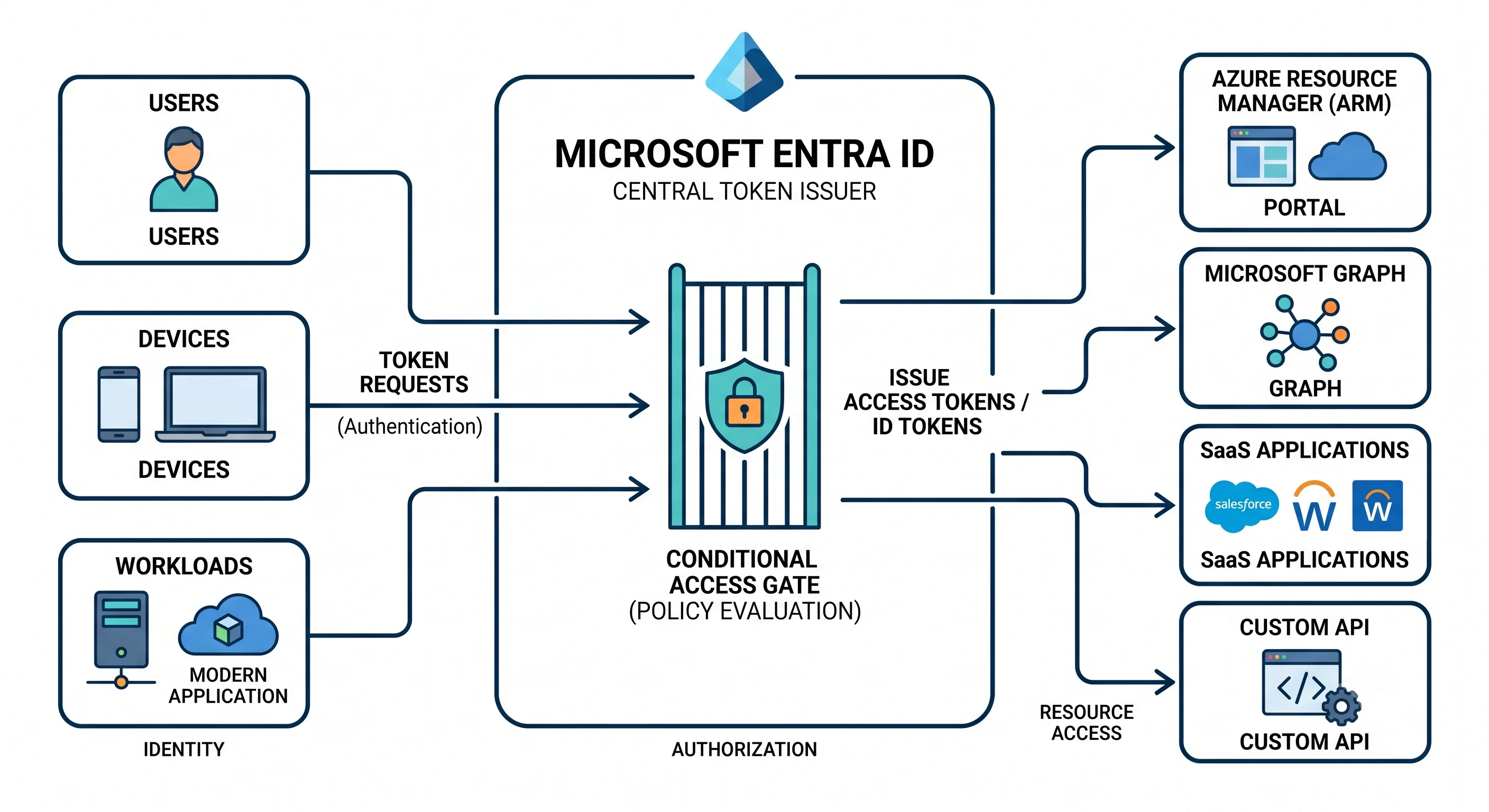
The one structural fact everything else follows from
Entra ID is not an Azure resource. It is not deployed into a resource group, it has no ARM
resource provider for the directory itself, and it is not created by terraform apply against
azurerm. Its objects live behind Microsoft Graph, a completely separate API with its own
permission model (delegated and application permissions, granted by consent) and its own tooling
(the azuread Terraform provider, the Microsoft Graph PowerShell SDK, az ad).
Four practical consequences fall straight out of that, and they explain most of the surprises:
- Being Owner on every subscription in the tenant gives you zero directory permissions. You cannot read the user list, let alone create an app registration.
- Bicep and ARM templates generally cannot manage directory objects. There is a Microsoft Graph Bicep extension, but it is limited in scope and has been in preview ⚠️ verify current availability and supported resource types against current Microsoft docs. This is the one topic in this article where "write all three IaC tools" genuinely doesn't apply cleanly, and Deployment says so explicitly rather than pretending.
- Directory objects are global, not regional. There is no "deploy Entra ID to UK South". The tenant has a home region that fixes data residency at creation and cannot be changed afterwards.
- Deleting a subscription doesn't touch the directory, and moving a subscription between tenants breaks every role assignment and every managed identity in it — the principals lived in the old directory.
When NOT to use it
- For customer-facing sign-up. Use External ID. Workforce licensing, guest-invite semantics, and Conditional Access scoping all assume employees.
- When the application needs LDAP or Kerberos. Entra ID speaks neither, and no amount of configuration will change that. This is the number-one cause of failed lift-and-shift identity designs.
- As a profile or CRM database. Directory extension attributes exist, but the directory is optimised for security reads at enormous scale, not for application data. Graph will throttle you long before it becomes a good database, and you will have created a data-residency problem.
- As a replacement for designing Azure RBAC. If the answer to every access request is a directory role, you have built a system with one permission level: total.
- As the only identity provider when you already have one. If the organisation lives in Okta or Ping, federate it into Entra ID. Azure resource access always needs an Entra token, but the authentication itself can be delegated. Two competing sources of truth for who works here is worse than either one alone.
- Free tier for anything with a compliance obligation. Conditional Access is P1. If you need to require MFA conditionally, block legacy authentication cleanly, or enforce device compliance, you need P1 and no amount of cleverness substitutes. (Security defaults give you a blunt, all-or-nothing version for free — better than nothing, worse than policy.)
What you should be able to say now
That Entra ID is a tenant-scoped identity provider issuing signed, short-lived tokens; that it is neither Active Directory nor Azure RBAC; that it lives outside ARM and is managed through Microsoft Graph; that Conditional Access is the feature with no AWS counterpart; and that the practical reason to care is that managed identities let you delete every connection string you own.
Next, the vocabulary — because "app registration", "enterprise application", "service principal", and "managed identity" describe two objects, not four, and nothing else makes sense until that's clear.
Next: Core Concepts →