
3. Architecture
The machinery most tutorials skip: what a request actually does inside the gateway, which plane governs what, how capacity behaves, and how it fails.
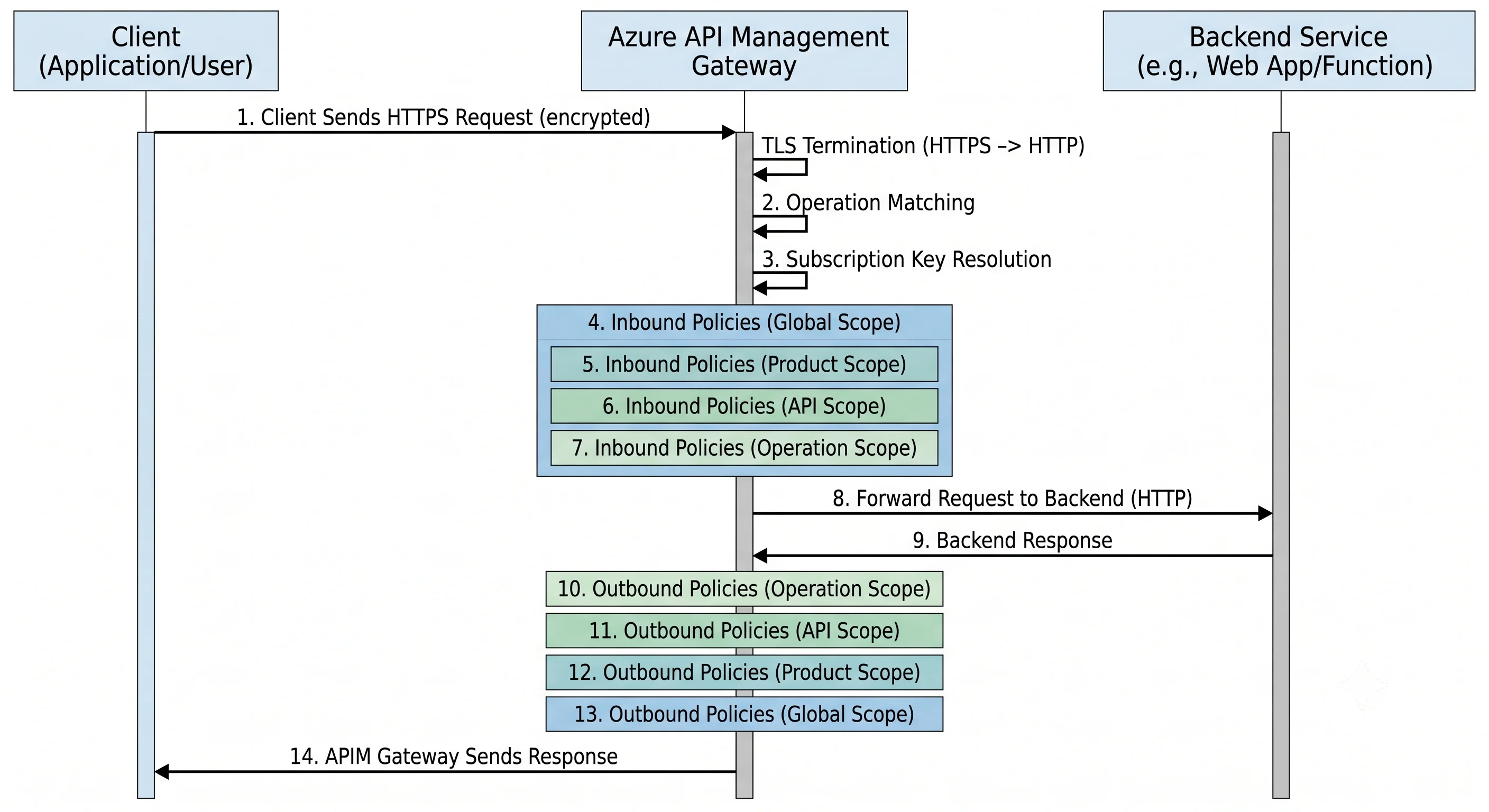
The request path, traced end to end
One GET https://contoso.azure-api.net/orders/v1/orders/42 with a subscription key and a bearer
token, from DNS to response body.
- DNS and TLS. The client resolves the gateway hostname — the default
*.azure-api.netname or your custom domain — and completes a TLS handshake. The certificate is either Azure-managed (for the default hostname) or one you attached, ideally by Key Vault reference so renewal is automatic. If the API requires client certificates, the mutual-TLS negotiation happens here, and the certificate becomes available to policy ascontext.Request.Certificate. - Routing to an operation. The gateway matches the path against the API URL suffix
(
orders/v1) and then against the operation's URL template (/orders/{id}). No match means404and no policy of yours ever runs. A match binds{id}as a template parameter for later policy expressions. - Subscription resolution. If the API or product requires a subscription, the gateway reads the
key from
Ocp-Apim-Subscription-Keyor the query string and resolves it to a subscription record. Missing or invalid key →401; suspended or expired →401/403; over quota →403. This is the only built-in check that runs before your policies. - The inbound policy pipeline runs, outermost scope first. Global
<inbound>executes until it reaches<base />, which is where the product scope's inbound runs, which in turn contains<base />for the API scope, and so on down to the operation. This is wherevalidate-jwtchecks the token,rate-limit-by-keycounts the call,ip-filterrejects the wrong network,validate-contentchecks the body against the schema,set-headerstrips internal headers, andcache-lookupmay short-circuit the whole thing by returning a cached response. Areturn-responseanywhere in inbound ends the request without the backend ever hearing about it. - The backend section runs. By default this is a single
<forward-request />. This is where the effective backend is decided — a plain URL, a backend entity, or a backend pool with load balancing and a circuit breaker — and where the timeout and retry behaviour live. Backend authentication happens here too: a client certificate, a managed-identity token obtained byauthentication-managed-identity, or a header set from a named value. - The backend responds (or times out, or the circuit breaker trips).
- The outbound pipeline runs, innermost scope first — the mirror image of inbound. Operation
outbound, then API, then product, then global. This is where response bodies get transformed,
internal headers get removed,
cache-storesaves the response, andemit-metricrecords a custom dimension. - The response leaves, and telemetry is written asynchronously to whatever loggers are attached — Application Insights, Event Hubs, and/or the diagnostic settings feeding Log Analytics.
- If anything above threw, the
<on-error>section runs instead of the remainder of the pipeline, with the failure available ascontext.LastError. Without anon-errorpolicy the client gets APIM's default error shape, which is more informative than you probably want an external caller to see.
Two consequences worth memorising. First, <base /> placement is control flow — it decides
whether the parent's checks run before or after yours, and omitting it silently skips them.
Second, inbound is outside-in and outbound is inside-out, so a header set globally on inbound is
visible to every narrower scope, while a global outbound rule is the last thing that touches the
response.
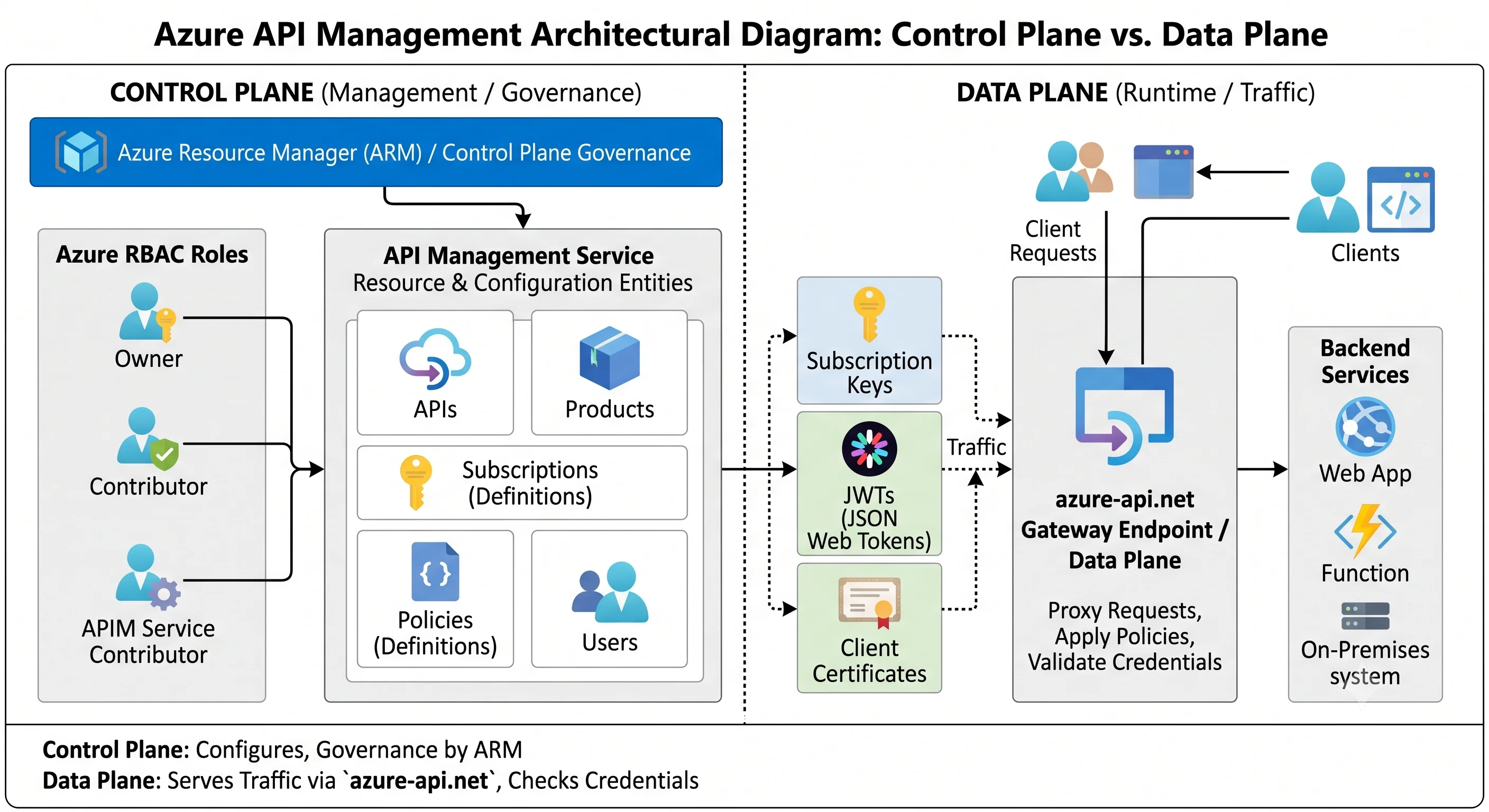
Control plane vs. data plane
Azure's split is sharper than AWS's, and APIM has an unusual amount on the control-plane side.
| Control plane | Data plane | |
|---|---|---|
| Endpoint | Azure Resource Manager (management.azure.com) — and, legacy, <name>.management.azure-api.net |
The gateway: <name>.azure-api.net or your custom domain |
| What it governs | The service resource and its configuration: APIs, operations, policies, products, subscriptions, named values, backends, loggers, certificates, tier and units | Actual API traffic |
| Who's allowed | Azure RBAC — API Management Service Contributor, ...Reader Role, ...Operator Role, or a custom role ⚠️ verify the current built-in list |
Subscription key, JWT, client certificate — whatever the policies demand |
| The classic mistake | Assuming an Azure RBAC role lets you call an API. It never does | Assuming a subscription key lets you change anything. It never does |
The genuinely unusual part: API configuration is ARM configuration. In most services, IaC
creates the resource and the app configures itself. Here, azurerm_api_management_api_policy is a
real ARM resource, so your Terraform state contains your policy XML. Three consequences:
- Portal edits are drift in the most literal sense, and the next pipeline run reverts them.
- Azure RBAC on the service instance is effectively access to every API in it — which is why Premium workspaces exist and why multiple instances are sometimes the right isolation answer.
- ARM throttling applies to configuration changes. A pipeline that pushes two hundred API definitions in a loop can hit control-plane rate limits and fail halfway ⚠️ verify current ARM request limits for this provider.
One more surface: the legacy direct management API (<name>.management.azure-api.net) is
authenticated by its own shared-key-derived token, entirely outside Entra ID. It is disabled by
default on newer instances and should stay that way ⚠️ verify current default.
The capacity and scaling model
APIM does not scale like a serverless service, and this is the second-biggest source of surprise after billing.
- You scale by units. A unit is a fixed slice of gateway capacity. You choose how many, not how big. Adding units is an online operation but takes minutes on classic tiers.
- Throughput per unit is not a fixed number. Published guidance exists, but it assumes a trivial
policy set and a fast backend. Every policy costs CPU:
validate-jwtdoes signature verification,validate-contentparses and validates a body against a schema,xml-to-jsonrewrites the whole payload, and asend-requestin inbound adds a synchronous network call to every request. Load test with your policies ⚠️ verify current per-unit throughput guidance and treat it as a ceiling. Capacityis the metric to watch. It's a composite percentage across the instance's gateway nodes, and it's the recommended autoscale signal — not CPU, not request count. Autoscale rules on the capacity metric are available on Standard and Premium (classic) ⚠️ verify current tier support and v2 behaviour. Sustained capacity above roughly 60–70% is the usual "add a unit" threshold because scaling itself takes minutes ⚠️ verify current guidance.- Consumption scales itself, per call, with a cold start after idle and no capacity metric to reason about.
- The ceiling is per instance, per region. Unit maxima are tier-bound; beyond that you add regions (Premium) or instances. Several other quotas — APIs per instance, subscriptions, named values, certificates — are counted per service instance, while the number of APIM instances itself is limited per subscription per region ⚠️ verify all current limits and their scopes.
Multi-region (classic Premium). You add regional deployments to one logical instance. The configuration is replicated from the primary region to the secondaries, and traffic is distributed by Azure Traffic Manager behind the single gateway hostname — which means DNS-based routing with its usual caveats (client-side DNS caching, failover in the tens of seconds, not instant). Each region has its own unit count and its own bill. Critically, the control plane lives in the primary region: losing the primary means configuration changes stop working even though the secondaries keep serving traffic ⚠️ verify current behaviour during a primary-region outage.
Caching, and what it actually does
cache-lookup in inbound plus cache-store in outbound is a full response cache keyed by the URL
plus whatever vary-by dimensions you declare (headers, query parameters, developer/subscription).
Get the vary-by wrong and you serve one tenant's data to another — the highest-severity APIM
misconfiguration there is, and it is one line of XML.
The internal cache is per-instance, small, tier-dependent, and not shared across regions or guaranteed to survive scaling. The external cache (Azure Cache for Redis) is shared, sized by you, and the only option that behaves sanely in a multi-unit or multi-region deployment. In Consumption tier there is no built-in cache at all, so external is mandatory if you want caching.
cache-lookup-value / cache-store-value cache arbitrary values rather than responses — the
standard way to hold a backend OAuth token you fetched with send-request so you don't fetch it on
every call.
Networking modes
| Mode | What it means | Tier |
|---|---|---|
| Public (default) | Public gateway IP; backends reached over the internet or via service endpoints | All |
| VNet integration — external | Injected into a subnet, keeps a public gateway IP, can reach private backends | Classic Premium/Developer; v2 tiers offer their own integration model ⚠️ verify |
| VNet integration — internal | Injected into a subnet with no public endpoint — the gateway is only reachable at a private IP. Requires your own DNS, and typically an Application Gateway or Front Door in front for public exposure | Classic Premium/Developer ⚠️ verify v2 support |
| Private endpoint | Inbound-only private access to the gateway without subnet injection ⚠️ verify current tier support and whether it can be combined with VNet integration | Varies |
| Self-hosted gateway | The data plane runs as a container in your cluster or datacentre; the control plane stays in Azure. Config is pulled from Azure and cached locally, so a brief control-plane outage doesn't stop traffic ⚠️ verify current offline-operation window | Premium (and Developer) |
VNet-injected classic APIM has a subnet requirements footgun: the subnet must be dedicated, must allow specific inbound management traffic through its NSG, and misconfiguring it puts the instance into a degraded state that reports vaguely. Budget time for it, and check the current required NSG rules and service tags before deploying ⚠️ verify — these change.
Failure modes
The list you should be able to recite in an incident:
429 Too Many Requestsfrom APIM itself. Yourrate-limitorquotapolicy fired, or the instance is at capacity. The response includes aRetry-Afterwhere the policy sets one. Distinguish it from a429forwarded from the backend — thex-ms-diagnostic headers and gateway logs tell you which.503/ gateway saturation. Capacity at 100%. Usually a slow backend holding connections open rather than genuine request volume: the gateway's capacity is consumed by concurrent in-flight requests, so a backend that went from 50 ms to 5 s multiplies concurrency by a hundred. The fix is a backend timeout and a circuit breaker, not more units.- Backend timeouts. APIM enforces its own timeout on the backend call, and there is an overall request ceiling. A long-running backend needs an async pattern (202 + polling), not a bigger timeout ⚠️ verify current default and maximum timeout values.
- Certificate expiry. The single most common APIM outage. A custom-domain certificate uploaded as a file expires silently; a Key Vault reference renews automatically. Use Key Vault, always, and alert on expiry anyway.
validate-jwtfailures after an identity change. Key rollover at the issuer, a changed audience, a tenant migration, or clock skew. The policy caches the OIDC discovery document, so changes at the IdP are not instantly reflected ⚠️ verify current cache behaviour.- Policy exceptions. A malformed expression, a null dereference in
context.Request.Body, or an unhandledsend-requestfailure surfaces as a500unless<on-error>catches it. Policy bugs are deployment bugs; test them. - Regional outage. Single-region instances go down with the region. Multi-region Premium keeps serving from the secondaries, with Traffic Manager failover latency and a read-only control plane if the primary is the one that failed.
- Control-plane throttling during bulk configuration. See above; the symptom is a pipeline that deploys 60% of your APIs and then errors.
- Soft-delete name collision. Destroy an instance, re-create it with the same name, and ARM
refuses because the name is still held by the soft-deleted resource.
az apim deletedservice purgeis the escape hatch, and it belongs in your runbook ⚠️ verify current command and retention.
The trade-offs, stated plainly
- A gateway centralises control and centralises risk. One policy fixes everything; one bad policy breaks everything. That asymmetry is the argument for revisions, staged environments, and policy fragments over copy-paste.
- Provisioned capacity buys predictable latency and costs you elasticity. You will over-provision for peak, or you will accept minutes of scaling lag. Consumption inverts both.
- Policies move work from N backends to one gateway — which is cheaper in engineering time and more expensive in gateway CPU. Every policy you add is throughput you gave up.
- Multi-region is availability, not latency parity. Traffic Manager routes by DNS; a client with a cached lookup keeps hitting the failed region until its TTL expires.
Next: Getting Started →
← Back to the Azure API Management overview · ← Previous: Core Concepts