
4. Getting Started
One HTTP-triggered function, stood up three ways, then deleted. This page is deliberately throwaway: hard-coded names, no variables, no remote state, no pipeline. Everything production-shaped lives in Deployment. If a snippet here would embarrass you in a pull request, that's the point.
The same tiny task each time: create a function app and call an HTTP function that returns a greeting.
Start by creating a throwaway resource group, because deleting one resource group is the cleanest teardown Azure offers — and a genuine advantage over AWS, where the equivalent cleanup is manual or CloudFormation-shaped.
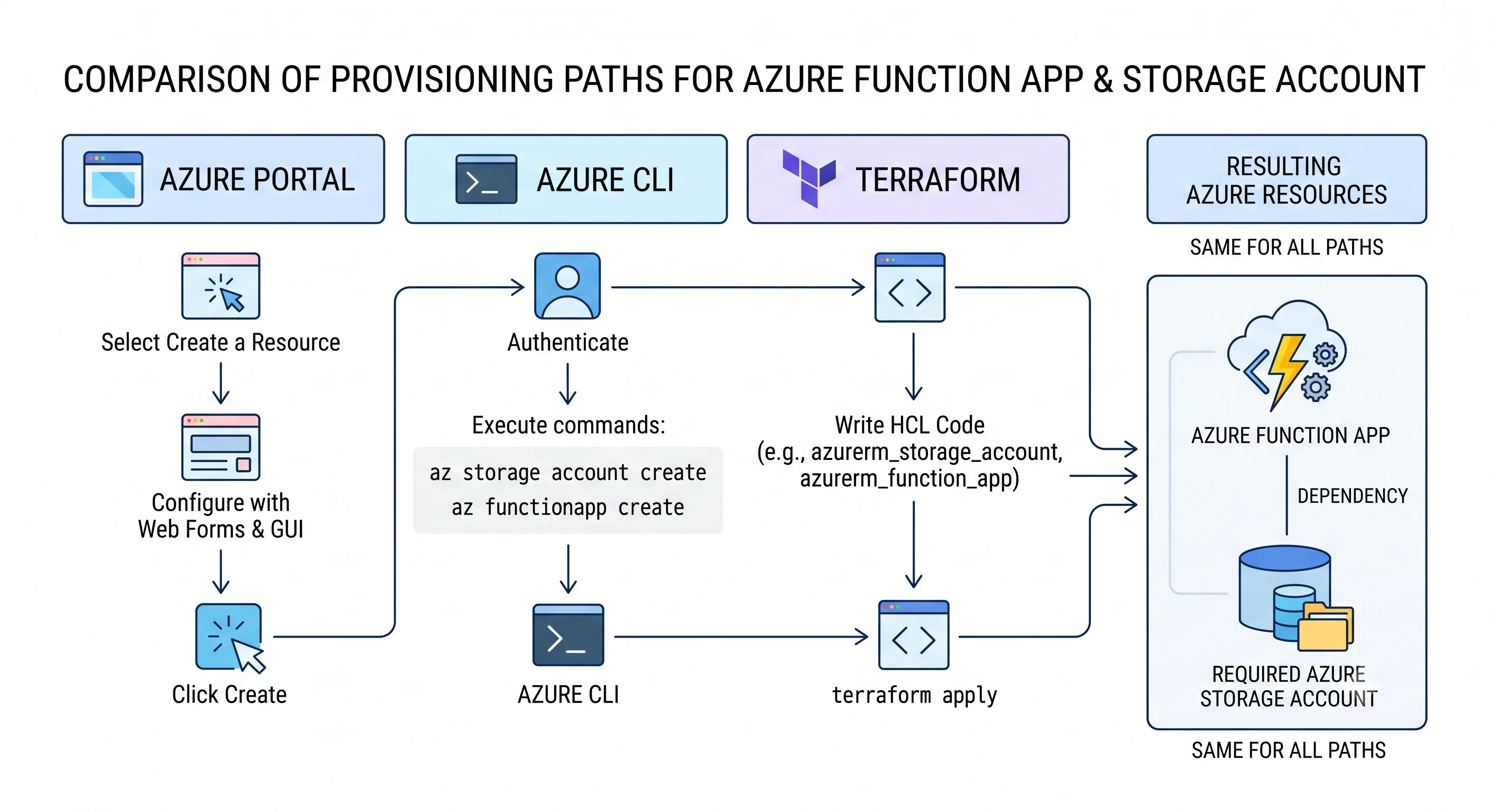
What you're actually creating
Even the minimal version is three resources plus one optional-but-do-it component. This is worth seeing before you type anything, because "why does my function app need a storage account?" is the first question everyone asks.
| Resource | Why it exists |
|---|---|
| Resource group | The container and the teardown handle |
| Storage account | The host's required backing store — triggers, timers, leases, keys, package |
Function app (Microsoft.Web/sites) |
The app itself |
| Application Insights | Optional to create, indispensable in practice |
On Consumption, the plan is created implicitly; on other plans it's a fourth resource
(Microsoft.Web/serverfarms).
1. Azure Portal
Fast to grasp, not repeatable. Portal navigation changes often, so this is described by destination blade rather than exact button chain.
- From Create a resource, choose Function App, then pick the hosting option — take Consumption (or Flex Consumption) for this exercise.
- On Basics, set the resource group to a new
rg-func-demo, give the app a globally unique name, pick a runtime stack (Node.js or Python is quickest) and a region near you. - On Storage, accept the new storage account it offers; on Monitoring, leave Application Insights enabled.
- Create it, then open the app's Overview blade and wait for the deployment to finish.
- In the app's Functions blade, create a function from the HTTP trigger template, then use Code + Test to run it and Get function URL to call it from a browser.
Note what the portal quietly did for you: created the storage account, wired
AzureWebJobsStorage, created an Application Insights component, and set the runtime version. Every
one of those becomes an explicit line in the IaC versions below — which is exactly why portal-created
resources are hard to reproduce.
2. Azure CLI
Copy-pasteable and repeatable. Storage account names must be globally unique, lowercase, and alphanumeric; function app names must be globally unique too. Change the two names below before running.
# --- variables (change the two unique names) ---
RG=rg-func-demo
LOC=uksouth
STORAGE=stfuncdemo$RANDOM
APP=func-demo-$RANDOM

# 1. Throwaway resource group — the teardown handle
az group create -n $RG -l $LOC

# 2. The host's required storage account
az storage account create \
  -n $STORAGE -g $RG -l $LOC \
  --sku Standard_LRS \
  --allow-blob-public-access false \
  --min-tls-version TLS1_2

# 3. The function app, on a Consumption plan (created implicitly)
az functionapp create \
  -n $APP -g $RG \
  --storage-account $STORAGE \
  --consumption-plan-location $LOC \
  --runtime node \
  --runtime-version 20 \
  --functions-version 4 \
  --os-type Linux

# 4. Confirm it exists and is running
az functionapp show -n $APP -g $RG --query "{name:name, state:state, kind:kind}" -o table
⚠️ Runtime names and supported versions change — az functionapp list-runtimes prints what's
actually available today, and is more reliable than any figure written down here.
Now deploy a function. The quickest honest path is Azure Functions Core Tools, which scaffolds the project structure the runtime expects:
# Scaffold locally
func init demo-fn --javascript
cd demo-fn
func new --name hello --template "HTTP trigger" --authlevel function

# Run it locally first — this uses a local storage emulator or your AzureWebJobsStorage setting
func start

# Publish to the app created above
func azure functionapp publish $APP
Then call it. The URL is printed by publish, but here's how to fetch the key yourself — note that
this is a control-plane call returning a data-plane secret, which is the split described in
Architecture:
KEY=$(az functionapp function keys list -g $RG -n $APP --function-name hello --query default -o tsv)
curl "https://$APP.azurewebsites.net/api/hello?name=Sunil&code=$KEY"
If you'd rather skip Core Tools entirely, deploy a zip you built yourself:
az functionapp deployment source config-zip -g $RG -n $APP --src ./demo-fn.zipPowerShell note. Functions apps are usually managed from az or from CI/CD rather than
interactively from PowerShell, so the Az equivalents are omitted here — unlike the VM and Entra ID
topics, a PowerShell-first shop has no particular advantage on this service.
3. Terraform (minimal)
The smallest thing that works — hard-coded, unparameterised, and not something to ship. The full module shape is in Deployment.
terraform {
  required_providers {
    azurerm = {
      source  = "hashicorp/azurerm"
      version = "~> 4.0"
    }
  }
}

provider "azurerm" {
  features {}
}

resource "azurerm_resource_group" "demo" {
  name     = "rg-func-demo"
  location = "uksouth"
}

resource "azurerm_storage_account" "demo" {
  name                     = "stfuncdemouniquename" # must be globally unique
  resource_group_name      = azurerm_resource_group.demo.name
  location                 = azurerm_resource_group.demo.location
  account_tier             = "Standard"
  account_replication_type = "LRS"
  min_tls_version          = "TLS1_2"
}

# On Consumption, the plan is a real resource with SKU "Y1"
resource "azurerm_service_plan" "demo" {
  name                = "plan-func-demo"
  resource_group_name = azurerm_resource_group.demo.name
  location            = azurerm_resource_group.demo.location
  os_type             = "Linux"
  sku_name            = "Y1" # Y1 = Consumption. EP1-EP3 = Premium. B1/S1/P1v3 = Dedicated
}

resource "azurerm_linux_function_app" "demo" {
  name                = "func-demo-uniquename" # must be globally unique
  resource_group_name = azurerm_resource_group.demo.name
  location            = azurerm_resource_group.demo.location
  service_plan_id     = azurerm_service_plan.demo.id

  storage_account_name       = azurerm_storage_account.demo.name
  storage_account_access_key = azurerm_storage_account.demo.primary_access_key

  site_config {
    application_stack {
      node_version = "20"
    }
  }
}

output "function_app_hostname" {
  value = azurerm_linux_function_app.demo.default_hostname
}
terraform init
terraform plan
terraform applyThree things to notice, because they're the seeds of the production version:
sku_nameon the plan is the whole hosting decision.Y1is Consumption;EP1is Premium;B1/P1v3is Dedicated. One string changes cold start, networking, and the bill.- The storage access key is in your state file. That's why remote state with restricted access matters, and why the production module in Deployment uses a managed identity for the storage connection instead.
- Flex Consumption is a different resource type
(
azurerm_function_app_flex_consumption), not a SKU onazurerm_service_plan. ⚠️ Verify the resource name and schema against the currentazurermprovider documentation before using it.
Teardown
Always. Half of all surprise cloud bills come from forgotten demo resources, and a Consumption function app is cheap enough to hide for months.
az group delete -n rg-func-demo --yes --no-wait# If you used Terraform
terraform destroyTwo caveats worth knowing even at this scale:
- Deleting the function app does not delete the plan or the storage account. If you deleted resources individually rather than deleting the resource group, check for an orphaned plan — on Premium it bills hourly forever.
- If you enabled Application Insights, its Log Analytics workspace may live in a different resource group and survive the delete.
Next: Deployment →
← Back to the Azure Functions overview · ← Previous: Architecture